




Here's how it works



How to use or fill out forma pgc 007 with our platform

- Click ‘Get Form’ to open the forma pgc 007 in the editor.
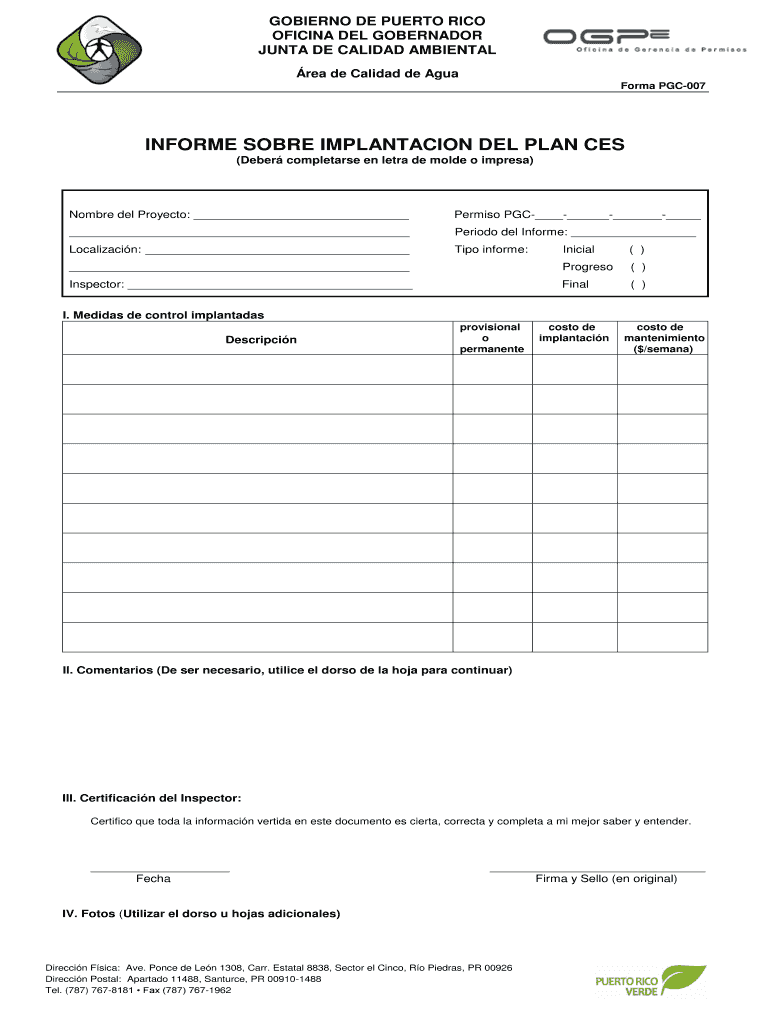
- Begin by entering the 'Nombre del Proyecto' in the designated field. Ensure that you provide a clear and concise project name.
- Fill in the 'Permiso PGC' number, which is crucial for tracking your project’s compliance. Make sure to format it correctly as indicated.
- Specify the 'Periodo del Informe' by selecting the appropriate dates for your report period.
- Indicate the type of report by checking either 'Inicial', 'Progreso', or 'Final'. This helps categorize your submission accurately.
- In section I, list all control measures implemented, detailing whether they are provisional or permanent, along with their respective costs for implementation and maintenance.
- Use section II for any additional comments. If more space is needed, feel free to utilize the back of the form.
- Complete section III by certifying that all information provided is accurate. Include your signature and date here.
- Lastly, if applicable, attach photos in section IV using additional sheets if necessary.
Start filling out forma pgc 007 today on our platform for free!
It's free
Got questions?
How can I create an electronic signature in my forma pgc 007 on Android?
Signing paperwork on a mobile device is fast, simple, and doesn’t require software installation when you have an account with DocHub. Sign in from any browser, fill in your blank fields with your data, and click on Sign → Create your signature. You can draw your eSignature the same way you usually do on paper, add its picture to your forma pgc 007, or type in your name and stylize its look. Whatever option you choose, your form will be valid.
How do you create an e-signature for the forma pgc 007 on iOS?
Apart from a comprehensive toolset for editing PDFs on mobile phones, DocHub allows you to sign your forma pgc 007 along the way. Open our editor in your web browser, make changes using DocHub’s toolset, and complete your editing by eSigning the completed form.
Security and compliance
At DocHub, your data security is our priority. We follow HIPAA, SOC2, GDPR, and other standards, so you can work on your documents with confidence.
Learn more


