




Here's how it works



How to use or fill out RCG LLC Guaranty of Lease - RCG-LLCcom

- Click ‘Get Form’ to open it in the editor.
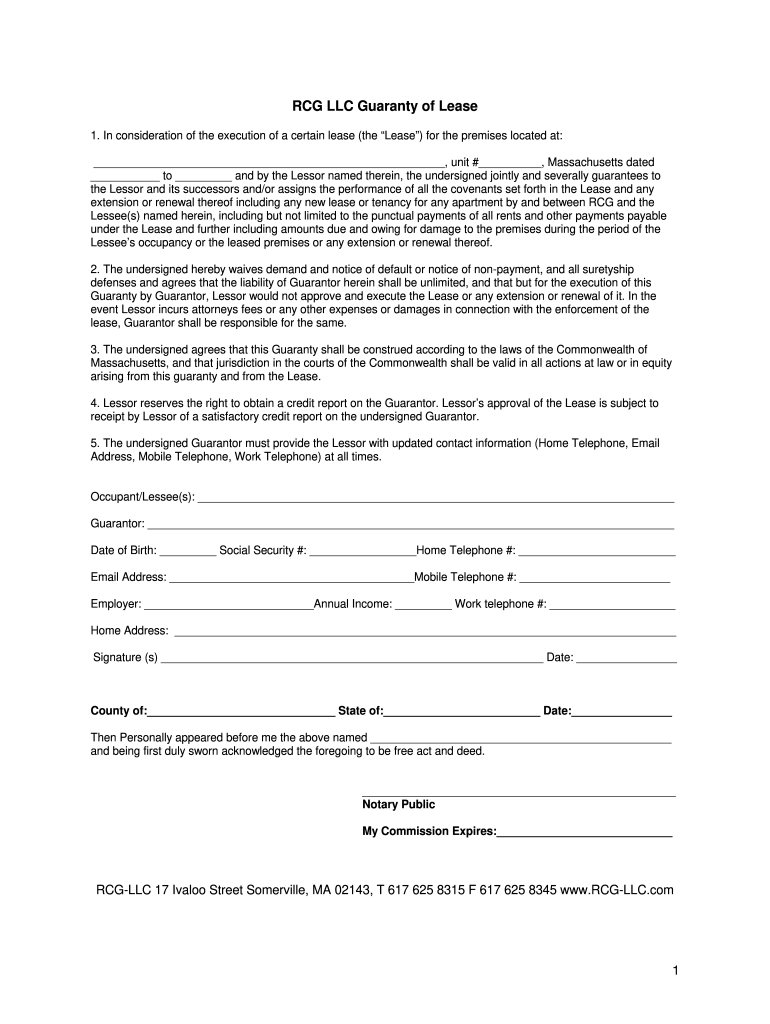
- Begin by entering the address of the premises in the designated field, including unit number and dates relevant to the lease.
- Fill in the names of all Occupant/Lessee(s) and ensure that the Guarantor's name is clearly stated.
- Provide personal details for the Guarantor, including Date of Birth, Social Security Number, and contact information such as Home Telephone, Email Address, and Mobile Telephone.
- Complete employment details by entering Employer name and Annual Income along with Work Telephone number.
- Sign and date the document in the signature section. Ensure that all information is accurate before submission.
- If required, have a Notary Public witness your signature and complete their section at the bottom of the form.
Start using our platform today to fill out your RCG LLC Guaranty of Lease easily and for free!
It's free
Got questions?
Can I sign my RCG LLC Guaranty of bLeaseb - RCG-LLCcom on a mobile?
Of course, you’ll find numerous applications for this on the web. However, if you need to eSign your RCG LLC Guaranty of bLeaseb - RCG-LLCcom without installing additional software, DocHub is the best choice you can make. This robust editor works on mobile devices just as on desktops. Open our editor in any internet browser, register or sign in to your account, and start managing your forms.
How to complete RCG LLC Guaranty of bLeaseb - RCG-LLCcom online for free in 2024?
With a swift editing platform like DocHub, you do not need anything but a browser and connection to the internet to modify your RCG LLC Guaranty of bLeaseb - RCG-LLCcom on the internet swiftly. Upload your file or get the appropriate form in DocHub’s catalog, open our editor with a single click, and finish it digitally. To edit your forms at any time, sign up a free profile with DocHub.
Security and compliance
At DocHub, your data security is our priority. We follow HIPAA, SOC2, GDPR, and other standards, so you can work on your documents with confidence.
Learn more


