Sop laf received meaning 2026

Get Form
sop online template Preview on Page 1

Here's how it works

01. Edit your sop online template online
Type text, add images, blackout confidential details, add comments, highlights and more.

02. Sign it in a few clicks
Draw your signature, type it, upload its image, or use your mobile device as a signature pad.

03. Share your form with others
Send sop online download via email, link, or fax. You can also download it, export it or print it out.

How to use or fill out sop laf received meaning with our platform

Form edit decoration
9.5
Ease of Setup
DocHub User Ratings on G2
9.0
Ease of Use
DocHub User Ratings on G2
  1. Click ‘Get Form’ to open it in the editor.
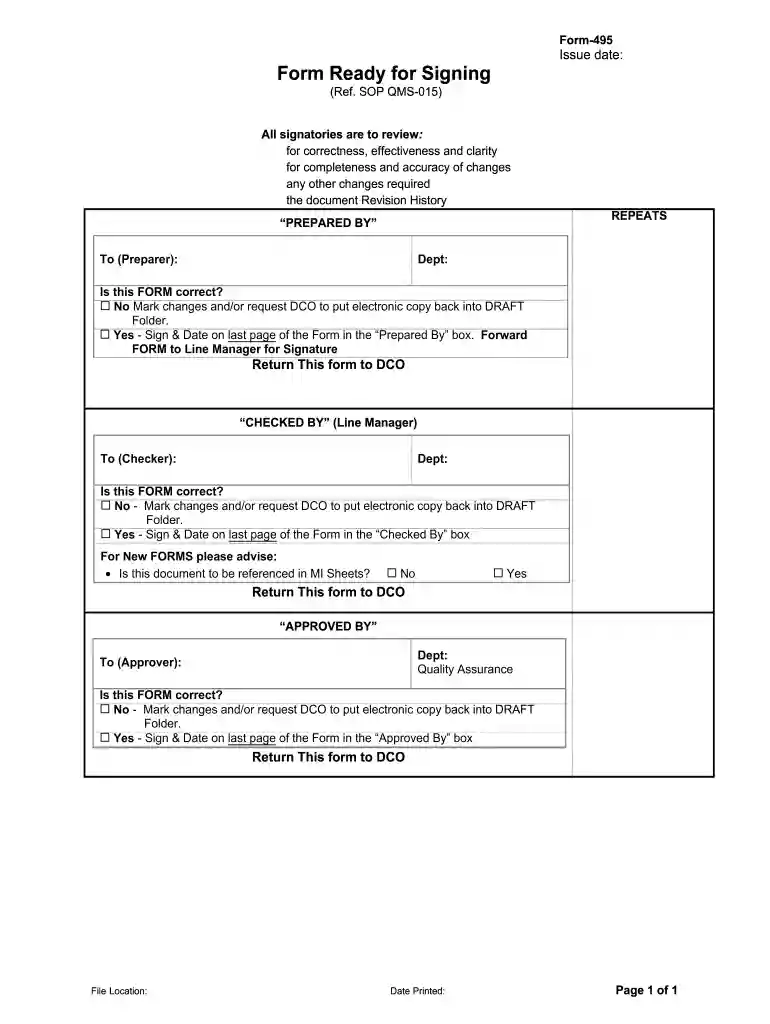
  2. Begin by filling out the 'Prepared By' section. Enter the name of the preparer and their department. Ensure that all information is accurate.
  3. Review the form for correctness, effectiveness, and clarity. If changes are needed, mark them clearly or request an electronic copy to be returned to draft status.
  4. If everything is correct, sign and date the last page in the 'Prepared By' box before forwarding it to your Line Manager for their signature.
  5. In the 'Checked By' section, your Line Manager will repeat a similar review process. They must also sign and date if no changes are required.
  6. Finally, in the 'Approved By' section, ensure that the Quality Assurance approver reviews and signs off on the document as well.

Start using our platform today for free to streamline your document editing and signing process!

be ready to get more

Complete this form in 5 minutes or less

Get form

Got questions?

We have answers to the most popular questions from our customers. If you can't find an answer to your question, please contact us.
Contact us
Online Method for NSFAS Status Check Step 1: Open the NSFAS Official Web Portal. Step 2: Go to myNSFAS Account Step 3: Log In to Your Account. Step 4: Click on View Applications Step 5: Get Your NSFAS Status. Step 1: Save the NSFAS WhatsApp Number. Step 2: Start a Chat. Step 3: Send Your Details.
If your NSFAS status shows Registration Received, it means that your institution has confirmed your registration with NSFAS. However, the payment process might still be underway. Reasons for Delays Processing Time: NSFAS may still be processing payments for your institution.
I, agree that the funder terms and conditions and the sBux terms and conditions attached to the Schedule of Particulars (SOP) or Loan Agreement Form (LAF) or Bursary Agreement Form (NBA) form part of the agreement between NSFAS and myself, and must be read as part of that agreement.
Provisionally Funded: This means that your application has passed all evaluation stages and you are funded provided you register at a TVET college or public university and there is availability of funds.

Security and compliance

At DocHub, your data security is our priority. We follow HIPAA, SOC2, GDPR, and other standards, so you can work on your documents with confidence.

Learn more
ccpa2
pci-dss
gdpr-compliance
hipaa
soc-compliance