What is the difference between DocHub vs ZENOO vs. etfile?
When it comes to document management platforms, there are a few names that stand out: DocHub, ZENOO, and etfile. These platforms offer unique features and advantages, making them popular choices for individuals and businesses alike.
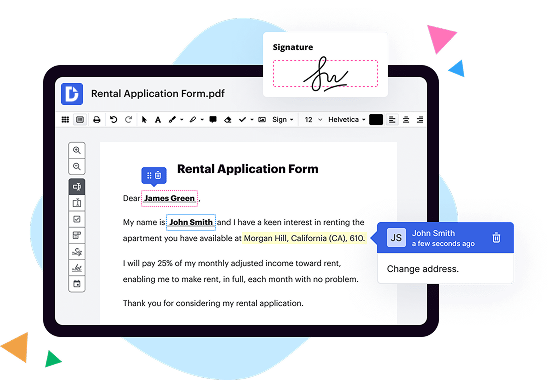
Starting with DocHub, it is an exceptional tool that allows you to easily edit, sign, and collaborate on your documents online. With its user-friendly interface, you can effortlessly manipulate PDFs, add text, highlight important information, and even insert signatures with just a few clicks. Its extensive range of features empowers you to streamline your workflow and get things done efficiently.
Moving on to ZENOO, this platform also offers a comprehensive set of tools for managing your documents. With ZENOO, you can create, edit, and share documents seamlessly. One of its standout features is its powerful search functionality, which allows you to quickly find specific information within your files. Additionally, ZENOO offers robust security measures to keep your documents safe and protected.
Last but not least, there's etfile. This platform is designed with convenience and organization in mind. With its intuitive interface, you can easily upload, store, and retrieve your documents whenever you need them. etfile also offers advanced document indexing capabilities, making it effortless to search for specific files based on keywords or metadata. Its emphasis on accessibility and efficiency makes it a fantastic choice for businesses of all sizes.
In summary, each of these document management platforms - DocHub, ZENOO, and etfile - brings its own unique set of features and advantages to the table. Whether you need robust editing capabilities, powerful search functionality, or seamless document organization, these platforms have got you covered.
DocHub vs ZENOO vs etfile: which is better for Enterprises?
While ZENOO and etfile are good solutions to work with PDFs online, DocHub offers greater capabilities to help individuals and businesses digitize their documents and make them run smoothly across different devices and your favorite apps.
DocHub vs ZENOO vs etfile: which is better for small businesses?
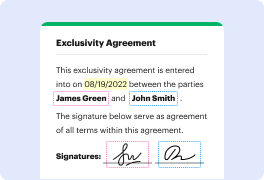
ZENOO and etfile are good options for editing, signing, and sharing PDFs. However, DocHub offers a more comprehensive featureset that includes organizations, reusable templates, advanced eSignatures, seamless Google integrations, and more that are perfect for small businesses, helping them simplify and streamline document editing, sharing, signing, and form completition.
What is DocHub?
DocHub is a Google-integrated PDF editor and eSignature solution that helps you get your PDFs done online, using any device. DocHub comes with an online PDF editor, advanced eSignatures, PDF forms, reusable templates, and straightforward Google integrations so you can maximize your productivity when working within your favorite Google apps.
What is ZENOO and how does it work?
ZENOO is a revolutionary platform designed to enhance your experience and simplify your life. It is a powerful tool that helps you streamline your tasks and unleash your productivity. With ZENOO, you can effortlessly manage your schedule, collaborate with others, and achieve your goals efficiently.
So, how does ZENOO work? Let's dive in!
First and foremost, ZENOO boasts a user-friendly interface that ensures a seamless and intuitive experience. From the moment you log in, you'll find yourself immersed in a world of organized bliss.
One key feature of ZENOO is its robust calendar system. This dynamic tool allows you to effortlessly schedule appointments, set reminders, and keep track of important events. With ZENOO's calendar, you can bid farewell to the chaos of missed meetings and conflicting commitments.
But ZENOO doesn't stop at just managing your time. It also excels in facilitating collaboration among teams. With ZENOO's seamless sharing capabilities, you can easily invite colleagues or friends to join your projects, assign tasks, and keep everyone in the loop. No more endless email chains or confusion about who's responsible for what. ZENOO streamlines the entire process, making teamwork a breeze.
Moreover, ZENOO goes beyond traditional task management by providing a comprehensive and customizable system. You can create to-do lists, set priorities, and track progress effortlessly. The power is in your hands as you take control of your workflow, boosting your productivity to new heights.
There's also a delightful feature called the ZENOO Dashboard, where you can access all your important information and updates at a glance. It is a hub of efficiency that consolidates all your tasks, appointments, and projects into one place. No more time wasted in searching for scattered notes or documents. With ZENOO, everything you need is easily accessible and beautifully organized.
In addition, ZENOO syncs seamlessly across devices, ensuring that you have access to your information whenever and wherever you need it. Whether you're on your computer, tablet, or smartphone, your data stays up to date and readily available.
ZENOO is truly a game-changer, designed to simplify your life and maximize your productivity. Its intuitive interface, collaborative features, and customizable task management system make it the ultimate tool for individuals and teams alike.
So, why wait? Experience the wonders of ZENOO today and unlock your full potential. Revolutionize the way you work and embrace a productive, organized, and stress-free lifestyle. Your journey to success starts here with ZENOO!
What is etfile and how does it work?
At its core, etfile is an incredibly efficient and user-friendly electronic document management system. It simplifies the way you handle and organize your digital files, making your life a whole lot easier.
So, how does etfile work, you ask? Well, let's dive in! With etfile, you can effortlessly store, retrieve, and manage all your documents in one centralized location. No more wasting time searching through piles of paper or endless folders on your computer. Trust me, etfile is like having your very own personal assistant, tirelessly organizing your files so that you can find what you need at the snap of your fingers.
But that's not all! etfile also boasts impressive collaboration features. You can easily share documents with others and work together to make edits, comments, and revisions. It's like a virtual workspace where everyone can come together and effortlessly collaborate. The days of back-and-forth email attachments and confusing version control are long gone with etfile by your side.
One of the key highlights of etfile is its robust security measures. Your sensitive documents are protected against unauthorized access with top-notch encryption and user permission controls. You can trust that your files are safe and sound within the confines of etfile's secure digital vault. With etfile, you can confidently manage confidential information without a single worry.
Transitioning to etfile is a breeze. Its intuitive interface and user-friendly design ensure that you'll quickly become a pro at navigating the system. Plus, its seamless integration with other popular programs means you can continue to work with your favorite tools while leveraging the power of etfile. It's like having an all-in-one solution that fits seamlessly into your existing workflow.
So, whether you're a small business aiming for better document organization or a large enterprise in need of streamlined collaboration and security, etfile is here to revolutionize the way you handle your digital files. Trust me when I say this, once you experience the time-saving, stress-relieving magic of etfile, you'll wonder how you ever managed without it. Embrace the future of document management with etfile, and prepare to be amazed!
Is DocHub free?
Yes. DocHub's free plan is a perfect fit for one-offs or occasional projects. You can start using DocHub’s Free Plan straight away after completing the quick account registration. No learning is needed. The DocHub Pro Plan has a 30-day free trial so you have enough time to test the product.
Is etfile free to use?
Yes, etfile is absolutely free to use. It's a fantastic tool that lets you easily and efficiently manage your files, saving you time and hassle. With etfile, you can effortlessly organize, store, and access your documents without any cost. It's user-friendly and designed to streamline your file management experience. So go ahead and take advantage of this amazing resource - it won't cost you a dime!
What is DocHub’s cost and pricing?
DocHub has straightforward pricing that includes one free plan and one paid plan. If you need to get documents done once in a while, the Free Plan is just the thing for you. It includes all the PDF tools to help you edit, sign, share, and organize your documents. For a growing document workflow, we recommend the DocHub Pro plan at $14 per user per month. It includes unlimited PDF capabilities and priority tech support. You can even test it free for 30 days before buying.
What are the plans and prices for etfile?
As of my knowledge, eFile offers a range of plans and pricing options, primarily focusing on their document management system and related services. Here are a few plans they offer:
1. Document Management Essentials: This plan starts at $49 per month and includes features like document storage, access control, document scanning, search functionality, and basic workflow automation.
2. Document Management Plus: Starting at $99 per month, this plan includes all the features of the Essentials plan, along with additional advanced functionalities such as advanced workflow automation, electronic forms, and integration with other business systems.
3. Accounts Payable Automation: This plan is ideal for businesses looking to streamline their accounts payable processes. Pricing varies based on the size and requirements of the organization, and it includes features like invoice capture, automated routing and approval, integration with accounting systems, and reporting capabilities.
Please note that these plans and pricing may vary depending on the specific requirements and size of your organization. It is recommended to contact eFile directly or visit their website for the most accurate and up-to-date information regarding their plans and pricing.
Is ZENOO safe?
Yes, ZENOO is completely safe! Rest assured, dear user, that your online security and privacy are of utmost importance to us. We have designed ZENOO with the highest standards of safety in mind. From the moment you sign up, our robust security measures are in place to protect your personal information and keep it secure.
When it comes to data encryption, we've got you covered! Our platform utilizes state-of-the-art encryption techniques to safeguard your sensitive data and ensure that only authorized individuals can access it. You can trust that your information is in good hands with ZENOO.
In addition to top-notch security protocols, we also prioritize your overall online experience. We have implemented measures to prevent any malicious activities or unauthorized access to our system. Our team is constantly monitoring and updating our security features to stay one step ahead of any potential threats.
We understand that trust is essential in any online service, and that's why we work tirelessly to earn and maintain it. Our users' satisfaction and safety are at the core of everything we do. So, you can feel confident and at ease while using ZENOO for all your needs.
To summarize, ZENOO is a safe and secure platform that safeguards your information, prioritizes your privacy, and provides you with a reliable and enjoyable user experience. Choose ZENOO with confidence, knowing that we have your back every step of the way.
Is etfile safe?
Yes, etfile is indeed safe and secure. Rest assured, dear user, that your valuable documents are in good hands. We prioritize the safety and privacy of our users above all else. With our state-of-the-art security measures, we have taken every possible step to protect your data from any unauthorized access or breaches. You can trust etfile to keep your information confidential, always. So, worry not and use our platform with confidence, knowing that your documents are well-guarded.
What are the main DocHub alternatives?
The main DocHub alternatives are Lumin PDF, Small PDF, PDF escape, and others. However, DocHub’s ease of use, flexibility, affordability, and deep Google integrations are the reasons why DocHub is ahead of the competition.
What are the 10 best ZENOO alternatives?
If you're looking for some amazing alternatives to ZENOO, you've come to the right place! We've compiled a list of the top 10 alternatives that are sure to meet your needs. Among these fantastic options, DocHub stands out as a powerful and versatile tool. However, we want to ensure that we present all the alternatives with equal importance, so let's dive into the list:
1. DocHub: With its user-friendly interface and robust features, DocHub allows you to effortlessly edit, sign, and share documents. It's a must-try alternative!
2. PandaDoc: This versatile platform offers intuitive document creation, e-signature capabilities, and seamless collaboration. It's a fantastic option for businesses of all sizes.
3. Adobe Sign: Known for its reliability and industry-standard security, Adobe Sign allows you to streamline your document signing process with ease.
4. HelloSign: Simplify your document workflows with HelloSign. Its user-friendly interface and advanced features make it a standout choice for businesses and individuals alike.
5. SignNow: Secure and easy to use, SignNow empowers users to sign, send, and manage documents online, saving time and enhancing productivity.
6. Nitro Sign: Nitro Sign offers an intuitive platform for document management and e-signatures. Its collaborative features make it an excellent choice for remote teams.
7. SignEasy: Get your documents signed quickly and effortlessly with SignEasy. Its seamless integrations and mobile-friendly design make it a go-to tool for professionals on the move.
8. Formstack Sign: This robust document signing solution offers a wide range of features, including advanced document routing and workflow automation.
9. Docusign: One of the pioneers in the electronic signature industry, Docusign remains a popular choice, providing a secure and efficient way to sign and manage documents.
10. Smallpdf: For those looking for a simple yet effective solution, Smallpdf offers a range of essential document editing and signing features, all in one easy-to-use platform.
Remember, these alternatives to ZENOO are all exceptional options, each with its own unique strengths and features. So go ahead and explore them to find the one that best suits your needs. Happy document management!
What are the 10 best etfile alternatives?
When it comes to finding the perfect alternative to etfile, there are plenty of fantastic options available. In fact, let me introduce you to the top 10 alternatives that can greatly enhance your document management experience.
1. DocHub: DocHub takes the lead with its user-friendly interface and robust features. It simplifies document editing, signing, and collaboration, making it a top choice for individuals and teams alike.
2. Adobe Acrobat: Known for its reliability and versatility, Adobe Acrobat offers powerful document management functionalities. From editing and converting files to secure document sharing, it has got you covered.
3. Nitro Pro: If you're looking for a comprehensive PDF editor and converter, Nitro Pro is an excellent choice. Its intuitive interface and extensive range of features make it ideal for professionals.
4. PandaDoc: With its focus on streamlining the document workflow, PandaDoc offers a seamless experience from creation to e-signature. Its automation capabilities save you time and effort.
5. HelloSign: HelloSign specializes in electronic signatures and simplifies the signing process. It integrates smoothly with various platforms, making it convenient for both personal and business use.
6. PDFelement: PDFelement combines powerful features with affordability, making it an attractive option for individuals and small businesses. Its intuitive interface makes document editing a breeze.
7. Smallpdf: As the name suggests, Smallpdf offers a lightweight and easy-to-use platform for managing PDF files. It features a wide array of tools, including compression, conversion, and editing.
8. SignNow: SignNow stands out with its focus on secure and legally binding electronic signatures. It also offers advanced collaboration and workflow management features.
9. eFileCabinet: For those seeking a comprehensive document management solution, eFileCabinet delivers. It provides robust organization, storage, and retrieval options for businesses of all sizes.
10. Foxit PhantomPDF: Last but certainly not least, Foxit PhantomPDF offers a wide range of features, including editing, OCR, security, and collaboration tools. Its versatility makes it a solid contender.
So there you have it, the top 10 etfile alternatives that can revolutionize your document management experience. Whether you need advanced editing capabilities, secure e-signatures, or streamlined workflows, these alternatives have got you covered. Explore them and find the perfect fit for your needs!