Insights on the DocHub vs. TurboTax Plans comparison
Choose the best editing solution for your business once and for all. Check out the detailed comparison of DocHub and TurboTax Plans
Create free account
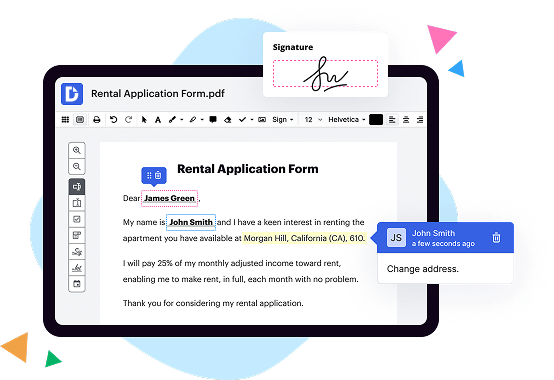
TurboTax vs. DocHub Plans comparison in a nutshell

|
TurboTax | |
|---|---|---|
| library of ALL tax forms | ||
| taxes' filing | ||
| PDF editor | ||
| tax calendar | ||
| e-signature tool | ||
| reviewing forms before filing | ||
| printing forms | ||
| downloading forms | ||
| online fax | ||
| cloud storage integrations | ||
| Get DocHub for free |
Here are the main differences between DocHub and TurboTax Plans
If we detect that your tax situation requires expanded coverage, like deductions for owning a home, unemployment income, or self-employment income, well prompt you to upgrade to a version that supports the forms you need so we can maximize your tax deductions and ensure you file an accurate return.
Move from TurboTax PDF to DocHub in a few steps

01. Register with DocHub using your email address or Google account. It's fast and easy. No credit card required.
02. Upload the document you need or create it from scratch. Then, customize it by adding images, drawings, and different types of fillable fields.
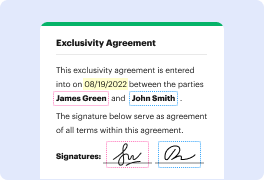
03. Customize your PDF in minutes. Type, highlight, underline, whiteout text, add comments, and sign your document.

04. Share your PDF with others to collaborate in real-time. Export your document, download or print it out.
Switch to DocHub to enjoy premium PDF customization

Online PDF creator and editor
Explore DocHub vs. TurboTax comparison data and choose the best platform for getting your perfect document without hassle. Start with a blank document or modify an existing one. Type text, add shapes, drawings, images, and highlight or whiteout information. Whatever you do with a PDF, the result is always high quality, without rasterized text or removed fields.

Diverse PDF management tools
Manage your PDF to perfection. Add, delete, and rearrange document pages or merge them to create a new document. DocHub supports a variety of file types including PDF, DOC, PPT, XLS, TXT, DOCX, and PPTX, which you can easily convert to a PDF.

Powerful PDF tools on your mobile device
Keep your work flowing from any location. Get DocHub, the most powerful TurboTax competitor. With DocHub's capabilities on your mobile device, you can edit, annotate, manage, sign, and share PDFs just as easily as you would on a desktop. No need to install the app.

Google integrations
Boost your productivity and deliver an amazing customer experience by managing your PDFs from your favorite Google apps. Import, edit, and sign your documents directly from your Gmail, Google Drive, and Dropbox.

Interactive PDF forms and templates
Get an intuitive and interactive experience when creating PDF forms and reusable document templates. Modify existing fields or create new ones for checkboxes, signatures, initials, and more. Publish forms on your website, social media, or share them via URL to collect data.

Real-time collaboration
Migrate from TurboTax to DocHub to collaborate effectively and securely on documents in real-time. Set document permissions to let others view, comment on, edit, and sign your documents. Stay in the loop with instant email notifications or track the status of your documents with court-admissible audit trails.
Industry-leading security and compliance
DocHub implements reasonable measures to comply with industry-leading standards, regulations, and certifications so you can securely edit, fill out, sign, and send documents and forms.

GDPR compliance
Regulates the collection, use, and holding of personal data for EU residents.

PCI DSS certification
Ensures the security of credit and debit card transactions made by a customer.

CPRA compliance
Enhances the privacy rights of California residents while protecting their personal data.

SOC 2 certification
Ensures the security of your data and the privacy of your clients.

HIPAA compliance
Protects privacy, security, and integrity of sensitive healthcare information.
Check out what our customers are saying about their DocHub experience
Great solution for PDF docs with very little pre-knowledge required.

A Valuable Document Signer for Small Businesses.

I can create refillable copies for the templates that I select and then I can publish those.

DocHub and TurboTax Plans comparison FAQ
Should I upgrade to TurboTax Deluxe?
Experts recommend TurboTax Deluxe for those with more complex tax situations, such as those with rental property income or dividend income. However, they also suggest the free version if your tax situation is simpler.
How much does TurboTax actually cost?
A Quick Look at TurboTax TurboTax Filing OptionsFiling OptionCostsTurboTax Free Edition Federal: Free State: FreeTurboTax Deluxe Federal: $59 State: $49TurboTax Premier Federal: $89 State: $491 more row Feb 1, 2023
What levels of TurboTax are there?
TurboTax offers four product tiers -- Basic, Deluxe, Premier and Self-Employed -- depending on the complexity of your return and how much live help you want. Two additional levels of expert help are also available to add on to each tier, for a fee.
Should I use TurboTax Deluxe or Basic?
Choose the TurboTax Deluxe edition if you are looking for deductions related to your job or home ownership. For deductions associated with stocks or rental properties, choosing the TurboTax Premier would be the best option. If you have a home business or are self-employed, TurboTax Home and Business would be ideal.
What is the difference between TurboTax Deluxe and free?
The Deluxe edition of TurboTax is designed to calculate line-item tax credits and deductions. With the Free Edition, you can only take the standard deduction and any above-the-line deductions and credits. TurboTax Deluxe lets you take itemized deductions and below-the-line credits.
Can you use TurboTax without Deluxe?
If you have a simple tax return, you can file for free yourself with TurboTax Free Edition, or you can file with TurboTax Live Assisted Basic or TurboTax Live Full Service Basic at the listed price. A simple tax return is one thats filed using IRS Form 1040 only, without having to attach any forms or schedules.