What is the difference between DocHub vs Square 9 GlobalSearch vs. Webdocs?
When it comes to document management solutions, three popular options to consider are DocHub, Square 9 GlobalSearch, and Webdocs. Each of these platforms offers unique features and advantages, catering to various user preferences and requirements.
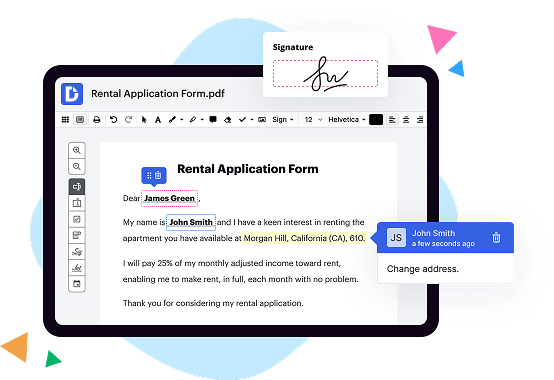
First and foremost, let's talk about DocHub. This versatile tool provides an intuitive and user-friendly interface, making it easy to create, edit, and collaborate on documents. DocHub's standout feature is its seamless integration with popular cloud storage services like Google Drive and Dropbox. This allows you to effortlessly access and manage your documents from anywhere, at any time. With DocHub's extensive annotation tools and customizable templates, you can annotate, sign, and streamline your documents with precision and efficiency.
Moving on to Square 9 GlobalSearch, this robust solution offers powerful search capabilities, ideal for organizations dealing with extensive document databases. GlobalSearch excels in document retrieval, enabling users to quickly locate specific files, saving time and boosting productivity. Its advanced OCR (Optical Character Recognition) functionality ensures accurate data extraction from scanned documents, further streamlining your document management process.
Lastly, we have Webdocs, a comprehensive document management system that specializes in compliance and security. With robust encryption measures and access controls, Webdocs ensures the confidentiality and integrity of your sensitive documents. This platform empowers users to automate workflows, reducing manual intervention and improving overall efficiency. Additionally, Webdocs supports seamless integration with various business applications, providing a seamless and synchronized experience.
In conclusion, each of these document management solutions offers distinct features and advantages. DocHub provides an intuitive interface and seamless cloud integration, while Square 9 GlobalSearch excels in search functionality, and Webdocs prioritizes compliance and security. Depending on your specific needs and preferences, one of these platforms is sure to meet and exceed your expectations.
DocHub vs Square 9 GlobalSearch vs Webdocs: which is better for Enterprises?
While Square 9 GlobalSearch and Webdocs are good solutions to work with PDFs online, DocHub offers greater capabilities to help individuals and businesses digitize their documents and make them run smoothly across different devices and your favorite apps.
DocHub vs Square 9 GlobalSearch vs Webdocs: which is better for small businesses?
Square 9 GlobalSearch and Webdocs are good options for editing, signing, and sharing PDFs. However, DocHub offers a more comprehensive featureset that includes organizations, reusable templates, advanced eSignatures, seamless Google integrations, and more that are perfect for small businesses, helping them simplify and streamline document editing, sharing, signing, and form completition.
What is DocHub?
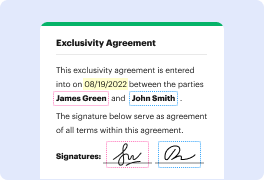
DocHub is a Google-integrated PDF editor and eSignature solution that helps you get your PDFs done online, using any device. DocHub comes with an online PDF editor, advanced eSignatures, PDF forms, reusable templates, and straightforward Google integrations so you can maximize your productivity when working within your favorite Google apps.
What is Square 9 GlobalSearch and how does it work?
Square 9 GlobalSearch is an innovative document management system that allows you to effortlessly manage and organize all your important information. It simplifies your workflow, enhances productivity, and brings a sense of order to your digital world.
So, how does it work? Well, let's break it down for you. With Square 9 GlobalSearch, you can easily capture your physical documents using scanners or import digital files from various sources. These documents are then securely stored in a centralized, cloud-based repository. No more hunting through paper files or dealing with scattered digital files - everything is conveniently accessible in one place.
Once your documents are safely stored, the real magic of GlobalSearch begins. This powerful tool utilizes advanced search algorithms to help you quickly locate specific documents or information within seconds. Whether you're searching by keyword, document type, date, or any other criteria, GlobalSearch is designed to find what you need, when you need it.
But it doesn't stop there. GlobalSearch also allows you to automate your business processes through customizable workflows. You can define rules and actions that streamline repetitive tasks, reducing manual effort and ensuring accuracy. This means more time saved and fewer errors made, allowing you to focus on what truly matters.
Furthermore, Square 9 GlobalSearch seamlessly integrates with popular business applications like Microsoft Office, enabling smooth collaboration and easy document sharing. You can access your files from anywhere, at any time, using any device. It's like having your own digital filing cabinet in the palm of your hand!
In summary, Square 9 GlobalSearch is the ultimate solution to document chaos. It simplifies your document management, enhances productivity, and brings order to your digital world. From capturing and storing documents to quick and accurate retrieval, automation of workflows, and seamless integration with other tools, GlobalSearch is designed to make your life easier and more efficient.
So, say goodbye to the headache of disorganized files, endless searching, and inefficient processes. With Square 9 GlobalSearch, you'll experience a new level of efficiency, productivity, and peace of mind.
What is Webdocs and how does it work?
Webdocs is a fantastic digital tool that allows you to easily store, manage, and access all your important documents online. It simplifies the process of document management and ensures that you can find what you need, when you need it, from wherever you are.
With Webdocs, you can say goodbye to the hassle of physical paper documents and the never-ending search for that one elusive file. Instead, you can effortlessly organize your files into folders and subfolders, just like you would with a traditional filing cabinet. The beauty of Webdocs is that it takes this concept to a whole new level, making it easier, more efficient, and more secure.
When you upload a document to Webdocs, it automatically indexes the content, making it fully searchable. This means that you can quickly locate a specific document simply by searching for a keyword or phrase. No more wasting time sifting through heaps of paperwork or scrolling endlessly through folders.
Webdocs also offers the ability to apply metadata to your documents. Metadata is like a little extra information that you can attach to a file, such as tags or labels. This makes it even easier to categorize and find your documents later on. You can use metadata to add details like document type, author, date, or any other information that is relevant to your workflow.
One of the standout features of Webdocs is its collaboration capabilities. You can share documents with your coworkers or clients, allowing them to access and edit files in real-time. This eliminates the need for back-and-forth emailing of documents and ensures that everyone is working on the most up-to-date version. Collaboration has never been easier or more efficient!
Security is a top priority for Webdocs. Your documents are encrypted and stored in secure data centers, protecting them from unauthorized access or loss. Webdocs also provides access control features, allowing you to define who can view, edit, or delete specific documents. You can rest easy knowing that your important information is safe and sound.
In summary, Webdocs is a game-changer when it comes to document management. It streamlines the process, making it easier than ever to store, find, and collaborate on your files. Its powerful search capabilities, metadata functionality, and robust security features set it apart from the rest. Say goodbye to paper clutter and welcome a more organized, efficient, and secure way of managing your documents with Webdocs!
Is DocHub free?
Yes. DocHub's free plan is a perfect fit for one-offs or occasional projects. You can start using DocHub’s Free Plan straight away after completing the quick account registration. No learning is needed. The DocHub Pro Plan has a 30-day free trial so you have enough time to test the product.
Is Square 9 GlobalSearch free to use?
Yes, Square 9 GlobalSearch is absolutely free for you to use! With this powerful tool at your disposal, managing your documents and streamlining your workflows has never been easier. GlobalSearch allows you to effortlessly organize, search, and access all your important files with just a few clicks. Say goodbye to the hassle of sifting through piles of paper or navigating through confusing digital folders. GlobalSearch simplifies the process and puts you back in control. Seamlessly integrate it into your existing systems or use it as a standalone solution – the choice is yours. Experience the convenience of Square 9 GlobalSearch today and unlock a whole new level of efficiency for your business. Transition into the future of document management and let GlobalSearch revolutionize the way you work.
What is DocHub’s cost and pricing?
DocHub has straightforward pricing that includes one free plan and one paid plan. If you need to get documents done once in a while, the Free Plan is just the thing for you. It includes all the PDF tools to help you edit, sign, share, and organize your documents. For a growing document workflow, we recommend the DocHub Pro plan at $14 per user per month. It includes unlimited PDF capabilities and priority tech support. You can even test it free for 30 days before buying.
What are the plans and prices for Square 9 GlobalSearch?
Square 9 GlobalSearch offers flexible pricing plans based on the specific needs of each customer. As a result, the prices can vary depending on factors such as the number of users, volume of documents, and desired features.
To get specific pricing information and details about the available plans, it is recommended to reach out to Square 9 directly through their official website or by contacting their sales team. They will be able to provide accurate pricing based on your business requirements.
Is Square 9 GlobalSearch safe?
Yes, Square 9 GlobalSearch is indeed a safe solution for your document management needs. With its robust features and advanced security measures, you can trust that your sensitive information will be handled with the utmost care and protection.
Using cutting-edge technology, GlobalSearch ensures the safety of your documents throughout the entire process. Its secure access controls guarantee that only authorized individuals can view and manage your files. Additionally, its encryption protocols safeguard your data from any potential threats or breaches.
You can rely on Square 9 GlobalSearch to keep your documents secure, whether they are stored in the cloud or on-premises. Its user-friendly interface simplifies the document management process while maintaining utmost security. From digitizing paper documents to organizing electronic files, GlobalSearch offers a comprehensive and secure solution.
Rest assured that with Square 9 GlobalSearch, your documents are in safe hands. Experience the peace of mind that comes with a reliable and secure document management system.
Is Webdocs safe?
Yes, Webdocs is a safe platform for all your needs. We have prioritized the security and protection of your information, ensuring a worry-free experience for our users. Our team works diligently to implement the highest standards of online safety to keep your data secure. With regular updates and advanced encryption technology, we strive to provide a safe environment for all your document-related tasks. Rest assured, your privacy is important to us and we take all necessary measures to maintain it. So go ahead, use Webdocs with confidence and enjoy a secure and seamless experience.
What are the main DocHub alternatives?
The main DocHub alternatives are Lumin PDF, Small PDF, PDF escape, and others. However, DocHub’s ease of use, flexibility, affordability, and deep Google integrations are the reasons why DocHub is ahead of the competition.
What are the 10 best Square 9 GlobalSearch alternatives?
When it comes to finding amazing alternatives to Square 9 GlobalSearch, there are plenty of options out there that can cater to your needs. One such option is DocHub.
1. DocHub: DocHub is a fantastic alternative to Square 9 GlobalSearch. With its user-friendly interface and powerful features, it allows you to easily edit, sign, and share documents online.
Moving on, another top contender in the list of Square 9 GlobalSearch alternatives is:
2. Dokmee: Dokmee offers robust document management capabilities, allowing you to efficiently store, organize, and retrieve your files. Its intuitive interface makes it a breeze to navigate.
3. M-Files: M-Files is an intelligent information management solution that enables you to seamlessly manage and access documents across various platforms. Its advanced search capabilities make finding files a breeze.
4. eFileCabinet: eFileCabinet streamlines your document management processes by offering secure cloud storage and easy retrieval options. Its efficient workflow automation saves you valuable time.
5. PandaDoc: PandaDoc enhances your document creation and collaboration experience. With its intuitive interface and integrated eSignature functionality, creating professional contracts and proposals has never been easier.
6. PaperSave: PaperSave is a robust document management solution that integrates seamlessly with various systems. Its automated document capture and retrieval features improve efficiency.
7. Laserfiche: Laserfiche offers comprehensive document management capabilities, including workflow automation and records management. Its scalable platform caters to both small businesses and large enterprises.
8. SmartSearch: SmartSearch is a powerful document management system that enables you to store, search, and retrieve files effortlessly. Its secure cloud-based solution ensures your documents are always accessible.
9. FileHold: FileHold provides an intuitive document management system designed to meet the needs of organizations across industries. Its advanced security features ensure the confidentiality of your files.
10. Templafy: Templafy simplifies document creation by offering a centralized platform for creating, managing, and sharing templates. Its integration capabilities allow for a seamless workflow experience.
These Square 9 GlobalSearch alternatives offer a wide range of features and capabilities to cater to your document management needs. Whether you're looking for advanced search capabilities, streamlined workflow processes, or seamless collaboration, these alternatives have got you covered. So go ahead, explore these options, and find the perfect fit for your business!
What are the 10 best Webdocs alternatives?
If you're on the hunt for top-notch alternatives to Webdocs, look no further! We've compiled a list of the 10 best options that are sure to meet your needs. And while we can't help but mention it first, DocHub is a fantastic choice to consider.
1. DocHub: DocHub offers an impressive array of features, allowing you to edit and sign documents seamlessly. Its user-friendly interface and powerful collaboration tools make it a standout in the field.
2. Adobe Acrobat DC: As one of the industry giants, Adobe Acrobat DC provides a comprehensive solution for creating, editing, and signing PDFs. With its robust feature set and seamless integration with other Adobe products, it's a reliable choice.
3. PandaDoc: Streamlining your document workflows is a breeze with PandaDoc. This all-in-one platform offers everything from document creation and collaboration to e-signature capabilities, making it a reliable choice for businesses of all sizes.
4. SignNow: Looking to simplify the process of signing documents electronically? SignNow has got you covered. With its intuitive interface and powerful features, this platform makes signing and managing documents a breeze.
5. HelloSign: When it comes to simplicity and ease of use, HelloSign excels. With its intuitive interface and seamless integration with cloud storage services, you can quickly send, sign, and manage documents with ease.
6. Docusign: Docusign is a reliable and widely recognized electronic signature platform that offers a plethora of features. Its robust security measures and extensive integration options make it a popular choice among businesses.
7. Nitro Sign: Nitro Sign offers a comprehensive solution for all your document management needs. From creating and signing documents to collaboration and sharing, this platform is a reliable choice for increasing productivity.
8. SignEasy: If you're searching for a straightforward yet powerful electronic signature solution, SignEasy is worth considering. Its simple interface and mobile-friendly features make signing and managing documents effortless.
9. Foxit PhantomPDF: Foxit PhantomPDF is a feature-rich PDF editor that provides powerful collaboration tools and advanced security features. With its extensive editing capabilities, this alternative stands out for its versatility.
10. PDF Expert: Rounding off our list is PDF Expert. This user-friendly PDF editor allows you to easily annotate, edit, and sign documents. Its seamless iCloud integration and intuitive interface make it a solid choice for both personal and professional use.
With this impressive lineup of alternatives, you're sure to find the perfect match for your document management needs. So go ahead and explore these options to streamline your workflows, enhance collaboration, and elevate your document editing experience.