DocHub vs HelloSign in Android: which is the better Online Signature Tool Alternative solution
Migrate from HelloSign to DocHub on your Android device to take advantage of powerful PDF document editing tools, legally-binding eSignatures, and strong integrations with Google Workspace.
Create free account
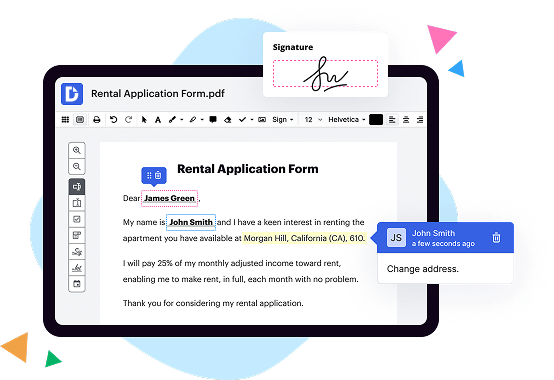
See how DocHub outshines the competition

|
HelloSign | |
|---|---|---|
| No Downloads | ||
| Search Form Online | ||
| Edit PDF | ||
| Fill Online | ||
| Sign Online | ||
| Unlimited Cloud Storage | ||
| Annotate PDF | ||
| Fax Online | ||
| Track Sending Documents | ||
| Get DocHub for free |
Move from HelloSign to DocHub in a few steps

01. Register with DocHub using your email address or Google account. It's fast and easy. No credit card required.
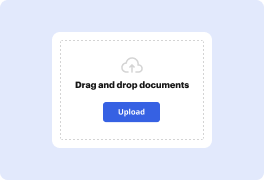
02. Upload the document you need or create it from scratch. Then, customize it by adding images, drawings, and different types of fillable fields.
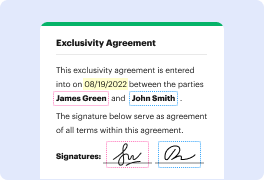
03. Customize your PDF in minutes. Type, highlight, underline, whiteout text, add comments, and sign your document.
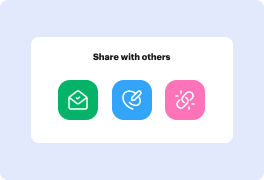
04. Share your PDF with others to collaborate in real-time. Export your document, download or print it out.
Switch to DocHub to enjoy premium PDF customization

Online PDF creator and editor
Explore DocHub vs. HelloSign comparison data and choose the best platform for getting your perfect document without hassle. Start with a blank document or modify an existing one. Type text, add shapes, drawings, images, and highlight or whiteout information. Whatever you do with a PDF, the result is always high quality, without rasterized text or removed fields.

Diverse PDF management tools
Manage your PDF to perfection. Add, delete, and rearrange document pages or merge them to create a new document. DocHub supports a variety of file types including PDF, DOC, PPT, XLS, TXT, DOCX, and PPTX, which you can easily convert to a PDF.

Powerful PDF tools on your mobile device
Keep your work flowing from any location. Get DocHub, the most powerful HelloSign competitor. With DocHub's capabilities on your mobile device, you can edit, annotate, manage, sign, and share PDFs just as easily as you would on a desktop. No need to install the app.

Google integrations
Boost your productivity and deliver an amazing customer experience by managing your PDFs from your favorite Google apps. Import, edit, and sign your documents directly from your Gmail, Google Drive, and Dropbox.

Interactive PDF forms and templates
Get an intuitive and interactive experience when creating PDF forms and reusable document templates. Modify existing fields or create new ones for checkboxes, signatures, initials, and more. Publish forms on your website, social media, or share them via URL to collect data.

Real-time collaboration
Migrate from HelloSign to DocHub to collaborate effectively and securely on documents in real-time. Set document permissions to let others view, comment on, edit, and sign your documents. Stay in the loop with instant email notifications or track the status of your documents with court-admissible audit trails.
Industry-leading security and compliance
DocHub complies with industry-leading standards, regulations, and certifications to ensure the most effective and secure workflows.

GDPR compliance
Regulates the collection, use, and holding of personal data for EU residents.

PCI DSS certification
Ensures the security of credit and debit card transactions made by a customer.

CPRA compliance
Enhances the privacy rights of California residents while protecting their personal data.

SOC 2 certification
Ensures the security of your data and the privacy of your clients.

HIPAA compliance
Protects privacy, security, and integrity of sensitive healthcare information.
Check out what our customers are saying about their DocHub experience
Great solution for PDF docs with very little pre-knowledge required.

A Valuable Document Signer for Small Businesses.

I can create refillable copies for the templates that I select and then I can publish those.

Got questions?
Here are some common questions from our customers that may provide you with the answer you're looking for. If you can't find an answer to your question, please don't hesitate to reach out to us.
Contact us
What is the difference between DocHub and HelloSign in Android?
DocHub and HelloSign are both Android applications that offer document editing and signing capabilities. However, there are some key differences between the two.
First and foremost, DocHub stands out as a more comprehensive and user-friendly solution. It goes beyond just document editing and signing, empowering anyone to streamline the entire process of document management. From editing to signing, distributing, and even completing forms, DocHub covers it all.
What makes DocHub particularly convenient is its deep integration with Google Workspace. Users can seamlessly import, export, modify, and sign documents directly from their favorite Google apps. This integration ensures a seamless workflow and saves time by eliminating the need to switch between different platforms.
DocHub's user-friendly interface makes it easy for anyone to navigate and utilize its features. With its simplicity and intuitive design, you can confidently edit and sign documents without any technical expertise.
In summary, while HelloSign may provide some similar features, DocHub offers a more comprehensive and user-friendly experience. Its deep integration with Google Workspace and its extensive range of document management capabilities make it the go-to solution for anyone looking to streamline their document editing, signing, distribution, and form completion process.
How does DocHub compare to HelloSign in terms of security features for enterprises?
DocHub offers a range of security features designed for enterprises. It complies with industry-leading security and compliance standards, including GDPR, PCI DSS certification, HIPAA, FERPA, CCPA, SOC 2 Type II, and Google Security Assessment for secure Google Workspace environments. To make an informed comparison of DocHub vs. HelloSign, you need to do more in-depth research on the latter solution and any certifications or compliance standards it adheres to.
Is DocHub an excellent alternative to HelloSign when it comes to pricing for small businesses?
DocHub offers two subscription options — Free and Pro. Each plan caters to the needs of individuals and businesses of any size. The Free plan has certain restrictions on the number of documents, signature requests, and attachments you can use. The Pro plan costs $14 per user/per month. It offers unlimited document workflow capabilities, which makes DocHub one of the most competitive solutions on the market. It’s a great alternative to HelloSign.
How can DocHub benefit document-based workflows?
With our super-intuitive yet robust document management solution, you can put an end to inefficient processes and turn your teams into a productivity powerhouse. DocHub offers a suite of features that streamlines document workflows for individuals and businesses at a competitive price, including editing, completing, signing, sharing, and storing documents. Additionally, it enables users to create reusable templates and fillable forms and collaborate on documents in real-time. And considering how well it integrates with popular productivity and storage services like Box, Dropbox, and OneDrive - it even offers deep integration with Google Workspace - our platform is the ultimate all-in-one solution for modern document workflows.
What is HelloSign and how does it work?
HelloSign is a fantastic tool that allows you to sign documents online quickly and easily. It simplifies the traditionally tedious process of signing and managing documents, giving you the freedom to focus on what really matters.
So, how does HelloSign work? Well, it's pretty straightforward! First, you upload your document to HelloSign's secure platform. Whether it's a contract, an agreement, or any other type of document, HelloSign ensures that your file is safely stored.
Next, you can add your signature using HelloSign's intuitive interface. It provides various options, such as drawing your signature with your mouse or finger, typing it out, or even uploading an image. HelloSign guarantees that your signature is legally binding, so you can sign with confidence.
Once you've added your signature, HelloSign allows you to invite others to sign the document as well. You can effortlessly collaborate with multiple parties, making it a breeze to gather all the necessary signatures in a timely manner.
In addition to digital signatures, HelloSign also offers useful features like requesting attachments, adding text fields, and even setting up automatic reminders. These tools streamline the whole document signing process, saving you valuable time and reducing the risk of errors.
Once everyone has signed, HelloSign generates a final, fully executed copy of the document. You can download it in various formats, such as PDF or Word, ensuring compatibility with your preferred software.
To summarize, HelloSign is a user-friendly and efficient online platform that simplifies the document signing process. With its secure storage, easy signature options, collaboration capabilities, and additional features, HelloSign is the perfect tool for anyone seeking a convenient and hassle-free way to sign documents digitally. Give it a try and experience the simplicity and effectiveness of HelloSign for yourself!
How much does DocHub cost?
The price for the Pro plan starts at $14 per user/per month. If you pay for one year upfront, you will save 29%, and the monthly price will be $10. DocHub also offers special discounts for non-profits, charities, and schools. For more information, please contact the DocHub support team.
Is HelloSign free to use?
Yes, HelloSign is absolutely free to use! It's a fantastic platform that allows you to sign documents electronically with ease and simplicity. You'll find it incredibly user-friendly, as it has been designed to cater to your needs and ensure a smooth signing process. With HelloSign, you can safely and securely sign documents online from anywhere, at any time. Whether you need to sign an important contract or just need a signature on a permission slip, HelloSign has got you covered. Plus, it's packed with helpful features that will make your document signing experience even better. So why wait? Give HelloSign a try today and experience the convenience of hassle-free electronic signatures.
Is DocHub free?
Yes, DocHub allows you to manage your documents without being charged. You can create a free account and use the service for a limited number of documents, electronic signatures, and email attachments. Also, a free 30-day trial will give you access to its complete set of features to help you decide if you want to switch to a Pro account.
How much does HelloSign cost?
Hello! The cost of HelloSign depends on the plan that suits your needs. There are various options available, each offering great value for your money. With HelloSign, you'll find a pricing structure that caters to both individuals and businesses. Whether you're a small team or a large enterprise, there's a plan that will fit perfectly. Plus, HelloSign provides a free trial to give you a taste of its remarkable features and seamless user experience. So, you can explore all the wonderful possibilities without any upfront commitment. With HelloSign, you'll discover a price that not only meets your budget but also delivers exceptional performance. Say goodbye to tedious paperwork and embrace the simplicity and efficiency of HelloSign at a cost that's just right for you!
How can I additionally protect documents in DocHub?
To ensure no third party will open your document after you share it with your recipients, you can protect it with a password. Edit your form and add fields for fill-out according to your requirements, and then proceed to the dropdown menu on the top of the page and choose Send → Email Attachment. Check the Password Protect option and type your secret combination in the relative field.
Is HelloSign safe?
Yes, HelloSign is absolutely safe to use! We understand how crucial it is to protect your sensitive information, which is why HelloSign prioritizes the security and privacy of its users. With advanced encryption protocols in place, your documents and personal data are safeguarded from unauthorized access. In addition, HelloSign complies with industry-standard security practices and regulations, giving you peace of mind while using the platform.
Furthermore, HelloSign maintains a robust system to ensure the integrity of your documents. Every signature and transaction is logged, creating a transparent and auditable trail. This feature not only enhances security but also adds accountability to the signing process.
Moreover, HelloSign’s user-friendly interface and intuitive design make it easy even for those unfamiliar with technology. You can confidently navigate the platform and complete your signing tasks effortlessly, without any technical hiccups.
By choosing HelloSign, you are opting for a reliable and trusted electronic signature solution. So go ahead and sign your documents with confidence, knowing that HelloSign is committed to providing a secure and seamless signing experience for its users.
Is DocHub’s eSignature legally binding?
Yes, DocHub's eSignature is indeed legally binding. When you use DocHub's eSignature feature to sign your documents online, you can be confident that it holds the same legal weight as a physical signature on a paper document. This means that contracts, agreements, and other important documents signed with DocHub are legally enforceable.
By offering a seamless and secure digital signing experience, DocHub ensures that your eSignature is valid and accepted by courts and other legal authorities. You can trust that your signed documents are legally binding, providing you with peace of mind and saving you time and effort.
With DocHub's user-friendly interface and intuitive features, signing documents electronically has never been easier. You can sign from anywhere, anytime, using any device connected to the internet. This convenience, paired with the legal validity of DocHub's eSignature, makes it an excellent choice for individuals and businesses alike.
So, whether you're a professional managing contracts or an individual signing an important document, rest assured that DocHub's eSignature is legally binding. Sign confidently, knowing that your digital signature holds the same legal weight as a traditional ink signature.
Are HelloSign signatures legal?
Yes, HelloSign signatures are indeed legal! HelloSign is a trusted eSignature platform that provides the convenience and security of signing important documents electronically. Using HelloSign, you can easily sign documents online, eliminating the need for time-consuming paperwork and physical signatures.
Rest assured, HelloSign signatures hold legal validity and are recognized as legally binding in various countries, including the United States and many other nations. Governments and regulatory bodies have acknowledged the growing acceptance of electronic signatures in today's digital world. HelloSign adheres to the highest industry standards and complies with legal requirements, ensuring the legality and enforceability of your signed documents.
With HelloSign, you can confidently sign contracts, agreements, or any other legal paperwork with a simple and user-friendly interface. Plus, HelloSign offers additional security measures such as authentication, tamper-proofing, and audit trails to protect the integrity of your signed documents. So, you can sign with peace of mind, knowing that your electronic signatures are legally sound.
Whether you are an individual, a small business owner, or part of a large enterprise, HelloSign provides a dependable and lawful solution for your digital signature needs. Experience the convenience and legal certainty of HelloSign signatures for yourself!
Can I create documents in DocHub?
DocHub is a powerful editor that allows users to modify their paperwork and create fillable forms from scratch. Sign in to your account, click New Document → Create Blank Document. Click the Manage Fields button left-side pane to open your left-side pane. Drop Text and Paragraph fields, dropdowns, checkmark boxes, and areas for people to sign your paperwork. Name your file and click on the DocHub logo to return to your Dashboard — our app automatically saves your form so you can get back to managing it later.
How do I use HelloSign?
To use HelloSign, it's easy-peasy! First, you'll need to create an account, which takes just a few minutes. Once you're all signed up, you can start uploading your documents right away. Just click that "Upload Document" button and voila, you're on your way!
After your document is uploaded, it's time to add your signature. HelloSign gives you multiple options— you can draw your signature using your mouse or trackpad, type it out, or even upload an image of your signature. Talk about flexibility!
Next, it's time to add all the necessary fields to your document. You can add text fields, checkboxes, initials, or even custom fields. Simply drag and drop them to the right spot, and you're good to go!
Don't forget to invite others to sign your document. You can add their names and email addresses, and HelloSign will send them an email with a link to sign. How convenient is that?
Oh, and did I mention that HelloSign is super secure? Your documents are encrypted, and you can even set password protection if needed. Plus, HelloSign is compliant with all the necessary regulations, so you can have peace of mind.
Once everyone has signed, you're ready to send out your documentation. HelloSign lets you share it via email or even integrate it with your favorite apps like Google Drive or Dropbox. It's all about making your life easier!
So, whether you need to sign a contract, get approval on a form, or collaborate on important paperwork, HelloSign has got your back. It's user-friendly, efficient, and reliable. Say goodbye to traditional pen and paper signatures and hello to the future of signing documents!
Why should I choose DocHub over other editors?
DocHub has many strong points compared to other solutions. For example, it enables users to create new forms from scratch and perfectly integrates with Google Docs and Gmail. Apart from that, students and teachers can easily export their modified documents right to Google Classroom. It also has favorable pricing options. Compare DocHub with any other solution on these points before you make your final decision.
What are the 10 best HelloSign alternatives in Android?
If you're looking for the best HelloSign alternatives in Android, you're in luck! We've compiled a list of the top 10 options for you. These alternatives offer a range of features and capabilities to meet your document signing and editing needs.
1. DocuSign: DocuSign is a popular choice and offers a user-friendly interface for signing and sending documents. It also integrates seamlessly with other apps and platforms.
2. Adobe Sign: Adobe Sign is a powerful alternative that provides robust features for document signing and management. It's known for its security and reliability.
3. SignNow: SignNow is a straightforward solution that allows you to sign documents on the go. It offers easy-to-use features and a simple interface.
4. PandaDoc: PandaDoc is a comprehensive platform that goes beyond just document signing. It enables you to create, send, and track documents, making it ideal for businesses.
5. SignEasy: SignEasy is designed to be a user-friendly and efficient solution for signing documents digitally. It offers a seamless experience across multiple devices.
6. eversign: eversign is a versatile platform that allows you to sign and manage documents in a secure and efficient manner. It offers advanced features such as templates and workflows.
7. Zoho Sign: Zoho Sign is a reliable solution that integrates seamlessly with other Zoho applications. It offers a straightforward and intuitive interface for document signing.
8. SignRequest: SignRequest is a straightforward and affordable option that allows you to easily sign and send documents. It offers a simple and intuitive user experience.
9. DocHub: While DocHub offers similar features to HelloSign, it takes it a step further by providing comprehensive document editing, signing, distribution, and form completion capabilities. It's user-friendly and offers deep integration with Google Workspace.
10. Docsketch: Docsketch is a user-friendly platform that allows you to create, sign, and track documents seamlessly. It offers a simple and intuitive interface.
In conclusion, these HelloSign alternatives in Android provide a range of features and options to streamline your document signing and editing processes. Whether you're an individual or a business, you'll find a solution that suits your needs and empowers you to handle documents with ease.