What is the difference between DocHub vs Signable vs. MetroFax?
When it comes to digital document management, there are several efficient options available to make your life easier. Among these options are DocHub, Signable, and MetroFax. While all three have their own set of features and benefits, there are some key differences that make each of them unique.
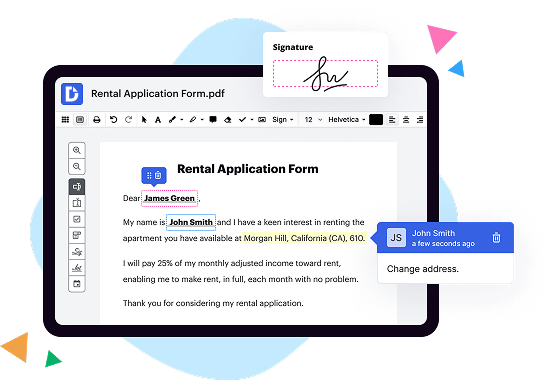
DocHub is a versatile document management platform that offers a wide range of tools for editing, signing, and managing PDF documents. With its user-friendly interface and seamless integration with various cloud storage platforms, DocHub allows you to easily create, edit, and collaborate on documents from anywhere, at any time. Whether you need to fill out forms, add annotations, or collect signatures, DocHub has got you covered.
Signable, another reliable document management solution, focuses primarily on electronic signatures. With its simple and intuitive interface, Signable enables you to send documents for signature and track the progress in real-time. It offers various signing options, including email, SMS, and in-person signing, making it convenient for both you and your clients or partners. Signable is designed to streamline the signing process and ensure legal compliance, saving you time and effort.
MetroFax, on the other hand, is a digital faxing service that allows you to send and receive faxes without the need for traditional fax machines. With MetroFax, you can easily send faxes via email or through its online portal, eliminating the need for paper, ink, and phone lines. It offers features like digital archiving, mobile access, and the ability to send faxes to multiple recipients simultaneously. MetroFax is a modern solution that brings faxing into the digital age.
In summary, DocHub, Signable, and MetroFax are all excellent options for managing your digital documents effectively. DocHub provides a comprehensive set of editing and signing tools, while Signable specializes in electronic signatures, and MetroFax offers a modern approach to faxing. Depending on your specific needs, each of these solutions has its own strengths and advantages. Whether you're a business professional, an entrepreneur, or an individual looking for efficient document management, there is a suitable solution available for you.
DocHub vs Signable vs MetroFax: which is better for Enterprises?
While Signable and MetroFax are good solutions to work with PDFs online, DocHub offers greater capabilities to help individuals and businesses digitize their documents and make them run smoothly across different devices and your favorite apps.
DocHub vs Signable vs MetroFax: which is better for small businesses?
Signable and MetroFax are good options for editing, signing, and sharing PDFs. However, DocHub offers a more comprehensive featureset that includes organizations, reusable templates, advanced eSignatures, seamless Google integrations, and more that are perfect for small businesses, helping them simplify and streamline document editing, sharing, signing, and form completition.
What is DocHub?
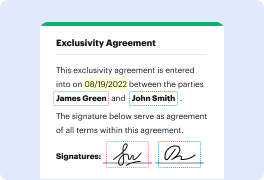
DocHub is a Google-integrated PDF editor and eSignature solution that helps you get your PDFs done online, using any device. DocHub comes with an online PDF editor, advanced eSignatures, PDF forms, reusable templates, and straightforward Google integrations so you can maximize your productivity when working within your favorite Google apps.
What is Signable and how does it work?
Signable is a powerful electronic signature platform that simplifies the entire signing process. It offers a seamless and efficient way to sign and send important documents online.
How does Signable work? Let me explain. When you need to get a document signed, Signable allows you to upload it to the platform. You can then add the necessary signature fields and any other required information. Next, you can send the document to the intended recipient via email, and they can sign it digitally, right from their computer or mobile device.
Signing a document with Signable is quick and hassle-free. The user-friendly interface makes it easy to navigate, ensuring a smooth and straightforward experience. Signable provides clear instructions at each step of the process, ensuring that you never feel lost or overwhelmed.
With Signable, you can say goodbye to the inconvenience of printing, scanning, and mailing documents. Everything can be done electronically, saving you valuable time and resources. Plus, Signable provides a secure environment for document storage, keeping your important files safe and easily accessible whenever you need them.
Whether you need to sign contracts, agreements, or any other type of document, Signable is here to simplify your life. It offers a reliable, efficient, and legally binding solution for all your signing needs.
So, why choose Signable? It's simple! Signable streamlines the entire signing process, saves you time and effort, and ensures the highest level of security for your documents. Experience the convenience of electronic signatures with Signable; you'll wonder why you didn't switch sooner!
What is MetroFax and how does it work?
MetroFax is a top-notch online faxing solution that simplifies faxing and allows easy communication. With its user-friendly interface and cutting-edge technology, MetroFax makes faxing a breeze.
So, how does MetroFax work? Well, imagine this: You have an important document that needs to be faxed to a client ASAP. Instead of digging through stacks of papers and wrestling with a clunky fax machine, you can simply log in to your MetroFax account from any device with internet access.
Once you're in, just upload your document, enter the recipient's fax number, and hit send. Voila! MetroFax swiftly converts your file into a fax format and transmits it securely over the web. No more wasting time and resources on traditional faxing methods!
But that's not all - MetroFax goes above and beyond by providing a host of other features to enhance your faxing experience. You can effortlessly organize and search through all your sent and received faxes, making it a breeze to keep track of important documents. Plus, you can easily integrate MetroFax with your email, making it even more convenient to send and receive faxes directly from your inbox.
MetroFax understands that security is a top concern when it comes to faxing important information. That's why they ensure that all your faxes are encrypted and protected. You can rest easy knowing that your sensitive data is safe and secure.
Moreover, MetroFax offers flexible pricing plans to cater to your unique needs. Whether you're a solo entrepreneur, a small business owner, or part of a large corporation, you'll find a plan that suits your budget and requirements.
In conclusion, MetroFax is a reliable, user-friendly, and efficient online faxing solution that simplifies communication and streamlines your workflow. It's time to say goodbye to cumbersome fax machines and embrace the convenience and innovation that MetroFax brings to the table. Give it a try today and experience the ease of modern faxing for yourself!
Is DocHub free?
Yes. DocHub's free plan is a perfect fit for one-offs or occasional projects. You can start using DocHub’s Free Plan straight away after completing the quick account registration. No learning is needed. The DocHub Pro Plan has a 30-day free trial so you have enough time to test the product.
Is Signable free to use?
Yes, Signable is completely free to use! Signing documents has never been easier or more convenient. With Signable, you can say goodbye to the hassle of printing, signing, and scanning documents. Our platform allows you to electronically sign documents with just a few clicks, saving you time and effort. Plus, you can access Signable from anywhere, whether you're in the office, at home, or on the go. Give Signable a try today and experience the freedom and simplicity of electronic signing. It's free, it's user-friendly, and it's the future of document signing. Start using Signable now and make your life easier.
Is MetroFax free to use?
Yes, MetroFax is indeed free to use! You can take advantage of MetroFax's fantastic features without any fees or hidden costs. With MetroFax, you can send and receive faxes right from your computer or mobile device, making it incredibly convenient and efficient. Whether you’re a busy professional or just need to send an occasional fax, MetroFax has got you covered. This user-friendly platform allows you to organize your faxes, manage your contacts, and even schedule faxes to be sent at a later time. It's the perfect solution for those who want a hassle-free faxing experience with no financial burden. So go ahead and give MetroFax a try – you won't be disappointed!
What is DocHub’s cost and pricing?
DocHub has straightforward pricing that includes one free plan and one paid plan. If you need to get documents done once in a while, the Free Plan is just the thing for you. It includes all the PDF tools to help you edit, sign, share, and organize your documents. For a growing document workflow, we recommend the DocHub Pro plan at $14 per user per month. It includes unlimited PDF capabilities and priority tech support. You can even test it free for 30 days before buying.
What are the plans and prices for Signable?
Signable offers various plans and pricing options based on the number of envelopes (documents) you need to send for electronic signature. Here are their standard plans:
1. Pay As You Go:
- Price: Starts at £1 per envelope
- Features: Basic features + Inclusive document history + Audit trail
2. Business:
- Price: Starts at £19 per month (billed annually) for 10 envelopes per month
- Features: Basic features + Inclusive document history + Audit trail + Templates + Automations + Bulk send + Reminders + Notifications + Support
3. Business Plus:
- Price: Starts at £39 per month (billed annually) for 25 envelopes per month
- Features: All features included in the Business plan + additional enhanced features
4. Custom Enterprise:
- Price: Custom pricing based on specific requirements
- Features: Tailored to the specific needs of your enterprise, including advanced integrations, additional security, dedicated account management, and more.
NOTE: The above prices are subject to change, and it's recommended to visit the Signable website directly for the most up-to-date pricing information. Additionally, Signable offers a free trial to test their service before committing to a plan.
What are the plans and prices for MetroFax?
As of my knowledge in October 2021, here are the plans and prices for MetroFax:
1. Essential Fax Plan:
- Price: $7.95 per month
- Included Pages: 500 fax pages (incoming or outgoing)
- Additional Pages: $0.03 per page
2. Value Fax Plan:
- Price: $12.95 per month
- Included Pages: 1,000 fax pages (incoming or outgoing)
- Additional Pages: $0.03 per page
3. Professional Fax Plan:
- Price: $35.95 per month
- Included Pages: 2,500 fax pages (incoming or outgoing)
- Additional Pages: $0.03 per page
4. Fax Number Plan:
- Price: $11.95 per month
- Included Pages: No fax pages included
- Additional Pages: $0.06 per page
Please note that these prices and plans are subject to change. It is recommended to check the official MetroFax website for the most up-to-date information and any potential promotional offers.
Is Signable safe?
Yes, Signable is a safe and secure platform for all your signing needs. Rest assured, Signable takes the utmost care in protecting your sensitive information and ensuring the confidentiality of your documents. With advanced encryption technology, your data is shielded from unauthorized access. Our user-friendly interface allows you to easily upload, sign, and manage your documents, all with just a few clicks. Plus, Signable adheres to the highest industry standards and complies with data protection regulations, giving you peace of mind that your documents are in good hands. Whether you're a business professional or an individual, Signable is the trusted solution for secure and efficient electronic signing. Try Signable today and experience the convenience and safety it offers firsthand.
Is MetroFax safe?
Yes, MetroFax is indeed a secure and trustworthy platform for all your faxing needs. Our system employs top-notch security measures to ensure the safety and confidentiality of your sensitive information. With our user-friendly interface and reliable encryption protocols, you can rest assured that your fax transmissions are protected from any unauthorized access. Furthermore, our dedicated team continuously monitors and updates our security features to stay ahead of potential threats. So, whether you're a small business or an individual, you can confidently rely on MetroFax to deliver your faxes promptly and securely.
What are the main DocHub alternatives?
The main DocHub alternatives are Lumin PDF, Small PDF, PDF escape, and others. However, DocHub’s ease of use, flexibility, affordability, and deep Google integrations are the reasons why DocHub is ahead of the competition.
What are the 10 best Signable alternatives?
If you're in search of outstanding alternatives to Signable, look no further! We've curated a list of ten exceptional options that are sure to meet your needs. While we acknowledge the greatness of DocHub, we'll make sure to present it among other remarkable alternatives without making it the sole focus. So, let's dive into the world of electronic signature solutions and explore these fantastic options:
1. DocHub: Starting off our list strong is DocHub, a widely respected and feature-rich platform that makes signing documents a breeze.
2. PandaDoc: With its user-friendly interface and powerful collaboration features, PandaDoc is a popular choice for businesses of all sizes. Prepare to streamline your document workflows effortlessly!
3. HelloSign: Offering simplicity and security in equal measure, HelloSign serves as an ideal solution for individuals and teams seeking an intuitive platform to manage their documents.
4. Adobe Sign: As a leader in the digital document industry, Adobe Sign offers comprehensive features and seamless integrations. Get ready to experience the pinnacle of electronic signing capabilities.
5. Docusign: Trustworthy and widely recognized, Docusign empowers users to sign documents with confidence. Its robust suite of features ensures a smooth and secure signing experience.
6. SignNow: Designed for both individuals and enterprises, SignNow brings simplicity and efficiency to the table. You'll appreciate its intuitive interface and extensive integrations.
7. SignRequest: Promising a seamless signing experience, SignRequest boasts an elegant and user-friendly interface. It prioritizes ease of use without compromising on security and compliance.
8. Eversign: Seamlessly handle your document signing needs with Eversign. Its user-friendly features, strong security, and flexible pricing plans make it an enticing option.
9. SignEasy: Offering a simple yet powerful document signing solution, SignEasy puts convenience at the forefront. Its mobile-friendly app ensures you can sign on-the-go hassle-free.
10. Signicat: Rounding off our list is Signicat, an enterprise-grade e-signature solution. With capabilities beyond basic signing, it caters to businesses seeking advanced identity verification and authentication features.
Now armed with this list of outstanding Signable alternatives, you can confidently choose the perfect platform suited to your unique requirements. Embrace the future of document signing and soar to new levels of efficiency and productivity!
What are the 10 best MetroFax alternatives?
If you're searching for reliable alternatives to MetroFax, you've come to the right place! There are plenty of options out there, but let me share with you the cream of the crop. One fantastic alternative that definitely deserves mention is DocHub. This powerful platform offers a range of features that make faxing a breeze. Plus, it's user-friendly, efficient, and versatile.
Now, let's delve into the rest of the top contenders for your faxing needs. Here are 10 remarkable MetroFax alternatives that you should definitely consider:
1. DocHub: As mentioned earlier, this feature-rich tool steals the show with its intuitive interface and robust capabilities. You can sign, edit, and send faxes effortlessly, ensuring smooth communication in your professional endeavors.
2. HelloFax: A popular choice among businesses, HelloFax provides seamless integration with popular cloud storage platforms, making it easy to manage and share your faxed documents. Its streamlined design ensures a hassle-free experience.
3. eFax: Trusted by millions worldwide, eFax is renowned for its reliability and security. You can easily send and receive faxes using email or the eFax mobile app, ensuring you stay connected no matter where you are.
4. FaxZero: If you're on the lookout for a free option without compromising on quality, FaxZero is an excellent choice. It allows you to send faxes online without any registration or fees, making it super convenient for occasional faxing needs.
5. Biscom 123: With a sleek and modern interface, Biscom 123 brings faxing into the digital age. It offers advanced features like digital signatures and encrypted transmission, ensuring your documents remain secure.
6. RingCentral Fax: As a comprehensive communication solution, RingCentral Fax seamlessly combines faxing with other communication channels. You can enjoy features like cloud storage integration and even receive faxes on your mobile device.
7. MetroFax (Yes, we're talking about alternatives, but let's not discount the original!): MetroFax may be the one you're looking to move away from, but it still deserves honorable mention for its user-friendly interface and reliable service.
8. MyFax: MyFax boasts an intuitive interface designed to make faxing a breeze. With its mobile app, you can conveniently manage your faxing needs on the go, making it an ideal choice for busy professionals.
9. SRFax: This web-based faxing service focuses on security, ensuring that sensitive information remains protected. SRFax also offers solid customer support to assist you whenever needed.
10. FaxBurner: Last but certainly not least, FaxBurner is a feature-packed faxing alternative that works directly from your smartphone. Whether you're a business owner or an individual, FaxBurner has you covered with its user-friendly interface and seamless operation.
So, there you have it, a remarkable list of the top 10 MetroFax alternatives. With these reliable options at your disposal, you can bid farewell to any faxing woes and embrace a smoother, more efficient way to communicate.