What is the difference between DocHub vs Secured Signing vs. Odyssey Tec eSign?
DocHub, Secured Signing, and Odyssey Tec eSign are all excellent electronic signature solutions. While they share similarities in their functionality, there are a few key differences that set them apart.
Let's start with DocHub. This user-friendly platform offers a seamless experience for managing and signing documents online. With its intuitive interface and robust features, DocHub ranks high in terms of usability. Whether you're a professional, student, or individual, DocHub streamlines the entire signing process, making it quick and effortless.
Next up is Secured Signing. This solution places a strong emphasis on security, ensuring that your documents and signatures are protected at all times. With advanced encryption technology and multi-factor authentication, you can rest assured that your sensitive information remains confidential and secure. Secured Signing is particularly popular among organizations that prioritize data protection and compliance.
Finally, there's Odyssey Tec eSign, which stands out with its extensive integration capabilities. This versatile solution seamlessly integrates with various third-party applications, allowing you to connect and streamline your workflow across multiple platforms. In addition, Odyssey Tec eSign offers a range of customization options, enabling you to tailor the software to your unique needs.
When choosing between these three options, consider your priorities. If ease of use is your primary concern, DocHub is an excellent choice. For those who prioritize security, Secured Signing offers robust protection measures. And if integration and customization are high on your list, Odyssey Tec eSign has you covered.
No matter which solution you choose, you can have confidence in their ability to simplify your document signing process. So go ahead and explore these fantastic options to find the one that best fits your needs.
DocHub vs Secured Signing vs Odyssey Tec eSign: which is better for Enterprises?
While Secured Signing and Odyssey Tec eSign are good solutions to work with PDFs online, DocHub offers greater capabilities to help individuals and businesses digitize their documents and make them run smoothly across different devices and your favorite apps.
DocHub vs Secured Signing vs Odyssey Tec eSign: which is better for small businesses?
Secured Signing and Odyssey Tec eSign are good options for editing, signing, and sharing PDFs. However, DocHub offers a more comprehensive featureset that includes organizations, reusable templates, advanced eSignatures, seamless Google integrations, and more that are perfect for small businesses, helping them simplify and streamline document editing, sharing, signing, and form completition.
What is DocHub?
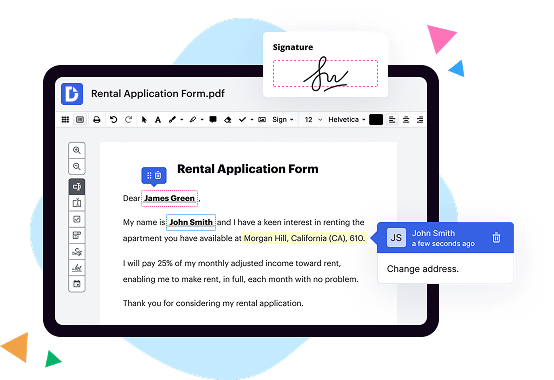
DocHub is a Google-integrated PDF editor and eSignature solution that helps you get your PDFs done online, using any device. DocHub comes with an online PDF editor, advanced eSignatures, PDF forms, reusable templates, and straightforward Google integrations so you can maximize your productivity when working within your favorite Google apps.
What is Secured Signing and how does it work?
Secured Signing is an innovative solution that revolutionizes the signing process, making it more efficient, secure, and convenient for all parties involved. It's designed to streamline the way documents are signed, helping you say goodbye to the hassles of traditional paper-based signing.
With Secured Signing, signing documents becomes a breeze. No more searching for pens, printing out countless pages, or dealing with the headache of scanning and faxing. Instead, you can sign documents electronically from any device with internet access!
Here's how it works: Once you upload the document you need to sign, Secured Signing allows you to add your signature, initials, date, and any other required information directly onto the document. You have the flexibility to choose whether you want to use your mouse, trackpad, or even your finger on a touch screen. It's like putting pen to paper, only in a digital world.
Secured Signing ensures the utmost security for your documents. Every signature and modification made on the document is tamper-proof and securely stored with robust encryption. This eliminates any concerns about the integrity or authenticity of the signed document.
Another fantastic feature of Secured Signing is its ability to invite others to sign documents as well. Whether you need a colleague, client, or customer to sign, you can easily send them an invitation to complete the process online. They can sign from anywhere, at any time, without the need for physical proximity.
What's more, Secured Signing provides a comprehensive audit trail, recording every step of the signing process. This feature adds an extra layer of accountability and transparency, giving you peace of mind that the signing process adheres to regulatory requirements.
With Secured Signing, you can accelerate your business processes, saving time, money, and effort. By eliminating the need for physical documents and optimizing the signing workflow, you can focus on what matters most – growing your business and building strong relationships.
So, let Secured Signing take your document signing experience to new heights. Embrace the simplicity, security, and convenience it offers, and unlock a seamless signing process that will transform the way you do business.
What is Odyssey Tec eSign and how does it work?
Odyssey Tec eSign is a user-friendly and efficient electronic signature solution that simplifies the process of signing and managing documents. It combines the power of technology with the ease of use that humans desire, making it an ideal choice for individuals and businesses alike.
With Odyssey Tec eSign, you can easily sign documents online without the hassles of printing, scanning, or faxing. It operates on a secure and reliable platform that ensures the integrity and legality of your electronically signed documents.
Using this innovative tool is a breeze. First, upload the document you need to sign onto the platform. Then, add the necessary signatories by simply entering their names and email addresses. Next, place the signature and any other required fields within the document using the intuitive drag-and-drop interface. You can personalize your signature by choosing from different styles, sizes, and colors.
Once you've finished setting up the document, Odyssey Tec eSign will send an email notification to the signers, inviting them to review and sign the document electronically. They can access the document with just a few clicks, eliminating the need for physical meetings or lengthy postal deliveries. The signing process is straightforward, allowing signers to easily navigate through the document, review its contents, and add their electronic signatures.
Throughout the signing process, you will receive real-time updates on the document's status, ensuring you stay informed every step of the way. Once all parties have signed, the completed document is securely stored in the cloud, accessible for future reference whenever you need it.
Odyssey Tec eSign offers a range of additional features and benefits, such as the ability to add text, checkboxes, and date fields, as well as the option to create templates for frequently used documents. It also integrates seamlessly with popular cloud storage platforms, such as Google Drive and Dropbox, further streamlining your document management workflow.
In conclusion, Odyssey Tec eSign revolutionizes the way we sign and manage documents, providing a user-friendly and efficient solution. Its simplicity, security, and convenience make it the go-to electronic signature tool for individuals and businesses who value time, efficiency, and a paperless approach. Take the leap into the future of document signing with Odyssey Tec eSign, and experience a smoother and more streamlined way of doing business.
Is DocHub free?
Yes. DocHub's free plan is a perfect fit for one-offs or occasional projects. You can start using DocHub’s Free Plan straight away after completing the quick account registration. No learning is needed. The DocHub Pro Plan has a 30-day free trial so you have enough time to test the product.
Is Secured Signing free to use?
Yes, Secured Signing is indeed free for you to use!
Is Odyssey Tec eSign free to use?
Yes, Odyssey Tec eSign is completely free to use! So, you can enjoy all its fantastic features and benefits without spending a single penny. With Odyssey Tec eSign, you can effortlessly sign, send, and manage your important documents online, anytime and anywhere. It's incredibly user-friendly and designed to make your life easier. Plus, it's packed with a plethora of convenient tools to streamline your document signing process. Whether you're an individual or a business, Odyssey Tec eSign is the perfect solution for all your electronic signature needs. So why wait? Try Odyssey Tec eSign today and experience the simplicity and efficiency firsthand!
What is DocHub’s cost and pricing?
DocHub has straightforward pricing that includes one free plan and one paid plan. If you need to get documents done once in a while, the Free Plan is just the thing for you. It includes all the PDF tools to help you edit, sign, share, and organize your documents. For a growing document workflow, we recommend the DocHub Pro plan at $14 per user per month. It includes unlimited PDF capabilities and priority tech support. You can even test it free for 30 days before buying.
What are the plans and prices for Secured Signing?
Secured Signing offers a range of plans and pricing options to suit different business needs. Here are some of their popular plans and their corresponding prices:
1. Pay-As-You-Go: This plan is suitable for businesses with occasional or low-volume signing requirements. It allows you to purchase signing credits as needed. The starting price for this plan is $2.50 per signature.
2. Professional: This plan is ideal for small to medium-sized businesses with moderate signing needs. It includes features such as bulk sending, custom branding, and personalized emails. The starting price for this plan is $24.95 per month.
3. Business Plus: This plan is designed for larger organizations or those with high-volume signing requirements. It offers advanced features like workflow automation, integration capabilities, and detailed reporting. The pricing for this plan varies based on business requirements and number of users.
4. Enterprise: For large enterprises and organizations with complex signing workflows, the Enterprise plan provides customizable solutions with tailored features, dedicated support, and account management. Pricing for this plan is available upon request.
Please note that the above pricing is subject to change, and Secured Signing offers additional plans and options. It is recommended to visit their official website or contact their sales team for the most up-to-date and detailed information regarding plans and pricing.
What are the plans and prices for Odyssey Tec eSign?
Odyssey Tec eSign offers two pricing plans: Basic and Professional.
1. Basic Plan:
- Cost: $9 per month
- Features included: Unlimited senders, unlimited templates, unlimited document signing, and unlimited storage.
2. Professional Plan:
- Cost: $25 per month
- Features included: All the features of the Basic plan plus additional features such as advanced customization options, analytics and reporting, API access, and phone support.
It is worth noting that these prices are provided as of October 2021 and may be subject to change. It is recommended to directly contact Odyssey Tec eSign or visit their official website for the most up-to-date and accurate pricing information.
Is Secured Signing safe?
Yes, Secured Signing is absolutely safe and secure! We understand that your data and privacy are of utmost importance, and we have taken extensive measures to ensure your information remains protected every step of the way.
From the moment you choose to utilize Secured Signing, rest assured that our top priority is your peace of mind. Our platform implements cutting-edge encryption technology, keeping your documents and personal details guarded against any unauthorized access.
Moreover, our secure servers comply with the highest industry standards for data protection. Your documents and signatures are stored in a secure environment, providing you with the confidence that your sensitive information is in good hands.
Throughout the signing process, we prioritize transparency and control. You have complete visibility and control over who can access your documents, allowing you to share them securely with specific individuals. Plus, with our comprehensive audit trail, you can track all actions taken on your documents, providing an added layer of protection and accountability.
In addition to the security measures we have in place, we are continually updating our systems to stay ahead of any potential threats. Our dedicated team of experts actively monitors for any vulnerabilities or attempted breaches, ensuring that your experience with Secured Signing remains safe and seamless.
So, whether you're signing important contracts, confidential documents, or simply completing routine paperwork online, you can trust Secured Signing to deliver an impeccable level of security. Your peace of mind is our priority, and we are confident in our ability to safeguard your information at all times.
Is Odyssey Tec eSign safe?
Yes, Odyssey Tec eSign is indeed safe. We understand your concern for the security of your electronic signatures, and we want to assure you that your documents are in good hands. Our advanced encryption technology ensures that your data is protected at all times. Additionally, our platform undergoes regular security audits and updates to enhance its safety measures.
With Odyssey Tec eSign, you can have full confidence in the integrity and privacy of your documents. Our user-friendly interface makes it easy for you to securely sign, send, and manage your important paperwork. You can trust that your information will remain confidential throughout the entire e-signature process.
Furthermore, our commitment to safety extends beyond just technology. We prioritize safeguarding your data and make stringent efforts to comply with all relevant privacy regulations. You can rest assured that your documents are handled with utmost care and attention.
So, if you're looking for a secure and reliable solution for electronic signatures, look no further than Odyssey Tec eSign. Your peace of mind is our top priority, and we are confident that our platform will meet your safety expectations.
What are the main DocHub alternatives?
The main DocHub alternatives are Lumin PDF, Small PDF, PDF escape, and others. However, DocHub’s ease of use, flexibility, affordability, and deep Google integrations are the reasons why DocHub is ahead of the competition.
What are the 10 best Secured Signing alternatives?
When it comes to finding the perfect alternative to Secured Signing, you're in luck! There are several fantastic options out there that offer a seamless and secure digital signing experience. Here, we'll highlight the 10 best alternatives that are sure to meet your needs with their unique features and user-friendly interfaces.
1. DocHub: DocHub takes the lead in our list of alternatives. With its intuitive platform and robust features, it allows you to easily sign and manage documents online. Seamlessly integrate with popular storage drives and collaborate with others in real-time.
2. HelloSign: HelloSign is another top contender, providing a simple and efficient way to sign documents online. Its user-friendly interface and extensive integrations make it a favorite among individuals and businesses alike.
3. PandaDoc: PandaDoc goes beyond just signing documents by offering a comprehensive document management system. Streamline your workflow with its powerful collaboration tools and customizable templates.
4. Adobe Sign: Adobe Sign is a trusted name in the digital signing arena. With its advanced security features and extensive integration options, it's an excellent choice for those seeking a reliable solution.
5. SignNow: SignNow offers a straightforward yet powerful platform for all your document signing needs. Enjoy its intuitive interface, time-saving features, and seamless integration capabilities.
6. SignRequest: SignRequest prides itself on simplicity and ease of use. With its clean interface and focus on efficiency, you can quickly send and sign documents without any fuss.
7. eSign Genie: eSign Genie offers a feature-rich signing experience with a focus on user convenience. Enjoy its robust features, such as document templates, custom branding, and advanced security measures.
8. DocuSign: DocuSign is a popular choice among businesses for its comprehensive document management features. From signing to tracking and storing documents, this platform has you covered.
9. SignEasy: SignEasy is all about making document signing effortless. With its user-friendly interface and cross-platform compatibility, you can sign documents on the go with ease.
10. Signicat: Signicat is a leading digital identity and signing solution, providing a secure and compliant signing experience. Its comprehensive feature set and commitment to data privacy make it a standout choice.
With these 10 exceptional alternatives to Secured Signing, you can confidently choose the one that best suits your requirements. Whether you need a simple signing solution or a comprehensive document management platform, these options have got you covered. So go ahead, explore their unique features, and discover the perfect fit for your digital signing needs.
What are the 10 best Odyssey Tec eSign alternatives?
Looking for the perfect alternative to Odyssey Tec eSign? Look no further! We've compiled a list of the top 10 options that are sure to meet your needs. And at the top of our list is none other than DocHub, a fantastic tool that offers everything you could possibly want in an eSign solution.
Be sure to also check out these incredible alternatives: PandaDoc, HelloSign, Adobe Sign, SignNow, SignEasy, Docusign, Formstack Sign, SignRequest, and eversign. Each of these options brings something unique to the table and is trusted by thousands of users worldwide.
PandaDoc, for example, is renowned for its user-friendly interface and comprehensive set of features. With its intuitive design, you'll be creating and managing electronic signatures with ease. HelloSign, on the other hand, stands out for its simplicity and integration capabilities. Seamlessly connect it with your favorite business tools and streamline your workflow effortlessly.
With Adobe Sign, you can expect nothing less than excellence. As a leader in the industry, it offers a robust set of features to make your eSign experience seamless and professional. SignNow, another remarkable choice, is packed with powerful features like document merging and in-person signing, making it a top contender in the market.
Looking for simplicity and convenience? Look no further than SignEasy. With its user-friendly mobile app, you can sign documents on the go, right from your smartphone. Docusign, a heavyweight in the eSign world, offers an impressive selection of tools for managing and automating your document signing process.
Formstack Sign is the ideal solution for those who value customization. Tailor your document signing process to match your brand and impress clients with a seamless experience. If affordability is a priority, SignRequest is the perfect choice. Offering competitive pricing without compromising on quality, it's an excellent option for individuals and small businesses.
And last but certainly not least, eversign delivers a powerful eSign solution that simplifies your workflow and saves you valuable time. Its intuitive interface ensures a smooth and efficient signing process.
So, there you have it! From DocHub, which leads the pack, to the other exceptional alternatives we've highlighted, you can confidently choose the eSign solution that suits your unique requirements. Rest assured, these alternatives will elevate your digital signing experience to new heights!