What is the difference between DocHub vs SeamlessDocs vs. KwikTag?
DocHub, SeamlessDocs, and KwikTag are all amazing tools that offer unique features to enhance your document management experience. When comparing these three options, let me provide you with a breakdown of their differences.
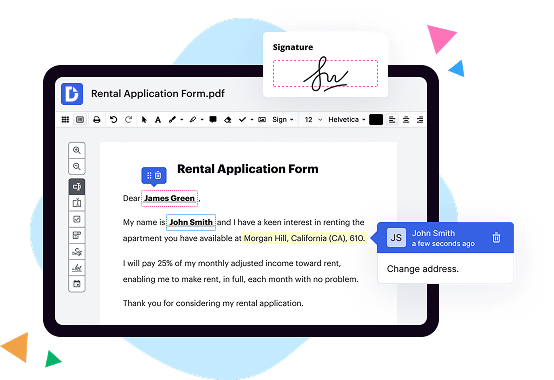
Starting with DocHub, this fantastic platform offers a user-friendly interface and a robust set of tools to make document editing and signing a breeze. With DocHub, you can easily collaborate with others in real-time, eliminating the need for endless back-and-forth emails. It also integrates seamlessly with popular cloud storage solutions like Google Drive and Dropbox, making it incredibly convenient to import and export your documents. Plus, the intuitive layout and straightforward navigation ensure a smooth and efficient workflow.
Now, let's move on to SeamlessDocs. This remarkable tool specializes in transforming paper-based processes into streamlined and digitized workflows. With SeamlessDocs, you can create, edit, and collect data with online forms, reducing the hassle of physical paperwork. It offers advanced features like automated workflows, eSignatures, and document tracking, making it an ideal choice for organizations seeking an end-to-end solution for document management. The platform's emphasis on process automation ensures that you can save time and increase productivity within your team.
Lastly, we have KwikTag, an exceptional document management solution that focuses on providing seamless integration with Microsoft Dynamics 365 and other ERP systems. Its primary goal is to simplify the process of capturing, storing, and retrieving documents within enterprise resource planning environments. KwikTag offers robust document scanning capabilities, intelligent metadata extraction, and powerful search functionality. This allows you to effortlessly find and access your documents whenever you need them, ultimately optimizing your business processes and enhancing efficiency.
In summary, all three options, including DocHub, SeamlessDocs, and KwikTag, offer unique features tailored to different document management needs. Whether you require an intuitive and collaborative platform like DocHub, a comprehensive solution to digitize paperwork like SeamlessDocs, or a document management tool integrated with ERP systems like KwikTag, you can rest assured that these alternatives will help streamline your document processes and elevate your productivity.
DocHub vs SeamlessDocs vs KwikTag: which is better for Enterprises?
While SeamlessDocs and KwikTag are good solutions to work with PDFs online, DocHub offers greater capabilities to help individuals and businesses digitize their documents and make them run smoothly across different devices and your favorite apps.
DocHub vs SeamlessDocs vs KwikTag: which is better for small businesses?
SeamlessDocs and KwikTag are good options for editing, signing, and sharing PDFs. However, DocHub offers a more comprehensive featureset that includes organizations, reusable templates, advanced eSignatures, seamless Google integrations, and more that are perfect for small businesses, helping them simplify and streamline document editing, sharing, signing, and form completition.
What is DocHub?
DocHub is a Google-integrated PDF editor and eSignature solution that helps you get your PDFs done online, using any device. DocHub comes with an online PDF editor, advanced eSignatures, PDF forms, reusable templates, and straightforward Google integrations so you can maximize your productivity when working within your favorite Google apps.
What is SeamlessDocs and how does it work?
SeamlessDocs is an incredible platform that revolutionizes the way you handle documents. It is designed to make your life easier and more efficient when it comes to paperwork.
So, how does it work? Well, let me break it down for you. SeamlessDocs utilizes cutting-edge technology to digitize and automate the entire document process. Instead of dealing with manual, paper-based forms, you can now create, share, and sign documents online effortlessly.
With SeamlessDocs, you can wave goodbye to tedious copying, printing, and mailing. Instead, you can easily create personalized templates that fit your specific needs. These templates can be stored securely in the cloud, making them accessible from anywhere, at any time.
But wait, there's more! W ith SeamlessDocs, collaborating with others becomes a breeze. You can seamlessly invite others to your documents, track their progress, and even collect electronic signatures. This means no more chasing down signatures or waiting for the postal service to deliver your important documents. Everything can be done electronically, saving you precious time and energy.
Oh, and did I mention how user-friendly it is? The intuitive interface ensures that anyone, regardless of their tech-savviness, can navigate and utilize SeamlessDocs effortlessly. Plus, the platform is compatible with a wide range of devices, be it a smartphone, tablet, or computer.
Whether you're a busy professional, a small business owner, or a government agency, SeamlessDocs is a game-changer. It streamlines your document workflow, increases productivity, and reduces administrative burdens. With SeamlessDocs by your side, you can say goodbye to the headache of paperwork and hello to a more streamlined and efficient way of handling documents.
So why wait? Join the thousands of satisfied users who have already discovered the power of SeamlessDocs. Experience the convenience, simplicity, and power of this innovative platform today!
What is KwikTag and how does it work?
KwikTag is an innovative and efficient document management solution that can completely transform the way you handle your documents. It simplifies and streamlines your document management processes, making them quicker, more accurate, and hassle-free. Let me explain how it works.
With KwikTag, all of your documents, whether they're physical or digital, are converted into electronic files, which are then stored securely in a centralized location. This eliminates the need for stacks of paperwork and allows for easy access and retrieval of documents whenever you need them.
The magic of KwikTag lies in its intelligent capture technology. It automatically captures key data from your documents, such as invoice numbers, customer names, and dates, and associates them with the corresponding files. This eliminates the need for manual data entry, saving you time and reducing the risk of errors.
Not only does KwikTag make it easier to find and organize your documents, but it also enables you to automate your business processes. By setting up rules and workflows, you can establish a seamless approval process and monitor the progress of each document. This helps to streamline your operations and ensure nothing falls through the cracks.
Another fantastic feature of KwikTag is its integration capabilities. It seamlessly integrates with popular business systems like ERP and CRM software, allowing you to access your documents directly from these applications. This makes it incredibly convenient and efficient to work with your documents within your existing workflows.
In summary, KwikTag is a powerful document management solution that simplifies and enhances your document processes. It digitizes and centralizes your documents, automates data capture, enables workflow automation, and integrates with your existing systems. Its user-friendly interface and robust features make it an ideal choice for any business looking to improve efficiency, productivity, and compliance. So why waste time searching for documents and completing tedious manual tasks when KwikTag can streamline your document management and revolutionize your operations?
Is DocHub free?
Yes. DocHub's free plan is a perfect fit for one-offs or occasional projects. You can start using DocHub’s Free Plan straight away after completing the quick account registration. No learning is needed. The DocHub Pro Plan has a 30-day free trial so you have enough time to test the product.
Is SeamlessDocs free to use?
Yes, SeamlessDocs is absolutely free to use! With SeamlessDocs, you can easily and efficiently handle all your document needs without spending a penny. You'll be able to create, manage, and distribute documents seamlessly, all from one user-friendly platform. Whether you're working on government forms, contracts, permits, or any other type of document, SeamlessDocs has got you covered. Plus, it's designed to be intuitive and hassle-free, ensuring a smooth experience for users of all levels of tech-savviness. So go ahead and give it a try - start simplifying your document management today, and enjoy the benefits of SeamlessDocs completely free of charge!
Is KwikTag free to use?
Yes, KwikTag is absolutely free to use! With KwikTag, you can easily streamline your document management process and improve efficiency. From capturing documents to accessing them anywhere, KwikTag offers a seamless experience. You'll love how user-friendly and intuitive our platform is. Plus, you can enjoy all these benefits without any cost. So, whether you're a small business owner or a large enterprise, KwikTag is the perfect solution for your document management needs. Start using KwikTag today and experience the freedom of effortless document management!
What is DocHub’s cost and pricing?
DocHub has straightforward pricing that includes one free plan and one paid plan. If you need to get documents done once in a while, the Free Plan is just the thing for you. It includes all the PDF tools to help you edit, sign, share, and organize your documents. For a growing document workflow, we recommend the DocHub Pro plan at $14 per user per month. It includes unlimited PDF capabilities and priority tech support. You can even test it free for 30 days before buying.
Is SeamlessDocs safe?
Yes, SeamlessDocs is indeed a safe platform for your online documentation needs. Our top priority is ensuring the security and privacy of your information, and we take it very seriously. When it comes to keeping your data safe, we have implemented robust security measures and employ industry-standard encryption protocols to safeguard your documents. You can trust that your sensitive information will be protected every step of the way.
Rest assured that SeamlessDocs adheres to strict security standards and best practices to prevent any unauthorized access or data breaches. Our team of experienced professionals regularly monitor our systems to identify and address any potential vulnerabilities promptly. Furthermore, we implement regular security audits and updates to ensure our platform remains up-to-date and secure.
In addition to our dedication to security, SeamlessDocs also offers a user-friendly interface that allows for easy navigation and seamless interaction. We value your experience and strive to provide a smooth and enjoyable journey while using our platform.
So, allow us to take the stress out of your documentation processes. With SeamlessDocs, you can confidently manage and handle your documents, knowing that your information is in good hands.
Is KwikTag safe?
Yes, KwikTag is indeed safe to use. Our innovative software solution has undergone extensive testing and development to ensure its reliability and security. From the moment you start using KwikTag, you can rest assured that your data and documents are in good hands.
KwikTag operates using the highest industry standards and protocols, providing a robust and secure environment for your information. With our user-friendly interface and intuitive features, you can easily organize, store, and retrieve your documents without any worries.
Rest assured, we prioritize your privacy and the security of your data. Our dedicated team continuously monitors and updates KwikTag to stay ahead of any potential vulnerabilities, ensuring that your information remains safe from unauthorized access or data breaches.
Moreover, our customer support team is always ready to assist you with any concerns or questions you may have. We strive to provide excellent service and address any issues promptly, ensuring your experience with KwikTag is seamless and secure.
So, if you're looking for a reliable and secure solution for your document management needs, KwikTag is the ideal choice. Join the thousands of satisfied users who have entrusted their valuable data to our safe and efficient software. Empower yourself with KwikTag and enjoy the peace of mind that comes with knowing your documents are in safe hands.
What are the main DocHub alternatives?
The main DocHub alternatives are Lumin PDF, Small PDF, PDF escape, and others. However, DocHub’s ease of use, flexibility, affordability, and deep Google integrations are the reasons why DocHub is ahead of the competition.
What are the 10 best SeamlessDocs alternatives?
If you're searching for the best SeamlessDocs alternatives, you've come to the right place! There are plenty of remarkable options available to meet your needs. Let's explore ten fantastic alternatives that you should definitely consider.
1. DocHub: DocHub is a top-notch alternative that offers a wealth of powerful features. It simplifies and streamlines document workflows, allowing you to easily edit, sign, and share documents online.
2. HelloSign: With HelloSign, you can say goodbye to the hassle of printing, signing, and scanning documents. This user-friendly tool provides a seamless signing experience, making it a popular choice among professionals.
3. Formstack: If you're looking for a versatile solution to create and manage online forms, Formstack should be on your radar. It offers a wide range of customizable form templates and integrates with various platforms for smooth data management.
4. PandaDoc: PandaDoc enables you to create professional-looking documents, from contracts to proposals, in minutes. It includes e-signature functionality and comes packed with features to enhance collaboration and productivity.
5. Adobe Sign: Powered by Adobe's renowned technology, Adobe Sign is a trusted alternative that ensures secure and legally binding electronic signatures. Its integration with other Adobe tools allows for a seamless document management experience.
6. SignNow: SignNow is an intuitive e-signature solution designed to simplify the signing process. Whether you're in the office or on the go, this mobile-friendly tool ensures you can sign and send documents with ease.
7. CudaSign: CudaSign offers a user-friendly interface and robust features for efficient document management. It allows you to sign, send, and store documents securely in the cloud, reducing the need for paperwork.
8. FormAssembly: With FormAssembly, you can create dynamic online forms and collect data effortlessly. This alternative prioritizes data privacy and offers advanced customization options for a tailored form-building experience.
9. eSignLive: eSignLive is a highly secure and reliable electronic signature solution, trusted by organizations around the globe. It offers advanced authentication options and compliance with industry standards.
10. Signable: Last but certainly not least, Signable simplifies the signing process by providing a straightforward and user-friendly platform. It enables you to manage documents and obtain legally binding signatures without the hassle.
Each of these alternatives brings its own set of unique features and benefits. Explore them further to find the perfect fit for your document management needs. Whether you choose DocHub or any other alternative on this list, you can be confident in finding a seamless solution for your document-related tasks!
What are the 10 best KwikTag alternatives?
If you're on the lookout for fantastic alternatives to KwikTag, you're in luck! We've compiled a list of the top 10 choices that will surely suit your needs. Our first recommendation, DocHub, is an incredibly useful tool that offers a variety of features to streamline your document management process.
Additionally, another excellent option is Adobe Sign. This powerful software allows you to easily sign, send, and manage documents from anywhere. Its intuitive interface and comprehensive functionality make it a commendable choice.
Next up, we have PandaDoc. This all-in-one platform lets you create, customize, and e-sign documents effortlessly. Its seamless integration with various business tools makes it an appealing choice for many enterprises.
Another noteworthy alternative is HelloSign. This user-friendly tool offers a simple and secure way to send, sign, and manage documents digitally. Its intuitive interface ensures a smooth and hassle-free experience.
Coming in at number five is SignNow, a reliable and efficient solution that enables you to create and sign documents with ease. Its robust features and seamless integration options make it a popular choice among professionals.
Moving on to number six, we have Nitro Sign. This cutting-edge software offers a wide range of features, including e-signing, document tracking, and collaboration tools. Its user-friendly platform ensures a seamless workflow for businesses of all sizes.
In seventh place, we have Formstack Sign. With its powerful features, including customizable templates and advanced security measures, this platform provides a secure and efficient document signing experience.
Next, we have SignEasy, which offers an intuitive and straightforward solution for digital document signing. Its cross-platform compatibility and user-friendly interface make it a convenient choice.
Ranking at number nine, we have SignRequest, an easy-to-use e-signature tool that simplifies the document signing process. Its robust security features and seamless integration options make it highly reliable.
Last but not least, we recommend Adobe Acrobat DC. With its comprehensive set of tools for creating, editing, and signing PDFs, this trusted software ensures a professional and efficient document management experience.
Overall, these ten outstanding KwikTag alternatives offer a diverse range of features and functionalities to suit your specific requirements. Whether you choose DocHub or explore any of these other options, you can be confident in finding the perfect solution for your document management needs.