What is the difference between DocHub vs Legito vs. etfile?
When it comes to document management and collaboration tools, there are several options available that can make your life easier. Three popular alternatives to consider are DocHub, Legito, and etfile. While all three offer unique features, it's important to understand their differences to choose the one that works best for you.
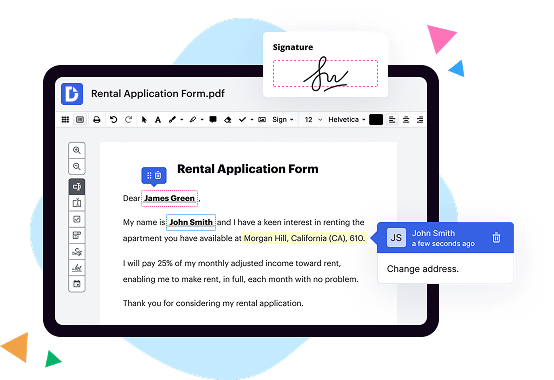
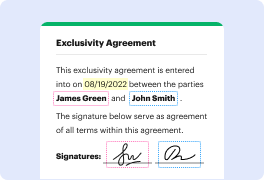
First on the list, we have DocHub. This powerful tool offers a wide range of features that allow you to seamlessly edit, sign, and share documents online. With its user-friendly interface and intuitive design, you can easily navigate through your documents and make necessary changes effortlessly. DocHub supports various file formats, making it compatible with most document types. It also integrates seamlessly with popular cloud storage platforms like Google Drive, Dropbox, and OneDrive. This ensures that your files are always accessible and up to date, no matter where you are. DocHub is known for its efficient editing tools and a smooth signing process, allowing you to streamline your document workflows with ease.
Next up is Legito, another fantastic option for managing and automating documents. Legito shines when it comes to document automation, making repetitive tasks a breeze. With its advanced automation features, you can create dynamic templates and generate documents in minutes. Legito also offers powerful collaboration tools, allowing multiple users to work on the same document simultaneously. This makes real-time collaboration efficient and straightforward. With Legito, you can also manage your document revisions effectively, ensuring that you have a clear audit trail of changes made during the drafting process.
Finally, we have etfile, a robust document management solution that focuses on secure file storage and organization. With etfile, you can securely store, track, and manage your documents, ensuring that sensitive information remains protected. This platform offers advanced security features such as access controls, encryption, and secure backups. etfile also provides powerful search functionality, allowing you to find the documents you need quickly. Its user-friendly interface makes navigating through your files a breeze, making document management a stress-free experience.
In conclusion, when it comes to choosing between DocHub, Legito, and etfile, it ultimately depends on your specific needs. DocHub excels in its editing and signing capabilities. Legito stands out with its document automation and collaboration features. On the other hand, etfile prioritizes secure storage and document organization. With any of these options, you can enhance your document management workflows and boost productivity.
DocHub vs Legito vs etfile: which is better for Enterprises?
While Legito and etfile are good solutions to work with PDFs online, DocHub offers greater capabilities to help individuals and businesses digitize their documents and make them run smoothly across different devices and your favorite apps.
DocHub vs Legito vs etfile: which is better for small businesses?
Legito and etfile are good options for editing, signing, and sharing PDFs. However, DocHub offers a more comprehensive featureset that includes organizations, reusable templates, advanced eSignatures, seamless Google integrations, and more that are perfect for small businesses, helping them simplify and streamline document editing, sharing, signing, and form completition.
What is DocHub?
DocHub is a Google-integrated PDF editor and eSignature solution that helps you get your PDFs done online, using any device. DocHub comes with an online PDF editor, advanced eSignatures, PDF forms, reusable templates, and straightforward Google integrations so you can maximize your productivity when working within your favorite Google apps.
What is Legito and how does it work?
Legito is a remarkable tool that empowers you to tackle the intricacies of document automation effortlessly. With its user-friendly interface and cutting-edge technology, Legito revolutionizes the way you handle legal documents. Let me walk you through how it works.
First and foremost, Legito simplifies the process of creating and managing legal documents. Whether it's contracts, agreements, or any other legal paperwork, Legito streamlines the entire workflow. You don't need to be a legal expert or spend endless hours on tedious document tasks anymore.
To begin, Legito offers a vast range of customizable templates to suit your specific needs. These templates are carefully crafted by legal professionals, ensuring accuracy and compliance. Select the appropriate template and let Legito guide you through each step of creating your document.
With Legito's intuitive editor, making amendments and adding personalized content becomes a breeze. You can easily modify text, insert clauses, or delete unnecessary sections, all in a straightforward and user-friendly manner. You no longer have to worry about small details or formatting issues – Legito takes care of it all.
Once your document is finalized, Legito enables seamless collaboration with others. You can easily share your document with colleagues or clients, track changes, and gather feedback all in one place. This eliminates the hassle of back-and-forth emails and helps you maintain a clear and organized communication channel.
Furthermore, Legito ensures document accuracy and consistency by automatically updating related clauses throughout your entire library. This means that any changes made to a clause will automatically be reflected in all relevant documents, saving you valuable time and effort.
Additionally, Legito integrates with other popular tools that you may already use, such as Salesforce, Microsoft Office, and Google Drive. This integration not only enhances the efficiency of your existing workflow but also allows for seamless data transfer and synchronization.
In summary, Legito empowers you to create, manage, and collaborate on legal documents with ease. Its user-friendly interface, vast template library, and advanced features make the entire process straightforward and efficient. Let Legito take care of the intricate details, while you focus on what truly matters – achieving your goals and driving success.
What is etfile and how does it work?
Etfile is an incredibly efficient and user-friendly electronic document management system. It is designed to streamline and simplify your document handling processes, making your life much easier! This innovative solution allows you to store, organize, and access all your digital files in one centralized location.
So, how does etfile work? Well, it's quite straightforward! Firstly, you can easily scan and upload your documents into the system. Once uploaded, etfile uses advanced indexing technology to automatically categorize and classify your files, making them effortlessly searchable. Gone are the days of sifting through piles of paper or endless folders on your computer!
With etfile, you can quickly retrieve any document with just a few clicks. Need to find an important contract or an old invoice? No problem! Simply input relevant keywords or search criteria, and etfile will present you with the exact file you're looking for in no time.
What's more, etfile offers robust security features to protect your sensitive information. You can assign different access levels to employees, ensuring that only authorized individuals can view or modify documents. Plus, as all your files are securely stored in the cloud, you won't need to worry about physical storage constraints or the risk of losing important paperwork.
Etfile also promotes collaboration among team members. Multiple users can effortlessly work on the same document simultaneously, making edits, leaving comments, and tracking changes. This ensures everyone stays on the same page, saving precious time and avoiding unnecessary back-and-forth.
Furthermore, etfile seamlessly integrates with popular software applications such as Microsoft Office and accounting software, making it a breeze to import and export files. It also offers customizable workflows and automation capabilities, allowing you to optimize your document management processes to suit your specific needs.
In summary, etfile is the ultimate solution to simplify and streamline your document management. Its user-friendly interface, advanced search capabilities, and robust security features make it an indispensable tool for any organization. Say goodbye to messy paper piles and hello to organized, efficient digital document handling with etfile!
Is DocHub free?
Yes. DocHub's free plan is a perfect fit for one-offs or occasional projects. You can start using DocHub’s Free Plan straight away after completing the quick account registration. No learning is needed. The DocHub Pro Plan has a 30-day free trial so you have enough time to test the product.
Is etfile free to use?
Yes, etfile is absolutely free to use! You can access all its amazing features and functionality without spending a dime. etfile offers a user-friendly platform that allows you to effortlessly manage your files and documents. Whether you need to store, organize, or share your files, etfile has got you covered. With a seamless user interface and intuitive design, navigating through the platform is a breeze. Plus, etfile provides top-notch security measures to ensure the confidentiality and privacy of your files. So, feel free to take advantage of all the benefits etfile has to offer, completely free of charge. Start enhancing your file management experience today!
What is DocHub’s cost and pricing?
DocHub has straightforward pricing that includes one free plan and one paid plan. If you need to get documents done once in a while, the Free Plan is just the thing for you. It includes all the PDF tools to help you edit, sign, share, and organize your documents. For a growing document workflow, we recommend the DocHub Pro plan at $14 per user per month. It includes unlimited PDF capabilities and priority tech support. You can even test it free for 30 days before buying.
What are the plans and prices for Legito?
Legito offers three different subscription plans: Start, Standard, and Enterprise. Here are the details of each plan:
1. Start Plan:
- Price: $29 per user per month
- Features:
- Basic Document automation
- Basic Template Editor
- Basic API connector
- Basic Workflow Designer
- 24/7 Support
- 2 GB Document Storage
- Collaboration Features
2. Standard Plan:
- Price: $49 per user per month
- Features:
- All Start Plan features
- Advanced Document automation
- Advanced Template Editor
- Advanced API connector
- Advanced Workflow Designer
- Premium Support
- 5 GB Document Storage
- Collaboration Features
- Analytics and Reports
3. Enterprise Plan:
- Price: Custom pricing (needs to be discussed with sales)
- Features:
- All Standard Plan features
- Enterprise-Level Document automation
- Enterprise-Level Template Editor
- Enterprise-Level API connector
- Enterprise-Level Workflow Designer
- Premium Support with dedicated account manager
- Customizable Document Storage
- Collaboration Features
- Analytics and Reports
- Custom Integration Solutions
- Advanced Security and Compliance Features
It is important to note that the prices mentioned above are subject to change, and it's recommended to visit Legito's official website or contact their sales team for the most up-to-date pricing information.
Is Legito safe?
Yes, Legito is absolutely safe! As humans, your safety and security are of utmost importance, and Legito is fully committed to ensuring that. We understand your concerns about the safety of using an online platform, but rest assured, Legito takes all the necessary measures to protect your data and keep it confidential.
When it comes to online transactions and sensitive information, Legito uses state-of-the-art encryption protocols to safeguard your data from any unauthorized access. Our platform is regularly updated and undergoes strict security evaluations to maintain the highest level of protection.
With Legito, you can confidently create, manage, and share your documents without worrying about any privacy breaches. Our dedicated team of experts works tirelessly to maintain the trust and confidence of our users, and we always prioritize the security and privacy of your information.
Furthermore, Legito adheres to stringent data protection regulations, such as GDPR, to ensure that your personal and sensitive data is handled with the utmost care. We value your trust in us and constantly strive to maintain the highest level of data protection and confidentiality.
So, in summary, Legito provides a safe and secure environment for all your document-related needs. Your security is our priority, and we are confident in the measures we have in place to keep your information safe. Let Legito take care of your document needs while you focus on what really matters to you. Try Legito today and experience worry-free document management!
Is etfile safe?
Etfile is indeed safe and secure. With robust security measures in place, your files and data are well-protected from unauthorized access. Our team consistently strives to ensure the highest level of safety, making Etfile a trusted platform for users like you. Rest assured, your information is treated with the utmost care, and we prioritize maintaining a secure environment for your files. So, feel confident and at ease when using Etfile for all your document management needs.
What are the main DocHub alternatives?
The main DocHub alternatives are Lumin PDF, Small PDF, PDF escape, and others. However, DocHub’s ease of use, flexibility, affordability, and deep Google integrations are the reasons why DocHub is ahead of the competition.
What are the 10 best Legito alternatives?
When it comes to finding the perfect alternative to Legito, you're in luck! There are several fantastic options out there that can cater to your needs. One standout choice is DocHub, a versatile platform that offers a wide range of features. But let's not stop there, as we've got a whole list of alternatives lined up just for you.
1. DocHub: This comprehensive tool provides an array of useful features for document management and collaboration, making it an excellent choice.
2. PandaDoc: Known for its intuitive interface and powerful functionality, PandaDoc offers seamless document creation, editing, and e-signature capabilities.
3. HelloSign: With its emphasis on simplicity and ease of use, HelloSign allows you to effortlessly create, sign, and send documents while keeping everything organized.
4. Adobe Sign: As a trusted name in the industry, Adobe Sign offers a robust set of features, including document creation, editing, and secure electronic signatures.
5. SignNow: This user-friendly platform streamlines the document signing process, offering advanced features like team collaboration and automated workflows.
6. SignRequest: With its focus on simplicity and affordability, SignRequest provides a no-frills solution for document signing and management.
7. Docusign: Widely recognized as a leader in electronic signatures, Docusign offers a comprehensive platform for secure and efficient document workflows.
8. Nitro Sign: Nitro Sign combines simplicity with powerful features, allowing you to create, sign, and share documents seamlessly.
9. Formstack Sign: With its robust document signing capabilities, Formstack Sign makes it easy to create legally binding contracts and agreements.
10. SignEasy: Lastly, SignEasy offers a user-friendly experience in document management and signing, with a focus on efficiency and convenience.
Whether you're searching for simplicity, advanced functionality, or affordability, these Legito alternatives have got you covered. So go ahead and explore these options to find the perfect fit for your document needs.
What are the 10 best etfile alternatives?
When it comes to finding the best etfile alternatives, you're in luck! There are plenty of fantastic options out there to cater to your unique needs. Let's dive right in and explore the top 10 alternatives, starting with DocHub.
1. DocHub: DocHub shines as a user-friendly and feature-rich alternative to etfile. With its intuitive interface and powerful capabilities, it enables you to easily edit, sign, and collaborate on documents seamlessly.
2. PDFelement: Looking for an all-in-one solution? PDFelement is here to impress. This robust alternative offers a wide range of functionalities, including form creation, data extraction, and OCR, making it a staple for individuals and businesses alike.
3. PandaDoc: If you're in search of a comprehensive document management platform, PandaDoc should be on your radar. Its focus on streamlining workflows, e-signature capabilities, and document analytics make it a top contender.
4. Adobe Acrobat DC: Adobe Acrobat DC boasts a strong reputation in the industry, and for good reason. It provides powerful PDF editing features, electronic signature options, and seamless integration with other Adobe products.
5. SignNow: When it comes to simplicity and efficiency, SignNow steps up to the plate. With its user-friendly interface and customizable signing workflows, this alternative ensures a hassle-free document signing experience.
6. Foxit PhantomPDF: Don't overlook Foxit PhantomPDF, a feature-packed alternative that offers extensive PDF editing capabilities. From document collaboration to security features, it has everything you need to enhance your workflow.
7. HelloSign: For those who prioritize a smooth and straightforward e-signature experience, HelloSign is an excellent choice. It simplifies the signing process with its intuitive interface and integrations with popular productivity tools.
8. Nitro: Nitro impresses with its wide-ranging features for editing, converting, and collaborating on PDFs. Its robust security measures and user-friendly design make it a standout alternative worth considering.
9. Smallpdf: If simplicity is your top priority, Smallpdf is your best bet. This cloud-based alternative makes it effortless to compress, convert, and edit PDFs, ensuring you can handle your documents with ease.
10. PDFescape: Last but not least, PDFescape offers a reliable and accessible alternative to etfile. Its wealth of PDF editing tools, form filling capabilities, and secure document sharing options make it a valuable choice for any user.
So, whether you're seeking intuitive interfaces, advanced features, or seamless signing experiences, these top 10 alternatives have got you covered. With such an array of outstanding choices, you'll find the perfect fit to meet your documentation needs.