What is the difference between DocHub vs IdenTrust Trust Sign vs. ADSS Signing Server?
When it comes to choosing a digital signing solution for your documents, there are several options available. Three popular choices are DocHub, IdenTrust Trust Sign, and ADSS Signing Server. While they all offer similar functionality, each platform has its own unique features that set it apart.
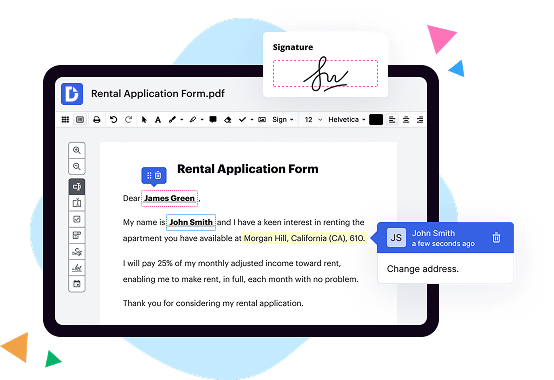
Let's start with DocHub. With its user-friendly interface and seamless integration with various platforms like Google Drive and Dropbox, DocHub is a top choice for individuals and businesses alike. Its intuitive tools allow you to easily create, edit, and sign documents electronically. Additionally, DocHub offers advanced features such as document collaboration and form filling, making it ideal for teams working together remotely.
Next on the list is IdenTrust Trust Sign. This platform prioritizes security and compliance, making it an excellent choice for industries that require strict adherence to regulatory standards. IdenTrust Trust Sign provides advanced encryption and authentication measures to ensure the integrity and confidentiality of your documents. Additionally, it offers a robust audit trail feature, providing a comprehensive overview of the signing process for added transparency and accountability.
Lastly, we have ADSS Signing Server. This platform is renowned for its scalability and enterprise-level features. ADSS Signing Server can handle high volumes of documents and transactions, making it suitable for large organizations with extensive signing requirements. It offers a wide range of signing methods, including digital certificates and biometric signatures, giving users flexibility in their signing choices. Furthermore, ADSS Signing Server provides comprehensive reporting and analytics capabilities, empowering businesses to track and analyze their signing activities effectively.
In summary, while all three platforms - DocHub, IdenTrust Trust Sign, and ADSS Signing Server - offer digital signing solutions, they cater to different needs. Whether you prioritize ease of use, security and compliance, or scalability and enterprise-level features, there is a solution that will meet your specific requirements. So, take a closer look at each option and choose the one that best suits your document signing needs.
DocHub vs IdenTrust Trust Sign vs ADSS Signing Server: which is better for Enterprises?
While IdenTrust Trust Sign and ADSS Signing Server are good solutions to work with PDFs online, DocHub offers greater capabilities to help individuals and businesses digitize their documents and make them run smoothly across different devices and your favorite apps.
DocHub vs IdenTrust Trust Sign vs ADSS Signing Server: which is better for small businesses?
IdenTrust Trust Sign and ADSS Signing Server are good options for editing, signing, and sharing PDFs. However, DocHub offers a more comprehensive featureset that includes organizations, reusable templates, advanced eSignatures, seamless Google integrations, and more that are perfect for small businesses, helping them simplify and streamline document editing, sharing, signing, and form completition.
What is DocHub?
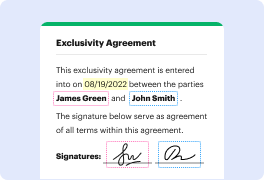
DocHub is a Google-integrated PDF editor and eSignature solution that helps you get your PDFs done online, using any device. DocHub comes with an online PDF editor, advanced eSignatures, PDF forms, reusable templates, and straightforward Google integrations so you can maximize your productivity when working within your favorite Google apps.
What is IdenTrust Trust Sign and how does it work?
IdenTrust Trust Sign is a cutting-edge digital signature solution that empowers individuals and businesses to securely sign documents electronically. With Trust Sign, the days of printing, signing, and scanning documents are long gone!
So, how does it work? Well, it's pretty simple! First, you create a digital signature using Trust Sign's intuitive interface. This signature is uniquely yours and legally binding, just like your handwritten signature.
Once your signature is created, you can easily apply it to any document that requires your authorization. Whether it's a contract, an agreement, or any other important paperwork, Trust Sign ensures that your signature is protected, reliable, and convenient.
With Trust Sign, you can sign documents from anywhere, at any time. No more wasting time and paper, or dealing with the hassle of physical signatures. The entire process is fast, efficient, and secure. Plus, you can easily track and manage your signature activity within the Trust Sign platform.
Trust Sign is built on advanced cryptographic technology, which means that your digital signature is tamper-proof and virtually impossible to counterfeit. Your documents are also encrypted, ensuring that they remain confidential and private.
The user experience with Trust Sign is seamless, designed to make your life easier. From the moment you sign up, you'll be guided through the process step-by-step. Trust Sign is user-friendly, allowing you to quickly become an expert in electronic signatures, regardless of your technical background.
So, in summary, IdenTrust Trust Sign revolutionizes the way we sign and manage documents. It's a game-changer that saves time, reduces costs, and provides peace of mind. With Trust Sign, you can finally say goodbye to the old-fashioned pen and paper and embrace the future of secure and convenient digital signatures.
What is ADSS Signing Server and how does it work?
ADSS Signing Server is an incredible solution that brings seamless electronic document signing to the forefront. It simplifies and streamlines the entire signing process, making it a breeze for businesses and individuals alike.
So, how exactly does ADSS Signing Server work? Well, picture this: using this remarkable software, you can easily sign documents electronically, without the hassle of printing, scanning, or mailing. It offers a secure and efficient way to digitally sign documents, saving you time and effort.
With ADSS Signing Server, you can confidently create your own digital signature and apply it to any document or form. This signature is unique to you, ensuring authenticity. This server also offers advanced features like timestamping, which guarantees the integrity of your signed documents over time.
One of the most impressive aspects of ADSS Signing Server is its versatility. It supports a wide range of document formats, from PDFs to Word documents, spreadsheets, and more. This means you can sign and secure any type of document with ease.
Furthermore, ADSS Signing Server is designed with utmost security in mind. It adheres to industry standards and regulations, providing you with a high level of assurance. This server protects your documents from unauthorized access or tampering, maintaining their integrity throughout the signing process.
Another remarkable feature of ADSS Signing Server is its ability to seamlessly integrate into existing workflows. Whether you're using it for personal use or within a larger organization, this server can be customized to fit your specific needs. It's scalable and can handle large volumes of electronic signatures, making it ideal for businesses of all sizes.
By implementing ADSS Signing Server into your document signing process, you'll enjoy a plethora of benefits. Not only will you save time and resources, but you'll also have peace of mind knowing that your documents are protected and legally valid.
In conclusion, ADSS Signing Server is the ultimate solution for electronic document signing. Its simplicity, security, and versatility make it an invaluable tool for individuals and businesses alike. With this server, signing documents becomes a seamless and efficient process, leaving you with more time to focus on what truly matters.
Is DocHub free?
Yes. DocHub's free plan is a perfect fit for one-offs or occasional projects. You can start using DocHub’s Free Plan straight away after completing the quick account registration. No learning is needed. The DocHub Pro Plan has a 30-day free trial so you have enough time to test the product.
Is IdenTrust Trust Sign free to use?
Yes, IdenTrust Trust Sign is free to use! You can utilize this fantastic service without spending a single penny. It's absolutely great for individuals and businesses alike. With IdenTrust Trust Sign, you can easily and securely sign documents online without any cost. It's a convenient and reliable tool that ensures your electronic signatures are legally binding. Plus, it's incredibly user-friendly and intuitive, making the signing process a breeze. So, go ahead and start using IdenTrust Trust Sign for free today - you won't be disappointed!
Is ADSS Signing Server free to use?
Yes, the ADSS Signing Server is indeed free to use! With this powerful tool, you can effortlessly create electronic signatures, ensuring the security and integrity of your documents. Plus, it allows for seamless integration with your existing systems, giving you maximum efficiency. It's the perfect solution for individuals and businesses alike who need a reliable and user-friendly signing platform. So go ahead and sign away, knowing that ADSS Signing Server has got you covered - for free!
What is DocHub’s cost and pricing?
DocHub has straightforward pricing that includes one free plan and one paid plan. If you need to get documents done once in a while, the Free Plan is just the thing for you. It includes all the PDF tools to help you edit, sign, share, and organize your documents. For a growing document workflow, we recommend the DocHub Pro plan at $14 per user per month. It includes unlimited PDF capabilities and priority tech support. You can even test it free for 30 days before buying.
Is IdenTrust Trust Sign safe?
Yes, IdenTrust Trust Sign is indeed safe. Rest assured, dear user, that this remarkable tool offers a secure and reliable solution for all your signing needs. With its advanced features and robust security measures, IdenTrust Trust Sign ensures that your digital transactions are protected from any potential threats or unauthorized access. By employing cutting-edge encryption technology and adhering to industry best practices, IdenTrust Trust Sign guarantees the confidentiality and integrity of your electronic signatures. So, feel confident in using this exceptional software to sign your documents with ease and peace of mind.
Is ADSS Signing Server safe?
Yes, ADSS Signing Server is absolutely safe and ensures the security of your documents. Our top priority is your peace of mind and protection of your valuable information. With its robust features and advanced encryption technologies, ADSS Signing Server guarantees the confidentiality, integrity, and authenticity of your digital signatures. By utilizing industry-standard security measures, we strive to provide a secure signing experience that surpasses your expectations. Trust ADSS Signing Server to safeguard your documents and empower you with a seamless and secure signing process.
What are the main DocHub alternatives?
The main DocHub alternatives are Lumin PDF, Small PDF, PDF escape, and others. However, DocHub’s ease of use, flexibility, affordability, and deep Google integrations are the reasons why DocHub is ahead of the competition.
What are the 10 best IdenTrust Trust Sign alternatives?
If you're looking for top-notch alternatives to IdenTrust Trust Sign, we've got you covered! We understand that finding the perfect solution can be a daunting task, so we've compiled a list of the 10 best options to make your decision easier.
First up on our list is the fantastic DocHub. Offering a seamless user experience, DocHub allows you to easily sign, edit, and collaborate on documents. Its user-friendly interface and comprehensive features make it a standout choice for many.
Next on the list is SignNow, a robust platform that prioritizes simplicity and efficiency. With SignNow, you can effortlessly create, send, and sign documents online, making it an ideal choice for individuals and businesses alike.
When it comes to secure and legally binding e-signature solutions, SignRequest is a standout option. With its intuitive interface and emphasis on security, SignRequest provides a reliable platform for signing and managing documents.
For those seeking a versatile and reliable alternative, HelloSign is an excellent choice. Streamlining the signing process, HelloSign allows you to sign documents with just a few clicks, ensuring efficiency without compromising on security.
Another alternative worth considering is PandaDoc. This all-in-one document automation software not only offers e-signature capabilities but also includes tools for creating and managing documents, making it a comprehensive solution for any organization.
If customization is a priority for you, Formstack Sign might be the perfect fit. With its intuitive and flexible features, Formstack Sign enables you to personalize your signing process while ensuring ease of use.
For individuals or small businesses seeking a cost-effective solution, eversign is a fantastic choice. With its affordable pricing plans and helpful features, eversign delivers an excellent value for e-signature needs.
Swiftly gaining popularity is Adobe Sign, a trusted and feature-rich alternative. Backed by Adobe's reputation for excellence, Adobe Sign offers a comprehensive platform for signing and managing documents securely.
Next up is DocuSign, a widely recognized and reliable option. Known for its extensive capabilities, DocuSign allows users to easily send, sign, and store documents, making it a go-to choice for many organizations.
Last but certainly not least, Nitro Sign wraps up our list of top IdenTrust Trust Sign alternatives. With its user-friendly interface and seamless integrations, Nitro Sign offers a straightforward and efficient solution for your e-signature needs.
We hope this diverse list of alternatives empowers you to find the perfect e-signature solution that caters to your unique requirements. Happy signing!
What are the 10 best ADSS Signing Server alternatives?
When it comes to ADSS Signing Server alternatives, there are several fantastic options available in the market today. One standout alternative to consider is DocHub, which offers a multitude of features that make document signing and management a breeze. But remember, there are many other noteworthy alternatives that can also meet your needs and preferences.
1. DocHub: With its user-friendly interface and extensive range of features, DocHub takes the lead. It allows you to sign, edit, and collaborate on documents effortlessly.
2. SignNow: Another top contender, SignNow offers a seamless signing experience with its intuitive interface and robust security features. It integrates seamlessly with various platforms, enhancing your workflow.
3. HelloSign: Well-known for its simplicity, HelloSign provides an intuitive solution for signing documents online. Its user-friendly interface and advanced authentication options ensure secure and legally binding signatures.
4. Adobe Sign: Adobe Sign is a trusted name for electronic signatures. It offers a comprehensive set of tools for managing and tracking documents, making it a reliable choice for businesses of all sizes.
5. PandaDoc: PandaDoc stands out with its exceptional document automation capabilities. Its user-friendly interface, customizable templates, and real-time tracking make it an excellent choice for streamlining your signing process.
6. Docusign: Docusign is a pioneer in the electronic signature industry. It offers a feature-rich platform that enables you to sign, send, and manage documents securely from anywhere.
7. SignRequest: SignRequest provides a straightforward and efficient solution for document signing. Its simplicity, affordability, and versatility make it an excellent alternative for individuals and small businesses.
8. KeepSolid Sign: KeepSolid Sign combines ease of use with robust security features. Its advanced authentication methods and seamless integration options make it an attractive choice for professionals.
9. SignEasy: SignEasy offers a user-friendly interface and seamless mobile experience, making it ideal for individuals and businesses on the go. It integrates effortlessly with popular cloud storage services.
10. RightSignature: RightSignature offers a comprehensive set of signing and document management tools. Its customizable templates and advanced security features make it a reliable alternative for businesses seeking a seamless signing experience.
Remember, all these alternatives provide unique features and benefits, so explore each one to find the perfect match for your specific requirements.