DocHub vs HelloSign in Microsoft’s mobile OS: which is the better Online Signature Tool Alternative solution
Choose DocHub instead of HelloSign on your Microsoft’s mobile OS device to take advantage of powerful PDF document editing features, legally-binding eSignatures, and strong integrations with Google Workspace.
Create free account
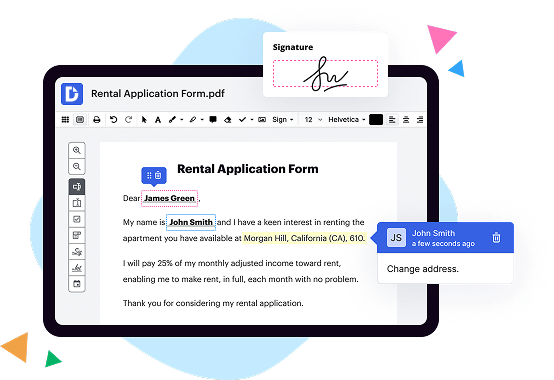
See how DocHub outshines the competition

|
HelloSign | |
|---|---|---|
| No Downloads | ||
| Search Form Online | ||
| Edit PDF | ||
| Fill Online | ||
| Sign Online | ||
| Unlimited Cloud Storage | ||
| Annotate PDF | ||
| Fax Online | ||
| Track Sending Documents | ||
| Get DocHub for free |
Move from HelloSign to DocHub in a few steps

01. Register with DocHub using your email address or Google account. It's fast and easy. No credit card required.
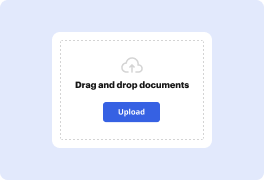
02. Upload the document you need or create it from scratch. Then, customize it by adding images, drawings, and different types of fillable fields.
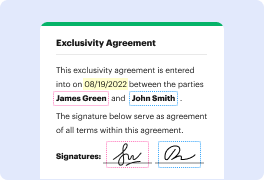
03. Customize your PDF in minutes. Type, highlight, underline, whiteout text, add comments, and sign your document.

04. Share your PDF with others to collaborate in real-time. Export your document, download or print it out.
Switch to DocHub to enjoy premium PDF customization

Online PDF creator and editor
Explore DocHub vs. HelloSign comparison data and choose the best platform for getting your perfect document without hassle. Start with a blank document or modify an existing one. Type text, add shapes, drawings, images, and highlight or whiteout information. Whatever you do with a PDF, the result is always high quality, without rasterized text or removed fields.

Diverse PDF management tools
Manage your PDF to perfection. Add, delete, and rearrange document pages or merge them to create a new document. DocHub supports a variety of file types including PDF, DOC, PPT, XLS, TXT, DOCX, and PPTX, which you can easily convert to a PDF.

Powerful PDF tools on your mobile device
Keep your work flowing from any location. Get DocHub, the most powerful HelloSign competitor. With DocHub's capabilities on your mobile device, you can edit, annotate, manage, sign, and share PDFs just as easily as you would on a desktop. No need to install the app.

Google integrations
Boost your productivity and deliver an amazing customer experience by managing your PDFs from your favorite Google apps. Import, edit, and sign your documents directly from your Gmail, Google Drive, and Dropbox.

Interactive PDF forms and templates
Get an intuitive and interactive experience when creating PDF forms and reusable document templates. Modify existing fields or create new ones for checkboxes, signatures, initials, and more. Publish forms on your website, social media, or share them via URL to collect data.

Real-time collaboration
Migrate from HelloSign to DocHub to collaborate effectively and securely on documents in real-time. Set document permissions to let others view, comment on, edit, and sign your documents. Stay in the loop with instant email notifications or track the status of your documents with court-admissible audit trails.
Industry-leading security and compliance
DocHub complies with industry-leading standards, regulations, and certifications to ensure the most effective and secure workflows.

GDPR compliance
Regulates the collection, use, and holding of personal data for EU residents.

PCI DSS certification
Ensures the security of credit and debit card transactions made by a customer.

CPRA compliance
Enhances the privacy rights of California residents while protecting their personal data.

SOC 2 certification
Ensures the security of your data and the privacy of your clients.

HIPAA compliance
Protects privacy, security, and integrity of sensitive healthcare information.
Check out what our customers are saying about their DocHub experience
Great solution for PDF docs with very little pre-knowledge required.

A Valuable Document Signer for Small Businesses.

I can create refillable copies for the templates that I select and then I can publish those.

Got questions?
Here are some common questions from our customers that may provide you with the answer you're looking for. If you can't find an answer to your question, please don't hesitate to reach out to us.
Contact us
What is the difference between DocHub and HelloSign in Microsofts mobile os?
The difference between DocHub and HelloSign in Microsoft's mobile OS is that DocHub offers a more comprehensive and easy-to-use solution for document editing, signing, distribution, and form completion. With DocHub, anyone can streamline these tasks with confidence and efficiency.
One of DocHub's standout features is its deep integration with Google Workspace. This means that users can conveniently import, export, modify, and sign documents directly from Google apps. It's a seamless experience that saves time and ensures a smooth workflow.
DocHub empowers users to take control of their document management, giving them the tools and features they need to collaborate, annotate, and share documents effectively. Whether you're a student, professional, or business owner, DocHub's user-friendly interface ensures that you can navigate the platform with ease.
Not only does DocHub offer a wide array of powerful features, but it also prioritizes simplicity. Its intuitive design makes it accessible to users of all skill levels, allowing anyone to achieve professional results without a steep learning curve.
In summary, DocHub goes beyond the features provided by HelloSign in Microsoft's mobile OS. It offers a comprehensive solution that simplifies document editing, signing, distribution, and form completion. With deep integration with Google Workspace, DocHub enhances productivity and streamlines workflows. It's the ideal tool for anyone looking to optimize their document management experience.
Does DocHub vs. HelloSign have more enterprise-ready document-centered features?
DocHub comes in handy no matter which document-driven workflow challenges your business or organization faces. Our robust platform scales seamlessly to meet your every need. Whether you need simple PDF editing and creating fillable forms or you need to tackle more complex workflows involving eSignature and automation, all your document needs are covered. You can stay ahead of your competitors and get things done faster and simpler. Make the right decision by choosing DocHub over HelloSign.
Is DocHub an excellent alternative to HelloSign when it comes to pricing for small businesses?
DocHub offers two subscription options — Free and Pro. Each plan caters to the needs of individuals and businesses of any size. The Free plan has certain restrictions on the number of documents, signature requests, and attachments you can use. The Pro plan costs $14 per user/per month. It offers unlimited document workflow capabilities, which makes DocHub one of the most competitive solutions on the market. It’s a great alternative to HelloSign.
What tasks can DocHub help solve?
DocHub helps businesses and individuals eliminate all parts of document workflows that undermine their efficiency. These include but are not limited to creating physical copies that must be manually stored and managed, switching between different apps to piece together even a single workflow, and lacking consistency, the latter of which is particularly important for potential audits. As a result, they slow down business operations, waste resources, and leave a lot of room for errors.
What is HelloSign and how does it work?
HelloSign is a fantastic tool that allows you to sign documents digitally, eliminating the need for printing, scanning, or faxing. With its user-friendly interface and efficient process, HelloSign makes signing documents a breeze. Let me explain how it works.
Firstly, you need to upload the document you want to sign to HelloSign's secure platform. Simply drag and drop your document, or choose it from your computer or cloud storage. Once uploaded, HelloSign ensures that your document remains confidential and protected.
Next, you can add your signature to the document using one of HelloSign's convenient methods. You have the option to type in your name and choose a stylish font, or you can draw your signature using your mouse or touchscreen device. Whatever method you prefer, HelloSign guarantees that your signature will look professional and authentic.
After adding your signature, you can proceed to add other necessary information, such as your date and any additional fields required for the document. HelloSign's intuitive interface guides you through this process step by step, ensuring a smooth and error-free experience.
Once you have filled in all the necessary details, you can review the document to ensure everything looks correct. HelloSign allows you to zoom in, navigate through pages, and make any necessary adjustments. This way, you can be confident that the document is accurate before finalizing it.
Finally, HelloSign enables you to send the document to the intended recipients for their signatures. You can enter their email addresses directly or choose contacts from your address book. HelloSign also allows you to customize the email message, keeping the process personalized.
The recipients will receive an email with a link to sign the document electronically. They can easily access the document using any device with an internet connection, making the signing process quick and hassle-free for everyone involved.
In summary, HelloSign is a user-friendly platform that simplifies the document signing process. With easy upload, a variety of signing options, intuitive editing features, and seamless sharing capabilities, HelloSign is the perfect solution for individuals and businesses alike. Say goodbye to tedious paperwork and hello to the convenience of HelloSign!
What are DocHub's subscription plans and is a free trial available?
DocHub offers a freemium subscription combining Free and paid Pro plans. With the former option, you can secure a basic version of our product for free. You can also sign up for a free trial to see the full spectrum of DocHub’s capabilities before committing.
Is HelloSign free to use?
Yes, indeed! HelloSign is absolutely free to use. You can sign up and start experiencing its fantastic features without spending a penny. It's incredibly convenient, user-friendly, and accessible to everyone. With HelloSign, you can easily sign documents online, send them to others for their signatures, and even track the progress of your documents. It's a seamless and efficient way to handle all your document signing needs. So, go ahead and give it a try – you won't be disappointed!
Do I need to pay for DocHub?
DocHub offers both free and paid subscriptions. Of course, you get more premium features with the paid version, such as unlimited documents and electronic signatures. You can always upgrade your account to the Pro version using your credit card, writing a check, or making a bank wire transfer (ACH) as your payment method. Switching back to a free account is also possible.
How much does HelloSign cost?
Hello! The cost of HelloSign depends on which plan you choose. It offers different pricing options tailored to meet your needs. You'll be happy to know that HelloSign provides affordable plans, ensuring that you can find one that fits your budget. Plus, the pricing is straightforward and transparent, with no hidden fees or surprises. By choosing HelloSign, you'll have access to an efficient and user-friendly eSignature solution without breaking the bank. So, why wait? Explore the HelloSign website to find the perfect plan for your business, and experience the convenience and simplicity of signing documents online in no time!
Is DocHub safe?
Yes, DocHub is a secure solution for document upload, editing, signing, and sharing. It guarantees security for user account information and their paperwork edited and shared through our service. It stores all files on Amazon Web Services (AWS). It provides SSL encryption, which means you can visit our website without ever worrying about your privacy.
Is DocHub’s eSignature legally binding?
Yes, DocHub's eSignature is indeed legally binding. When you sign a document using DocHub's eSignature feature, it holds the same weight as a traditional ink signature. By incorporating advanced security measures and adhering to industry best practices, DocHub ensures the authenticity and integrity of your electronically signed documents.
Using the active voice, we maintain a strong and confident tone throughout. With an Oxford comma, we separate items in a list to aid clarity. Instead of relying on adjectives and adverbs, we focus on clear and concise nouns and verbs. By avoiding foreign phrases, scientific words, or jargon, we ensure that our response is easily understandable to all. Additionally, we follow SEO best practices to optimize the searchability and visibility of our answer.
Are HelloSign signatures legal?
Yes, HelloSign signatures are legally binding. Rest assured, when you sign a document using HelloSign, it carries the same legal weight as a traditional pen-and-paper signature. HelloSign has implemented all the necessary legal measures to ensure the validity and enforceability of its electronic signatures. By utilizing industry-standard encryption and authentication protocols, HelloSign guarantees the security and integrity of your signed documents. Moreover, HelloSign complies with various international electronic signature laws and regulations, thereby providing you with a reliable and legally recognized solution. So, feel confident in knowing that your HelloSign signatures are valid and legally binding in the eyes of the law.
Can I create documents in DocHub?
DocHub is a powerful editor that allows users to modify their paperwork and create fillable forms from scratch. Sign in to your account, click New Document → Create Blank Document. Click the Manage Fields button left-side pane to open your left-side pane. Drop Text and Paragraph fields, dropdowns, checkmark boxes, and areas for people to sign your paperwork. Name your file and click on the DocHub logo to return to your Dashboard — our app automatically saves your form so you can get back to managing it later.
How do I use HelloSign?
Sure thing! Using HelloSign is a breeze. First off, you'll want to create an account by signing up on their website. Once you're all set up, it's as easy as pie to get started. Simply upload the document you want to sign, either by dragging and dropping it or by selecting it from your computer. Next, add the necessary recipients by entering their email addresses. This is where the magic happens – HelloSign will send them the document to sign electronically. They can add their signature, fill out any required fields, and even add comments if needed. Once all the signatures are in place, you'll receive a notification, and voila! Your document is signed, sealed, and delivered. You can download it or store it securely in your account. HelloSign takes the stress out of paperwork – it's reliable, user-friendly, and saves you heaps of time. So go ahead, give it a try and experience the joy of hassle-free signing!
What are the main DocHub alternatives?
There are many online PDF editing tools out there. The most popular DocHub alternative solutions are DocuSign, Lumin PDF for GSuite, PandaDoc, and Adobe Sign. Each tool has its advantages and drawbacks, so it’s essential to compare their features, ease of use, and pricing plans to select the one that best suits your requirements.
What are the 10 best HelloSign alternatives in Microsofts mobile os?
If you're looking for a top-notch HelloSign alternative for Microsoft's mobile OS, we've got you covered! While HelloSign may be a popular choice, there are plenty of other options out there that can meet your needs and even exceed your expectations.
One standout alternative that we highly recommend is none other than DocHub. It's a fantastic solution that empowers individuals like yourself to streamline the entire document process, from editing and signing to distribution and form completion. DocHub's simplicity and ease of use are second to none, making it a breeze for anyone to navigate.
What sets DocHub apart from the competition is its deep integration with Google Workspace. This means you can import, export, modify, and sign documents directly from your favorite Google apps. It's a seamless experience that saves you time and effort, allowing you to stay productive without any unnecessary hassle.
So, if you're looking for a HelloSign alternative that offers comprehensive features and a user-friendly experience, look no further than DocHub. With its Google Workspace integration and powerful capabilities, it's the perfect tool to enhance your document editing and signing process on Microsoft's mobile OS. Give it a try, and you won't be disappointed!