What is the difference between DocHub vs DottedSign vs. Thales Digital Signing?
When it comes to digital document signing, you may have come across popular options like DocHub, DottedSign, and Thales Digital Signing. Each of these tools offers its own unique features and functionalities, providing a variety of options to meet your specific needs.
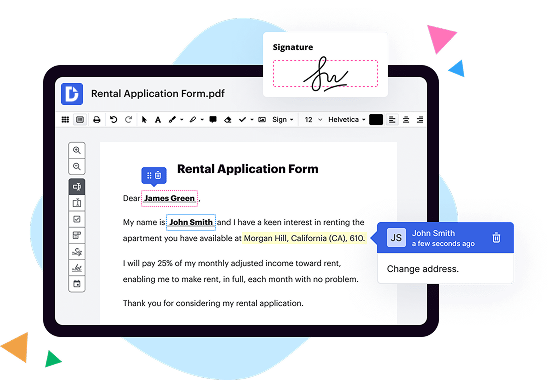
Let's start with DocHub. This powerful platform stands out for its user-friendly interface, allowing you to effortlessly sign, edit, and collaborate on your documents. With DocHub, you can easily upload any PDF, Word, or PowerPoint file, and then sign it digitally using your computer or mobile device. The platform also offers a wide range of annotation and editing tools, enabling you to add text, highlight important sections, draw shapes, and much more. Plus, you can invite others to collaborate on your documents, making it a great choice for teamwork and efficient communication.
Moving on to DottedSign, this digital signing solution brings simplicity and efficiency to the table. With its intuitive design, you can quickly upload your documents and add your signature with just a few clicks. DottedSign also provides a seamless signing experience on both desktop and mobile devices, allowing you to sign documents no matter where you are. Additionally, the platform offers real-time notifications and reminders, keeping you informed about the status of your document and eliminating any delays in the signing process.
Last but not least, we have Thales Digital Signing. This comprehensive platform combines advanced security features with ease of use, ensuring that your documents are protected while maintaining a smooth signing experience. Thales Digital Signing leverages encryption technologies to secure your files and signatures, providing you and your recipients with peace of mind. The platform also offers customizable workflows, enabling you to tailor the signing process to your specific requirements. With Thales Digital Signing, you can be confident that your documents are legally binding and tamper-proof.
In conclusion, DocHub, DottedSign, and Thales Digital Signing all offer powerful digital signing solutions, each with its own unique set of features. Whether you prefer a user-friendly interface, simplicity and efficiency, or advanced security measures, there is an option that will cater to your needs. So go ahead and explore these tools to find the one that best suits your requirements!
DocHub vs DottedSign vs Thales Digital Signing: which is better for Enterprises?
While DottedSign and Thales Digital Signing are good solutions to work with PDFs online, DocHub offers greater capabilities to help individuals and businesses digitize their documents and make them run smoothly across different devices and your favorite apps.
DocHub vs DottedSign vs Thales Digital Signing: which is better for small businesses?
DottedSign and Thales Digital Signing are good options for editing, signing, and sharing PDFs. However, DocHub offers a more comprehensive featureset that includes organizations, reusable templates, advanced eSignatures, seamless Google integrations, and more that are perfect for small businesses, helping them simplify and streamline document editing, sharing, signing, and form completition.
What is DocHub?
DocHub is a Google-integrated PDF editor and eSignature solution that helps you get your PDFs done online, using any device. DocHub comes with an online PDF editor, advanced eSignatures, PDF forms, reusable templates, and straightforward Google integrations so you can maximize your productivity when working within your favorite Google apps.
What is DottedSign and how does it work?
DottedSign is a powerful digital signing tool that simplifies the way you sign, complete, and manage documents. It provides a seamless and efficient solution for individuals and businesses alike.
To put it simply, DottedSign allows you to electronically sign documents from anywhere, at any time. It eliminates the need for printing, scanning, and faxing, as everything can be done online.
So, how does it work? Well, it's incredibly user-friendly. Once you've uploaded your document to the DottedSign platform, you can easily add your signature, initials, or even text fields to the document. You can customize the size, color, and style of your signature to make it truly your own.
But that's not all – DottedSign also allows you to invite others to sign your document. Simply enter their email addresses, and they'll receive a link to sign electronically. This feature is especially convenient for collaboration or when multiple signatures are required.
Furthermore, DottedSign ensures the security and integrity of your documents. It uses industry-standard encryption and complies with all the necessary regulations to protect your sensitive information.
Using DottedSign saves you time and effort, allowing you to complete your paperwork swiftly and smoothly. No more frantically searching for a pen or rushing to the post office – everything is done digitally and efficiently.
In summary, DottedSign is a reliable, intuitive, and secure digital signing solution that simplifies your document workflow. It empowers you to sign, send, and manage documents with ease. Give it a try, and experience the convenience and efficiency it brings to your life.
What is Thales Digital Signing and how does it work?
Thales Digital Signing is an incredibly innovative and secure method of signing documents electronically. It offers a seamless and reliable solution to replace traditional paper-based signatures. When using Thales Digital Signing, users can confidently authenticate their identity and apply their signature to electronic documents in a matter of seconds.
Using this cutting-edge technology is remarkably simple. First, the user uploads the document they want to sign onto the platform. Then, they are prompted to provide their unique digital credentials, confirming their identity. This could be a password, PIN, biometric data, or even an encryption key.
Once the user's identity has been verified, the platform generates a digital signature, unique to that specific document and individual, using complex algorithms and cryptographic methods. This digital signature is essentially a mathematical representation of the document and the signer's identity.
The document is then securely sealed with the digital signature, ensuring its integrity and authenticity. This means that any tampering or alteration of the document can be easily detected. The digital signature is also time-stamped, adding an extra layer of security and preventing any malicious attempts to manipulate the document.
One of the key advantages of Thales Digital Signing is its high level of security. The platform employs robust encryption algorithms to protect sensitive information and prevent unauthorized access. Additionally, the digital signatures generated by Thales Digital Signing cannot be forged or duplicated, further enhancing document security.
Moreover, Thales Digital Signing is incredibly versatile, accommodating various document formats and supporting seamless integration with existing applications and workflows. This makes it an ideal solution for businesses of all sizes, industries, and sectors.
In summary, Thales Digital Signing is an exceptional solution for anyone seeking a secure, efficient, and convenient way to sign documents electronically. By leveraging advanced cryptographic techniques, this innovative technology guarantees the integrity and authenticity of signed documents, bringing the traditional paper-based signatures into the digital age.
Is DocHub free?
Yes. DocHub's free plan is a perfect fit for one-offs or occasional projects. You can start using DocHub’s Free Plan straight away after completing the quick account registration. No learning is needed. The DocHub Pro Plan has a 30-day free trial so you have enough time to test the product.
Is DottedSign free to use?
Yes, DottedSign is absolutely free to use! You won't have to pay a penny to experience the incredible benefits of this user-friendly electronic signature platform. Whether you're an individual or a business professional, DottedSign offers a seamless and efficient solution for all your signing needs. So go ahead and start signing documents electronically with confidence and ease. Rest assured, DottedSign is here to make your life easier, without any hidden costs or fees!
Is Thales Digital Signing free to use?
Yes, Thales Digital Signing is absolutely free to use! It is a fantastic tool that allows you to securely sign your digital documents without emptying your wallet. You can confidently rely on this user-friendly platform to effortlessly add your signature with just a few clicks. Thales Digital Signing ensures that your documents remain secure and authentic, providing peace of mind in an increasingly digital world. Whether you're a business professional or an individual, this free service caters to all your digital signing needs. So, why wait? Give Thales Digital Signing a try and experience the convenience and security it offers, completely free of cost!
What is DocHub’s cost and pricing?
DocHub has straightforward pricing that includes one free plan and one paid plan. If you need to get documents done once in a while, the Free Plan is just the thing for you. It includes all the PDF tools to help you edit, sign, share, and organize your documents. For a growing document workflow, we recommend the DocHub Pro plan at $14 per user per month. It includes unlimited PDF capabilities and priority tech support. You can even test it free for 30 days before buying.
What are the plans and prices for DottedSign?
As of my knowledge, here are the available plans and prices for DottedSign:
1. Free Plan:
- Cost: $0 per user per month
- Features: Limited to 3 sign requests per month, 3 templates, and 3 participants per transaction.
2. Pro Plan:
- Cost: $9.99 per user per month
- Features: Unlimited sign requests, templates, and participants. In addition, features like cloud storage integration (Google Drive, Dropbox, etc.), real-time notifications, and audit trails are included.
3. Business Plan:
- Cost: $19.99 per user per month
- Features: All the features included in the Pro plan, along with advanced team management features such as user roles and permissions, team management console, and access to team transaction data.
Please note that these plans and prices are subject to change. It is recommended to visit the DottedSign website or contact their customer support for the most up-to-date information.
Is DottedSign safe?
Yes, DottedSign is indeed safe. Our advanced security measures ensure the protection and confidentiality of your documents. You can trust in the integrity of our platform as we prioritize your privacy and data security. With DottedSign, you can confidently sign and manage your documents online without any concerns.
Is Thales Digital Signing safe?
Yes, Thales Digital Signing is indeed safe. When it comes to safeguarding your digital transactions and ensuring the integrity of your documents, Thales Digital Signing takes security seriously. It utilizes state-of-the-art encryption techniques to protect your data from unauthorized access. Additionally, Thales Digital Signing undergoes regular security audits and adheres to industry best practices, giving you added confidence in its safety measures.
Not only does Thales Digital Signing prioritize security, but it also offers a user-friendly experience. With its intuitive interface and seamless integration, signing and managing your digital documents becomes a breeze. You'll appreciate the convenience it brings to your workflow without compromising on security.
Furthermore, Thales Digital Signing has earned a strong reputation in the market. Countless individuals and organizations trust its technology to ensure the authenticity and validity of their digital transactions. This reliability speaks volumes about its safety and effectiveness.
Rest assured that when you choose Thales Digital Signing, you are placing your digital transactions in capable hands. Your data will be securely protected, and you can confidently sign and manage your important documents with ease. Say goodbye to worries about digital security and embrace the peace of mind that comes with knowing your transactions are safe.
What are the main DocHub alternatives?
The main DocHub alternatives are Lumin PDF, Small PDF, PDF escape, and others. However, DocHub’s ease of use, flexibility, affordability, and deep Google integrations are the reasons why DocHub is ahead of the competition.
What are the 10 best DottedSign alternatives?
When it comes to finding the perfect alternative to DottedSign, you're in luck because there are plenty of fantastic options out there. In this list of ten remarkable alternatives, we'll make sure to highlight the impressive features of each one while keeping your needs and preferences in mind.
First on our list is DocHub, a widely popular e-signature tool that offers a seamless and user-friendly experience. With DocHub, you can sign, edit, and share documents effortlessly. Its intuitive interface and robust features make it a standout choice for individuals and businesses alike.
Next up is Adobe Sign, a trusted name in the industry. Known for its reliability and comprehensive set of features, Adobe Sign allows you to create, manage, and track electronic signatures with ease. This powerful tool offers seamless integration with other Adobe products, providing a seamless experience for users.
Another excellent alternative is PandaDoc, which offers a wide range of document management features alongside its robust e-signature capabilities. With PandaDoc, you can create professional-looking documents, track actions, and collaborate with team members all in one place.
If you're looking for a versatile e-signature solution, HelloSign is definitely worth considering. This user-friendly platform offers a simple and streamlined signing experience, with features like reusable templates and integrations with popular cloud storage services.
For those who value security and compliance, eversign is an exceptional option. With features such as two-factor authentication and detailed audit trails, eversign ensures that your documents are securely signed and stored.
SignNow is another top-notch alternative, allowing you to sign documents from any device with ease. With its robust collaboration features, you can work with multiple signers and track the progress of each document effortlessly.
Next, we have SignRequest, an intuitive e-signature tool that keeps things simple yet powerful. With its user-friendly interface, you can easily upload, sign, and send documents in just a few clicks.
With its focus on simplicity and ease of use, SignEasy is a popular choice for individuals on the go. Its straightforward interface and mobile-friendly app make it a breeze to sign documents from any device.
If you're looking for a feature-packed alternative, Formstack Sign is a great option. With its extensive set of tools, you can automate your document signing process and integrate it with other popular apps seamlessly.
Finally, we have Signable, a user-friendly e-signature tool that focuses on providing a straightforward signing experience. With Signable, you can easily send documents for signing and track their progress in real-time.
In conclusion, while DottedSign is a great e-signature solution, there are several remarkable alternatives available. Whether you prioritize simplicity, collaboration, security, or comprehensive features, these ten alternatives, including DocHub, have got you covered. Each of these tools offers unique benefits, so take your time to explore them and find the one that best suits your needs.
What are the 10 best Thales Digital Signing alternatives?
When it comes to digital signing alternatives, there are some fantastic options out there that can cater to your specific needs. One highly recommended alternative is DocHub. It provides a robust set of features and a user-friendly interface, making digital signing a breeze. Plus, it offers seamless integration with popular cloud storage services.
Another excellent choice is Adobe Sign. Known for its reliability and extensive capabilities, Adobe Sign makes signing documents electronically a seamless process. It boasts advanced security features and is widely recognized as one of the go-to solutions in the industry.
PandaDoc is another noteworthy option worth considering. This platform offers a comprehensive set of tools for creating, sending, and signing documents. With its intuitive interface and customizable templates, PandaDoc streamlines the entire document workflow.
Next on the list is HelloSign. With its user-friendly design and robust functionality, HelloSign has gained popularity among individuals and businesses alike. It offers powerful collaboration features and ensures the security of your documents throughout the signing process.
Docusign is undeniably one of the leaders in the digital signing realm. Trusted by millions of users worldwide, Docusign simplifies the process of signing documents electronically while maintaining the highest standards of security and compliance.
SignNow is also worth considering as an alternative. It combines ease of use with powerful features, allowing you to sign and manage documents with ease. SignNow's integration capabilities make it a convenient choice for streamlining your document workflow.
Formstack Sign offers a simple and intuitive solution for digital signing needs. With its user-friendly interface and robust features, Formstack Sign enables you to sign documents electronically hassle-free.
CudaSign, previously known as SignNow, continues to deliver excellent digital signing solutions. It offers a range of features designed to streamline your document signing process, all while maintaining security and reliability.
eSignLive, part of the VASCO family, provides a highly secure and flexible electronic signature service. With its robust authentication methods and comprehensive audit trails, eSignLive ensures the integrity of your digital signatures.
Finally, SignEasy rounds out our list of top Thales Digital Signing alternatives. SignEasy offers a simple, yet powerful, solution for digital signing, making it easy to sign documents on-the-go. Its seamless integration with popular cloud storage services adds to its appeal.
These ten alternatives to Thales Digital Signing offer a range of features, user-friendly interfaces, and robust security measures to meet your digital signing needs. Whether you choose DocHub, Adobe Sign, or any of the other excellent options, you can be confident in finding a solution that fits your requirements seamlessly.