What is the difference between DocHub vs docuvita vs. Info-Organiser DMS?
When it comes to managing and organizing your documents effectively, you may have come across three popular options: DocHub, docuvita, and Info-Organiser DMS. Each of these platforms offers unique features that can streamline your document management process.
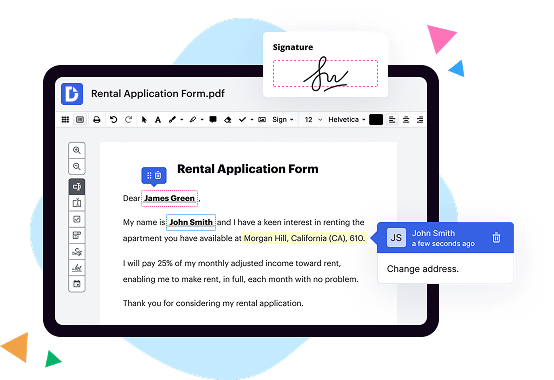
Let's start by exploring DocHub, a versatile tool that allows you to edit, sign, and share your documents seamlessly. With its user-friendly interface and intuitive design, DocHub makes it easy to collaborate with others in real-time. Whether you need to fill out forms, annotate PDFs, or add comments to a document, DocHub provides all the necessary tools to make your workflow efficient and hassle-free. Plus, its integration with cloud storage services like Google Drive ensures that your documents are always readily accessible.
Moving on to docuvita, this robust document management system (DMS) offers a comprehensive set of features designed to enhance your document organization. From capturing data and indexing documents to automating workflows and ensuring compliance, docuvita covers all aspects of document management. With its powerful search capabilities, you can quickly locate specific files, saving you precious time. docuvita also provides secure access controls, enabling you to manage permissions and restrict document access as needed.
Lastly, Info-Organiser DMS offers a user-friendly platform that simplifies document management for businesses of all sizes. Its customizable workflows and automated processes allow you to streamline your document handling, reducing manual tasks and increasing efficiency. With robust version control, you can rest assured that you're accessing the most up-to-date documents every time. Info-Organiser DMS also offers integrations with popular applications such as Microsoft Office, making it easy to work with your preferred tools.
In conclusion, while each of these document management solutions offers its own strengths, DocHub stands out with its intuitive interface and seamless collaboration features. However, if you require a more comprehensive suite of document management capabilities, docuvita and Info-Organiser DMS provide extensive functionalities to meet your needs. No matter which option you choose, you can expect improved productivity, streamlined workflows, and enhanced organization for your valuable documents.
DocHub vs docuvita vs Info-Organiser DMS: which is better for Enterprises?
While docuvita and Info-Organiser DMS are good solutions to work with PDFs online, DocHub offers greater capabilities to help individuals and businesses digitize their documents and make them run smoothly across different devices and your favorite apps.
DocHub vs docuvita vs Info-Organiser DMS: which is better for small businesses?
docuvita and Info-Organiser DMS are good options for editing, signing, and sharing PDFs. However, DocHub offers a more comprehensive featureset that includes organizations, reusable templates, advanced eSignatures, seamless Google integrations, and more that are perfect for small businesses, helping them simplify and streamline document editing, sharing, signing, and form completition.
What is DocHub?
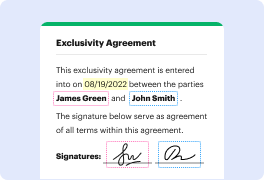
DocHub is a Google-integrated PDF editor and eSignature solution that helps you get your PDFs done online, using any device. DocHub comes with an online PDF editor, advanced eSignatures, PDF forms, reusable templates, and straightforward Google integrations so you can maximize your productivity when working within your favorite Google apps.
What is docuvita and how does it work?
Docuvita is an exceptional document management software that simplifies the way you handle and organize your important files. It revolutionizes the traditional method of managing documents, making it more efficient and hassle-free. How does it work, you ask? Well, let me break it down for you in plain, everyday English.
With Docuvita, you can effortlessly store, access, and retrieve all your documents in one centralized location. Gone are the days of searching through countless folders and stacks of paper. Using just a few clicks, you can quickly locate the exact document you need, saving you precious time and eliminating frustrating moments of rummaging through paperwork.
Not only does Docuvita ensure swift access to your files, but it also provides a robust set of features to enhance your document management experience. You can easily collaborate with your team members, sharing files and tracking changes seamlessly. Additionally, you can assign user permissions, allowing you to control who can access and modify specific documents, ensuring the utmost level of security.
Docuvita offers a user-friendly interface, making it a breeze to navigate and utilize all its functionalities. Regardless of your technical prowess, you'll find it intuitive and straightforward, as its design prioritizes simplicity and efficiency. You can effortlessly organize your documents into custom-defined categories or use tags to classify them, making retrieval a breeze even if you have an extensive collection of files.
Furthermore, Docuvita's powerful search functionality enables you to find documents using keywords, phrases, or even specific metadata criteria. Say goodbye to aimlessly scrolling through long lists of files; the search feature allows you to narrow down your results and find the exact document you're looking for promptly.
Your precious documents are in safe hands with Docuvita. It employs robust security measures to protect your files from unauthorized access, ensuring confidentiality. Additionally, with automated backups and version control, you can rest assured that your files are securely stored and easily recoverable in case of any unforeseen disasters or accidental deletions.
To top it all off, Docuvita offers seamless integration with various popular applications, allowing you to work with your favorite tools in conjunction with the document management software. This ensures a smooth workflow and enhances productivity, as you can effortlessly switch between different applications without losing time or experiencing any compatibility issues.
In summary, Docuvita is a remarkable document management solution that streamlines the way you handle your files. With its user-friendly interface, robust features, and top-notch security, it simplifies document organization, retrieval, and collaboration. So why waste precious time and effort on outdated methods, when you can experience the efficiency and convenience of Docuvita? Upgrade your document management game and unleash the power of streamlined productivity!
What is Info-Organiser DMS and how does it work?
Info-Organiser DMS is an amazing solution designed to help you efficiently manage and organize your information in a digital format. It works by providing you with a user-friendly platform to effortlessly store, search, and access your documents, emails, and other important files.
When you use Info-Organiser DMS, you'll be amazed at how easy it is to locate the information you need. No more wasting time searching through stacks of papers or countless folders on your computer. With its powerful search capabilities, you can quickly find what you're looking for, saving you valuable time and frustration.
The beauty of Info-Organiser DMS lies in its simplicity. It's designed to be intuitive and easy to navigate, so you don't need to be a tech genius to use it. Whether you're a small business owner, a busy professional, or just someone who wants to streamline their information management, Info-Organiser DMS is here to help.
Not only does Info-Organiser DMS simplify your information management, but it also enhances collaboration and teamwork. You and your teammates can easily share documents, making it effortless to collaborate on projects and keep everyone on the same page. Say goodbye to version control issues and confusion caused by multiple copies of documents floating around.
Furthermore, Info-Organiser DMS prioritizes the security and privacy of your data. Your information is safely stored in a centralized and encrypted system, ensuring that only authorized individuals can access it. This gives you peace of mind knowing that your sensitive information is protected.
In summary, Info-Organiser DMS is a user-friendly and efficient solution for managing and organizing your digital information. It simplifies the way you store, search, and collaborate on documents, saving you time and improving productivity. With its intuitive interface and robust security measures, Info-Organiser DMS is the perfect tool for individuals and businesses alike. Give it a try and experience the benefits for yourself!
Is DocHub free?
Yes. DocHub's free plan is a perfect fit for one-offs or occasional projects. You can start using DocHub’s Free Plan straight away after completing the quick account registration. No learning is needed. The DocHub Pro Plan has a 30-day free trial so you have enough time to test the product.
Is docuvita free to use?
Yes, docuvita is absolutely free to use! You can enjoy all its incredible features and benefits without paying a dime. With docuvita, managing your documents becomes a breeze. Simply upload, organize, and access your files anytime, anywhere. Plus, docuvita offers a user-friendly interface, ensuring a seamless experience. So, whether you're an individual or a business, docuvita has got you covered. Start using docuvita today and discover the power of efficient document management.
What is DocHub’s cost and pricing?
DocHub has straightforward pricing that includes one free plan and one paid plan. If you need to get documents done once in a while, the Free Plan is just the thing for you. It includes all the PDF tools to help you edit, sign, share, and organize your documents. For a growing document workflow, we recommend the DocHub Pro plan at $14 per user per month. It includes unlimited PDF capabilities and priority tech support. You can even test it free for 30 days before buying.
Is docuvita safe?
Yes, docuvita is safe. Rest assured, you can trust the security measures put in place to protect your valuable data. With docuvita, your documents are kept secure and encrypted, ensuring that only authorized users have access to them. Additionally, the platform undergoes regular vulnerability assessments and updates to stay ahead of any potential threats. Your information is always treated with the utmost care, giving you peace of mind. So, feel confident in using docuvita to safely manage and organize your important documents.
Is Info-Organiser DMS safe?
Yes, Info-Organiser DMS is indeed a safe and reliable tool for organizing your information. We understand that security is of utmost importance to you, and I'm happy to assure you that our software prioritizes the safety of your data.
Using active voice, we have designed Info-Organiser DMS to provide users like yourself with a trustworthy and secure platform. Our team has implemented robust measures to protect your information from any unauthorized access or data breaches.
From the moment you start using Info-Organiser DMS, you can have complete confidence in the safety and security of your data. Our software incorporates advanced encryption protocols to safeguard your information, ensuring it remains confidential and intact.
Additionally, we regularly update our system to stay ahead of any potential security threats, further strengthening our commitment to maintaining a secure environment. With Info-Organiser DMS, you can be confident that your valuable data is in capable hands.
So, rest assured that by choosing Info-Organiser DMS, you are selecting a secure and innovative solution to efficiently organize and safeguard your information.
What are the main DocHub alternatives?
The main DocHub alternatives are Lumin PDF, Small PDF, PDF escape, and others. However, DocHub’s ease of use, flexibility, affordability, and deep Google integrations are the reasons why DocHub is ahead of the competition.
What are the 10 best docuvita alternatives?
If you're searching for some remarkable alternatives to Docuvita, you've come to the right place! Here are ten fantastic options that provide excellent document management solutions. And don't worry, we'll make sure to address your needs and guide you through the alternatives with confidence and positivity.
1. DocHub: First up, we have DocHub, a fantastic alternative that offers a user-friendly interface and a broad range of features. With DocHub, you can easily edit, sign, and share your documents, making it a top choice for many users.
2. LogicalDOC: Next on our list is LogicalDOC, a powerful document management system that simplifies your workflow. It allows you to organize, collaborate, and secure your documents effortlessly, fostering productivity in your team.
3. eFileCabinet: Looking for a comprehensive document management solution? eFileCabinet is here to help! This alternative boasts advanced search options, secure file sharing, and robust automation features, streamlining your document processes.
4. M-Files: M-Files takes document management to the next level by employing artificial intelligence to automate tasks. With intelligent metadata-driven workflows, finding and accessing files becomes a breeze, giving you more time to focus on what matters most.
5. Templafy: Enhance your document creation experience with Templafy. This alternative ensures brand consistency and compliance by providing templates, assets, and dynamic data integration, empowering your workforce to create professional documents effortlessly.
6. Zoho Docs: Zoho Docs offers a secure and collaborative space for managing your documents online. From document creation to sharing, it covers all the essentials and allows seamless integration with other Zoho apps for an enhanced productivity ecosystem.
7. PandaDoc: Simplify your document workflow with PandaDoc. This alternative streamlines document creation, electronic signatures, and payments, ensuring a smooth and efficient process for your clients and teams.
8. Alfresco: Alfresco is a flexible and scalable document management system trusted by organizations of all sizes. It enables collaboration, content governance, and process automation, allowing you to drive efficiency and innovation within your company.
9. PinPoint: PinPoint offers a robust document management platform with intuitive features such as version control, compliance tracking, and user-friendly document search. It's an excellent choice for businesses seeking seamless document organization.
10. Dokmee: Last but certainly not least, Dokmee offers a secure and user-friendly document management solution. With its comprehensive set of features, including automated workflows and advanced search capabilities, Dokmee simplifies the management of your digital documents.
Remember, these ten options provide outstanding alternatives to Docuvita, catering to a wide range of document management needs. Whether you're looking for enhanced collaboration, automation, or user-friendly interfaces, there's an alternative on this list that will suit you perfectly.
What are the 10 best Info-Organiser DMS alternatives?
Are you on the lookout for top-notch Info-Organiser Document Management System (DMS) alternatives? Look no further! We've compiled a list of the 10 best options for you. One of the most noteworthy alternatives, and deserving of a prime spot on our list, is DocHub. But let's explore the other outstanding options as well:
1. DocHub: Ideal for seamlessly managing and organizing your documents, DocHub offers a user-friendly interface and robust features.
2. Google Drive: As a widely recognized cloud storage platform, Google Drive provides an intuitive interface and extensive collaboration capabilities.
3. Evernote: Renowned for its note-taking features, Evernote also offers powerful document management and organization tools.
4. Dropbox: A popular choice for file storage and sharing, Dropbox excels in its simplicity and efficiency.
5. OneDrive: Microsoft's OneDrive is a reliable and feature-packed DMS solution, seamlessly integrating with their suite of productivity tools.
6. Zoho Docs: Zoho Docs offers comprehensive document management features and enables seamless collaboration within teams.
7. M-Files: With its advanced metadata-driven approach, M-Files simplifies document management, making it a top choice for businesses.
8. Slack: Although primarily a communication platform, Slack's file-sharing abilities and integration with various apps make it an effective DMS alternative.
9. Alfresco: A robust open-source platform, Alfresco offers flexible document management solutions tailored to meet specific business needs.
10. SharePoint: Microsoft SharePoint provides a highly scalable and configurable DMS solution that caters to organizations of all sizes.
These alternatives exhibit diverse strengths and capabilities, ensuring you'll find the perfect fit for your specific requirements. So go ahead, explore these exceptional options and find the Info-Organiser DMS alternative that resonates with you the most!