What is the difference between DocHub vs ADSS Signing Server vs. SignCenter?
When comparing DocHub, ADSS Signing Server, and SignCenter, there are a few key differences that set them apart. Let's dive into these differences while keeping it simple and clear.
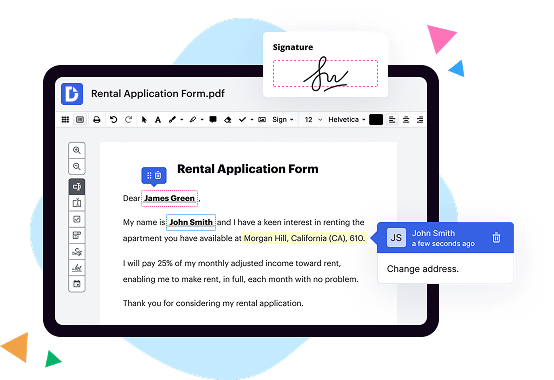
First on the list is DocHub, a robust online PDF editor that offers seamless document signing capabilities. With its user-friendly interface and intuitive features, DocHub makes it easy for you to edit, sign, and collaborate on documents with others. Whether you're a student, professional, or just need to handle documents on a regular basis, DocHub provides a reliable solution.
Moving on, we have ADSS Signing Server, which focuses specifically on digital signatures and document protection. This server-based solution ensures the integrity and authenticity of your documents, making it ideal for organizations that require strong security measures. ADSS Signing Server boasts advanced encryption technology and compliance with industry standards, providing peace of mind when it comes to document security.
Last but not least, SignCenter offers a comprehensive suite of electronic signature services. With SignCenter, you can easily send, track, and manage legally binding documents for signature. It simplifies the signing process and eliminates the need for paper-based contracts, speeding up your workflows and enhancing efficiency.
So, in summary, while all three options have their own strengths, DocHub stands out with its versatile PDF editing capabilities and integrated signing features. ADSS Signing Server focuses primarily on robust document security, while SignCenter offers a comprehensive solution for electronic signatures. Ultimately, the choice depends on your specific needs and priorities.
DocHub vs ADSS Signing Server vs SignCenter: which is better for Enterprises?
While ADSS Signing Server and SignCenter are good solutions to work with PDFs online, DocHub offers greater capabilities to help individuals and businesses digitize their documents and make them run smoothly across different devices and your favorite apps.
DocHub vs ADSS Signing Server vs SignCenter: which is better for small businesses?
ADSS Signing Server and SignCenter are good options for editing, signing, and sharing PDFs. However, DocHub offers a more comprehensive featureset that includes organizations, reusable templates, advanced eSignatures, seamless Google integrations, and more that are perfect for small businesses, helping them simplify and streamline document editing, sharing, signing, and form completition.
What is DocHub?
DocHub is a Google-integrated PDF editor and eSignature solution that helps you get your PDFs done online, using any device. DocHub comes with an online PDF editor, advanced eSignatures, PDF forms, reusable templates, and straightforward Google integrations so you can maximize your productivity when working within your favorite Google apps.
What is ADSS Signing Server and how does it work?
ADSS Signing Server is an incredible tool that allows you to securely sign your documents electronically, saving you time and effort. It is designed to streamline your signing process and make it more efficient. Let's dive into how it works!
Firstly, the ADSS Signing Server utilizes advanced cryptographic technology to ensure the authenticity and integrity of your documents. This means that when you sign a document using this server, you can trust that it hasn't been tampered with and that it genuinely came from you.
When you want to sign a document, you simply upload it to the ADSS Signing Server. It then applies a digital signature to the document, which serves as an electronic seal of approval. This signature is unique to you and cannot be replicated or tampered with.
The signing process is incredibly straightforward and user-friendly. You don't need to be a tech-savvy person to navigate and use the ADSS Signing Server. It simplifies the signing process by guiding you through each step, ensuring that you don't miss any crucial details.
The server also offers additional features to enhance your document management experience. For example, it allows you to manage multiple signers and specifies the signing order. This is especially useful when dealing with complex documents that require the input of multiple parties.
One of the great advantages of the ADSS Signing Server is that it eliminates the need for physical paperwork. Say goodbye to printing, scanning, and mailing documents for signatures. With this server, you can sign your documents electronically from anywhere at any time, saving both time and resources.
In addition to its convenience, the ADSS Signing Server is highly secure. It employs robust encryption algorithms to protect your documents and signatures from unauthorized access. This means that your sensitive information remains confidential and cannot be compromised.
To sum it up, the ADSS Signing Server is a user-friendly and efficient electronic signing solution that simplifies your document signing process. It offers advanced security measures to ensure the integrity and authenticity of your documents. By using this server, you'll be able to sign documents electronically, save time, and reduce paper waste. It's a game-changer for anyone looking to optimize their document workflow. So why not give it a try and experience the benefits for yourself?
What is SignCenter and how does it work?
SignCenter is a remarkable tool that has revolutionized the way individuals and businesses create high-quality signage. It is designed to be user-friendly and efficient, allowing you to effortlessly design, customize, and order signs for a wide range of purposes.
When you first visit SignCenter's website, you will be greeted with a sleek and intuitive interface, making the sign creation process a breeze. The platform offers a variety of templates, fonts, colors, and graphics to choose from, allowing you to tailor your sign to your specific needs.
To get started, simply select a template that catches your eye, and then begin customizing it to reflect your unique message or brand. Whether you're looking to create eye-catching advertisements, engaging informational signs, or attention-grabbing displays, SignCenter has all the tools you need.
One of the standout features of SignCenter is its user-friendly editing capabilities. You can easily resize and reposition elements, change fonts and colors, and even add logos or images to your signs. The intuitive interface ensures that even those with limited design experience can effortlessly create stunning signs.
Once you are satisfied with your design, SignCenter makes the ordering process quick and simple. With just a few clicks, you can select the size, material, and quantity of your signs. SignCenter also offers a range of shipping options to ensure that your signs arrive promptly and in pristine condition.
Thanks to SignCenter's commitment to excellence, you can have peace of mind knowing that your signs will be printed using state-of-the-art technology and high-quality materials. The attention to detail and craftsmanship ensures that your signs will be visually striking, durable, and built to withstand the test of time.
In summary, SignCenter is the go-to solution for anyone in need of professional, customized signs. With its user-friendly interface, versatile design options, and top-notch printing process, SignCenter empowers individuals and businesses of all sizes to create visually stunning signs that effectively communicate and captivate.
Is DocHub free?
Yes. DocHub's free plan is a perfect fit for one-offs or occasional projects. You can start using DocHub’s Free Plan straight away after completing the quick account registration. No learning is needed. The DocHub Pro Plan has a 30-day free trial so you have enough time to test the product.
Is ADSS Signing Server free to use?
Yes, the ADSS Signing Server is absolutely free to use. You can take advantage of its remarkable features without any cost whatsoever. It provides a seamless and secure digital signing experience that ensures the integrity and authenticity of your documents. With ADSS Signing Server, you can easily sign and verify documents with just a few clicks. It offers an intuitive user interface that simplifies the signing process, allowing you to efficiently manage your digital signatures. Moreover, ADSS Signing Server has robust security measures in place, assuring you of complete confidentiality and compliance with industry regulations. So, go ahead and embrace the power of digital signing with ADSS Signing Server, completely free of charge.
Is SignCenter free to use?
Yes, SignCenter is absolutely free to use! With SignCenter, you can easily create stunning and professional signs without any cost. It provides a user-friendly platform that allows you to design customized signs to meet your specific needs. Plus, SignCenter offers a wide range of templates, fonts, and graphics to help you make eye-catching signs that grab attention. Whether you need signs for your business, event, or personal use, SignCenter has got you covered. Start creating your sign today and experience the convenience and quality of SignCenter, all for free! So don't hesitate, give it a try and see for yourself how SignCenter can elevate your sign-making game, no strings attached!
What is DocHub’s cost and pricing?
DocHub has straightforward pricing that includes one free plan and one paid plan. If you need to get documents done once in a while, the Free Plan is just the thing for you. It includes all the PDF tools to help you edit, sign, share, and organize your documents. For a growing document workflow, we recommend the DocHub Pro plan at $14 per user per month. It includes unlimited PDF capabilities and priority tech support. You can even test it free for 30 days before buying.
Is ADSS Signing Server safe?
Yes, the ADSS Signing Server is indeed safe. Rest assured, we prioritize the security of your documents and data above all else. With our cutting-edge technologies and robust encryption measures, your information remains fully protected throughout the signing process.
Our expert team has designed the ADSS Signing Server to meet the highest standards of security. By utilizing industry-leading encryption algorithms and implementing comprehensive authentication protocols, we guarantee that your documents are in safe hands.
Furthermore, our server undergoes regular audits and security assessments to ensure its integrity and mitigate any potential vulnerabilities. We are committed to maintaining a safe environment for your important documents, fostering trust and confidence in our services.
Feel confident in utilizing the ADSS Signing Server, as it offers a reliable, secure, and seamless solution for all your signing needs. Embrace the peace of mind that comes when you entrust your documents to a platform that places security at the forefront of its operations.
Make the smart choice and join countless satisfied users who have experienced the safety and reliability of the ADSS Signing Server. Your data deserves the utmost protection, and we are here to provide it. Dive into a world where convenience and security go hand in hand and empower yourself with a trusted digital signing solution.
Is SignCenter safe?
Yes, SignCenter is indeed a safe platform for all your sign needs. Our team takes great pride in maintaining strict security measures to ensure the safety and confidentiality of your personal information. We prioritize the protection of your data and use advanced encryption technology to safeguard your privacy.
When it comes to the quality of our signs, rest assured that we consistently deliver exceptional results. Our skilled professionals employ state-of-the-art equipment and premium materials to create signs that are both visually stunning and long-lasting. We understand the importance of clear communication, and our signs are designed to effectively convey your message to your intended audience.
Furthermore, our user-friendly interface makes the sign creation process seamless and hassle-free. Our website is intuitively designed, allowing you to easily navigate through various options and customization features. Whether you need signs for your business, events, or personal use, we provide a wide range of templates and customization options to meet your unique requirements.
Customer satisfaction is our top priority, and we strive to deliver a seamless experience from start to finish. Our dedicated customer support team is always ready to assist you, addressing any concerns or queries promptly and professionally. We value your trust and work tirelessly to ensure that your experience with SignCenter is positive, efficient, and secure.
In conclusion, SignCenter is a reliable and secure platform where you can create high-quality signs for your diverse needs. Our commitment to safety, exceptional craftsmanship, and customer satisfaction sets us apart. Let SignCenter be your go-to choice for all your sign requirements, and experience the peace of mind that comes with our dependable service.
What are the main DocHub alternatives?
The main DocHub alternatives are Lumin PDF, Small PDF, PDF escape, and others. However, DocHub’s ease of use, flexibility, affordability, and deep Google integrations are the reasons why DocHub is ahead of the competition.
What are the 10 best ADSS Signing Server alternatives?
There are numerous impressive alternatives to ADSS Signing Server that you can explore. One highly recommended option is DocHub, which offers a seamless and user-friendly experience. With DocHub, you can easily sign, edit, and share documents hassle-free. But wait, there's more! Let's take a closer look at the top 10 alternatives that deserve your attention.
1. DocHub: With its intuitive interface and comprehensive features, DocHub emerges as a standout alternative to ADSS Signing Server. It allows you to electronically sign documents, collaborate with others, and securely store files in the cloud.
2. SignRequest: A reliable choice that simplifies the signing process. SignRequest allows you to sign documents quickly and effortlessly. It also integrates seamlessly with various platforms, ensuring maximum convenience.
3. Adobe Sign: With the trusted Adobe brand name, Adobe Sign offers a professional solution for document signing. This feature-rich platform enables you to manage your documents efficiently and provides a smooth signing experience.
4. PandaDoc: A versatile alternative that not only allows you to sign documents but also streamlines your entire document workflow. PandaDoc offers advanced features such as document tracking, templates, and payment integrations.
5. HelloSign: Known for its simplicity, HelloSign ensures a seamless signing process for both individuals and teams. From signing contracts to requesting signatures, HelloSign offers a user-friendly and efficient solution.
6. CocoSign: Providing a straightforward and secure e-signature experience, CocoSign is worth considering. It offers a range of signing options, including drawing, typing, and uploading signatures, while keeping your documents protected.
7. SignEasy: Perfect for both personal and professional use, SignEasy offers a reliable and straightforward platform for signing documents on the go. It supports a wide range of file formats and provides integrations with popular cloud storage services.
8. eversign: This popular alternative delivers a robust set of features to streamline your document signing process. eversign allows you to create templates, invite multiple signers, and track documents to completion.
9. RightSignature: Designed with ease of use in mind, RightSignature offers a user-friendly interface and an extensive set of features. It allows you to sign documents digitally, saving time and eliminating the need for printing and scanning.
10. SignNow: This versatile alternative offers a wide range of signing options, including mobile signing and in-person signatures. SignNow provides a comprehensive solution for document management and collaboration.
Now that you're aware of these excellent alternatives, you can explore each one based on your specific requirements and preferences. Remember, choosing the right e-signature solution can greatly enhance your productivity and simplify your document management process. Happy signing!
What are the 10 best SignCenter alternatives?
If you're in search of top-notch alternatives to SignCenter, look no further! We've curated a list of ten exceptional options, each with its own unique strengths and features to fulfill your needs. One standout alternative, and our first mention, is DocHub. But fret not, we won't solely fixate on it! So, without further ado, let's explore the diverse selection of alternatives:
1. DocHub: Combining simplicity and functionality, DocHub lets you effortlessly sign and edit documents online. Seamlessly navigate through its intuitive interface and enjoy a plethora of powerful features.
2. Adobe Sign: With its brand reputation and extensive range of tools, Adobe Sign empowers you to sign documents electronically with ease. Its comprehensive security measures ensure your documents are safe and protected.
3. PandaDoc: Offering a delightful user experience, PandaDoc simplifies the entire document signing process. Collaborate with others seamlessly and track document progress effortlessly.
4. HelloSign: Bring efficiency to your document workflows with HelloSign. This user-friendly platform makes it a breeze to eSign documents and request signatures from others. Say goodbye to the hassle of printing and scanning!
5. Docusign: With millions of users worldwide, Docusign is a reliable and widely recognized eSignature solution. Streamline your document processes and enhance productivity with their feature-rich platform.
6. SignRequest: Designed for simplicity and effectiveness, SignRequest enables you to send and sign documents in a matter of minutes. It integrates seamlessly with popular productivity tools, making your workflow even smoother.
7. SignNow: Enjoy a seamless signing experience with SignNow. Their user-friendly interface and advanced features, such as custom templates and document routing, ensure a hassle-free eSignature process.
8. eversign: Delivering an intuitive and versatile platform, eversign lets you easily sign documents online and collaborate with others in real-time. It offers robust security features and integrations with popular business tools.
9. SignEasy: As the name suggests, SignEasy makes signing documents a breeze. Their user-friendly interface, along with features like document templates and in-person signing, provides a smooth and efficient experience.
10. RightSignature: Rounding out our list is RightSignature, offering a simple and secure way to collect digital signatures. Customize your document signing workflow and track document status effortlessly.
Rest assured, each of these alternatives presents ample potential to meet your specific requirements. Now, explore their unique offerings and find the perfect fit to streamline your document signing process!