What is the difference between DocHub vs ABBYY FineReader vs. jPDFProcess?
When considering the different options for document management and PDF editing, it's important to explore the unique strengths offered by each solution. DocHub, ABBYY FineReader, and jPDFProcess are all powerful tools that can revolutionize your workflow, but let's dive into what sets them apart.
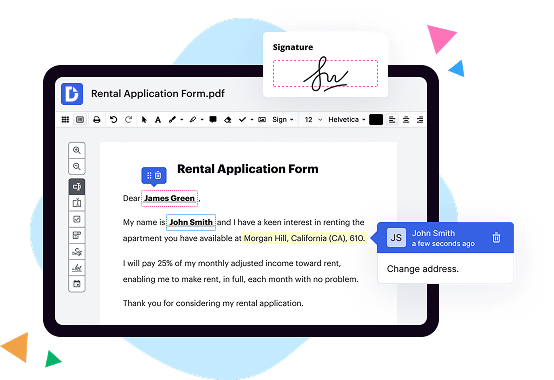
First on the list is DocHub, a user-friendly platform that excels in its simplicity and versatility. With DocHub, you can effortlessly edit, sign, and share PDF documents with ease. Its intuitive interface allows for seamless collaboration and document management, making team workflows a breeze. DocHub's extensive set of features ensures that your PDF editing needs are met, whether you need to highlight, annotate, or fill out forms. Plus, its integration with popular cloud storage services ensures that your files are always accessible wherever you go.
Next up is ABBYY FineReader, a powerful OCR (Optical Character Recognition) tool that specializes in transforming scanned documents into editable files. ABBYY FineReader's advanced recognition technology brings your paper-based documents to life, converting them into searchable and editable formats with stunning accuracy. Its robust OCR capabilities, combined with its ability to retain document formatting, make it an excellent choice for industries that heavily rely on accurate data extraction, such as legal, finance, and healthcare.
Finally, we have jPDFProcess, a comprehensive PDF library offering advanced PDF manipulation capabilities with a deep focus on Java-based solutions. Whether you need to extract text, merge documents, or add interactive elements to your PDFs, jPDFProcess provides the tools and flexibility to get the job done efficiently. Its seamless integration with Java-based applications makes it a go-to choice for developers looking to enhance their PDF workflows with minimal effort.
In conclusion, DocHub, ABBYY FineReader, and jPDFProcess all offer unique strengths in the realm of document management and PDF editing. While DocHub stands out for its user-friendly interface and seamless collaboration features, ABBYY FineReader shines with its powerful OCR capabilities, and jPDFProcess caters to Java-based development needs. Whether simplicity, accurate data extraction, or enhanced PDF manipulation is your priority, there's a solution tailored to your specific requirements. So, take a closer look at these exceptional tools, and elevate your document management experience to new heights.
DocHub vs ABBYY FineReader vs jPDFProcess: which is better for Enterprises?
While ABBYY FineReader and jPDFProcess are good solutions to work with PDFs online, DocHub offers greater capabilities to help individuals and businesses digitize their documents and make them run smoothly across different devices and your favorite apps.
DocHub vs ABBYY FineReader vs jPDFProcess: which is better for small businesses?
ABBYY FineReader and jPDFProcess are good options for editing, signing, and sharing PDFs. However, DocHub offers a more comprehensive featureset that includes organizations, reusable templates, advanced eSignatures, seamless Google integrations, and more that are perfect for small businesses, helping them simplify and streamline document editing, sharing, signing, and form completition.
What is DocHub?
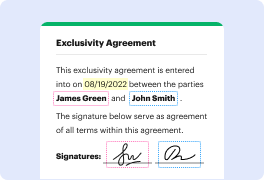
DocHub is a Google-integrated PDF editor and eSignature solution that helps you get your PDFs done online, using any device. DocHub comes with an online PDF editor, advanced eSignatures, PDF forms, reusable templates, and straightforward Google integrations so you can maximize your productivity when working within your favorite Google apps.
What is ABBYY FineReader and how does it work?
ABBYY FineReader is an incredible software that has revolutionized the way we handle documents. It is a powerful tool that allows you to effortlessly turn paper documents and PDFs into editable and searchable files. Let me explain how it works in a simple and straightforward manner.
When you come across a document that you need to scan or convert, ABBYY FineReader swoops in to save the day. It uses advanced optical character recognition (OCR) technology, which is just a fancy way of saying that it can "read" and understand text from images.
First, you scan or upload your document into the software, and that's where the magic begins. FineReader analyzes the scanned image or PDF file, identifying every single character on the page. It recognizes not only standard fonts, but also cursive handwriting and even text in various languages. Talk about impressive!
Once ABBYY FineReader has identified all the characters, it's time for the real work to start. The software takes those characters and reconstructs the entire document, preserving the exact layout, formatting, and even images. It ensures that important elements such as tables, headers, footers, and bullet points are captured accurately.
But wait, there's more! This user-friendly software allows you to edit and make changes to the recognized text. Say goodbye to tedious retyping. You can correct any errors, amend the layout, add or delete text, and rearrange pages with just a few simple clicks. It's like having a virtual document assistant right at your fingertips.
The best part? ABBYY FineReader doesn't just stop at converting documents. It goes above and beyond by making your files searchable. This means that you can easily find specific words or phrases within the text, saving you time and effort. No more aimlessly scrolling through long documents or manually skimming for information.
So, whether you're dealing with invoices, contracts, academic papers, or even personal documents, ABBYY FineReader empowers you to transform them into editable and searchable files. It's a game-changer for productivity and efficiency in the digital age.
In conclusion, ABBYY FineReader is a top-notch software that enables you to effortlessly convert paper documents and PDFs into editable and searchable files. With its advanced OCR technology and user-friendly interface, this remarkable tool saves you time, eliminates the need for manual retyping, and puts the power of editing and searching documents right at your fingertips. You'll be amazed at how seamlessly it works and how much it enhances your document management experience. Give it a try and discover a whole new level of convenience!
What is jPDFProcess and how does it work?
jPDFProcess is a powerful PDF library that offers an easy solution for working with PDF files in Java applications. It provides a wide range of functionality, allowing users to create, manipulate, and extract data from PDFs efficiently.
When you use jPDFProcess, you can confidently handle all aspects of PDF documents without any hassle. The library supports various features like merging multiple PDFs into a single file, splitting one PDF into multiple files, and adding watermarks or annotations. It even enables you to extract text, images, and other content from PDFs, making it ideal for data processing and analysis.
One of the fantastic capabilities of jPDFProcess is its ability to modify existing PDF files. You can add or remove pages, update content, and even modify the structure of the document. This gives you complete control over your PDFs and allows for seamless customization.
By utilizing the library's simple and intuitive API, you can effortlessly integrate jPDFProcess into your Java applications. Its active voice ensures smooth functionality, allowing you to focus on creating exceptional user experiences rather than getting tangled up in complex code.
When it comes to PDF manipulation, jPDFProcess is the go-to solution. With its reliable performance and extensive range of features, you can confidently handle all your PDF needs. Whether you are a software developer or a tech-savvy individual, jPDFProcess is your reliable companion for all your PDF-related tasks.
Is DocHub free?
Yes. DocHub's free plan is a perfect fit for one-offs or occasional projects. You can start using DocHub’s Free Plan straight away after completing the quick account registration. No learning is needed. The DocHub Pro Plan has a 30-day free trial so you have enough time to test the product.
Is ABBYY FineReader free to use?
Yes, ABBYY FineReader is indeed free to use! ABBYY FineReader is a fantastic software that allows you to easily convert documents and images into editable and searchable content. It's a powerful tool that can save you time and effort, especially when you need to extract information from printed materials.
Whether you're a student, a professional, or just someone looking for a convenient way to digitize your documents, ABBYY FineReader is here to help. With its user-friendly interface and advanced optical character recognition (OCR) technology, you can quickly and accurately convert your scanned files into editable formats such as Word, Excel, or PDF.
The best part about ABBYY FineReader is that it's free for personal use! You can download and install the software on your computer without any cost. Imagine the possibilities: effortlessly digitize your textbooks, organize important receipts, or transform paper documents into searchable archives.
By using ABBYY FineReader, you can unleash the potential of your scanned documents and unleash your productivity. So why wait? Give it a try, and experience the convenience and efficiency of ABBYY FineReader for yourself!
Is jPDFProcess free to use?
Yes, jPDFProcess is absolutely free to use! When it comes to utilizing this incredible software, you won't have to spend a penny. With jPDFProcess, you have all the power and convenience at your fingertips, without any cost. It's a fantastic tool that allows you to effortlessly handle PDF documents, from reading and modifying to creating and signing. So, rest assured, jPDFProcess is the perfect solution for all your PDF-related needs, and it won't put a dent in your wallet. Enjoy the ease and efficiency of jPDFProcess without any financial burden.
What is DocHub’s cost and pricing?
DocHub has straightforward pricing that includes one free plan and one paid plan. If you need to get documents done once in a while, the Free Plan is just the thing for you. It includes all the PDF tools to help you edit, sign, share, and organize your documents. For a growing document workflow, we recommend the DocHub Pro plan at $14 per user per month. It includes unlimited PDF capabilities and priority tech support. You can even test it free for 30 days before buying.
What are the plans and prices for ABBYY FineReader?
ABBYY FineReader offers various plans and pricing options based on the specific needs of users. The pricing details mentioned below are approximate and may vary depending on the region and specific requirements:
1. FineReader PDF Standard: This plan is suitable for individual users and small teams who need basic PDF editing and OCR capabilities. The approximate price starts at $199 for a perpetual license.
2. FineReader PDF Pro: This plan is designed for professionals and business users who require advanced PDF editing, collaboration, and automated processing. The approximate price starts at $299 for a perpetual license.
3. FineReader PDF Corporate: This plan is ideal for larger organizations that need advanced document processing, redaction, and validation capabilities, along with enhanced security features. The pricing for this plan is available upon request.
4. FineReader Server: It is a server-based OCR solution that offers high-volume document processing and data extraction capabilities for enterprises. The pricing for FineReader Server is available upon request.
5. FineReader Engine: It is a development toolkit for integrating OCR capabilities into custom applications and solutions. The pricing for FineReader Engine is available upon request.
Note: ABBYY also offers subscription-based pricing plans for FineReader PDF, which provide access to the software with additional benefits such as free product updates and technical support. Subscription pricing may vary based on the plan and duration selected.
It is recommended to visit the official ABBYY website or contact their sales team for the most accurate and up-to-date pricing information based on your specific requirements.
Is ABBYY FineReader safe?
Yes, ABBYY FineReader is absolutely safe to use. With its advanced technology and reliable reputation, you can trust that your documents are in good hands. ABBYY FineReader utilizes state-of-the-art security measures to ensure the confidentiality and integrity of your data. So rest assured, your sensitive information is well-protected.
Is jPDFProcess safe?
Yes, jPDFProcess is indeed a safe software solution. Designed to enhance your document processing experience, it provides a secure and reliable platform for manipulating PDF files. With its user-friendly interface and robust functionality, jPDFProcess offers peace of mind when it comes to handling sensitive documents. As a user, you can trust that your data and privacy are well-protected while using this software. So rest assured, jPDFProcess is a secure tool that prioritizes your safety and ensures a smooth PDF processing experience.
What are the main DocHub alternatives?
The main DocHub alternatives are Lumin PDF, Small PDF, PDF escape, and others. However, DocHub’s ease of use, flexibility, affordability, and deep Google integrations are the reasons why DocHub is ahead of the competition.
What are the 10 best ABBYY FineReader alternatives?
If you're searching for top-notch alternatives to ABBYY FineReader, look no further! We've compiled a list of the 10 best options that will surely impress you. One such fantastic alternative is DocHub. This versatile tool offers a plethora of features that make document editing a breeze. But that's just the beginning! Let's delve into the other remarkable alternatives.
1. OCR.space: With its accurate OCR technology, this powerful tool will effortlessly convert your scanned documents into editable text. It's quick, reliable, and user-friendly.
2. Soda PDF: Seamlessly combining simplicity and efficiency, Soda PDF allows you to edit, create, convert, and merge PDF files. Say goodbye to complex document management tasks!
3. Adobe Acrobat DC: Widely recognized for its excellence, Adobe Acrobat DC offers an extensive array of features and tools for all your PDF needs. It's a true powerhouse.
4. Foxit PhantomPDF: From document creation to collaboration, Foxit PhantomPDF has got you covered. Its intuitive interface and abundance of functions make it a remarkable choice.
5. Nitro Pro: Boost your productivity with Nitro Pro's comprehensive PDF editing and conversion capabilities. This feature-rich software will cater to all your document-related tasks effortlessly.
6. Smallpdf: If simplicity is what you seek, Smallpdf is your answer. This user-friendly platform enables you to perform various PDF operations without any hassle.
7. PDFelement: With its sleek design and broad range of functionalities, PDFelement allows you to edit, convert, annotate, and protect your PDFs like a pro. Prepare to be impressed!
8. Sejda PDF Editor: Enhance your document workflow with Sejda PDF Editor's impressive set of features. From editing text to merging files, this tool has it all covered.
9. Microsoft Word: As a trusted name in document processing, Microsoft Word offers powerful OCR capabilities and an array of editing tools, making it a reliable alternative.
10. PDF24 Tools: Rounding off our list is PDF24 Tools, a comprehensive online platform that simplifies your PDF editing experience. It's a true gem.
These ten exceptional alternatives to ABBYY FineReader will undoubtedly meet all your document needs. Whether it's OCR capabilities, editing features, or seamless file conversions, there's a perfect choice for everyone. Try them out and elevate your document management game today!
What are the 10 best jPDFProcess alternatives?
When it comes to finding the perfect alternative to jPDFProcess, look no further than DocHub! This fantastic tool offers an array of features that will surely meet your needs. But let's not stop there, because there are nine other remarkable alternatives that you should also consider. So, without further ado, here are the top 10 jPDFProcess alternatives:
1. DocHub: Offering a user-friendly interface and a wide range of editing and signing capabilities, DocHub takes the top spot on our list. It allows you to collaborate seamlessly with others and manage your documents effortlessly.
2. Nitro Pro: Known for its robust PDF editing features, Nitro Pro enhances your productivity and streamlines your workflow. Its intuitive interface makes it easy to create, edit, convert, and share PDFs.
3. Adobe Acrobat DC: A household name in the PDF world, Adobe Acrobat DC provides a comprehensive set of tools to create, edit, and manage your documents. With its advanced features, you can elevate your PDF game to the next level.
4. PDFelement: Empowering users with a sleek design and powerful features, PDFelement simplifies your PDF tasks. Whether it's editing, converting, or securing PDFs, this versatile alternative has got you covered.
5. Foxit PhantomPDF: Offering a secure and efficient PDF solution, Foxit PhantomPDF facilitates collaboration and boosts productivity. Its customizable interface and extensive editing capabilities make it an excellent choice for professionals.
6. Smallpdf: With its emphasis on simplicity and ease of use, Smallpdf allows you to handle PDFs effortlessly. From compressing files to converting between formats, this online alternative makes managing PDFs a breeze.
7. PDFescape: Offering a web-based platform, PDFescape lets you edit, annotate, and fill out PDF forms in a snap. Its intuitive interface and comprehensive features make it an ideal choice for both personal and professional use.
8. Sejda PDF Editor: Seamlessly combining editing features with a cloud-based workflow, Sejda PDF Editor enables you to work on your documents anytime, anywhere. Its collaboration tools and security features make it a standout choice.
9. Soda PDF: Boasting a user-friendly interface and a wide range of features, Soda PDF caters to all your PDF needs. From editing to converting, this alternative provides a smooth and productive experience.
10. PDF-XChange Editor: Equipped with advanced editing capabilities and a lightweight design, PDF-XChange Editor delivers an efficient PDF solution. Its versatile features and customizable interface make it worth considering.
Now that you have a fantastic lineup of alternatives to jPDFProcess, explore each one and find the perfect fit for your PDF requirements. Embrace the possibilities and elevate your document management game!