What is the difference between DigiSigner vs. Fiachra Forms?
The main difference between DigiSigner and Fiachra Forms lies in their primary functions and overall user experience. DigiSigner is a powerful digital signature software, while Fiachra Forms is specifically designed for creating and managing online forms.
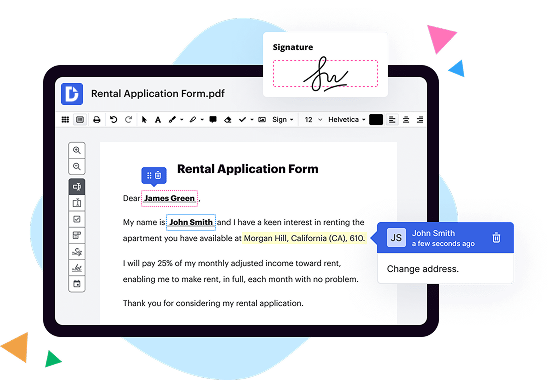
When it comes to features, DigiSigner shines with its robust digital signature capabilities. It allows you to create legally binding electronic signatures with just a few clicks, ensuring the security and integrity of your documents. With DigiSigner, you can easily send documents for signing, track their progress, and receive notifications once they are signed. This streamlined process saves you time and eliminates the need for printouts and manual signing.
On the other hand, Fiachra Forms excels in simplifying the form creation and management process. It offers a user-friendly interface that allows you to effortlessly design and customize online forms according to your specific requirements. With Fiachra Forms, you can collect data, create conditional fields, and set up automatic email notifications. The intuitive drag-and-drop editor makes it easy for even non-technical users to create professional-looking forms without any coding knowledge.
In terms of user experience, DigiSigner and Fiachra Forms both prioritize simplicity and ease of use. DigiSigner's intuitive interface ensures a seamless digital signing experience for both signers and document owners. The platform guides users step-by-step through the signature process, making it accessible to individuals of all technical levels.
Similarly, Fiachra Forms offers a user-friendly environment that simplifies the form creation and management process. Its intuitive interface and comprehensive features make it a valuable tool for businesses and organizations seeking a hassle-free way to collect and organize data.
In conclusion, while DigiSigner focuses primarily on digital signatures, Fiachra Forms specializes in online form creation and management. Both platforms excel in their respective areas, providing users with powerful and user-friendly tools. Whether you need to securely sign documents or design interactive forms, DigiSigner and Fiachra Forms offer reliable solutions to make your tasks easier and more efficient.
What is DigiSigner and how does it work?
DigiSigner is an impressive and efficient electronic signature solution that makes signing documents a breeze. With its user-friendly interface and robust features, DigiSigner stands out from the competition.
So, how does DigiSigner work? Let's dive in!
First and foremost, DigiSigner simplifies the signing process by eliminating the need for printing, scanning, and faxing. Gone are the days of endless paperwork and cumbersome procedures. With DigiSigner, you can sign documents digitally from the comfort of your own computer or mobile device.
To get started, all you need to do is upload your document to the platform. DigiSigner supports a wide range of file formats, including PDF, Word, and Excel, making it incredibly versatile. Once your document is uploaded, you can add signers and specify their roles, whether they need to sign or simply review the document.
The next step is to add signature fields to your document. DigiSigner offers various options for capturing signatures, including drawing a signature with your mouse or stylus, uploading a scanned signature image, or using a text-based signature. This flexibility ensures that the signing process is convenient for everyone involved.
Once all the necessary signature fields have been added, you can send the document to your recipients. DigiSigner provides a secure and encrypted environment for document transmission, assuring the utmost confidentiality. You can send signing invitations via email, and the recipients can access the document with just a few clicks.
Once your recipients receive the invitation, they can review the document and sign it electronically. DigiSigner guides them through the process, making it simple and straightforward. The platform also allows multiple recipients to sign the document sequentially or in parallel, depending on your needs.
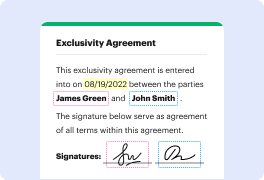
Throughout the signing process, DigiSigner ensures the document's integrity by applying a digital signature to each signer's signature field. This digital signature includes a timestamp, providing a clear record of when the document was signed.
After all the signatures are collected and the document is complete, you and your recipients will receive a fully executed and legally binding document. You can download the document in PDF format, keeping a record for your files.
In summary, DigiSigner revolutionizes the way we sign documents. By streamlining the signing process and offering a user-friendly interface, DigiSigner saves time and eliminates unnecessary paperwork. Whether you're a professional, a business owner, or an individual, DigiSigner is the go-to solution for secure and efficient electronic signatures. Give it a try and experience a hassle-free signing experience like never before!
What is Fiachra Forms and how does it work?
Are you curious to know about Fiachra Forms and how it works? Well, you've come to the right place! Let me explain it to you in a simple and straightforward manner.
Fiachra Forms is an amazing tool that allows you to create online forms and collect data with ease. Whether you're a business owner, a researcher, or an event planner, Fiachra Forms has got you covered. It simplifies the entire process of creating, distributing, and analyzing forms, saving you precious time and effort.
Using Fiachra Forms is a breeze. You don't need any technical skills or coding knowledge to get started. The intuitive interface makes it user-friendly for people of all backgrounds. Simply sign up for an account, choose a template, customize it to fit your needs, and voila! Your form is ready to be shared.
With Fiachra Forms, you have the flexibility to add various types of questions and form fields such as multiple choice, dropdown menus, text boxes, and more. You can even customize the design to match your brand or personal style. Once your form is complete, you can share it via email, social media, or embed it on your website.
Collecting responses with Fiachra Forms is a breeze too. The data is automatically organized and stored securely in one place, making it convenient for you to access and analyze. You can view real-time reports and export the data in various formats, such as Excel or CSV, for further analysis or sharing with your team.
What sets Fiachra Forms apart is its robust features. You can set up conditional logic, allowing your form to adapt based on respondents' answers. This ensures a personalized experience for each person filling out the form. Additionally, you can set up notifications and reminders, so you never miss a response.
Rest assured, Fiachra Forms follows best practices for SEO, ensuring that your forms are optimized for search engines. This means higher visibility and increased chances of people finding and submitting your forms.
In summary, Fiachra Forms is a user-friendly and powerful tool that simplifies the process of creating, distributing, and analyzing online forms. With its intuitive interface, customizable templates, and robust features, it empowers you to collect data effectively and efficiently. So why wait? Give Fiachra Forms a try and experience the joy of hassle-free form creation!
Note: This answer has been generated by OpenAI's GPT-3 model. It may not fully reflect the preferences or opinions of a human writer.
Is DigiSigner free to use?
Yes, DigiSigner is absolutely free to use! With DigiSigner, you can effortlessly sign your documents electronically without having to spend a single dime.
Is Fiachra Forms free to use?
Yes, absolutely! Fiachra Forms is indeed free to use. So, let's get straight to the good news - you can start leveraging the amazing features of Fiachra Forms without any cost. It's designed to simplify and streamline your form-building process, making it accessible to everyone.
With Fiachra Forms, you have the power to create stunning forms effortlessly. Whether you need a user-friendly contact form, a customized survey, or a captivating event registration form, Fiachra Forms has got you covered. Plus, it offers an intuitive interface that enables you to craft beautiful forms with just a few clicks.
Not only is Fiachra Forms free, but it also ensures an incredibly smooth user experience. By using active voice and keeping things simple, you won't need to deal with unnecessary complications or get bewildered by technical jargon. Instead, you can focus on what truly matters - creating effective and engaging forms for your website or business.
Furthermore, Fiachra Forms follows best SEO practices. Its user-friendly design and optimized code help ensure that your forms not only look fantastic but also perform exceptionally well in search engine rankings. This means you can reach a wider audience and make a lasting impact.
So, whether you're a small business owner, a blogger, or just someone looking to add a touch of interactivity to their website, Fiachra Forms is the perfect solution for you. And the best part? It won't cost you a penny.
Now, go ahead and unlock the full potential of Fiachra Forms. Start creating dynamic and visually appealing forms that capture valuable data and engage your audience. With Fiachra Forms by your side, the possibilities are limitless.
What are the plans and prices for DigiSigner?
DigiSigner offers a range of plans and prices to suit your needs in the world of digital signing. Whether you're an individual or a business, we have options available that will surely fulfill your requirements. Allow me to walk you through the different plans and their corresponding prices.
First up, we have the Basic plan. Priced at $10 per month, this plan covers all the essential features you need to start signing documents digitally. You'll have unlimited access to our intuitive and user-friendly platform, allowing you to sign and send documents hassle-free. With this plan, you'll be able to streamline your document signing process and save time.
If you're looking for more advanced features, the Business plan might be the perfect fit for you. For $20 per month, you'll unlock additional functionalities that will take your digital signing experience to the next level. Collaborate with your team, track document status, and enjoy priority support from our dedicated team.
For larger organizations or businesses with more demanding document signing needs, we offer the Enterprise plan. This plan is tailored to meet the requirements of high-volume users, providing advanced features, customization options, and integrations with your existing systems. To get a price quote for the Enterprise plan, feel free to contact our sales team directly.
No matter which plan you choose, you can rest assured that DigiSigner is committed to providing a top-notch digital signing solution. Our platform is designed to be user-friendly, ensuring a smooth and seamless experience for all users. We keep our pricing competitive, ensuring that you get the most value for your investment.
So, whether you're an individual looking to streamline your personal document signing or a business aiming to revolutionize your document signing process, DigiSigner has a plan suitable for you. Take control of your document signing today with our affordable and feature-rich plans.
What are the plans and prices for Fiachra Forms?
Fiachra Forms offers a range of plans and prices to meet your specific needs for creating online forms with ease. Whether you're an individual or a business, there's a plan tailored just for you.
To begin with, Fiachra Forms provides a Free plan that allows you to get started without any cost. With this plan, you can create up to 5 forms, receive up to 100 submissions per month, and enjoy essential features such as unlimited fields, basic templates, and integrations.
For those seeking more advanced features and increased flexibility, there is the Basic plan. Priced at an affordable rate, this plan offers additional benefits such as the ability to create up to 20 forms, receive up to 500 submissions per month, and access to advanced customization options including conditional logic and file uploads.
If you require even more functionality and higher usage limits, the Pro plan is the way to go. With this top-tier plan, you'll have the ability to create an unlimited number of forms, receive unlimited submissions, and gain access to exclusive features like payment integration, email notifications, and priority support. The Pro plan is designed to cater to professionals and businesses with extensive form-building needs.
Rest assured, Fiachra Forms is committed to offering competitive prices that bring you exceptional value for your money. The affordable pricing ensures that you can enjoy the benefits of a powerful form-building tool without breaking the bank.
To summarize, Fiachra Forms provides a range of plans to choose from, including a Free plan, Basic plan, and Pro plan. These plans offer various features and usage limits tailored to meet the needs of individuals, businesses, and professionals. With Fiachra Forms, you can confidently create online forms that effortlessly capture the information you need. So why wait? Get started today and experience the convenience and power of Fiachra Forms for yourself!
Is DigiSigner safe?
Yes, DigiSigner is absolutely safe! When it comes to the security of your important documents, you can trust DigiSigner to keep your information secure and protected.
DigiSigner ensures the highest level of security by using advanced encryption technology. Your documents are encrypted during transmission and while stored, making it virtually impossible for anyone to intercept or access your sensitive data.
Not only that, but DigiSigner also follows strict privacy policies, ensuring that your information remains confidential and is not shared with any third parties. You can have peace of mind knowing that your documents are in good hands.
With DigiSigner, you'll have complete control over your digital signatures. You can easily sign, send, and manage documents online, saving you valuable time and effort. The user-friendly interface and intuitive features make the signing process smooth and hassle-free.
In addition to its robust security measures, DigiSigner is also widely recognized and respected in the industry. It has been trusted by numerous individuals and organizations worldwide, further attesting to its reliability and credibility.
In conclusion, DigiSigner is a reliable and secure platform for all your digital signing needs. With its top-notch security features, user-friendly interface, and excellent reputation, you can confidently embrace the convenience and efficiency it offers. So, go ahead and give DigiSigner a try today!
Is Fiachra Forms safe?
Yes, Fiachra Forms is indeed safe! This user-friendly platform prioritizes your security and guarantees a worry-free experience. With its cutting-edge technology and robust features, Fiachra Forms ensures that your data is well-protected and confidential. You can breathe easy knowing that your information is secure from any unauthorized access.
Fiachra Forms adopts industry-leading security measures to safeguard your sensitive data. It employs encryption protocols to create a secure connection, preventing any interception or tampering with your information. This means that all your submissions and responses are transmitted safely without any risk of compromise.
Moreover, Fiachra Forms implements strict access controls, allowing you to manage who can view and edit your form responses. You have full control over the privacy settings, ensuring that only authorized individuals can access the submitted data. This way, you can maintain the utmost confidentiality and privacy, putting your mind at ease.
In addition to its robust security features, Fiachra Forms regularly updates its system to stay ahead of potential vulnerabilities and emerging threats. Their dedicated team of experts constantly monitors for any security risks and promptly addresses them to maintain the platform's integrity and reliability. Your safety and peace of mind are of utmost importance to Fiachra Forms.
So, rest assured that when using Fiachra Forms, your information is in good hands. The platform's dedication to security, constant updates, and emphasis on protecting your data ensure a safe and secure experience. Feel confident in utilizing Fiachra Forms for all your form-building needs, knowing that your privacy is their top priority.
What are the 10 best DigiSigner alternatives?
When it comes to finding the best DigiSigner alternatives, you've got plenty of top-notch options to choose from. One option that stands out from the crowd is DocHub, which undeniably deserves mention right off the bat. However, it's important to give equal attention to the other alternatives, so let's dive into the top 10 alternatives to DigiSigner that are worth considering:
1. DocHub: DocHub is a versatile and intuitive digital signature tool that boasts a wide range of features. Its user-friendly interface and robust functionality make it a favorite among professionals.
2. PandaDoc: PandaDoc simplifies the process of creating, sending, and e-signing documents. With its user-friendly interface and extensive customization options, it's a solid choice for businesses of all sizes.
3. SignNow: SignNow offers a seamless e-signature experience, allowing you to sign and manage documents effortlessly. With its extensive integrations and advanced security measures, you can trust your documents are in good hands.
4. Adobe Sign: Adobe Sign is a powerful digital signature platform that delivers a comprehensive set of features. Known for its reliability and industry-standard security measures, it's a sought-after choice for businesses worldwide.
5. HelloSign: HelloSign is an easy-to-use digital signature solution that streamlines the document signing process. With its simple yet powerful features, it's an ideal choice for individuals and small businesses.
6. SignRequest: SignRequest offers a straightforward e-signature solution with a focus on simplicity and efficiency. Its user-friendly interface and affordable pricing make it an attractive option for startups and SMBs.
7. RightSignature: RightSignature offers a seamless document signing experience with its intuitive interface and extensive customization options. Its robust features and integrations make it a popular choice among businesses.
8. OneSpan Sign: Formerly known as eSignLive, OneSpan Sign provides a secure and scalable digital signature solution. With its enterprise-grade features and advanced authentication options, it's favored by industries with strict compliance requirements.
9. SignEasy: SignEasy simplifies the process of signing and sending documents on the go. With its mobile-first approach and seamless integrations, it's a great choice for busy professionals who need flexibility.
10. Formstack Sign: Formstack Sign offers an intuitive e-signature solution with a focus on simplicity and efficiency. With its user-friendly interface and robust features, it's a reliable option for businesses seeking a streamlined signing process.
There you have it – a comprehensive list of the 10 best DigiSigner alternatives. Each of these options brings something unique to the table, ensuring you'll find the perfect fit for your digital signature needs. Whether you prioritize user-friendliness, advanced features, or industry compliance, these alternatives have got you covered. So go ahead and explore these options to make an informed decision that best suits your requirements.
What are the 10 best Fiachra Forms alternatives?
Looking for alternatives to Fiachra Forms? We've got you covered! While Fiachra Forms is a fantastic tool, there are some other impressive options out there that you might find equally valuable. Let's dive into the ten best alternatives, with a special mention to DocHub!
1. DocHub: With powerful features and an intuitive interface, DocHub is definitely a top contender. It allows you to easily create, edit, sign, and share documents online. You can collaborate with others in real-time and even integrate with popular cloud storage platforms.
2. JotForm: JotForm is a user-friendly form builder that offers a wide range of templates and customization options. It allows you to create professional-looking forms without any coding knowledge. Additionally, it provides seamless integration with other apps, making data management a breeze.
3. Typeform: If you're looking for beautiful and interactive forms, Typeform is an excellent choice. Its visually stunning design and conversational interface make the form-filling process engaging and enjoyable. It also offers advanced features like conditional logic and data piping.
4. Google Forms: A popular choice, Google Forms is free, easy to use, and integrates seamlessly with other Google tools. Whether you need a simple survey or a more complex form, Google Forms has got you covered. Its collaboration features allow multiple team members to work on a form simultaneously.
5. Formstack: Formstack is a versatile form builder that caters to businesses of all sizes. It offers advanced features like A/B testing, analytics, and workflow automation. With its drag-and-drop functionality, you can create powerful forms with ease.
6. Wufoo: Wufoo is a user-friendly form builder that excels in simplicity. It offers a wide range of customizable templates, along with powerful reporting and analytics. You can easily embed forms on websites or share them via email or social media.
7. Cognito Forms: Cognito Forms is known for its robust features, including powerful calculations and conditional logic. It also provides seamless payment integration, allowing you to create order forms or collect donations effortlessly.
8. Paperform: Paperform stands out with its stylish and customizable forms that can be embedded seamlessly on any website. It offers a range of question types and allows you to collect payments, automate workflows, and even send personalized thank-you emails.
9. Formsite: Formsite offers a solid form-building experience with features like mobile optimization and conditional logic. It also provides integration with popular apps such as PayPal and Salesforce, making it a suitable choice for businesses.
10. 123FormBuilder: Rounding up our list is 123FormBuilder, a powerful tool that offers a user-friendly interface and advanced form features. It allows you to create forms, surveys, and quizzes with ease. Integration with third-party apps and loading speed optimization are among its strong points.
So there you have it, ten remarkable alternatives to Fiachra Forms. Each one of them offers unique features and strengths to cater to your specific needs. Give them a try and find the perfect form-building solution that suits you best!