
How to notarize PDF documents online: A step-by-step guide

Last reviewed: October 2026
To notarize a PDF online, you prepare the document, upload it to a remote online notarization (RON) service, verify your identity, and sign it during a live video session with a commissioned notary. The notary then applies an electronic notary seal and a tamper-evident digital certificate, which creates a notarized PDF you can download and share. You can use DocHub to fill out and organize the PDF beforehand, but a commissioned notary must perform the notarization itself.
TL;DR
- Remote online notarization lets an eligible notary perform a notarial act through live audio-video technology instead of requiring an in-person appointment.
- Before you try to notarize a PDF online, check whether RON is allowed for your document and whether the organization receiving it accepts remote notarization.
- Review and prepare the PDF first, but don’t add your signature in advance if the notary needs to witness you signing.
- DocHub can help you edit text, complete permitted fields, organize pages, and download the prepared PDF. It does not act as an online notary.
- Once the document is ready, save it and upload it separately to the remote notarization provider you choose.
For decades, getting a document notarized meant printing it, driving to a notary’s office, waiting in line, and signing in person. That process still works, but it does not fit how most people and businesses handle paperwork today. Contracts, affidavits, and authorizations now arrive as PDFs, and many signers live far from the person who needs the signed document.
Remote online notarization is the natural evolution of traditional paper-based notarization. It keeps the core safeguards of a notary public, confirming identity and witnessing a signature, but moves the process to a secure video session. For a remote worker, a small business owner, or a family handling a power of attorney across state lines, this can save hours or days.
This guide explains what it means to notarize a PDF, how online notarization differs from electronic signatures, and how to complete the notarization process step by step. You will also learn how to prepare your PDF with DocHub so the online notary can accept it on the first try.
Disclaimer: The information contained in this blog post is provided for general informational purposes only and does not constitute formal legal advice.
What does it mean to notarize a PDF?
To notarize a PDF means having a commissioned notary public perform an official notarial act on an electronic document. The notary confirms the identity of the person signing, checks that the signer is acting willingly, and watches the signature happen. The notary then adds an electronic notarial certificate, an electronic notary seal, and an electronic signature to the file.
Common notarial acts include:
- Acknowledgments, where the signer confirms they signed the document willingly.
- Jurats, where the signer swears or affirms that the contents of the document are true.
- Oaths and affirmations, which are spoken commitments made before the notary.
A notarized PDF does not prove that the content of the document is accurate or legally sound. It proves that a verified person signed it in front of an authorized official. This is why notarized documents are often required for affidavits, powers of attorney, real estate transactions, and other legal matters.
Can you notarize a PDF online?
In many situations, yes. Remote online notarization, commonly shortened to RON, lets a signer and notary meet remotely using live audiovisual communication. The document can be electronic, the signer can sign electronically during the session, and the notary can complete the notarial act electronically when applicable law allows it.
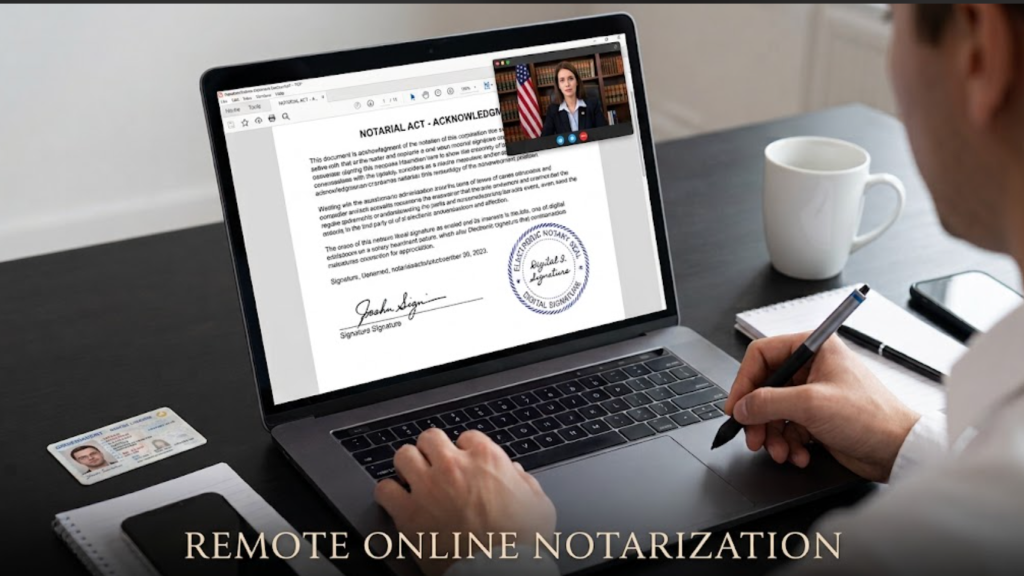
The key factor is usually the notary’s commissioning state, not the location of the signer. Many state laws allow a notary who is physically located in their commissioning state to notarize a document for a signer located elsewhere, including in another state. Some documents may still need traditional, in-person notarization, such as certain wills, documents headed to specific foreign countries, or records required by a particular county or court.
RON authorization across states
Remote notarization has become widely authorized in the United States. NASS reports that 47 states and the District of Columbia have laws allowing some form of remote electronic notarization. Florida’s notary law
 Open
For example, the National Notary Association’s current state-by-state platform information shows meaningful differences among jurisdictions, including states where RON isn’t authorized, and jurisdictions where legislation exists but remote notarization isn’t yet operational. Its platform information was current as of August 10, 2026.
Before choosing an online notary, check four separate questions:
- Is remote notarization allowed under the rules that apply to the notary?
- Can this particular type of document be notarized remotely?
- Will the organization receiving the document accept remote notarization?
- Does the notary need to use a particular approved technology or RON provider?
Keep in mind that online notarization eligibility varies by document; being able to notarize one file online does not guarantee every document qualifies.
Is an eSignature the same as online notarization?
No. These terms are often used interchangeably, but they describe different things. An electronic signature records a person’s intent to sign. A notarization adds an official verification by a notary. The table below explains the differences.
| Term | What it is | Who perfoms it | Is a notary involved? |
|---|---|---|---|
| Electronic signature (eSignature) | Any electronic mark showing intent to sign, such as a typed name or drawn signature. Recognized in the U.S. under the ESIGN Act and UETA. | The signer | No |
| Digital signature | A type of electronic signature backed by a digital certificate that links the signature to the signer and makes later changes to the document detectable. | The signer, using signing software | No |
| Electronic notarization (IPEN) | A notary notarizes an electronic document while the signer is physically present in the same room. | A commissioned notary, in person | Yes |
| Remote online notarization (RON) | A notary notarizes an electronic document while meeting the signer through live audio-video. | A commissioned notary, remote online | Yes |
The main takeaway is that a signature alone, even one secured by a digital certificate, is not a notarization. Electronic signatures and digital signatures are legally valid for many business agreements. However, when a document requires notarization, only a notary public can complete that step.
The Revised Uniform Law on Notarial Acts also distinguishes electronic and remote notarization and provides a model framework involving audiovisual communication and identity-proofing technology. States decide whether and how to adopt such rules.
How do you notarize a PDF online?
The online notarization process follows a consistent sequence of steps. These steps apply to most online notary services, although the specific screens may differ.
Step 1: Check whether remote notarization is appropriate
Start by confirming three things:
- The receiving party accepts a document notarized electronically,
- The document type can be notarized remotely,
- The notary service works with notaries commissioned in a state that permits RON.
Getting answers in writing, such as in an email, gives you a record if questions arise later.
Pay particular attention to higher-stakes documents such as wills, estate documents, real estate instruments, powers of attorney, court-related forms, or records intended for use outside the United States. Special rules may apply. If the document will be used abroad, ask whether it also needs an apostille.
Step 2: Prepare your PDF
Open the PDF and complete everything except the signature and notary sections. Fill in names, dates, addresses, and other required details. Check that every page is present, in the correct order, and easy to read. A tool such as DocHub lets you fill out fields and remove blank or duplicate pages. If the PDF needs basic corrections, its Edit and annotate PDFs tools support adding or editing text, dates, annotations, shapes, and other document elements.
Step 3: Fill in only what you’re supposed to complete beforehand
Generally, forms can be filled out before notarization, with some sections remaining blank until the signer is present with the notary. You may be able to provide information such as:
- your legal name;
- contact information;
- property or account information;
- descriptions;
- reference numbers;
- non-signature dates;
- other factual fields.
DocHub lets you type into PDFs and add fillable fields when a static document needs editable areas.
Step 4: Leave signature and notary fields alone
This is one of the easiest mistakes to avoid.
The notary must watch you sign, so do not sign the document in advance. Also, leave the notarial certificate, seal area, and any witness lines blank. The notary will complete those parts during the notary session. If you are unsure, check the notary service’s instructions before you add anything.
Prepare the document, but leave the required signature sections unsigned.
If you simply need to sign a non-notarized PDF, see DocHub’s guide to adding a signature to a PDF online. For documents that require notarization, follow the notary’s instructions instead.
Step 5: Save a clean copy of the prepared PDF
Once you’ve checked the file, save the final version as a standard PDF. Avoid password protection or editing restrictions, because the notary platform needs to place signature fields and the notary seal on the file. Give the file a clear, descriptive name that is easy to identify, such as “Affidavit-Smith-2026.pdf,” so it is easy to find later.
A descriptive filename helps, especially if you’re juggling several versions:
“Power-of-Attorney_Prepared-for-Notary.pdf“ or “Affidavit-Smith-2026.pdf.”
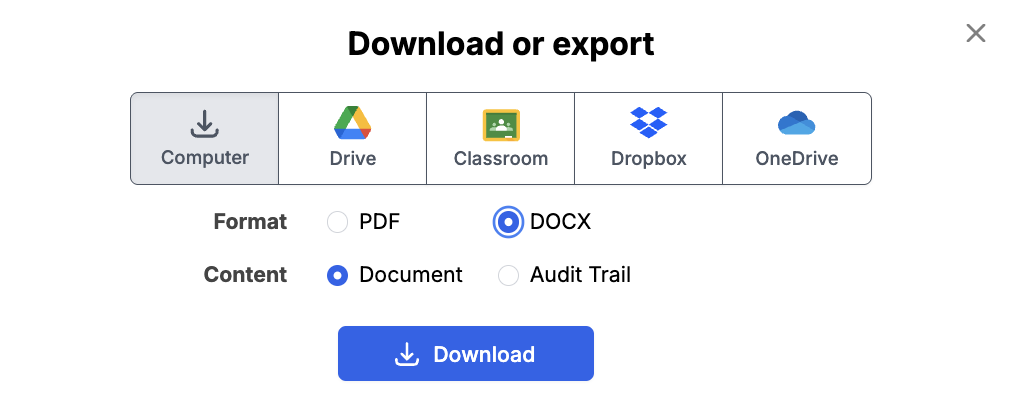
DocHub lets you download PDF documents, export them to supported cloud-storage services, flatten fields, or save other output versions through its print, download, and export tools.
Step 6: Upload your PDF to an eligible remote notarization service
Now you’re moving out of the PDF-preparation stage and into the actual notarization process. This distinction matters:
DocHub does not provide remote online notarization and does not integrate directly with RON services.
You should select a third-party, authorized RON platform. Create an account with your chosen online notary service and upload the PDF. If the document has two or more signers, add each person signing and their email address. Many services allow multiple signers to join a single session, even if they are in different places.
Step 7: Verify your identity
Identity verification is a core part of remote notarization.
NASS’s standards specify several methods for verifying the signer’s identity before the remote online notarization (RON) process begins, such as:
- Credential analysis, where you photograph your government-issued ID and the system checks it for signs of tampering.
- Knowledge-based authentication (KBA), where you answer questions generated from public and credit records.
- Visual comparison, where the notary compares your face on video with the photo on your ID.

Ensure you have a valid, unexpired government-issued ID ready, such as a driver’s license or passport. You will also need a device with a working camera, microphone, and a stable internet connection. Conducting a five-minute equipment check beforehand can help avoid any frustrating issues at the start of the session.
Step 8: Meet the notary by live video and sign
The notary will join the video call, confirm your identity, and may ask questions to make sure you understand the document and are signing willingly. You then apply your electronic signature while the notary watches. If the document needs a jurat, the notary will give you an oath or affirmation out loud.
The session is usually recorded. Many states require the notary to keep the audio-video recording and an electronic journal entry for a set number of years. This record serves as an audit trail if anyone later questions the transaction.
Step 9: Receive and save the notarized PDF
After the notary completes the notarial certificate and applies the electronic notary seal and digital certificate, the platform makes the notarized PDF available for download. Save a copy in a secure location and share the original electronic file with the recipient. Do not print, scan, and re-send it unless the recipient specifically asks for that, because a scan may lose the tamper-evident digital certificate.
Avoid reopening the notarized file in an editor and making casual changes. Alterations after notarization can create questions about the integrity of the completed document and may affect electronic protections attached to it.
How can you prepare a PDF for notarization with DocHub?
DocHub is not a notary service, and it does not perform notarial acts. Its role comes before the remote notary session and aims to help you get the PDF ready so the notary session goes smoothly. A clean, complete document reduces the chance of delays or rejection.
Here is how DocHub helps at the preparation stage:
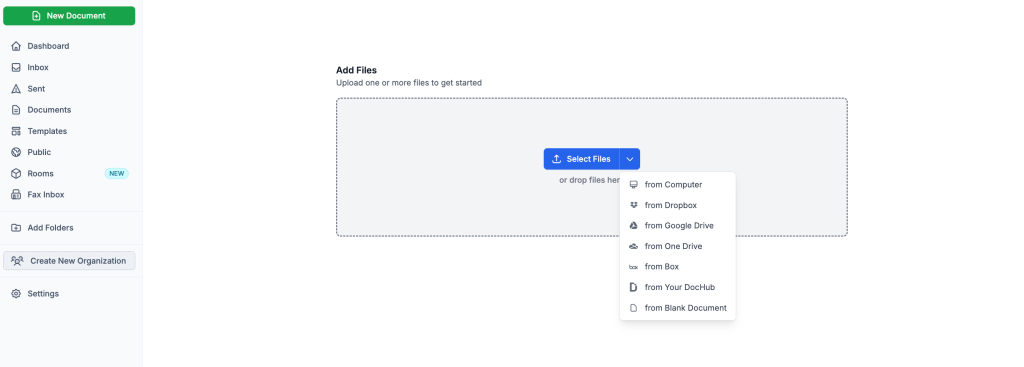
1. Upload and open PDFs from your device or connected cloud storage in your browser.
2. Edit and fill in text so names, dates, and addresses are correct and typed clearly.
3. Organize pages by rotating, reordering, or deleting pages so the document is in the right order.
4. Add fillable fields for information the signer must enter, while leaving signature and notary areas untouched.
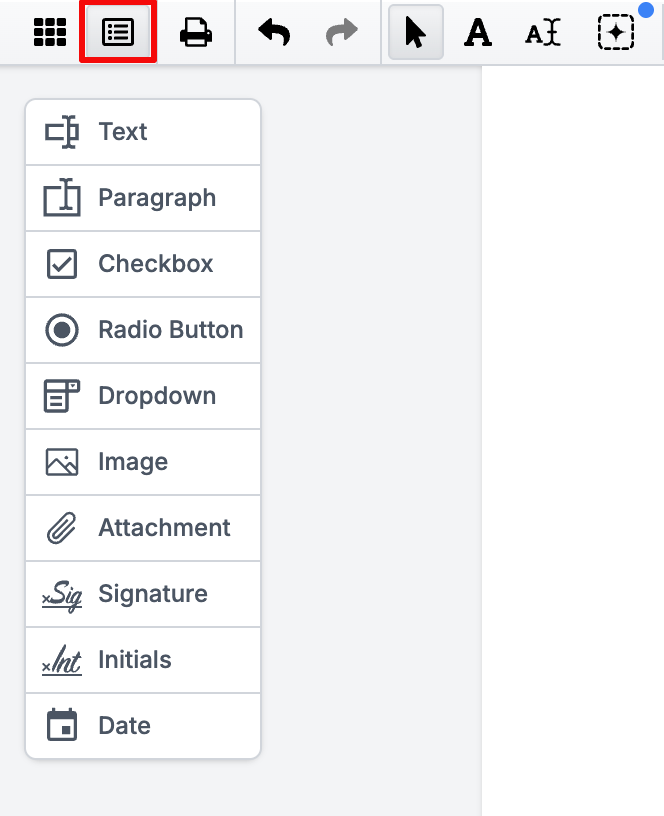
5. Export a standard PDF that you can upload to an online notary service.
If you’re creating a document for a standard eSignature workflow rather than notarization, DocHub also lets you sign the document yourself and add and assign signature fields for other parties. The separate guides on adding signature fields and lines to PDFs and adding multiple signers to a PDF explain the process.
For a notarized document, however, don’t confuse preparing a signing area with performing the notarization itself.
What should you check before sending a PDF to an online notary?
A short review before upload can save you from rescheduling a notary session. Use this checklist:
- The receiving party has confirmed that it accepts online notarization.
- All pages are included, in the correct order, and are readable.
- All required information is filled in, with no blank spaces where text should be.
- Signature, witness, and notary areas are left blank unless the instructions say otherwise.
- The file is not password-protected or locked against editing.
- Each signer has a valid, unexpired government-issued ID.
- Each signer’s name on the document matches the name on their ID.
- Each signer has a device with a camera, a microphone, and a stable connection.
- You know whether witnesses are needed and how the service provides them.
Name mismatches are a common issue. If your ID says “Jonathan” and the document says “Jon,” ask the notary service how to handle it before the session.
It’s a short list, but it catches most of the preventable problems before you’re already on camera with a notary.
Why might an online notary reject your PDF?
A notary can refuse to complete a notarization if something does not meet legal or professional standards. Understanding the common reasons helps you avoid them.
- The document is incomplete. Notaries generally should not notarize documents with blank spaces that a signer could fill in later.
- The document was signed before the session. If the notarial act requires the signature in the notary’s presence, a pre-signed PDF may need to be signed again.
- Identity proofing failed. An expired ID, a poor ID photo, or failed knowledge-based questions can stop the session.
- The name does not match. The signer’s name on the document should match the government-issued ID.
- The document type is not eligible. Some documents may require traditional in-person notarization under the applicable laws.
- The signer seems confused or pressured. Notaries must confirm that the person signing understands the document and is acting willingly.
- The file is unreadable or locked. Blurry scans, missing pages, or editing restrictions can prevent the notary from completing the certificate.
A notary cannot give legal advice or tell you which type of notarial act you need. If you are unsure, ask the receiving party or an attorney before the session.
What happens after a PDF is notarized?
Once the notary finishes, the PDF contains an electronic notarial certificate, the notary’s electronic signature, and an electronic notary seal. These elements are usually secured with a digital certificate, making the file tamper-evident. If anyone changes the document later, PDF readers that check signatures can show that the file was altered.
You can then send the notarized PDF to the recipient by email or through their upload portal. If the document will be used in another country, you may need to request an apostille from the notary’s commissioning state.
Keep a secure copy of the notarized file and any confirmation emails from the service. The notary keeps an electronic journal and a session recording as required by state law, which can help confirm the notarization if it is ever questioned.
Final thoughts
Notarizing a PDF online is now a practical, legally recognized option for most documents in most states. The process is simple when you follow the right order: confirm acceptance, prepare the PDF, verify your identity, and sign during a live session with a commissioned notary. Remember that an eSignature or digital signature is not the same as a notarization, and a notarized PDF should not be edited after the seal is applied.
Preparation is the step you control most. DocHub gives you a secure, browser-based way to edit, fill out, and organize PDFs before notarization, and to sign documents that require only a legally valid electronic signature rather than notarization. Explore DocHub to simplify your document workflows and get your paperwork ready the first time.
Glossary
- Notary public: A person commissioned or otherwise authorized under applicable law to perform specified notarial acts.
- Notarization: A formal process in which a notary performs an authorized act such as witnessing a signature, taking an acknowledgment, administering an oath, or completing another legally recognized notarial function.
- Notarial act: The specific official action performed by a notary.
- Remote online notarization (RON): A notarization conducted remotely using electronic documents and live audiovisual communication, subject to applicable law.
- Electronic notarization: A notarization involving electronic records and electronic notarial information. Electronic notarization doesn’t always mean the signer and notary are remote from one another.
- Credential analysis: Technology used to examine an identification credential, such as a government-issued ID, as part of identity verification.
- Knowledge-based authentication (KBA): An identity-proofing method that asks questions based on information associated with the person being verified.
- Notarial certificate: The part of the document or attached record in which the notary documents the notarial act performed.
Trusted sources
- National Notary Association — Remote Online Notarization: What you need to know
- National Notary Association — Remote Online Notarization Platforms
- National Notary Association — How do you identify signers for a remote online notarization?
- Cornell Legal Information Institute — 15 U.S.C. § 7001.
- Uniform Law Commission — Revised Uniform Law on Notarial Acts
FAQ
Can a PDF document be notarized online?
Yes, many PDF documents can be notarized through a remote online notarization service when applicable law permits the process, and the receiving organization accepts it. Requirements vary by jurisdiction and document type, so check before starting.
How do I notarize a PDF online?
To notarize a PDF online, prepare the document by filling out all the requested fields, but leave the signature areas blank. Choose an eligible remote online notarization provider, upload the file, verify your identity, and meet the notary by live video. Sign when instructed and download the completed notarized document.
Can I notarize a PDF with DocHub?
No. DocHub doesn’t provide remote online notarization and doesn’t directly integrate with RON services. You can use DocHub to prepare the PDF by filling in information, editing text, and arranging pages. After that, you export the file and upload it to a remote online notarization service, where a commissioned notary performs the notarial act.
Should I sign a PDF before sending it to an online notary?
No. The notary must usually watch you sign during the live video session, so signing in advance can force you to sign again or cause the notary to decline. Fill in everything else, but leave the signature, witness, and notary fields blank. Always follow the specific instructions from your online notary service, because requirements can differ by state and document type.
Can a scanned PDF be notarized?
Often, yes, as long as the scan is clear, complete, and readable. You will typically sign the scanned document electronically during the notary session, even if it already has a printed layout. If the scan already contains a handwritten signature, the notary may ask you to sign again in their presence. Note that notarizing a signature on a scanned document is different from certifying a copy, which some states do not allow.
Is online notarization legal in the United States?
Remote notarization is broadly authorized, but rules and availability differ by state. NASS currently reports laws permitting some form of remote e-notarization in 47 states and the District of Columbia. Always check the current rules applicable to your particular transaction.
Can I edit a PDF after it has been notarized?
You generally shouldn’t alter the completed notarized version. Changes may affect document integrity or create questions about what was actually notarized. If a correction is necessary, contact the notary or recipient and ask how they want it handled.
What ID do I need for an online notary?
Requirements vary by jurisdiction and provider. Remote notarization commonly involves government-issued identification along with additional identity-verification procedures. Check the RON platform’s requirements before your appointment.
Can I use DocHub to sign a document that doesn’t need notarization?
Yes. DocHub supports standard electronic signing, including typed, drawn, mobile, and uploaded signature methods. You can also prepare documents for other signers.
- TL;DR
- What does it mean to notarize a PDF?
- Can you notarize a PDF online?
- Is an eSignature the same as online notarization?
- How do you notarize a PDF online?
- How can you prepare a PDF for notarization with DocHub?
- What should you check before sending a PDF to an online notary?
- Why might an online notary reject your PDF?
- What happens after a PDF is notarized?
- Final thoughts
- Glossary
- Trusted sources
- FAQ