
Electronic signature legal validity: ESIGN, UETA, and other legal frameworks for eSigning explained

In the U.S., legally binding eSignature requirements are set out in two key laws: the federal ESIGN Act and state-level legislation like UETA. Meet those requirements, and your electronic signatures are just as valid as a pen-and-ink sign-off. But a legally binding eSignature is more than just a signature image. The signer must intend to sign, consent to electronic transactions where required, and the signed record must be accurate, accessible, and tied to the signer. DocHub brings it all together — document prep, signature requests, audit trails, and secure storage to ensure compliance for electronic signatures.
TL;DR
- The ESIGN Act gives electronic signatures and electronic records legal validity in many U.S. transactions.
- UETA provides a state-level framework that generally gives eSignatures the same legal standing as handwritten signatures.
- Legally binding eSignature requirements usually include intent, consent, signer attribution, record retention, and a reliable audit trail.
- Some documents and notices may still require paper, wet ink, notarization, or jurisdiction-specific handling.
- DocHub supports eSignature workflows with signing tools, signature requests, timestamps, audit trails, and downloadable signed records — all in line with major eSignature laws.
Disclaimer: The information contained in this blog post is provided for general informational purposes only and does not constitute formal legal advice.
What is an electronic signature?
An electronic signature (or eSignature) is a digital action that shows agreement with an electronic record. U.S. law generally gives electronic and handwritten signatures the same legal effect when the required conditions are met. The key point is that an electronic signature is not defined by how closely it looks like handwriting. What matters is whether the signature is attached to the document and whether the person intended to sign it.
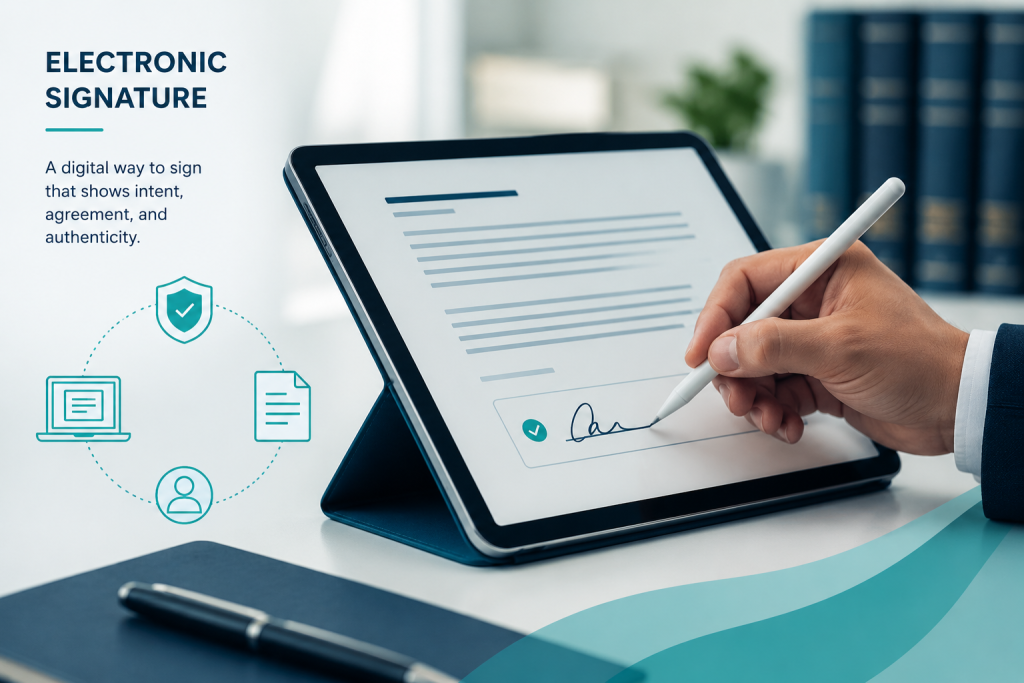
The ESIGN Act defines an electronic signature as “any electronic sound, symbol, or process attached to or associated with a contract or record” — and executed by someone with the intent to sign. That’s why many different actions can count as a valid signature, depending on the context:
- A typed name
- A checkbox
- A drawn signature
- A click-to-sign button.
A scanned signature on its own doesn’t prove much, but when it’s part of a controlled signing process that includes identity information, timestamps, consent records, and an audit trail, it becomes much easier to confirm who signed and when.
Curious how we got here and how signing methods evolved? Check out the evolution of electronic signature standards to see how signing has changed over time.
It’s also worth knowing the difference between electronic signatures and digital signatures. An electronic signature is a broad legal term. A digital signature is a specific technical method that uses cryptography and certificates to verify authenticity and document integrity.
What is the ESIGN Act?
The Electronic Signatures in Global and National Commerce Act, commonly called the ESIGN Act, is the primary federal law governing the legal validity of electronic signatures in the United States. It says that a signature, contract, or record related to a transaction may not be denied legal effect solely because it is in electronic form. It also says that a contract may not be denied enforceability solely because an electronic signature or electronic record was used to create it.
The ESIGN Act does not make every electronic signature automatically enforceable. Instead, it removes the old objection that “electronic” means “not legally valid.” Courts and businesses still look at the normal contract questions: Did the parties agree? Did the signer intend to sign? Can the signed record be produced later? Can the signature be connected to the signer?
ESIGN Act summary
Here’s what the ESIGN Act actually says, in plain terms:
- Electronic signatures and records carry the same legal weight as paper ones — for most interstate and foreign commerce transactions.
- A signature or contract can’t be rejected just because it’s electronic.
- If a law requires information to be provided “in writing,” businesses can only go digital if the consumer actively consents and is informed of their options (such as obtaining a paper copy or withdrawing consent).
- A solid eSignature process should clearly explain what the signer is agreeing to, capture their intent, keep an accurate record, and store the completed document for future reference.
What is UETA?
The Uniform Electronic Transactions Act (UETA) is a model state law created by the Uniform Law Commission to give electronic records and signatures the same legal standing as paper documents and handwritten signatures, clearing the path for electronic commerce at the state level.
UETA works hand in hand with the federal ESIGN Act. ESIGN establishes the national foundation, while UETA provides each state with a consistent framework for recognizing electronic transactions.
If your business operates across multiple states and regularly handles contracts, HR documents, onboarding forms, sales agreements, or client approvals, it’s worth understanding how both frameworks apply to you.
UETA legal requirements
To keep electronic transactions valid under UETA, a few key conditions need to be met:
- Each party must agree to conduct business electronically.
- The electronic record or signature must be linked to the relevant transaction.
- The record must be stored in a way that can be accurately reproduced and referenced later.
Meeting these requirements helps ensure your e-signature workflow holds up — whether you’re onboarding a new hire or closing a client deal.
ESIGN vs. UETA: What is the difference?
ESIGN and UETA establish a legal framework for using electronic documents and signatures in many business transactions. Let’s look at their key differences.
| Topic | ESIGN Act | UETA |
|---|---|---|
| Type of law | Federal law | State-level uniform law framework |
| Main purpose | Gives electronic signatures and records legal effect in many interstate and foreign commerce transactions | Gives electronic signatures and records legal effect in state transactions |
| Core principle | A signature or contract cannot be denied legal effect solely because it is electronic | Electronic records and signatures can be legally equivalent to paper and handwritten signatures |
| Consent | Includes detailed consumer consent rules for electronic records | Generally recognizes the party's agreement to conduct transactions electronically |
| Business impact | Important for online contracts, consumer disclosures, and interstate business | Important for state-level contracts, internal workflows, and local business transactions |
The main takeaway is that ESIGN and UETA are not competing laws. They are complementary. A business using eSignatures should design workflows that meet the practical expectations of both: clear consent, clear intent, reliable attribution, accurate records, and accessible retention.
What makes electronic signatures legally binding?
Electronic signature legal validity depends on the full transaction record, not just the visual signature. A well-designed signing workflow can actually provide more contextual evidence than a handwritten signature on paper — if it captures the right information.
Here are the legally binding eSignature requirements:
- Intent to sign — The signer must take a clear action to show they want to sign, like clicking a “Sign” button or typing their name. The clearer the interface, the stronger the intent.
- Consent to do business electronically — For B2B deals, conduct and context usually show consent. For consumers, ESIGN has stricter rules: they must actively agree, receive clear disclosures, and be able to access the format used.
- Attribution to the signer — This ties the signature to the right person. Think email addresses, IP addresses, timestamps, and authentication steps. The higher the stakes, the stronger the verification should be.
- Accurate record retention — Signed documents need to stay accurate and accessible. Under ESIGN, that means the record reflects the original content and can be reproduced for as long as required.
- Record integrity — You need to show the document hasn’t changed since it was signed. Version control, tamper-evident records, and audit logs all help if a dispute comes up.
- Audit trail — A solid audit trail logs every key moment: when the doc was sent, viewed, signed, and downloaded — along with signer details and timestamps. It’s one of the best ways to back up a signature’s validity.
How does DocHub support compliance for electronic signatures?
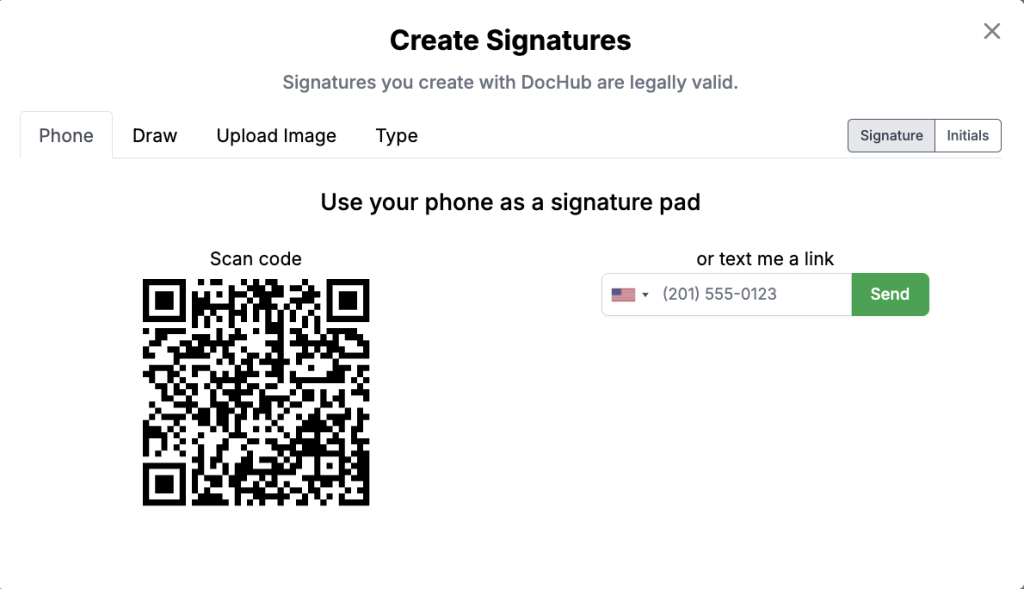
DocHub brings document editing, signing, sharing, and record management into one browser-based workspace. Users can upload a document, create a signature, place it where needed, and then save, share, or export the signed document. DocHub supports several ways to create a signature, including drawing, typing, scanning a code to sign from a phone, or uploading an image of a handwritten signature.
For teams that need to collect multiple signatures from others, DocHub’s signature request workflow is especially relevant. Businesses can prepare a document, add fields, send it for signature, track progress, and keep a record of signer actions. DocHub states that signed documents are legally binding and admissible in court under the ESIGN Act, and that actions and changes are recorded in an audit trail to support document security.
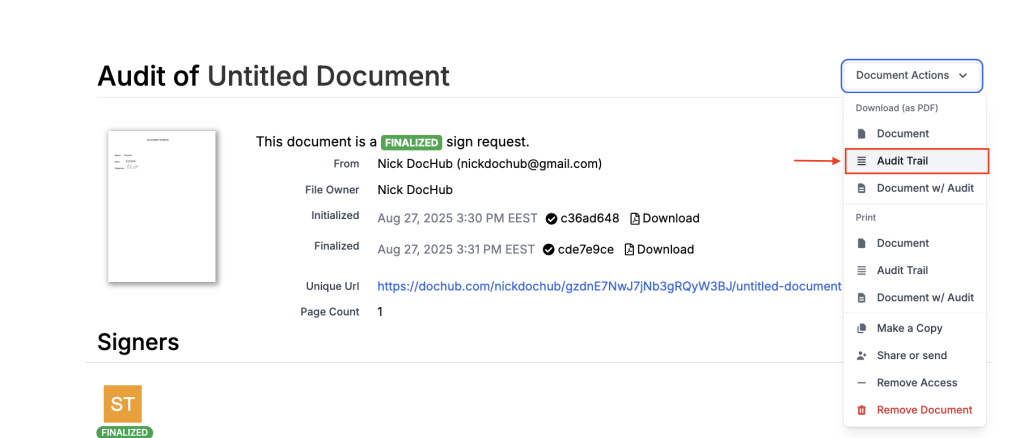
DocHub’s audit trail can record signer-identifying information such as email address, geolocation, browser and operating system, and IP address, along with signer and sender actions such as views, consent to eSign, email notifications, signatures, initials, and modifications. With DocHub’s Sign Requests, before-and-after document snapshots are automatically created for additional proof of authenticity.
Security is another part of a reliable signing process. DocHub states that documents processed in its editor are protected with end-to-end encryption between the user and server, and that it follows standards including CCPA, GDPR, PCI DSS, HIPAA, and others.
When are electronic signatures not appropriate?
Electronic signatures are widely accepted, but they’re not always the right fit. Certain transactions governed by the Uniform Commercial Code may not be subject to standard eSignature rules, depending on which section of the code applies. The ESIGN Act outlines several exceptions where traditional signatures are still required, including:
- Wills, codicils, and testamentary trusts
- Adoption, divorce, and other family law documents
- Certain court documents
- Notices related to utility termination, foreclosure, or eviction
- Health or life insurance cancellation notices
- Product recalls
- Documents connected to transporting hazardous materials.
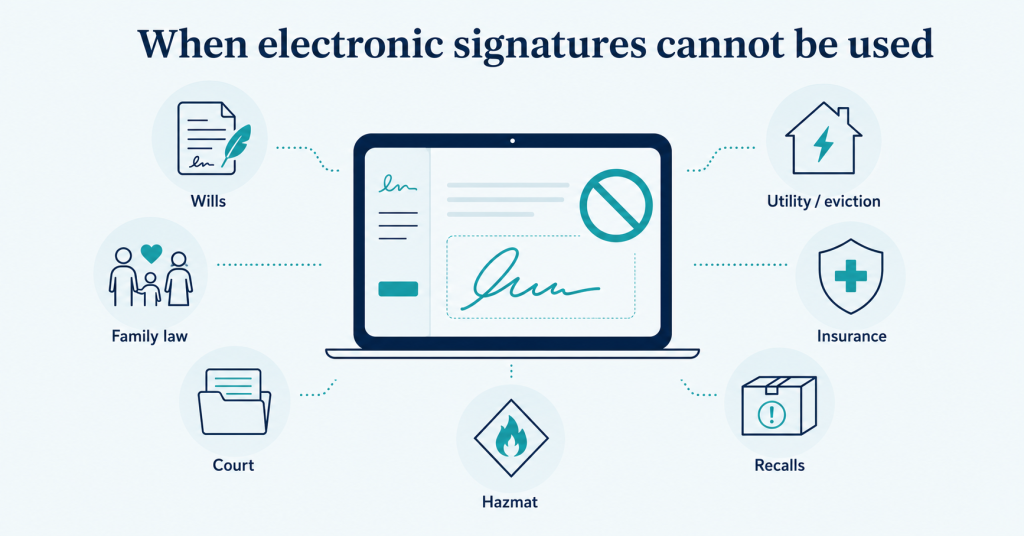
That doesn’t mean every document in those categories must be signed on paper. It just means ESIGN’s general rule may not be enough on its own — state law, court rules, notarization requirements, or industry regulations may still apply.
Before using an eSignature on high-stakes documents, check the rules for your document type and jurisdiction — especially for real estate, healthcare, finance, government filings, family law, estate planning, and regulated consumer notices.
How does eIDAS compare for international eSigning?
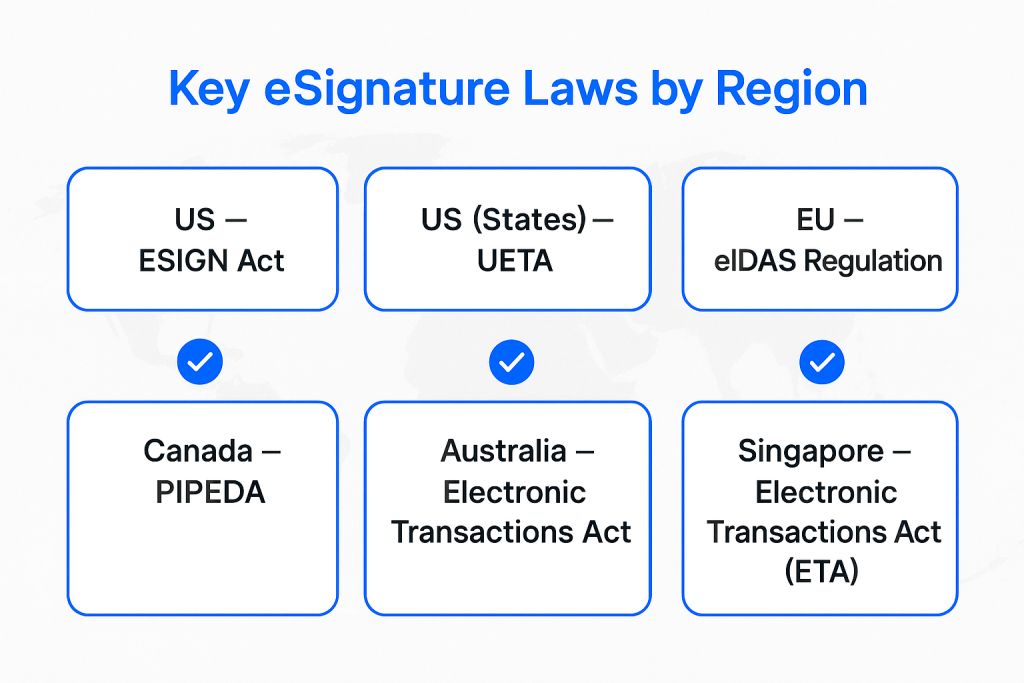
If you work with European customers or partners, eIDAS is the framework to know. Regulation (EU) No. 910/2014 establishes the legal rules for electronic identification and trust services across the EU.
eIDAS defines three levels of electronic signatures, each with increasing security and legal weight:
- Simple electronic signature – works for most routine agreements
- Advanced electronic signature – adds stronger identity and integrity controls
- Qualified electronic signature (QES) – the highest level, using a qualified certificate and signature creation device; legally equivalent to a handwritten signature under eIDAS
For U.S.-based teams, the practical lesson is simple: do not assume one global eSignature rule applies everywhere. ESIGN and UETA are central in the United States; eIDAS matters in the EU; and other countries may have their own requirements, like PIPEDA in Canada.
What are common myths about electronic signature legal validity?
Myth 1: “An eSignature must look like a handwritten signature.”
Not true. A signature can be a typed name, drawn mark, click, symbol, or process if it is connected to the record and used with the intent to sign. The law focuses on intent and association with the record, not whether the mark looks handwritten.
Myth 2: “Every eSignature needs a digital certificate.”
Not usually. Digital certificates can strengthen authentication and integrity, especially in higher-risk workflows, but many everyday electronic signatures are valid without a formal digital certificate. The right level depends on the document, risk, jurisdiction, and evidence needed.
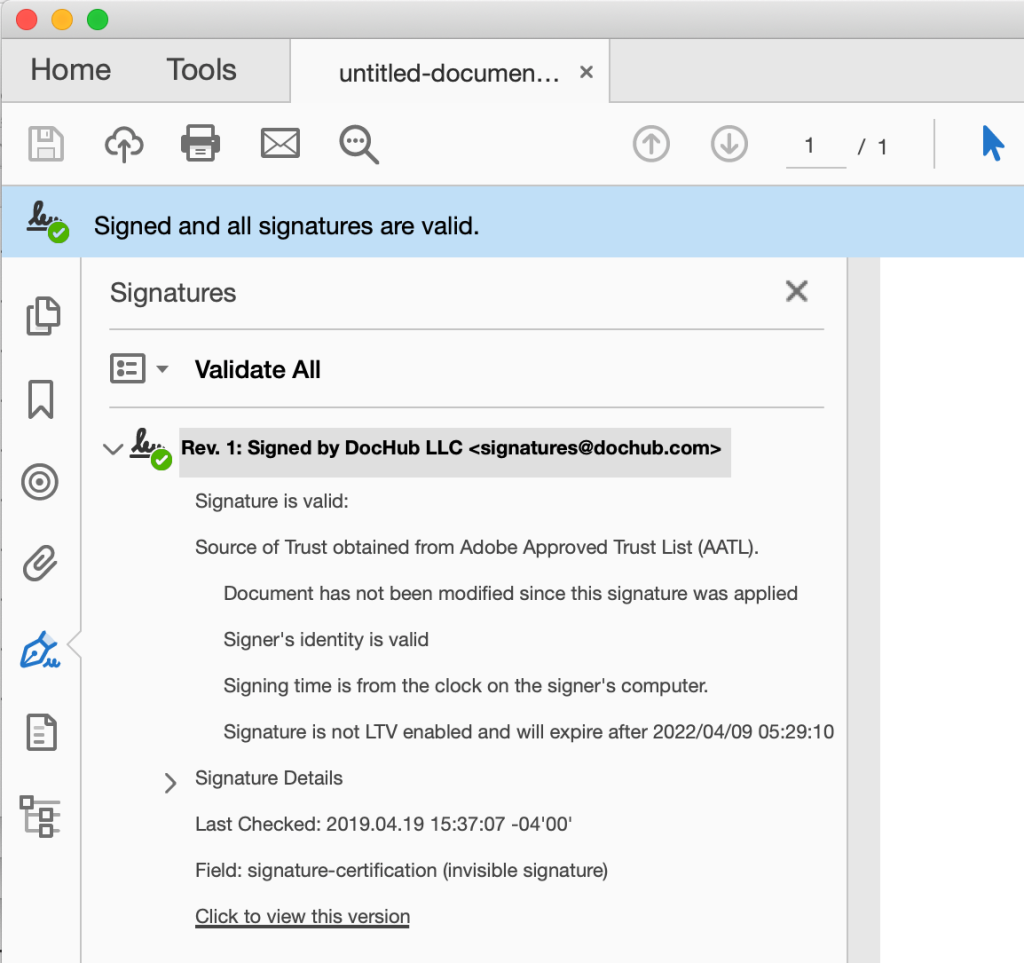
When you sign a document in DocHub, you can download it as a PDF with an embedded digital signature — proof that it’s authentic and hasn’t been touched since signing. You can get these digitally signed PDFs through certified document downloads or Sign Requests.
Myth 3: “A PDF signature image is enough.”
A signature image alone is weaker than a full eSignature workflow. A reliable process should capture who signed, when they signed, what document they signed, and whether the completed record can be reproduced later.
Myth 4: “Electronic signatures are automatically enforceable.”
Electronic format alone does not guarantee enforceability. A disputed contract may still fail if there was no agreement, no authority, unclear consent, fraud, missing required disclosures, or poor record retention.
Myth 5: “Compliance is only a legal department issue.”
Compliance for electronic signatures is operational. Sales, HR, procurement, finance, and customer support teams all influence whether documents are prepared correctly, sent to the right person, signed in the right order, and stored securely.
How can businesses use DocHub for legally sound eSigning?
You can learn how to create and add signatures to PDF files online by visiting our dedicated guide. Here’s a quick overview of how a typical DocHub signature process works, and how each step helps ensure your documents remain legally binding:
- Upload or import the document to DocHub.
- Add fillable fields, signature fields, initials, dates, or required text fields.
- Sign the PDF yourself and send the document as a Sign Request.
- Let each signer review and complete the document.
- Track completion status.
- Download the finalized PDF with audit trail.
- Store the completed document according to your retention policy.
This workflow supports the core needs behind legally binding eSignature requirements: clear presentation of the document, signer action, signer attribution, record retention, and later reproducibility.
DocHub is especially useful for teams that want eSigning connected to document preparation. Instead of editing a PDF in one tool, sending it through another, and storing the final file somewhere else, you can manage the document lifecycle in one place.
Final thoughts
Electronic signatures are no longer a workaround for paper. They are a recognized way to complete many business agreements, approvals, onboarding packets, forms, and contracts. The legal framework is built around a practical idea: if the parties intended to sign, agreed to use electronic records where required, and the record can be preserved and proven, the signature should not be rejected simply because it is electronic.
For businesses, the safest approach is to treat e-signing as a workflow, not a decorative signature field. Choose tools that help capture evidence, protect records, and make completed documents easy to access. With DocHub, teams can edit, sign, send, track, and store documents online while supporting the practical compliance steps that make e-signatures reliable.
Try DocHub today to streamline document signing, keep records organized, and make it easier to manage secure, legally binding agreements from anywhere.
FAQ
1. What is the eSign framework?
The eSign framework refers to the legal and technical standards that govern how electronic signatures are created, used, and enforced. In the U.S., this is largely shaped by the ESIGN Act and UETA, while other countries have their own equivalent laws and standards. The framework is designed to ensure that e-signatures are secure, trustworthy, and legally recognized across industries.
2. What regulation covers eSign?
In the U.S., electronic signatures are primarily governed by the ESIGN Act (Electronic Signatures in Global and National Commerce Act), passed in 2000. Many states also follow UETA (Uniform Electronic Transactions Act), which works alongside the ESIGN Act to give eSignatures the same validity as handwritten ones. Together, these two laws make sure your e-signed documents hold up in court. Other countries have their own laws governing electronic signatures, like eIDAS in the EU, so it’s important to research and understand the local laws.
3. What is a 21 CFR Part 11 electronic signature?
21 CFR Part 11 is a set of regulations from the U.S. Food and Drug Administration (FDA) that sets the rules for electronic records and signatures in the life sciences industry. It requires that eSignatures must be unique to each user, verifiable, and tied to a secure audit trail. If you work in pharmaceuticals, biotech, or medical devices, you’ll want to make sure your eSignature solution is 21 CFR Part 11 compliant.
4. What are the legal requirements for an electronic signature?
For an eSignature to be legally valid, it generally needs to show clear intent to sign, be linked to the signer, and be associated with the document being signed. The signer must also consent to using electronic signatures in place of a handwritten one. DocHub’s electronic signatures are built to meet these requirements, so you can use the platform to sign your forms and agreements with confidence.
5. What is an audit trail?
An audit trail is a record of signing events. It may show who viewed, signed, modified, or completed a document, along with timestamps and signer-identifying information. DocHub provides audit trails for Sign Requests and filled template copies.
Sources
- National Credit Union Administration: Electronic Signatures in Global and National Commerce Act (E-Sign Act)
- Uniform Electronic Transactions Act (UETA)
- eIDAS Regulation (910/2014) — EU-Lex
- Office of the Privacy Commissioner of Canada: The Personal Information Protection and Electronic Documents Act (PIPEDA)
- Legal Information Institute: 15 U.S. Code § 7003 – Specific exceptions
- US Laws Explained: The Ultimate Guide to Electronic Signatures: Are They Legally Binding?
- TL;DR
- What is an electronic signature?
- What is the ESIGN Act?
- What is UETA?
- ESIGN vs. UETA: What is the difference?
- What makes electronic signatures legally binding?
- How does DocHub support compliance for electronic signatures?
- When are electronic signatures not appropriate?
- How does eIDAS compare for international eSigning?
- What are common myths about electronic signature legal validity?
- How can businesses use DocHub for legally sound eSigning?
- Final thoughts
- FAQ
- Sources