
Electronic vs. digital signatures: Understanding the mechanics, differences, and applications

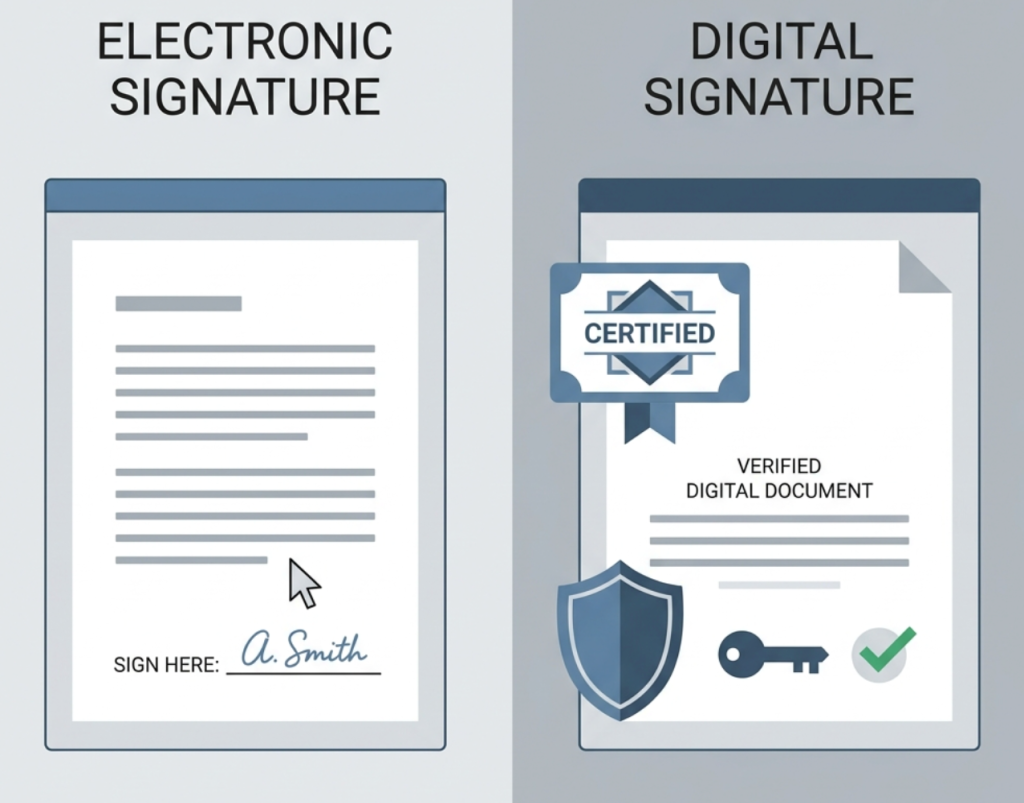
An electronic signature is an electronic mark—like a typed name, a hand-drawn signature, or even a click— that shows you intend to sign a document. A digital signature is a specific type of electronic signature that uses cryptography to verify the signer’s identity and ensure the document hasn’t been altered.
- Electronic signatures are broadly recognized and legally valid under U.S. laws such as ESIGN and UETA.
- Digital signatures add cryptographic security using public key infrastructure (PKI) and a digital certificate.
- All digital signatures are electronic signatures, but not all electronic signatures are digital.
- Electronic signatures suit everyday, low-risk agreements; digital signatures suit sensitive, high-value documents.
- DocHub supports both—legally binding eSignatures plus Adobe-approved digital certificates.
If you’ve ever signed a contract online, you’ve used an electronic signature. But things can get confusing because people often use “electronic signature” and “digital signature” interchangeably. While they’re related, they aren’t the same.
The difference matters more than you’d think. One is a broad legal term for signing electronically, the other is a specific security technology built on cryptography. Knowing when to reach for each one helps you pick the right tool for everything from a quick form to a high-stakes contract.
In this article, we’ll explain the differences between electronic and digital signatures, how each technology works, and when to use them.
At a glance
A few numbers show just how quickly signing has gone digital:
- The global digital signature market was valued at $9.85 billion in 2025 and is projected to reach $154.52 billion by 2034 (Fortune Business Insights, 2025).
- North America led the way, accounting for 38.0% of the global market in 2025 (Fortune Business Insights, 2025).
- 70%–80% of U.S. organizations use eSignature tools as part of their digital transformation efforts (Fortune Business Insights, 2025).
- A Forrester Total Economic Impact study of Adobe Sign found organizations saved roughly $6 per signed document and accelerated business cycle times dramatically (Forrester, 2019).
What is an electronic signature?
An electronic signature is any electronic sound, symbol, or process that shows you intend to sign a document. That’s the official definition from the U.S. ESIGN Act, and it’s intentionally broad.
In practice, that can mean a few different things. An electronic signature could be:
- Your name typed into a signature field
- A signature you draw with a mouse, finger, or stylus
- An uploaded image of your handwritten signature
- A click on a checkbox or an “I agree” button
- A scanned signature added to a PDF
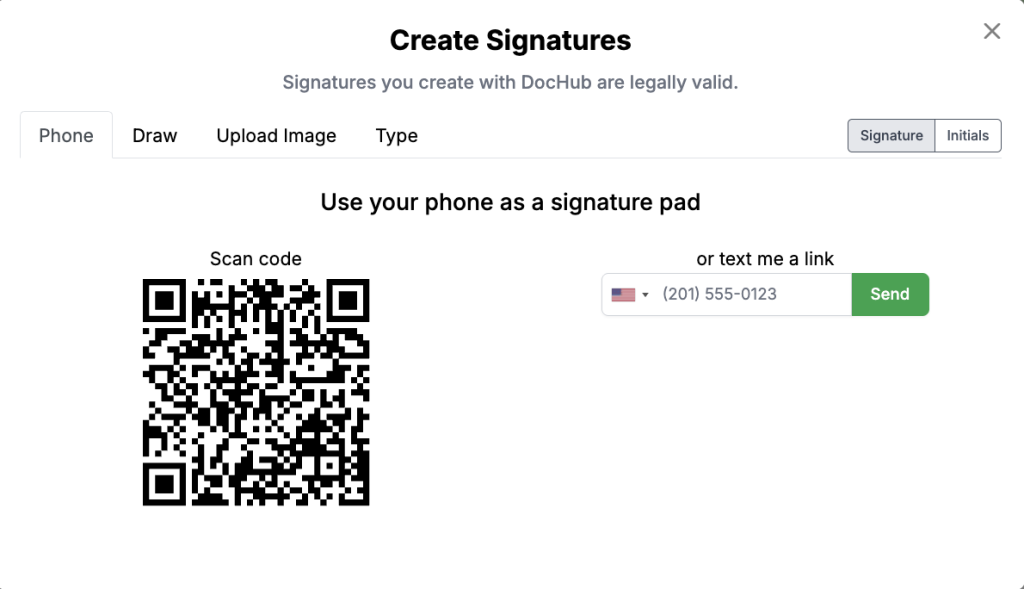
Electronic signatures are popular because they’re fast. Instead of printing, signing, scanning, and mailing, you can sign a digital document on your device and move on. You’ll see electronic signatures on all kinds of documents, like employment offers, service contracts, and invoices. If you just need to sign something fast, check our guide on how to sign a PDF online for free.
What electronic signatures don’t offer on their own is built-in identity verification or strong protection against tampering. That’s where digital signatures come in, which we’ll cover next.
Are electronic signatures legally valid?
Yes. Electronic signatures are generally legally valid in the United States and most countries worldwide, as long as they’re executed properly.
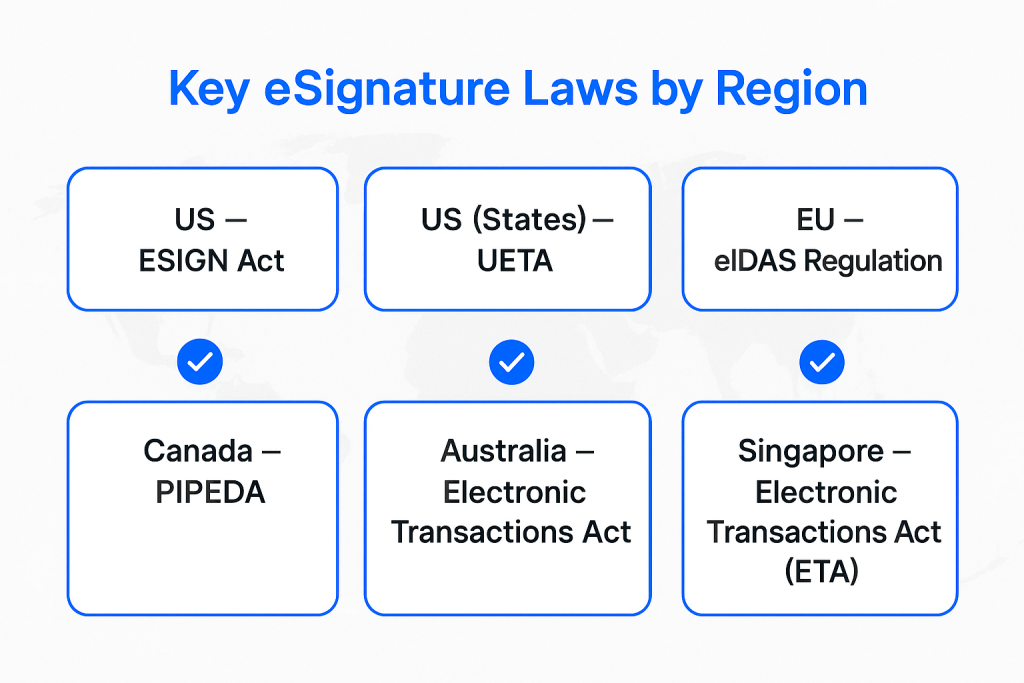
In the US, two main laws govern eSignature validity:
- The Electronic Signatures in Global and National Commerce Act (ESIGN): This federal law gives electronic signatures the same legal weight as handwritten ones.
- The Uniform Electronic Transactions Act (UETA): Most states have adopted this act, which says a signature can’t be dismissed just because it’s electronic.
ESIGN and UETA make clear that a signature cannot be denied legal effect solely because it’s in electronic form. While most states follow UETA, some, like Illinois and New York, have their own similar laws. It’s always a good idea to check your local regulations, but for most everyday uses, e-signatures are good to go.
Electronic signatures have legal recognition in many countries around the world. Laws like the European Union’s eIDAS Regulation set standards that make e-signatures legally binding in many countries. While rules can vary by region, the global trend is toward recognizing their legitimacy.
Criteria for eSignature validity
For an electronic signature to be legally valid, a few key conditions generally need to be met. Here’s a quick rundown of what those are:
- Intent to sign: The person signing must show a clear intention to sign the document.
- Consent to do business electronically: Both parties must agree to conduct the transaction electronically.
- Clear association: The signature must be clearly connected to the document it’s signing.
- Record keeping: A record of the electronic transaction process, from start to finish, should be maintained.
DocHub’s electronic signatures meet these requirements, making them legally binding. The platform complies with both ESIGN and UETA, which makes electronic signing quick, convenient, and legally binding. It also authenticates every signer, either through an emailed signature request or their DocHub login. Check out our guide on how to add electronic signatures to a PDF and get tips for using DocHub to sign documents online.
A quick heads-up: laws vary by jurisdiction and document type. Some documents, like wills or certain family-law papers, may have special requirements. When the stakes are high, it’s smart to check the rules that apply to your situation.
What is a digital signature?
Now that we’ve covered electronic signatures, let’s explore a more specific and secure subtype: the digital signature. A digital signature is a form of electronic signature that uses cryptography to authenticate a signer’s identity and ensure the document’s integrity has been preserved since signing. Consider it the high-tech equivalent of a notarized signature.
Here’s a simple way to think about it: All digital signatures are electronic signatures, but not all electronic signatures are digital signatures. The key difference is the technology behind them.
Digital signature technology relies on public key infrastructure, or PKI. It pairs a signature with a cryptographic key and a trusted digital certificate. Together, they confirm who signed the document and create a tamper-evident seal. If anything in the document changes after signing, that change gets flagged—and the signature becomes invalid.
That’s what makes digital signatures so trusted in high-security situations. The cryptographic certificate, timestamp, and tamper evidence build a verifiable chain of trust. The signature stops being just a mark and becomes actual proof. Now, let’s see how digital signing works.
How do digital signatures work?
Digital signatures can sound intimidating, but the core process is simple once you break it into steps. Here’s what happens behind the scenes.
- A key pair is created. The signer has two mathematically linked cryptographic keys: a private key and a public key. The private key stays secret and belongs only to the signer. The public key can be shared with anyone who needs to verify the signature.
- The document gets hashed. When you sign, the software runs the document through a hashing algorithm, producing a unique fixed-length string called a hash. Even a tiny change to the document would create a completely different hash.
- The hash is encrypted with the private key. This encrypted hash is the actual digital signature. It gets attached to the document.
- The recipient verifies the signature. Anyone verifying the document uses the signer’s public key to decrypt the signature, revealing the original hash. The software then re-hashes the document and compares the two.
- A match confirms integrity. If the two hashes match, the document hasn’t been altered, and the signature is valid. If they don’t match, something changed after signing—and the signature is flagged as invalid.
DocHub uses this kind of technology to back its signed documents. For Sign Requests, DocHub creates before-and-after document snapshots, generates a SHA256 hex digest of each PDF, and uploads that identifier into the Bitcoin blockchain for perpetual verification. That gives you a tamper-evident record anchored outside DocHub itself.
How do digital certificates work?
A digital signature certificate is a trusted electronic document that links a person’s identity to their public key. It answers a crucial question: how do you know the public key really belongs to the person who claims to own it?
Certificates are issued by a Certificate Authority (CA), a trusted organization that verifies identities before handing out certificates. Just as a passport office verifies your identity, a CA verifies that a key pair belongs to a specific person or organization.
A typical digital certificate contains:
- the holder’s name
- their public key
- the certificate’s expiration date
- the digital signature of the issuing CA.
When you verify a digitally signed document, your software checks that certificate against the CA to confirm everything is legitimate.
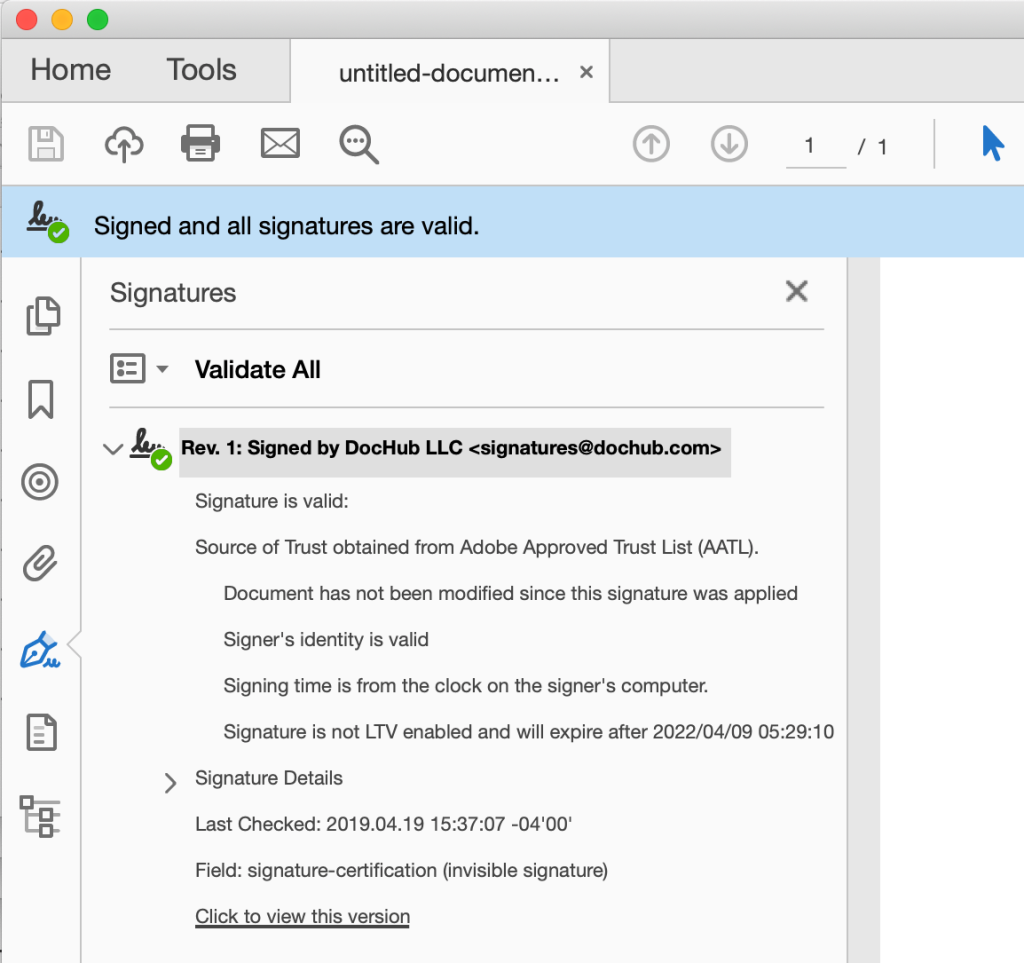
DocHub uses an X.509 PKI certificate to certify PDFs. When you download a certified copy of a document or complete a Sign Request, DocHub embeds a digital signature that proves authenticity and shows the document hasn’t been modified. These signatures are best viewed in Adobe Acrobat, where a green check confirms the signature is valid. DocHub’s signatures are also “LTV enabled,” which keeps the signature from expiring when viewed in Acrobat.
Electronic vs. digital signatures: What’s the difference?
Now that both terms are defined, here’s a clear side-by-side comparison.
| Feature | Electronic signature | Digital signature |
|---|---|---|
| What it is | Any electronic method of signing a document | A signature secured with cryptography and tied to a digital certificate |
| Identity verification | Assumes the signer is who they claim to be | Verifies the signer's identity through certificate validation |
| Tamper detection | Limited or no technical proof of changes | Cryptographic seal; any change invalidates the signature |
| Security level | Basic to moderate | High |
| Legal standing | Recognized under ESIGN and UETA; relies partly on context | Adds embedded proof of integrity and an audit trail |
| Best for | Everyday agreements and low-risk workflows | Sensitive, high-value, or regulated documents |
What are the benefits of digital signatures in documents?
Digital signatures bring real advantages when security and trust matter. Here’s what they offer:
- Stronger identity verification. Certificate-based validation confirms a signer’s identity and cuts down on fraud.
- Tamper detection. The signature seals the doc, so any edit made after signing breaks the seal and flags the change. You’ll know right away if a document has been altered.
- Long-term auditability. Digital signatures include timestamps and an evidence trail that holds up in audits, disputes, or regulatory reviews.
- Legal defensibility. A digital signature embeds proof of intent, authenticity, and integrity, which is exactly what courts and auditors look for.
- Peace of mind for sensitive workflows. For fields like healthcare, finance, and government, that extra assurance isn’t just a nice-to-have—it’s often a must
When should you use electronic and digital signatures?
The choice really comes down to one question: how much assurance does this document need?
Choose an electronic signature when speed and convenience are the priority for a low-risk document. They’re a great fit for internal approvals, routine agreements, and other transactions with trusted parties where extra security steps would only slow things down.
Choose a digital signature when you need extra security for sensitive, high-value documents that might be challenged later. The added verification is worth it for things like tamper protection, identity confirmation, and a solid audit trail.
Because risk varies by industry, document type, and company size, there’s no one-size-fits-all answer. When you’re unsure—especially in heavily regulated fields—it’s wise to consult legal advice for your specific use case.
Common use cases of electronic vs. digital signatures
Here’s a quick look at some common scenarios for electronic and digital signing and which type of signature works best.
| Electronic signature | Digital signature |
|---|---|
| Employment paperwork (offer letters, onboarding forms) and internal approvals (expense reports, internal requests) | Government contracts and filings |
| Sales agreements and service contracts | Banking, loan, and mortgage paperwork |
| Invoices and purchase orders | Healthcare authorizations and consent forms |
| Consent and intake forms (waivers, registrations) | Agreements involving valuable intellectual property |
| Real estate and rental documents (lease agreements) | Real estate transactions and licensing agreements |
How DocHub helps teams sign documents confidently
Getting documents signed shouldn’t be a headache. DocHub makes it easy to edit, sign, and share PDFs right from your browser—no extra software to install.
Here’s what stands out for teams that care about doing signatures right:
- Legally binding eSignatures. DocHub complies with ESIGN and UETA, so your signed documents carry real legal validity.
- Signer authentication. Every signer is verified through an emailed signature request or DocHub login credentials, with account data transferred over SSL.
- A detailed audit trail. DocHub attaches a full event log to every Sign Request, capturing signer details, timestamps, and a SHA256 identifier stored in Bitcoin’s blockchain for perpetual verification.
- Adobe-approved digital certificates. Need that extra layer? DocHub uses an X.509 PKI certificate to certify documents, producing tamper-evident PDFs you can verify in Adobe Acrobat.
- Access from anywhere. All you need is an internet connection and a browser. Your finalized documents are available as downloadable PDFs.
Need a quick eSignature on a form? Or a certified signature on a high-stakes contract? DocHub handles both with ease. Try DocHub today and get your documents done—fast and securely.
Disclaimer: The information contained in this blog post is provided for general informational purposes only and does not constitute formal legal advice.
Glossary
- Electronic signature: An electronic mark showing intent to sign a document. It can be a typed name, a drawing, or a simple click.
- Digital signature: A secure type of electronic signature that uses cryptography to verify the signer’s identity and ensure the document hasn’t been altered.
- PKI (Public Key Infrastructure): The system that powers digital signatures. It uses a pair of cryptographic keys (one public, one private) to verify the authenticity of a signature.
- Digital certificate: An electronic file that links a public key to a person or organization, confirming that a digital signature is from who it says it’s from.
- Audit trail: A detailed log of a document’s journey—when it was sent, opened, viewed, and signed. This provides proof of the signing process.
FAQ
1. Is a digital signature the same as an electronic signature?
No. An electronic signature is any electronic method of signing a document, such as a typed name or drawn signature. A digital signature is a specific subset that uses cryptography and a digital certificate to verify identity and detect tampering. All digital signatures are electronic signatures, but not the other way around.
2. What is a digital signature certificate?
A digital signature certificate is an electronic credential that links a person’s verified identity to their public key. It’s issued by a Certificate Authority, which confirms the signer’s identity before issuing the certificate. The certificate lets others verify that a signature genuinely belongs to the claimed signer.
3. Which signature is more secure, electronic or digital?
A digital signature is more secure. It uses cryptography and certificate-based verification to authenticate the signer and detect any changes made after signing. A basic electronic signature offers convenience and speed but provides less built-in identity verification and tamper protection.
4. When should I use a digital signature instead of a standard electronic signature?
Use a digital signature for sensitive or high-value documents where strong identity verification and tamper detection are critical. This includes government contracts, loan paperwork, healthcare authorizations, and real estate agreements. For everyday, low-risk agreements, a standard electronic signature is typically sufficient.
5. Does DocHub support both electronic and digital signatures?
Yes. DocHub provides legally binding electronic signatures that comply with the US. ESIGN and UETA regulations, plus an Adobe-approved X.509 PKI digital signature certificate for documents that need certified, tamper-evident proof. Every Sign Request also includes a detailed audit trail with an SHA-256 identifier stored on Bitcoin’s blockchain.
Sources
- Digital Signature Market Size, Share & Industry Analysis – Fortune Business Insights, 2026
- The Total Economic Impact™ Of Adobe Sign – Forrester, 2019
 Open
Open - National Credit Union Administration: Electronic Signatures in Global and National Commerce Act (E-Sign Act)
- Uniform Laws Commission UETA
- eIDAS Regulation (910/2014) — EU-Lex
- Digital Signatures: What They Are & How They Work – Okta, 2024
- Digital Signature Algorithm (Glossary) – Computer Security Resource Center
- At a glance
- What is an electronic signature?
- Are electronic signatures legally valid?
- What is a digital signature?
- How do digital signatures work?
- How do digital certificates work?
- Electronic vs. digital signatures: What’s the difference?
- What are the benefits of digital signatures in documents?
- When should you use electronic and digital signatures?
- How DocHub helps teams sign documents confidently
- Glossary
- FAQ
- Sources