

The way we sign documents has changed more in the last 25 years than in the previous several centuries. What started as ink on paper now happens in a browser, on a phone, or with a tap. Behind that convenience sits a long history of legal milestones, technical standards, and evolving regulations that make digital signing trustworthy.
This article walks through the evolution of electronic signature standards. You’ll learn where electronic signatures came from, how U.S. and EU laws shaped them, and what the three levels of eSignatures under eIDAS actually mean. We’ll also look at why these standards matter in today’s business world, and how tools like DocHub fit into modern signing workflows.
Disclaimer: The information contained in this blog post is provided for general informational purposes only and does not constitute formal legal advice.
At a glance
- The first court-recognized electronic signature dates back to telegraph messages in the 1860s.
- The U.S. passed the Uniform Electronic Transactions Act (UETA) in 1999 and the Electronic Signatures in Global and National Commerce Act (ESIGN) in 2000, giving eSignatures the same legal weight as handwritten ones.
- The EU’s eIDAS regulation defines three signature levels: Simple (SES), Advanced (AES), and Qualified (QES).
- “Electronic signature” and “digital signature” are not the same thing—one is a legal concept, the other a specific technology.
- DocHub complies with ESIGN and UETA, authenticates signers, and attaches a tamper-evident audit trail to every document.
What are digital signing standards?
Digital signing standards are the rules and frameworks that determine when an electronic signature is valid and legally binding. Digital signing standards help establish trust in documents, contracts, and electronic communications. They cover questions like: Who signed this? Did they mean to sign it? Can anyone prove the document wasn’t changed afterward?
These standards exist because a signature is more than a mark on a page. It’s evidence of intent and agreement. For that evidence to hold up, laws and technical specifications need to define what makes a signature authentic, secure, and enforceable. They help make digital transactions more secure, enforceable, and efficient.
Different regions set their own standards. The United States relies on the ESIGN Act and UETA. The European Union uses eIDAS. While the details differ, the goal is the same: give people and businesses confidence that a signed digital document is just as real as a paper one.
A brief history of electronic signatures
The history of electronic signatures is older than most people expect. The story doesn’t begin with computers.
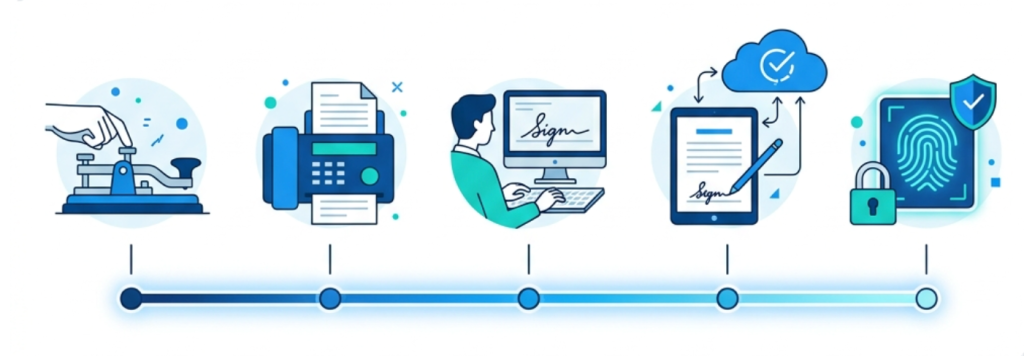
The telegraph way
U.S. courts established an important legal precedent in the late 1860s, most notably in Howley v. Whipple (New Hampshire Supreme Court, 1869), recognizing that a name transmitted by telegraph could satisfy a legal signature requirement. The technology was primitive, but the legal principle was groundbreaking: a signature didn’t have to be handwritten in ink to be binding.
Fax machine signatures
The fax machine carried that idea forward in the 20th century. Faxed signatures became common in business and were widely accepted as legitimate. Each step chipped away at the assumption that only pen-on-paper could seal a deal.
Here’s how it worked: You would sign traditional paper contracts with a handwritten signature, scan them using a fax machine, and send them to the recipient’s machine, which would then print a copy. While it seems old-fashioned today, this method is technically a form of electronic signature because it uses an electronic process to send the signed document.
The internet era
The real turning point came with the internet. As commerce moved online in the 1990s, businesses needed a way to sign agreements digitally—and they needed laws to back it up. That demand led directly to the modern frameworks we use today.
Digital signing standards timeline
Here’s how the key milestones unfolded:
- 1860s: U.S. courts accept telegraph messages as legally binding contracts—the first electronic signatures.
- 20th century: Fax machines popularize remote signing, and faxed signatures gain broad acceptance.
- 1999: The Uniform Electronic Transactions Act (UETA) is a U.S. federal law introduced that gives electronic records and signatures legal validity at the state level. This means a signature cannot be denied legal effect solely because it is created in an electronic form.
- 2000: The U.S. Electronic Signatures in Global and National Commerce Act (ESIGN) passes, confirming e-signatures are valid across the country.
- 2014: The EU adopts the eIDAS regulation, creating a unified framework for electronic signatures across member states.
- 2024–2026: eIDAS 2.0 rolls out, introducing the European Digital Identity Wallet.
European Union’s eIDAS regulation summary
The eIDAS regulation (short for “electronic IDentification, Authentication, and trust Services”) is the EU’s legal framework for electronic signatures and digital identity. Adopted in 2014, it replaced a patchwork of national rules with one consistent standard across all member states. It created a legal structure for secure electronic communications and trust services across the EU.
eIDAS does two main things:
- It sets out clear categories of electronic signatures, each with different levels of legal assurance.
- It defines the trust services, such as certificates and timestamps, that back up those signatures.
A major update, often called eIDAS 2.0, is now reshaping the landscape. Its centerpiece is the European Digital Identity Wallet, which will allow EU citizens to verify their identities and sign electronic documents across borders. Under the mandate, all 27 EU member states must offer these wallets by December 2026, with high-priority sectors such as public services and banking facing the earliest compliance deadlines.
The three levels of eSignatures under eIDAS
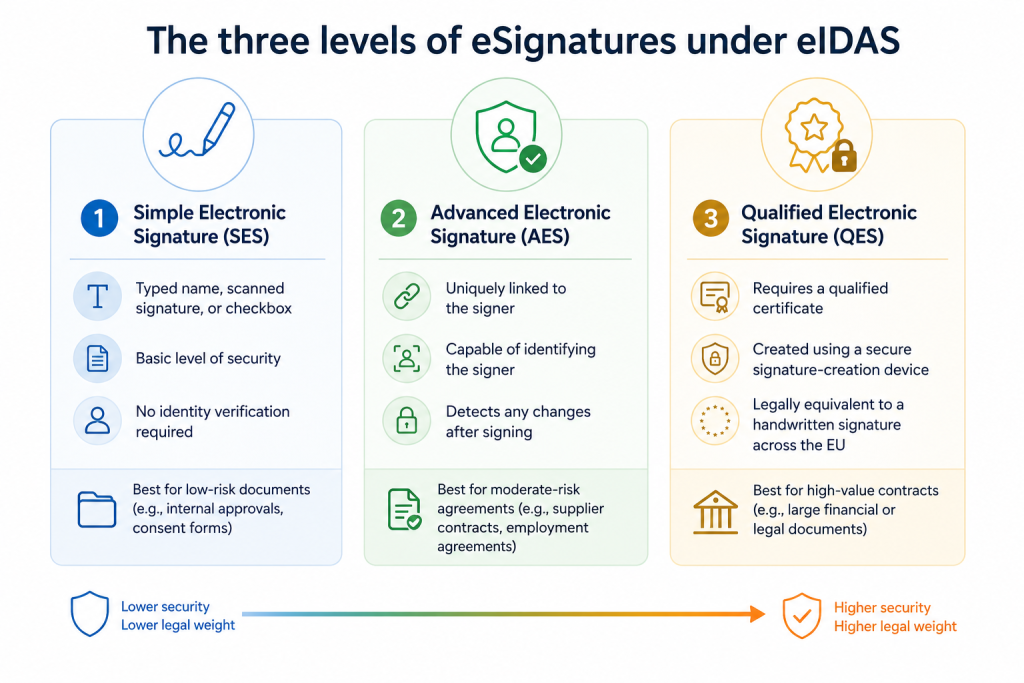
One of the most helpful parts of eIDAS is how it defines three levels of electronic signatures. Each level offers a different degree of security and legal weight, making it easier to choose the right one for your document.
Simple electronic signature (SES)
A Simple electronic signature is the most basic level. It covers options such as a typed name, a scanned signature, or a checkbox confirming agreement. SES works well for low-risk documents where the stakes are modest—think internal approvals or routine consent forms.
Advanced electronic signature (AES)
An Advanced electronic signature adds stronger mechanisms for verifying identity and detecting tampering. To qualify as an AES, the signature must be uniquely linked to the signer, capable of identifying them, and created in a way that detects any changes made after signing. This level is a good fit for moderate-risk agreements where you need stronger proof of who signed.
Qualified electronic signature (QES)
A Qualified electronic signature is the gold standard under eIDAS. It builds on AES but requires a qualified certificate and a secure signature-creation device. A QES is legally equivalent to a handwritten signature across the entire EU. Choose QES for high-value contracts—large financial agreements or legal documents where maximum assurance matters more than speed.
Why did electronic signature standards evolve?
Electronic signature standards didn’t just appear out of nowhere. They evolved over time to solve real-world problems as they arose.
In the early days, the biggest issue was trust. If a contract was signed digitally, how could a court be sure it was genuine? Electronic signature laws like ESIGN and UETA answered that by spelling out what made an electronic signature valid: intent to sign, consent to do business electronically, and a record that could be retained.
As digital transactions grew, so did concerns about fraud and identity theft. This prompted regulators to develop stronger verification methods, such as those built into AES and QES. The more valuable the transaction, the more proof of identity was needed.
Cross-border business added another wrinkle. A signature valid in one country might not hold up in another. eIDAS solved that problem within the EU by establishing a single standard recognized by all member states. eIDAS 2.0 and the Digital Identity Wallet take it further, aiming for seamless identity verification across the entire bloc.
Electronic vs. digital signature: What’s the difference?
People often use these terms interchangeably, but they mean different things.
An electronic signature is a broad legal concept. It’s any electronic indication that a person intends to sign—a typed name, a drawn signature, or a click of an “I agree” button. The term describes the legal act, not the technology behind it.
A digital signature is a specific technology. It uses encryption, cryptographic algorithms (public and private keys), and digital certificates to secure a document and verify its authenticity. A digital signature is always electronic, but an electronic signature is not always digital. Digital signatures use specific technologies to provide higher levels of security, such as Advanced and Qualified electronic signatures.
Read our article about the differences between electronic and digital signatures to learn more about how both signing methods work.
What does this mean for businesses today?
For most businesses, the practical takeaway is simple: electronic signatures are legally binding and can be used with confidence for the vast majority of your electronic documents.
The key is to match the signature level to the document’s risk. A routine internal form doesn’t require the same level of security as a multimillion-dollar contract. For everyday agreements, such as offer letters, NDAs, and client approvals, a standard electronic signature compliant with ESIGN and UETA is more than sufficient.
What you should look for in any digital signature solution is solid evidence. Can it prove who signed? How can it show the signer intended to sign? Can it detect tampering after the fact? An audit trail that captures these details is what turns a signature into defensible proof.
For teams that work across borders—especially in or with the EU—it’s worth understanding which eIDAS level your documents require. High-value or regulated transactions may call for AES or QES, while most routine work fits comfortably within SES.
How DocHub supports modern electronic signing workflows
DocHub is a user-friendly PDF editor and document-signing tool that streamlines your workflow by making it fast and easy to sign documents. With its deep integration into Google Workspace, it fits seamlessly into your team’s existing signing processes.
On the compliance side, DocHub meets the requirements of the U.S. ESIGN Act and UETA, which makes electronic signing quick, convenient, and legally binding. When a signature is requested, DocHub places the field in the right spot and captures the signer’s intent to execute the document.
DocHub also authenticates every signer. To sign, a person must either receive an emailed signature request or log in with their DocHub credentials. All account information is transferred over SSL to keep it protected.
DocHub’s audit trail and digital signature certificates
For evidence, DocHub attaches an audit trail to every document. That trail includes a designated SHA-256 unique identifier stored in Bitcoin’s blockchain for perpetual verification, along with snapshots capturing every major change. This creates a tamper-evident record of who did what, and when.
Documents signed in DocHub can be downloaded as a PDF with an embedded digital signature. This proves the file is authentic and ensures it hasn’t been modified.
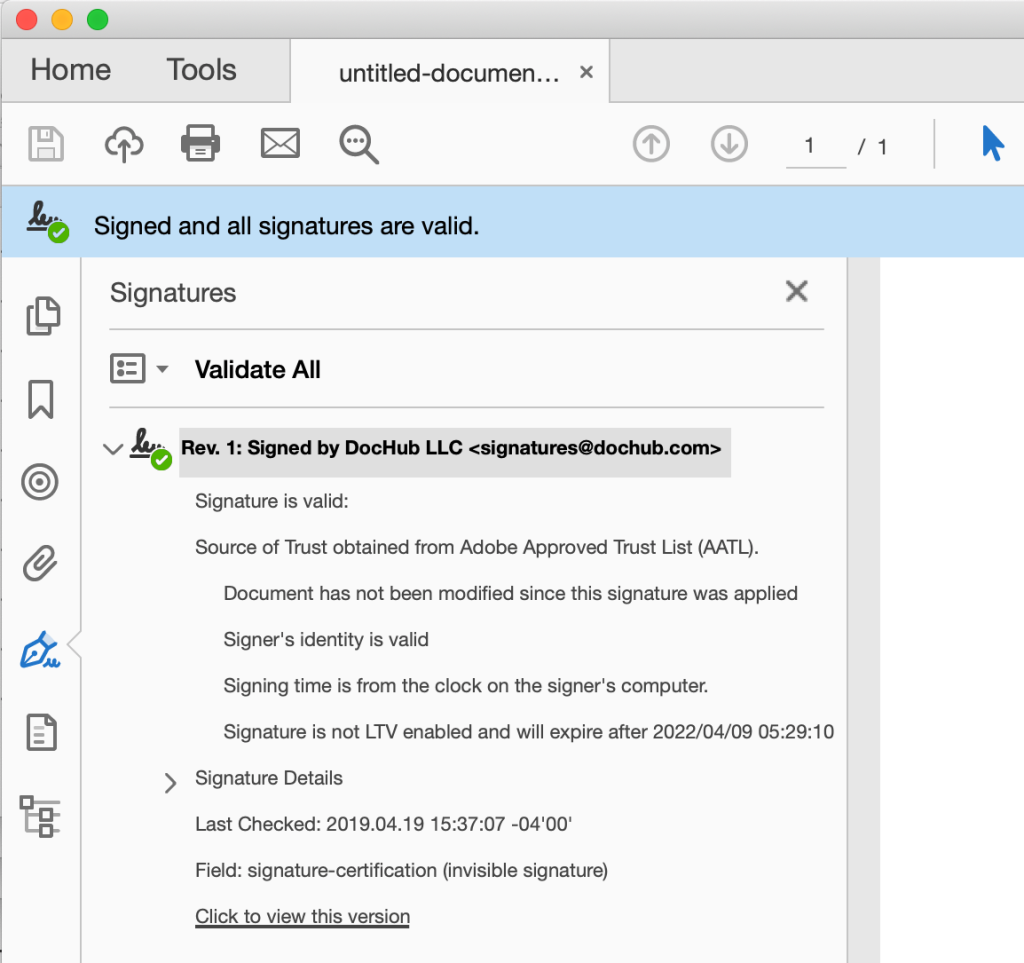
To verify a document’s authenticity, DocHub uses an X.509 PKI certificate to certify PDFs. When you download a finalized document or complete a Sign Request, a digital signature is embedded to prove the file is authentic and hasn’t been altered. You can view these signatures in Adobe Acrobat, where a green checkmark will confirm their validity. Because DocHub’s signatures are LTV enabled, they won’t expire when viewed in Acrobat.
Because DocHub runs in the browser, all you need is an internet connection. You can sign, access, and download documents in PDF format from any device—no installation required. Check our comprehensive guide on how to sign PDF documents online to learn more about DocHub’s features and capabilities.
Final thoughts
Electronic signatures have come a long way, from telegraph contracts in the 1860s to the European Digital Identity Wallet arriving by 2026. Each milestone built more trust, more security, and more legal certainty into the simple act of signing your name.
For businesses, the path forward is clear. Understand the standards that apply to you, match the signature level to the risk, and choose a tool that provides reliable evidence. DocHub offers compliant, browser-based signing that works with the tools you already use.
Ready to see how easy it can be? Try DocHub for free and sign contracts securely and confidently.
Glossary
- ESIGN Act: A U.S. federal law passed in 2000 that makes electronic signatures legally valid for interstate and foreign commerce.
- UETA: The Uniform Electronic Transactions Act, introduced in 1999, gives electronic records and signatures legal standing at the U.S. state level.
- eIDAS: The EU electronic signature law that sets a unified framework for electronic signatures, identification, and trust services across member states.
- Audit trail: A record attached to a document that captures who signed, when, and what changes were made—used as evidence of authenticity.
- Digital Signature: A specific technology that uses encryption and cryptographic keys to secure a document and verify its authenticity.
FAQ
1. Are electronic signatures legally binding?
Yes. In the U.S., the ESIGN Act and UETA make electronic signatures legally binding for most documents. In the EU, eIDAS gives electronic signatures legal recognition, with Qualified Electronic Signatures holding the same legal weight as handwritten ones.
2. What is the difference between SES, AES, and QES?
Simple Electronic Signature (SES) is the most basic, suited to low-risk documents. Advanced Electronic Signature (AES) adds identity verification and tamper detection for moderate-risk agreements. A Qualified Electronic Signature (QES) requires a qualified certificate and a secure device, offering the highest assurance for high-value contracts.
3. When do EU businesses need to comply with eIDAS 2.0?
Under eIDAS 2.0, all 27 EU member states must provide European Digital Identity Wallets by December 2026. High-priority sectors, including public services and banking, face the first compliance deadlines around the end of 2026.
4. Is an electronic signature the same as a digital signature?
No. An electronic signature is a broad legal term for any electronic symbol of an intent to sign. A digital signature is a specific type of electronic signature that uses encryption to secure and verify a document’s authenticity. While all digital signatures are electronic signatures, not all electronic signatures are digital.
5. Is DocHub secure for document signing?
Yes, DocHub is a secure platform for document editing and signing. We authenticate documents and every signer and use SSL encryption to protect all data transfers. For added security, every document includes a tamper-evident audit trail with a unique identifier stored on the blockchain.
Sources
- National Credit Union Administration: Electronic Signatures in Global and National Commerce Act (E-Sign Act)
- Uniform Laws Commission UETA
- eIDAS Regulation (910/2014) — EU-Lex
- eIDAS 2.0 Updates, Compliance, 2025
- The Evolution of Electronic Signatures in the United States and Canada — Association of Corporate Counsel (ACC)
- At a glance
- What are digital signing standards?
- A brief history of electronic signatures
- Digital signing standards timeline
- European Union’s eIDAS regulation summary
- The three levels of eSignatures under eIDAS
- Why did electronic signature standards evolve?
- Electronic vs. digital signature: What’s the difference?
- What does this mean for businesses today?
- How DocHub supports modern electronic signing workflows
- Final thoughts
- Glossary
- FAQ
- Sources