

Quick answer: Multi-party signature workflows allow several recipients to sign the same document either in a specific order or in parallel. In DocHub, the sender can configure the signing order, assign fields to each recipient, track individual progress, send reminders, and review a timestamped Audit Trail after the document is completed.
This guide walks you through creating, managing, and tracking multi-signature workflows in DocHub. It’s designed for operations, HR, legal, sales, and finance teams that need to route contracts, agreements, approval forms, and other business documents among multiple signers.
What benefits does a signing workflow structure offer?
A well-structured workflow is essential. A single incorrect email address, a misplaced field, or an unavailable signer can bring the entire process to a halt. By understanding the difference between sequential and parallel routing, your team can select the right approach for each document and maintain a clear, auditable record of every stage in the process.
Summary: How do multi-party workflows operate?
- Choose sequential signing when recipients must sign the document in a particular order.
- Choose parallel signing when everyone can act independently and speed matters more than sequence.
- Add recipients, assign each field to the correct person, and review the configuration before sending.
- Track delivery, document activity, completion, declines, and other status changes in real time.
- Use reminders and the Audit Trail to maintain progress visibility and a record of signer actions.
What is a multi-party signature workflow?
A multi-party signature workflow is a process in which two or more people receive the same document and complete assigned fields or signatures. The sender defines who participates, which fields each person can fill, and whether recipients sign sequentially or in parallel.
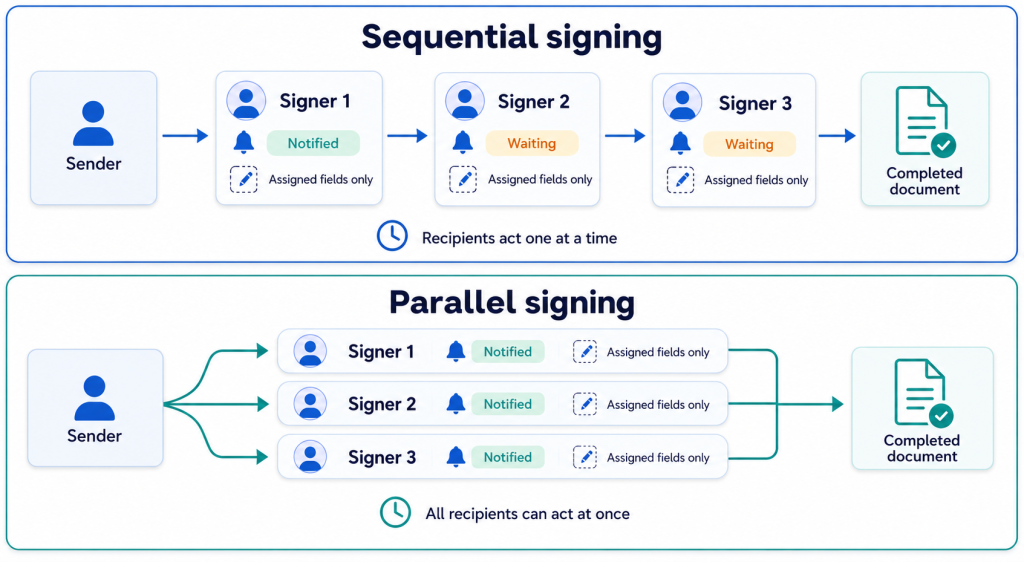
DocHub supports both types of routing. Each signer receives access to the fields assigned to their role, which helps prevent one person from editing another recipient’s responses.
For example, an employment agreement may require an employee to sign first, a manager to approve it second, and an HR representative to confirm it last. A team acknowledgment form, by contrast, may allow all recipients to sign at the same time.
We’ve described the process of creating sign requests for multiple signers in the article: How to add multiple signatures in eSign workflows.
What is the difference between sequential and parallel signing?
The main difference is whether one recipient’s turn depends on another signer completing their part.
| Workflow | How recipients are notified | Best suited to | Main consideration |
|---|---|---|---|
| Sequential signing | Each signer receives a notification after the previous person completes their part | Approvals, countersignatures, witnessed forms, and controlled review | One delayed signer can block everyone later in the sequence |
| Parallel signing | All parallel signers receive the request when it is sent | Independent acknowledgments and time-sensitive collection | Recipients may complete the document in any order |
How do you set the signing order in DocHub?
The following process provides a practical overview. Button names or placement may vary slightly as the interface develops.
- Open the document in your DocHub account and prepare it for signature.
- Start a Sign Request and select the option to Add Recipients.
- Enter each recipient’s name and email address.
- Assign signature, date, text, or other fields to the correct recipient.
- Turn on sign in order if the recipients must act sequentially.
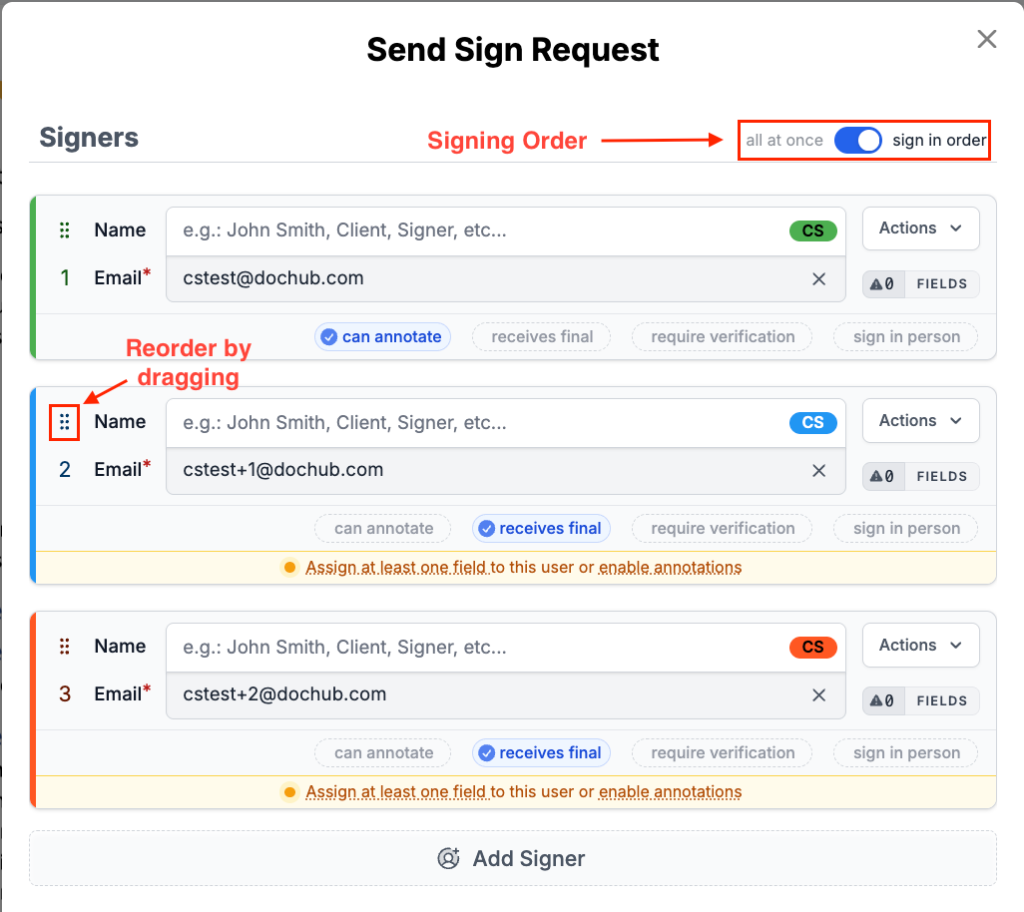
In the Sign request tab, drag recipients into the required sequence.
- Confirm that the first person listed should act first and that every approval follows the correct signer.
- Configure reminders, expiration preferences, or authentication options when available and appropriate.
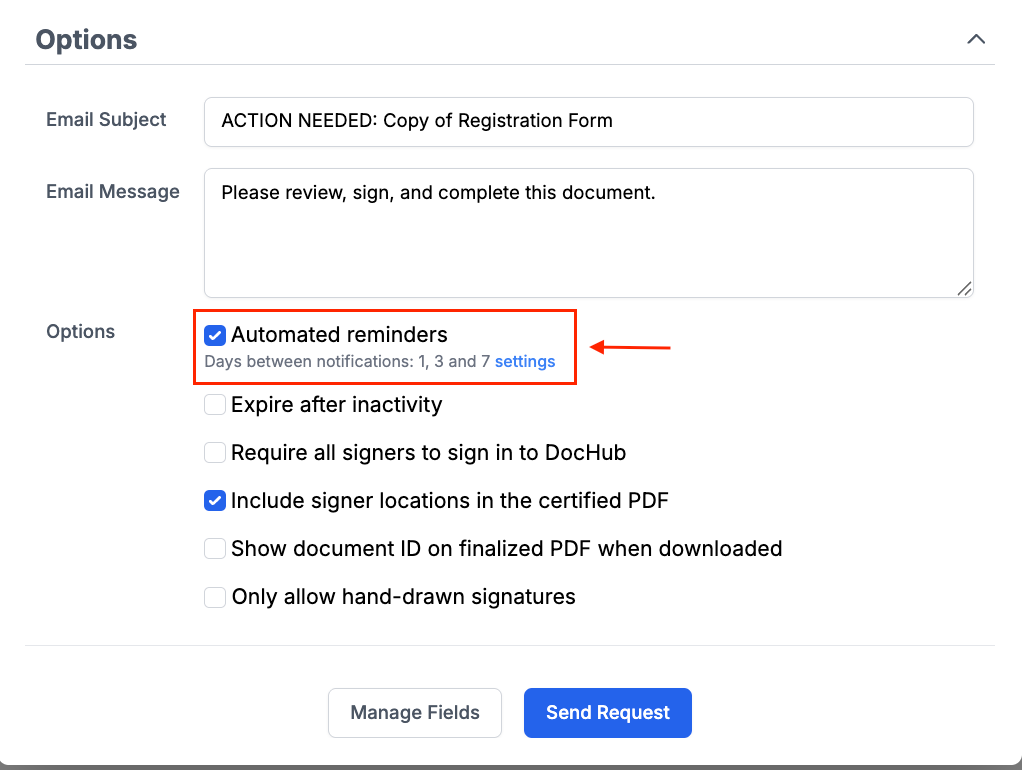
- Review the request, then select Send.
To create a parallel flow, switch to all at once. All recipients will then receive the request without waiting for another signer.
Before sending, walk through the document once from each role’s perspective. This short review helps ensure that fields, routing, recipient addresses, and required actions are correct.
How does DocHub track the signing process?
DocHub tracks each recipient separately, giving the sender greater transparency into the request. The status view updates as recipients interact with the mail invitation and document, reducing the need to contact every signer manually.
Depending on the event, you can track whether:
- The invitation was delivered or bounced
- The recipient opened the email or document
- The signer started completing fields
- The signer completed or declined the request
- The invitation expired
- A sequential signer is active or still waiting
- The full document was completed
The system can also send email notifications as signers act. Mobile notifications may be available through the DocHub app, while configured automatic reminders can prompt a person who has not completed their stage.
For connected business systems, teams can subscribe to sign request notifications through the Developer Portal. This can help keep a CRM or internal dashboard aligned with current document progress.
What information does the Audit Trail contain?
The DocHub Audit Trail is a chronological record of activity associated with a document. It may include invitations, email activity, reminders, authentication events, recipient changes, signatures, declines, cancellations, and timestamps.
The Audit Trail remains associated with the completed document and can be downloaded for recordkeeping. According to DocHub’s legal information, the signature workflows use authentication measures, activity records, document snapshots, and unique identifiers to support document integrity and attribution.
An audit trail does not independently guarantee that every agreement will be enforceable. It provides evidence about the process, while enforceability may also depend on consent, intent, authority, document type, jurisdiction, and other circumstances.
How can teams prevent common signing problems?
Most delays originate in request configuration rather than the signature tool itself. These tips can reduce avoidable interruptions:
- Check every address. A typo can cause the invitation to bounce. DocHub allows the sender to correct an address and resend through Manage and Audit without rebuilding the entire request.
- Explain the sequence. Later recipients in a sequential workflow are not notified until their turn. Tell all parties how routing will work before you send.
- Review field ownership. Confirm that every field belongs to the intended recipient.
- Limit required fields. Mark only necessary fields as required so an unnecessary entry does not prevent completion.
- Plan for absences. In a sequence, one unavailable signer blocks everyone behind them.
- Use reminders carefully. A reasonable notification schedule keeps the process moving without overwhelming recipients.
- Configure in-person signing correctly. If someone will sign on the sender’s device, add that person as an in-person signer instead of expecting an email response.
- Confirm before sending sensitive contracts. A decline stops the request and requires the sender to create a new one.
What are the legal considerations for multiple signatures?
Disclaimer: The information in this blog post is provided for general informational purposes only and does not constitute formal legal advice.
In the United States, the ESIGN Act and state laws based on UETA generally establish that a signature cannot be denied legal effect solely because it is electronic. Important factors commonly include intent to sign, consent to electronic transactions where required, signer attribution, record integrity, and the ability to retain and reproduce the completed record. DocHub’s eSignature legal overview
Multi-party workflows add a routing consideration: the record should show which parties acted, what they completed, and when they acted. Signing order, assigned roles, authentication information, and timestamps can help document that history.
Requirements vary by document and jurisdiction, and some transactions may need special authentication, notarization, paper delivery, or another process. This article provides general information, not legal advice; consult qualified counsel for high-risk or regulated agreements.
Final thoughts
Effective multi-party signing depends on three things: correct routing, accurate field assignment, and reliable progress tracking. Sequential workflows provide control when order matters, while parallel workflows help teams collect independent signatures faster.
DocHub brings document preparation, role-based fields, notifications, reminders, live status tracking mechanisms, and audit records into one workflow.
Try DocHub to configure your next multi-party Sign Request and keep every signer, stage, and approval organized.
Glossary
- Audit Trail: A timestamped history of document and signer activity.
- Parallel signing: A workflow in which all recipients can act independently.
- Sequential signing: Routing that invites recipients one at a time in a defined order.
- Signer role: The identity used to assign specific fields to a recipient.
- Signing Order: The DocHub feature that controls the sequence in which signers receive and complete a request.
- Sign Request: A document sent to one or more people for completion and signature.
FAQ
Can multiple people sign the same document in DocHub?
Yes. The sender can add multiple recipients, assign specific fields to each person, and choose between sequential or parallel routing. Each signer will only see and complete the fields assigned to their role.
What should I do if a signer hasn’t received their request?
Start by checking whether the invitation bounced or whether the signer is waiting for their turn in a sequential workflow. If the email address is incorrect, update it through Manage and Audit and resend the invitation.
Can I change the signing order after sending?
To protect the integrity of an active workflow, it’s important to review the sequence carefully before sending. If the correction you need isn’t available for an active request, cancel it and create a new, properly configured one.
What happens if someone declines to sign?
A decline immediately stops the request for all recipients and locks the document. Since this action cannot be reversed, the sender will need to resolve the issue and send a new request.
Is sequential signing more legally binding than parallel signing?
Not necessarily. Sequential signing can create a clearer audit trail when approval order is important, but the legal validity of either method ultimately depends on the specifics of the transaction and the laws that apply to it.
- Summary: How do multi-party workflows operate?
- What is a multi-party signature workflow?
- What is the difference between sequential and parallel signing?
- How do you set the signing order in DocHub?
- How does DocHub track the signing process?
- What information does the Audit Trail contain?
- How can teams prevent common signing problems?
- What are the legal considerations for multiple signatures?
- Final thoughts
- Glossary
- FAQ