
Exploring eSignature verification: How eSignature platforms verify identity

eSignature platforms verify identity using a layered approach that includes email authentication, one-time passcodes, knowledge-based questions, government ID checks, biometrics, and cryptographic digital certificates. Each method adds a different level of assurance. Most platforms also protect document integrity through encryption, audit trails, and tamper detection.
TL;DR
- eSignature identity verification combines signer authentication, signature intent, and document integrity checks.
- Common verification methods range from email links to biometric ID scanning.
- Cryptographic digital signatures use public-key infrastructure (PKI) to detect any post-signing changes
- Audit trails record timestamps, IP addresses, authentication events, and document snapshots as legal evidence
- DocHub combines authentication, encryption, and a court-admissible audit trail to help business, legal, and HR teams sign and verify PDF documents online with confidence.
Every time someone signs a document online, a platform has to answer a simple but important question: Is this really the person who is supposed to be signing? Getting that answer right matters for contracts, HR paperwork, real estate transactions, and any agreement where the wrong signer — or a tampered document — could cause real financial or legal harm.
This guide breaks down how identity verification works, how eSignature platforms verify identity, the different authentication methods available, and how cryptography and audit trails protect a signed PDF after the fact. It also covers how DocHub puts these principles into practice, so business, legal-adjacent, and operations teams can sign and manage documents with a clear paper trail.
Disclaimer: This article is for educational purposes only and does not constitute legal advice.
What does “identity verification” mean in eSigning?
Identity verification is a security process of confirming that a person is genuinely who they claim to be by validating their personal data and official documents.
The phrase “identity verification” gets used loosely, but in the context of electronic signatures, it actually covers five distinct concepts. Understanding the difference matters because a platform can satisfy one without satisfying the others.
- Identity proofing is the process of confirming that a person is who they claim to be before they sign. This might involve checking a government-issued ID, verifying a phone number, or asking knowledge-based questions drawn from public records. Identity proofing happens before the signature is applied.
- Authentication is the process of confirming a signer’s identity at the time of access. A login credential, one-time passcode, or email link all function as authentication mechanisms. Authentication answers the question: “Is this really the person we invited to sign?”
- Signature intent is a legal concept requiring that a signer consciously intend to execute a document. Laws like the ESIGN Act and UETA require that electronic signatures be made with clear intent. Platforms capture this through explicit actions—clicking a “Sign” button, drawing a signature, or typing a name—and often record these as evidence of intent.
- Signature verification is the technical process of confirming that a signature hasn’t been altered since it was applied. This typically relies on cryptographic methods rather than visual inspection.
- Document integrity refers to the assurance that the document itself—not just the signature—hasn’t changed after signing. Tamper detection software and cryptographic hashing are the primary tools used here.
These concepts are what make an eSignature both legally binding and technically trustworthy.

Authentication methods for electronic signature verification
Not every document needs the same level of identity assurance. A low-risk internal form and a six-figure real estate contract call for very different authentication methods. Most eSignature platforms offer a range of options, generally increasing in strength as follows.
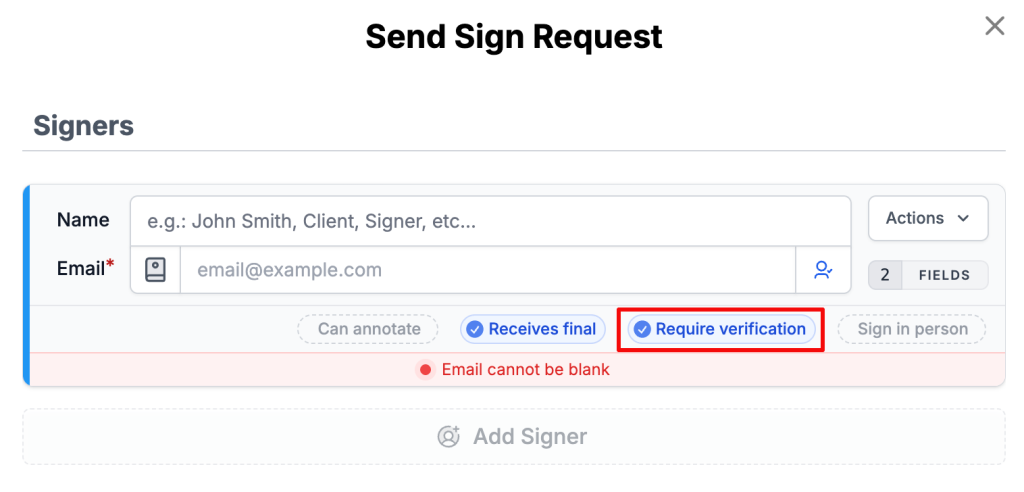
Secure eSign platform identity check methods
Here are some common identity verification methods utilized by secure eSignature platforms to meet varying levels of assurance needs:
- Email links and account authentication. This is the most common method, when the document owner sends a signature request, and the signer receives a unique email link to complete it. Only someone with access to that inbox can use it, which is why platforms like DocHub use this approach for the vast majority of everyday business documents.
- One-time verification codes (OTP). A one-time passcode adds a second layer of confirmation by sending a numeric code via SMS or email after the signer clicks their link. This combines something the signer has (their device or inbox) with something they know (the code), making unauthorized access significantly harder.
- Knowledge-based authentication (KBA). This method asks signers to answer questions drawn from their personal history, such as past addresses, credit records, or similar details that only the real person would likely know. It’s common in financial services and legal workflows where the risk of impersonation is elevated. Knowledge-based questions are generated dynamically and pulled from secure databases rather than set manually by the sender.
- Government-issued ID verification. Some platforms allow signers to upload or photograph a government-issued ID, which the system checks against their claimed identity using optical character recognition (OCR) and pattern-matching technology. This method provides strong identity proofing and is often used in regulated industries.
- Biometric verification and liveness detection. Biometric verification takes ID checks a step further by comparing the photo on a government-issued document to a live selfie or short video from the signer. Facial recognition software checks that the two faces match, while liveness detection confirms the selfie was captured in real time, not lifted from a photo or a video replay. This is an enhanced identity verification method, typically reserved for high-value contracts or regulated transactions.
- Federated identities and trusted identity providers. Federated identity systems let signers authenticate using credentials from a trusted third-party provider, such as Google Authenticator, Okta, or Microsoft Entra ID (formerly Azure ID). DocHub supports this through Single Sign-On (SSO) using SAML authentication, making it a secure and convenient option for organizations that already manage identity centrally.
- Certificate-based digital identities. Certificate-based signatures tie a signer’s identity to a cryptographic digital certificate issued by a trusted Certificate Authority (CA). These are recognized under regulations like eIDAS in the European Union and are required for qualified electronic signatures—the most legally robust signature type available.
Want to go deeper? Check out our guide to electronic signature validity to learn more about the laws that govern them.
Digital identity verification methods compared
| Verification signal | What it helps establish | What it doesn't prove by itself |
|---|---|---|
| Email verification | Confirms access to the specified email address | The true identity of the person using the email |
| SMS code verification | Confirms possession of a specific phone number | The user's actual identity or authorization for the transaction |
| Government-issued ID upload | Verifies possession of an official identification document | The validity or authenticity of the uploaded document |
| Certificate-based digital signature | Confirms the signer's identity via a trusted Certificate Authority | The intent behind the signed document |
Digital signature verification methods: How cryptography protects a signed document
Knowing who signed a document is only part of the equation. The other part is knowing that the document hasn’t changed since signing. This is where digital signature verification methods come in.
It’s worth separating two related ideas that often get blurred together: an “electronic signature” (any electronic mark showing intent to sign) and a “digital signature” in the technical sense, which is a specific cryptographic method used to create and secure that electronic signature. Not sure what sets them apart? Check out our blog post on electronic vs. digital signatures for a full breakdown.
So, what about digital signature verification methods? When a signer applies a digital signature, the platform generates a unique cryptographic “hash”—a fixed-length string of characters that acts like a fingerprint for that exact document. This hash is encrypted using the signer’s private key to create the signature. To verify it later, anyone can use the signer’s public key to decrypt the hash and compare it to a freshly generated one from the current document. If the two match, the document is unchanged, and the signature is valid. If even a single character has been altered, the hashes won’t match—and the tampering is immediately detectable.
How DocHub handles digital signature verification
DocHub’s digital signature is unique to the signer, can verify the signer’s identity, is under the signer’s sole control, and is linked to the document so that any subsequent changes can be detected. This meets the core technical requirements set out under both the ESIGN Act and UETA.
DocHub provides a digital certificate for every signed document, ensuring authenticity and compliance with global eSignature standards. Each certificate includes a detailed audit trail that verifies the signer’s identity, timestamps, and document integrity. This feature guarantees peace of mind for small businesses managing paperwork with sensitive data, meeting key legal and security requirements.
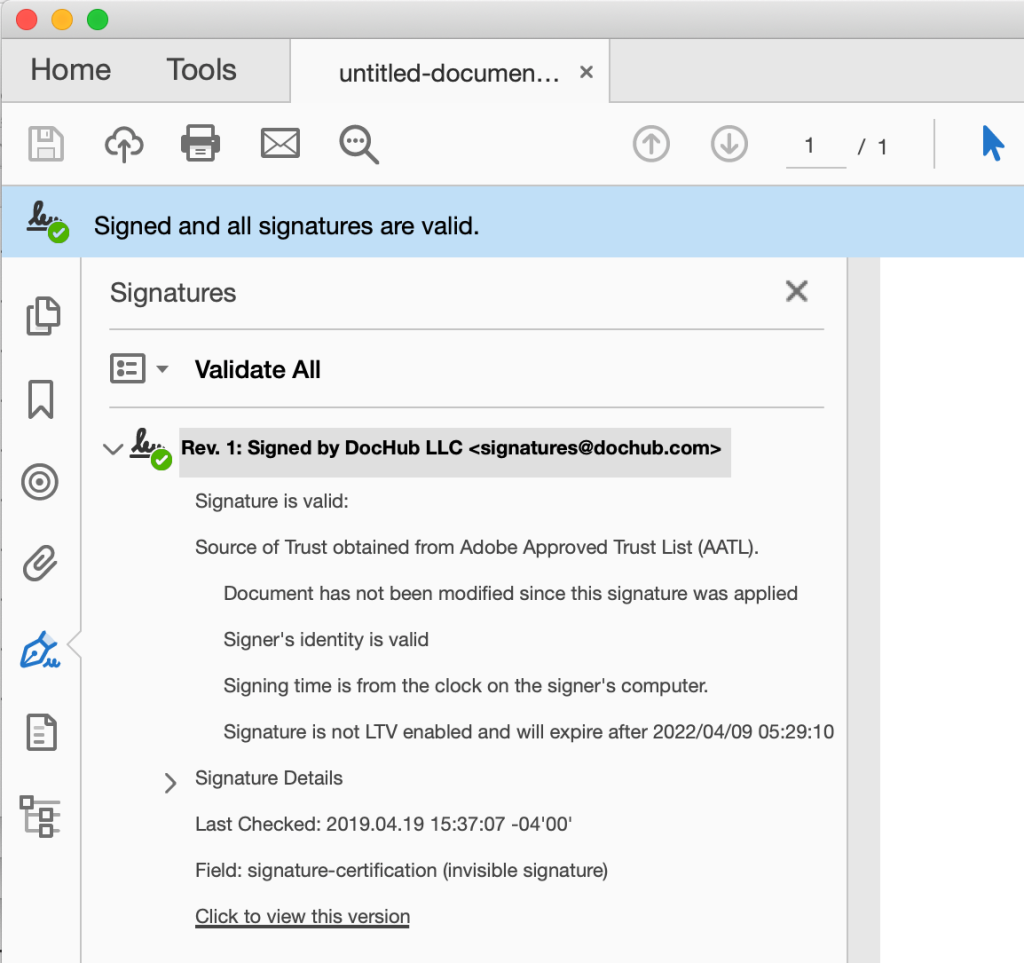
DocHub’s digital signatures do more than timestamp your document. They embed key signer and creator details—like name, email, and geolocation—in the “Signature Details” > “Reason” field, keeping everything transparent and accountable. Signatures are also LTV (Long-Term Validation) enabled and secured with an X.509 PKI certificate, so they stay valid and encrypted when viewed in tools like Adobe Acrobat.
What does an eSignature Audit trail prove?
An audit trail is the documented record of everything that happened to a document throughout its lifecycle. For legal compliance purposes, it’s often just as important as the signature itself.
A complete eSignature audit trail typically captures:
- Timestamps—when each action occurred, recorded in UTC
- Signer identity—name and email address associated with each action
- IP address—the network location from which each action was taken
- Browser and device information—the environment used to access the document
- Authentication events—how the signer was verified (e.g., email link opened, OTP entered)
- Document views—records of when the document was opened and reviewed
- Signing actions—when and where each signature or initials field was completed
- Modifications—any changes made to the document, including by whom and when
- Document identifiers—unique IDs that tie the audit trail to a specific version of the document
Because this data is captured automatically and locked once the process is complete, a tamper-proof audit trail gives both parties—and, if necessary, a court—a factual, time-stamped record of the entire signing process, not just a signature image.
DocHub’s audit trail provides a detailed, secure record of every interaction with an eSigned document. It records key details: when each action was completed, who was involved in the signing process, and any changes made along the way. That means businesses always have a clear, trustworthy record of their signed documents, meeting the requirements of the U.S. ESIGN Act.
How document tamper detection software detects changes
Tamper detection is the technical safeguard that confirms a document hasn’t been changed after signing. It works alongside digital signature cryptography, but operates at the document level rather than the signature level.
Document tamper detection software works by comparing a PDF’s current state to a cryptographic snapshot taken at the time of signing. When a document is finalized, the platform generates a cryptographic hash of its entire contents—every character, image, and field. This hash is stored separately, either in the document’s metadata or an external ledger. When the PDF is later opened or shared, the platform recalculates the hash and compares it to the original.
If the values match, the document is intact. If they don’t, the discrepancy signals that the PDF has been modified. This process is automatic and doesn’t rely on visual inspection or manual review.
Every DocHub Sign Request automatically creates before-and-after document snapshots, each saved as a PDF. DocHub then generates a SHA256 hex digest of each snapshot and uploads it into the Bitcoin blockchain as a unique document identifier. Storing these identifiers in Bitcoin’s blockchain means the record is immutable and publicly verifiable. No single entity, including DocHub itself, can alter a blockchain record after it’s been written. For businesses that need long-term proof of document authenticity, this provides a robust and independent verification mechanism.
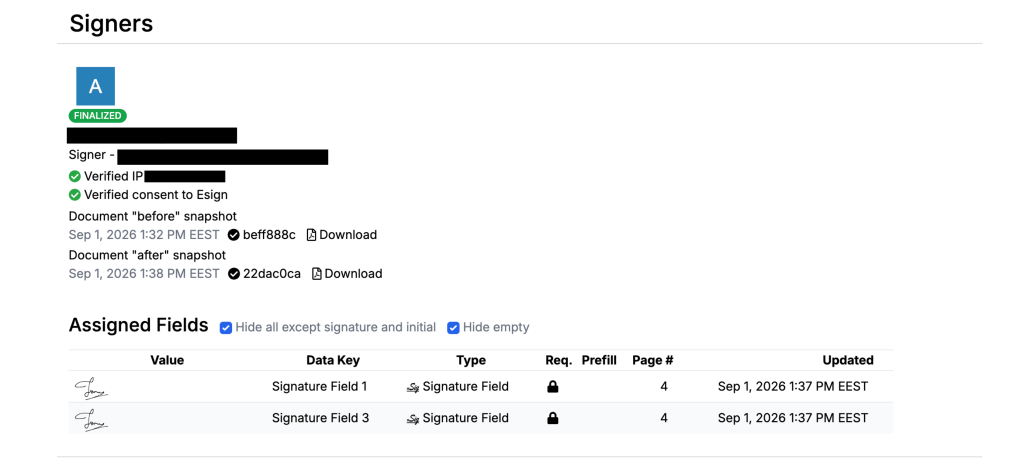
How DocHub verifies signing activity and protects document integrity
DocHub was built around the idea that security shouldn’t complicate the signing process. Every signer is authenticated before they can sign — either through a unique emailed signing request or by logging into a DocHub account — and account access is protected with two-factor authentication via text message, backup code, or authenticator app.
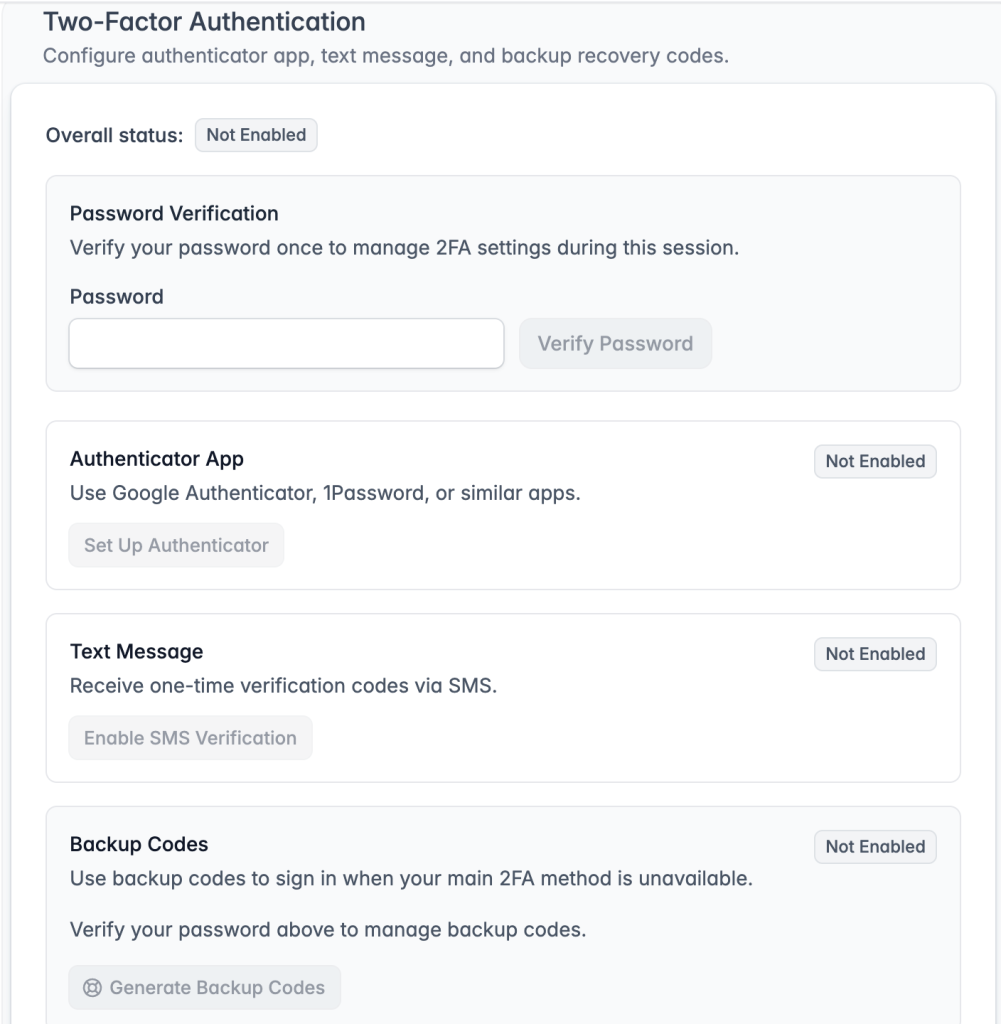
Here’s how DocHub’s secure eSign platform identity checks and document protections work in practice:
- Authentication: Every signer must either receive a designated email request or log in with DocHub credentials. This ensures that only invited parties can access and sign a document. All account data is transmitted over SSL (Secure Sockets Layer), which encrypts information in transit.
- Signature intent: DocHub captures real handwritten signatures—drawn on-screen using a mouse, stylus, or touch—as evidence of signer intent. Users can also type or upload a signature image. This explicit signing action satisfies the intent requirement under the ESIGN Act and UETA.
- Audit trail: DocHub affixes an audit trail to every completed document. The trail records authentication events, access times, IP addresses, and signing actions. Each document receives a SHA256 unique identifier that is stored in Bitcoin’s blockchain, making it independently verifiable at any point in the future. Document snapshots capture the state of the document at each major change, providing a full visual history.
- Account security: DocHub supports two-factor authentication (2FA) to protect user accounts from unauthorized access. Password protection allows PDF owners to restrict access when sharing. Role-based access permissions let organizations control who can view, edit, or sign a PDF.
- SSO and federated identity: For organizations that manage identity through providers like Okta or Microsoft Entra ID, DocHub supports SAML-based Single Sign-On. This means signers authenticate through their organization’s existing identity infrastructure—adding an institutional layer of verification on top of DocHub’s own checks.
Checklist for choosing a secure eSign platform
Before adopting an eSignature platform for contracts, HR paperwork, or high-value agreements, it helps to confirm that the platform offers:
- Multiple authentication methods, so the signer identity verification process can scale with the risk level of each document.
- A digital certificate and public key infrastructure, so signatures are cryptographically tied to both signer and document.
- A comprehensive, exportable audit trail, including timestamps, IP addresses, device data, and every signing action.
- Document tamper detection, so any post-signing edit is automatically flagged.
- Encrypted storage and access controls, including password protection and two-factor authentication for accounts.
- Clear compliance alignment with relevant standards such as the ESIGN Act, UETA, eIDAS, GDPR, or industry-specific regulations.
- User-friendly signing flows, since strong security only helps if signers and senders actually use it correctly.
Final thoughts
Understanding how eSignature platforms verify identity is more than just a technical detail; it can determine whether a signed document is legally binding or not. The best eSignature platforms integrate strong signer authentication, robust cryptographic document protection, and comprehensive audit trails. Together, these features produce a thorough and legally defensible record.
If your team needs to sign and manage PDFs online with reliable identity assurance, DocHub provides effective solutions. Its authentication options, digital certificate-backed signing, and detailed audit trails ensure a confident and straightforward signing process.
Explore DocHub today to see how a secure, auditable signing process can fit into your existing workflow.
Glossary
- Identity proofing: The process of confirming a person’s real-world identity before granting them access to sign.
- Authentication: Confirming that the person accessing a document is the same person who was invited or approved.
- Digital certificate: An electronic credential, built on public key infrastructure, that cryptographically ties a signature to a specific identity.
- Audit trail: A timestamped record of every action taken on a document, from opening to signing.
- Tamper detection: A key part of document verification, it is the process of determining whether a document’s content has changed since it was signed, typically using cryptographic hashing.
- Knowledge-based authentication (KBA): An identity check based on security questions drawn from personal or public records.
FAQ
An electronic signature is any electronic process that indicates a person’s intent to sign—this can be a typed name, a drawn signature, or a clicked checkbox. A digital signature is a more specific, cryptographically secured type of electronic signature. Digital signatures use public-key infrastructure (PKI) to generate a unique encrypted hash tied to both the signer’s identity and the document content. All digital signatures are electronic signatures, but not all electronic signatures are digital signatures.
Yes. The U.S. ESIGN Act (Electronic Signature in Global and National Commerce Act) and UETA (Uniform Electronic Transactions Act) both establish that electronic signatures carry the same legal weight as handwritten signatures, provided certain conditions are met. These conditions include signer intent, association of the signature with the document, and the ability to retain and reproduce the record.
Under Section 13 of UETA, electronic records, including audit trails, cannot be excluded from legal proceedings solely because they are in electronic form. An audit trail that captures timestamps, signer identity, IP addresses, authentication events, and document snapshots provides a detailed chain of custody that courts can review. The strength of an audit trail as evidence depends on how comprehensive and tamper-proof it is.
The appropriate level of verification depends on the risk associated with the transaction. For routine internal documents, like time-off requests, policy acknowledgments, or NDAs, email authentication is generally sufficient. For higher-stakes agreements, such as financial contracts, regulated industry documents, or high-value transactions, consider platforms that offer one-time passcodes, knowledge-based authentication, or government ID verification. Choose a verification method proportionate to the consequences if a signature were disputed or fraudulent.
Disputes are possible with any type of signature. However, a robust eSignature process, with a strong identity verification process, a complete audit trail, and cryptographic tamper detection, makes successful disputes much harder. Courts accept electronically signed documents when the signing party can demonstrate signer intent, proper authentication, and an unaltered record. The more comprehensive the platform’s evidence trail, the stronger the position of the party relying on the signature.
- TL;DR
- What does “identity verification” mean in eSigning?
- Authentication methods for electronic signature verification
- Digital signature verification methods: How cryptography protects a signed document
- What does an eSignature Audit trail prove?
- How document tamper detection software detects changes
- How DocHub verifies signing activity and protects document integrity
- Checklist for choosing a secure eSign platform
- Final thoughts
- Glossary
- FAQ