
Wet signature vs. electronic signature: What’s the difference, and which one do you need?

The main difference between a wet signature and an electronic signature is the format and method of signing. A wet signature requires a person to physically mark a paper document using wet ink, while an electronic signature uses digital technology to indicate agreement on an electronic document. Both are legally binding in most business scenarios, though electronic signatures offer much faster processing, better security tracking, and lower operational costs.
- A wet signature involves signing a physical document with a pen, while an electronic signature is a digital mark indicating agreement.
- Electronic signatures are legally recognized in the U.S., EU, and many other regions for most business transactions.
- While wet signatures are still required for some legal documents like wills and property deeds, electronic signatures are the standard for most everyday contracts.
- Comparing the cost of paper vs. electronic signing shows that digital processes often lower spending on supplies, postage, storage, and manual handling.
- With DocHub, you can easily sign documents and collect eSignatures from others — complete with audit trails and digital certificates for extra security.
Wet signature vs. electronic signature: Choosing the right way to sign
Imagine you just finalized a major business agreement and need to get the final contract signed today. You could print the document, sign it with a pen, scan it back into your computer, and email it to your partner. Alternatively, you could open the file on your device, apply a saved digital mark, and instantly request the other party’s signature. This exact scenario highlights the core debate of wet signature vs. electronic signature.
Many small business owners, operations managers, and HR specialists still feel confused about which method is legally acceptable. They worry about the legal differences eSign vs. wet signature formats carry. This guide is for professionals who need to sign or send documents and want to understand the exact differences, legal requirements, and best use cases for both methods.
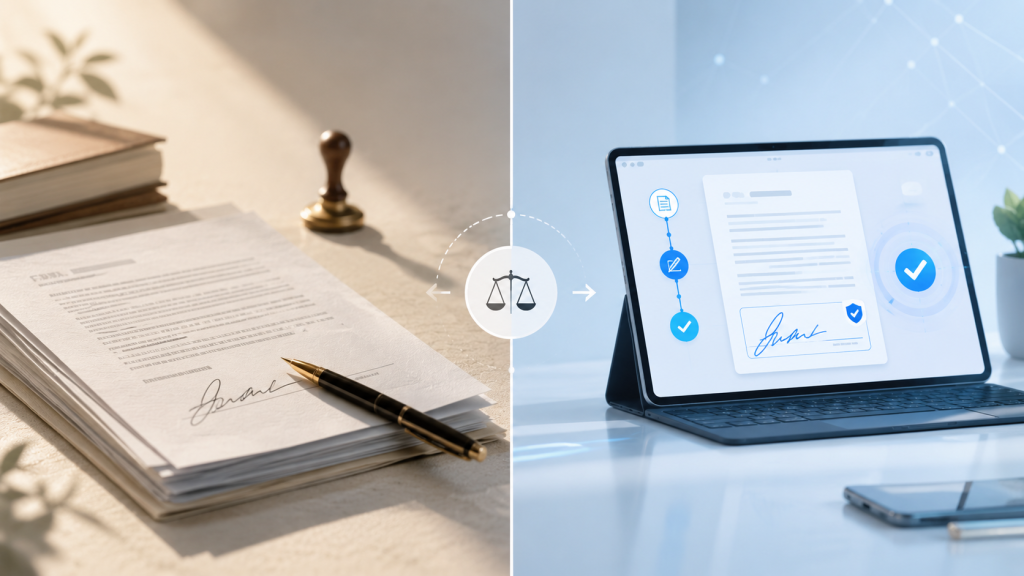
In this article, we’ll describe exactly when to reach for a pen and why to use eSignatures. We’ll also show you how DocHub makes signing documents electronically both easy and secure.
Disclaimer: The information contained in this blog post is provided for general informational purposes only and does not constitute formal legal advice.
What is a wet signature?
A wet signature is the physical mark someone makes on a paper document to show they agree to or authorize it. It gets its name from the wet ink of a pen. Before digital tools, this was the only way to make a contract legally binding. Examples of wet signatures include:
- Signing a physical check
- Endorsing a printed employment contract
- Signing a receipt at a store
Historically, personalized stamps or wax seals served the same purpose. Because it requires a physical presence, a wet signature has long been the default for identity verification and consent.
Disadvantages of wet signatures
But even with their long history, the disadvantages of wet signatures are clear today, in our digital era. Chasing down physical signatures can be difficult and inconvenient — especially across distances. Let’s review the common disadvantages of wet signatures:
- It’s slow. Printing, signing, and mailing documents takes time. With shipping delays, this can add a week or more to simple agreements.
- It’s hard to track. Once a paper document is out of your hands, you can’t see who’s opened it, when they viewed it, or if it was changed after signing.
- It’s risky. Paper documents are easy to lose or damage, and they require physical storage space.
- It’s expensive. The costs of paper, printing, and postage add up — not to mention the time your team spends managing it all. For example, the USPS lists a single stamp cost at $0.78, unusual envelopes at $1.27, and Priority Mail Flat Rate Envelopes at almost $13. And that doesn’t even include the cost of paper, envelopes, and printer supplies.
Simply put, wet signatures create unnecessary delays, costs, and risks that modern businesses can’t afford. Luckily, there’s a more efficient way to handle your document signing needs: electronic signatures.
What is an electronic signature?
An electronic signature, as defined in the ESIGN Act, is “an electronic sound, symbol, or process, attached to or logically associated with a contract or other record and executed or adopted by a person with the intent to sign the record”. In plain language, it is the digital equivalent of a handwritten signature. It lets you agree to the terms of electronic documents without ever printing them.
Common types of eSign methods:
You can create a simple eSignature in a few different ways:
- Typing your name into a field
- Checking an “I agree” box
- Drawing your signature with a mouse or touchscreen
- Uploading an image of your handwritten signature
Electronic signature vs. digital signature
While people often use the terms interchangeably, they are not the same thing. An eSignature is a broad legal category for any digital mark of agreement. A digital signature is a highly secure subset of electronic signatures that uses a digital certificate and encryption to authenticate the signer’s identity and ensure document integrity.
Wet signature vs. electronic signature: What are the key differences?
When comparing a wet signature vs. electronic signature, the differences go far beyond paper and screens. Here’s a breakdown of the main differences between the two methods.
| Wet signature | Electronic signature | |
|---|---|---|
| Format | Requires a physical document and ink. | Exists in a digital form and is applied to electronic documents. |
| Speed | Slow and manual, often taking days for printing, routing, and scanning. | Instant and remote, allowing deals to close in minutes. |
| Convenience | Signers must be physically present or rely on mail services. | Users can sign in from anywhere, on any device. |
| Security | Higher risk of forgery; verification relies on handwriting experts. | Offers secure authentication, passwords, and multi-factor tracking. |
| Storage | Requires physical filing cabinets, which are hard to search | Lives securely in the cloud, making records instantly searchable. |
| Tracking | Limited to no visibility once the document is sent. | Provides real-time status tracking, timestamps, and audit trails. |
| Cost | High costs for paper, printing, postage, and administrative time. | Eliminates spending on paper, postage, and physical file management. |
Are electronic signatures legally valid?
Yes. In most situations, electronic signatures are just as legally valid as traditional wet-ink signatures.
To understand the legal differences eSign vs. wet signature methods involve, it is important to look at the laws that govern electronic transactions in the U.S. and the European Union. In the United States, the ESIGN Act and UETA give eSignatures the same legal weight as handwritten ones. These laws make sure a contract can’t be dismissed just because it was signed electronically.
The European Union has a similar law called the Electronic Identification and Trust Services Regulation (eIDAS), which standardizes electronic transactions across member states. Most other industrialized nations also have laws that make eSignatures legally binding.
To be legally binding, an electronic signature generally needs to meet four requirements:
- The user must clearly intend to sign the document.
- All parties must agree to do business electronically.
- The signature must be clearly linked to the record being signed.
- The system must keep a copy of the record for future reference.
When is a wet signature still required?
While eSignatures are great for most businesses, there are a few important exceptions where a handwritten signature is still required. In these cases, the law often prioritizes extra steps for identity verification.
Laws vary, so it’s always a good idea to check your local regulations on using eSignatures. However, there are some common documents that still require a wet signature, including:
- Wills, testaments, codicils, and some trusts
- Certain real estate documents, like property deeds, evictions, and some mortgage paperwork
- Many family law documents, such as adoption paperwork, divorce decrees, and child custody agreements
- Any document that needs to be notarized in a jurisdiction that requires a physical stamp
- Specific government forms that require a physical signature to be valid
When should you use an electronic signature instead?
For most daily operations, using eSignature is the fastest and most efficient choice. When it comes to everyday agreements and approvals that don’t require notarization or specialized legal handling, the answer to ‘why use eSignatures’ is simple: they’re faster, more flexible, and easier to track.
Common use cases include:
- Standard business agreements
- Non-disclosure agreements (NDAs)
- Employment offer letters
- Vendor paperwork and client approvals
- Employee onboarding forms and expense reports
- School permission slips and admin forms
Basically, if it’s a general contract or form that accepts eSignatures, signing digitally is the smartest option.
How eSignatures work in DocHub
For most everyday documents, electronic signatures are the way to go. And that’s where DocHub comes in.
DocHub gives you a simple and secure way to sign, send, and manage your paperwork online — no printing or scanning required. It fits right into your workflow, helping you get documents like NDAs and vendor agreements done fast without sacrificing security. Read our latest guide on how to add electronic signatures in DocHub to learn how it works.
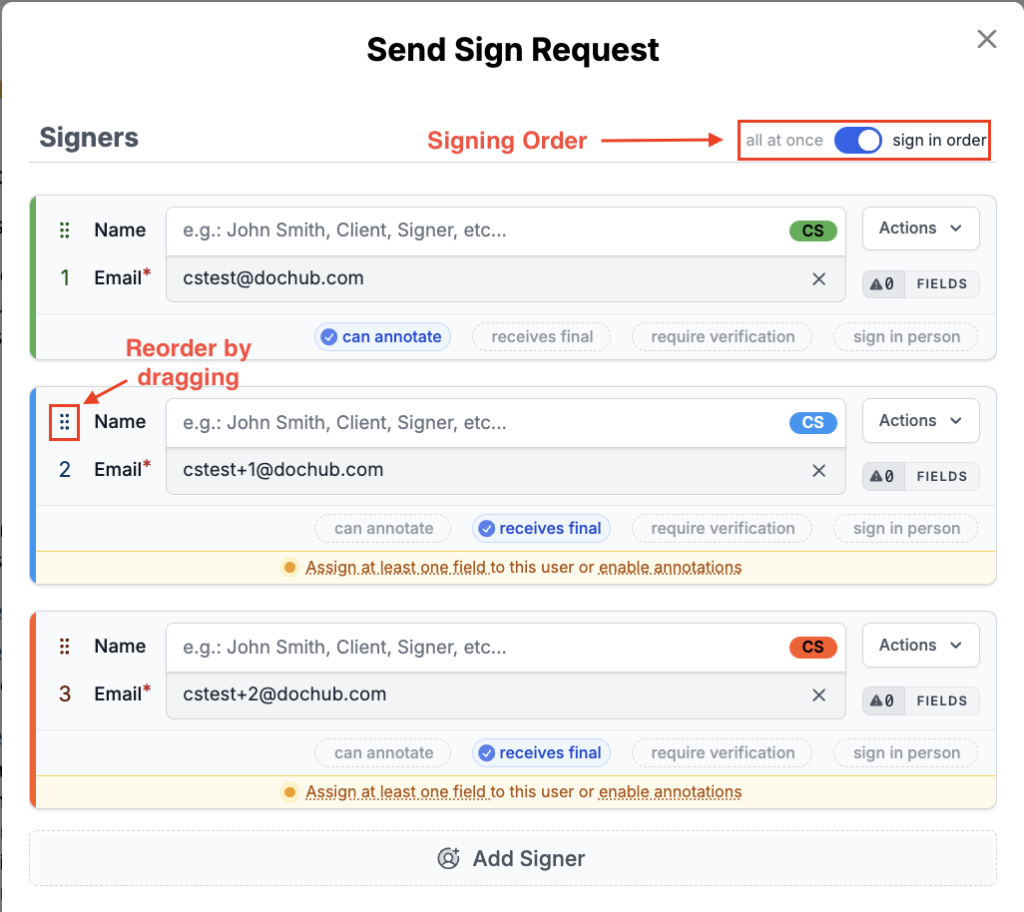
With DocHub’s Sign Requests, you can easily send a document to multiple people and decide the order in which they sign. And with the Audit Trail, you get a full history of every document — when it was viewed, signed, and completed.
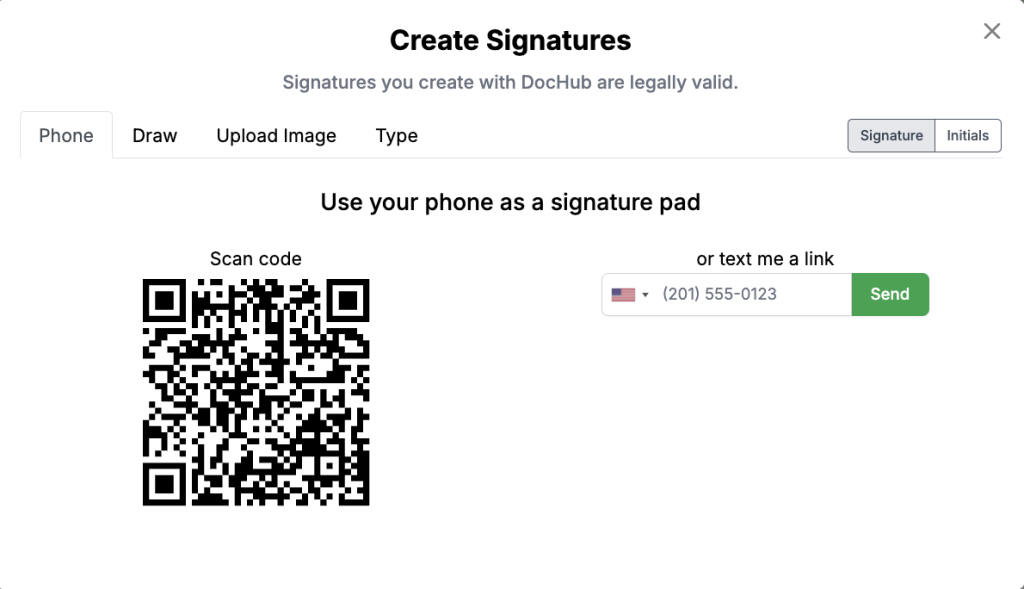
- Create your electronic signature: Easily type your name, draw it with your mouse, or upload a photo of your handwritten signature.
- Add your signature to documents: Drag and drop your saved signature exactly where it needs to go on any PDF.
- Send documents for signature: Use Sign Requests to easily email documents to clients or colleagues for their signature.
- Track signing activity: Monitor the status of your sent documents in real-time to see who has signed and who is holding up the process.
- Keep a record with audit trails: Automatically generate a detailed history of every action taken on the document.
- Certify documents for additional assurance: Apply a digital certificate to lock the document and prove its integrity.
Are DocHub eSignatures legally binding?
Yes. DocHub provides secure, legally-binding electronic signatures that comply with the U.S. ESIGN Act and the Uniform Electronic Transactions Act (UETA). This means DocHub eSignatures are just as valid as handwritten ones, giving you peace of mind when closing important deals.
When you request a signature or send a fillable form, DocHub automatically creates an audit trail. This log tracks every interaction with the document, including email addresses, IP addresses, and timestamps. It serves as powerful evidence of who signed the document and when, making it difficult for anyone to dispute their signature later.
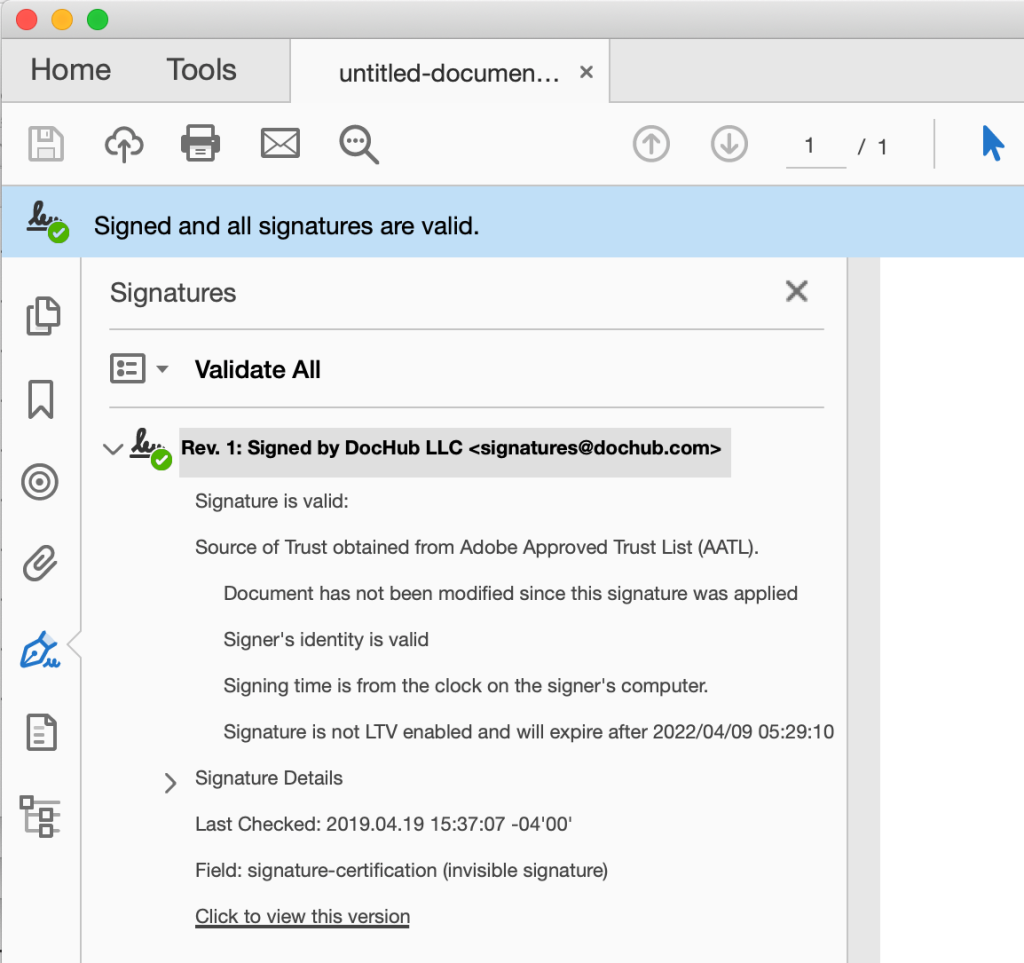
DocHub’s certification options add another layer of trust to your signed documents. DocHub provides a digital certificate that makes signatures unique to the signer and compliant with U.S. law. The signature remains under the signer’s control and is linked to the document, making any later changes easy to detect.
Why use eSignatures in DocHub?
Switching to DocHub from physical paperwork makes your work life a whole lot easier. It replaces slow, manual processes with a faster, simpler way to get documents signed and managed. This shift also helps lower the cost of paper vs. electronic signing, especially for teams that send contracts, forms, or approvals at scale.
Here’s how DocHub makes a difference:
- Get documents done faster. Send, sign, and receive a completed document in minutes, not days. No more waiting for the mail to arrive.
- Edit documents before signing. Add and edit text, insert images, fill out forms, create fillable fields, or make annotations before you send a document for signature.
- Manage PDFs with ease. Add or delete pages, merge documents, and rotate pages to get your files just right.
- Cut down on costs. DocHub’s flexible, affordable pricing plans, combined with reduced printing and scanning, mean you’ll save on paper, ink, and office supplies. It’s a win for your budget and the environment.
- Sign from anywhere. Prepare and sign documents from anywhere, and let recipients sign on any device—whether they’re at home or on the go.
- Keep track of everything. DocHub makes recordkeeping easy. A clear audit trail shows who signed what and when, providing a level of security that filing cabinets can’t match.
Final thoughts
The debate between wet signature vs. electronic signature ultimately comes down to the needs of your specific document. While wet signatures still have a strict legal place in wills, family law, and estate planning, they are largely outdated for daily commerce. Electronic signatures provide a legally recognized, secure, and incredibly fast way to execute business agreements.
DocHub gives you all the tools you need to sign, send, and certify your PDFs securely in one place. Explore DocHub today and see how easy it is to handle your documents without the runaround.
Glossary
- Electronic signature: A digital mark, sound, or process attached to a document that indicates a person’s intent to agree to its contents.
- Wet signature: A traditional signature made by physically marking a paper document with wet ink from a pen.
- Digital signature: A highly secure type of electronic signature that uses a digital certificate and encryption to verify identity and document integrity.
- Audit trail: A secure, automated digital log that records the history of actions taken on a document, including IP addresses and timestamps.
- Digital certificate: An electronic credential used to prove identity and encrypt data, ensuring that a digital signature is authentic and tamper-evident.
FAQ
1. What is the difference between a wet signature and an electronic signature?
A wet signature involves using a pen to physically mark a piece of paper. An electronic signature is a digital equivalent used to sign electronic documents on a computer or mobile device. While both serve to show agreement, electronic signatures are much faster and easier to track.
2. Are electronic signatures legally binding?
Yes, in the vast majority of business and commercial transactions, electronic signatures are legally binding. Laws like the ESIGN Act in the U.S. and eIDAS in the European Union ensure they carry the same legal weight as a physical signature. However, some legal requirements must be met, such as proving the signer’s intent.
3. Is a scanned signature the same as an electronic signature?
A scanned image of your handwritten signature can function as a simple electronic signature when placed onto a digital document. However, simply pasting an image does not provide the same security as using dedicated electronic signature software. Platforms like DocHub capture timestamps, IP addresses, and other details that help legally validate a signature.
4. What is the difference between an electronic signature and a digital signature?
An electronic signature is a broad term for any digital mark used to sign a document. A digital signature is a specific, highly secure type of electronic signature. Digital signatures use cryptographic technology and digital certificates to permanently link the signer’s identity to the document, ensuring it hasn’t been altered.
5. How does an audit trail help with legal recognition?
An audit trail provides a verifiable digital history of a document’s lifecycle. It tracks who opened the document, when they signed it, and the IP address of the device they used. This comprehensive data makes it very difficult for anyone to falsely deny having signed the document, thereby supporting its legal validity in a dispute.
6. What electronic signatures does DocHub offer?
DocHub provides several signing methods. You can draw your signature digitally, just as you would with a pen and paper, type your full name and customize its appearance, or upload an image of your handwritten signature. You can also use your phone as a signature pad to get a more accurate digital signature. All methods are secure and compliant.
- Wet signature vs. electronic signature: Choosing the right way to sign
- What is a wet signature?
- What is an electronic signature?
- Wet signature vs. electronic signature: What are the key differences?
- Are electronic signatures legally valid?
- When is a wet signature still required?
- When should you use an electronic signature instead?
- How eSignatures work in DocHub
- Are DocHub eSignatures legally binding?
- Why use eSignatures in DocHub?
- Final thoughts
- Glossary
- FAQ