
HIPAA-compliant electronic signature: 10-point security checklist & requirements

Electronic signatures have become an essential tool for healthcare providers, but ensuring they comply with HIPAA regulations is crucial to protecting patient information. This guide covers the key security requirements and a comprehensive checklist to keep your eSignature solution secure and compliant.
- An eSignature isn’t “HIPAA-certified” on its own; the entire signing process must protect patient data with security measures like access controls and audit trails.
- For a healthcare eSignature to be legally binding, it must meet basic legal standards and comply with HIPAA’s privacy and security rules.
- If an eSignature vendor stores patient information, they are a “Business Associate,” and you must have a Business Associate Agreement (BAA) with them.
- HIPAA security rules are being updated, requiring healthcare providers and their vendors to adopt stronger cybersecurity practices.
- When choosing a vendor, ask for proof of their security, including encryption methods, audit trails, and security reports.
When a document contains Protected Health Information (PHI), using non-compliant tools for patient consent forms or other agreements can render the consent invalid and result in significant fines. For healthcare providers, understanding the intersection of federal and state laws is crucial.
The legal landscape for electronic signatures involves three main pillars: the Electronic Signatures in Global and National Commerce (ESIGN) Act, the Uniform Electronic Transactions Act (UETA), and the Health Insurance Portability and Accountability Act (HIPAA). The ESIGN Act and UETA establish the legal validity of electronic signatures, while HIPAA sets strict rules for protecting sensitive patient information. A truly HIPAA-compliant electronic signature solution must satisfy all three. This guide provides a 10-point checklist to help you evaluate electronic signature software and ensure compliance.
What HIPAA regulations apply to eSignatures?
HIPAA does not contain a separate rule specifically for electronic signatures. Instead, healthcare organizations must evaluate the entire electronic signing workflow under the HIPAA Privacy and Security Rules whenever protected health information (PHI) is created, received, maintained, or transmitted. Several provisions are especially relevant:
- 45 CFR §164.504(e) — Business Associate Agreements. When an eSignature provider is acting as a business associate and handles PHI on behalf of a covered entity, the required contract or other arrangement must define permitted uses and disclosures of PHI and require appropriate safeguards.
- 45 CFR §164.508 — Authorizations. HIPAA requires a valid written authorization for certain uses and disclosures of PHI. When an authorization is required, it must contain specified elements, including a description of the information, the persons authorized to use or disclose it, an expiration date or event, and the individual’s signature and date.
- 45 CFR §164.520 — Notice of Privacy Practices. Most covered healthcare providers and health plans must provide individuals with a notice explaining how PHI may be used and disclosed, their privacy rights, and the covered entity’s legal duties. Signing an acknowledgment that the notice was received is not the same as authorizing additional uses or disclosures of PHI.
The U.S. Department of Health and Human Services (HHS) takes a technology-neutral approach: an eSignature tool is not automatically “HIPAA certified.” Compliance depends on how the covered entity and its business associates use the technology, what PHI it handles, what safeguards are implemented, and whether required agreements and policies are in place.
The 10-point HIPAA eSignature checklist
When evaluating an eSignature solution for your healthcare practice, it is essential to verify its security measures and compliance capabilities. A HIPAA-compliant eSignature platform must provide robust safeguards to protect patient data throughout the entire signing process. Use this checklist to vet potential vendors and ensure they meet the necessary HIPAA requirements for handling electronic transactions involving PHI.
1. User authentication
A fundamental requirement for a compliant electronic signature is verifying the identity of the person signing. The system must have mechanisms to confirm that the individual is who they claim to be.
- What to look for: Methods like email verification, SMS codes sent to a mobile phone, or knowledge-based questions.
- Why it matters: Strong user authentication links the signature to a specific individual, which is a core principle of both the ESIGN Act and HIPAA rules. Simply drawing a signature on a screen without verification does not prove who created it.
2. Audit trails
A comprehensive audit trail is non-negotiable for HIPAA compliance. The system must create a detailed log of every action taken on a document.
- What to look for: The ability to record and export information such as IP addresses, device types, timestamps for viewing and signing, and a history of all document activity.
- Why it matters: Comprehensive audit trails provide the evidence needed to prove a document’s history and integrity. In the event of a dispute, this audit log serves as your proof of compliance and can protect you from legal challenges.
3. Encryption and enhanced security
Data must be protected at all times, both when it is stored (at rest) and when it is being sent over the internet (in transit).
- What to look for: Encryption at rest using standards like AES-256 and encryption in transit using Transport Layer Security (TLS).
- Why it matters: Encryption makes PHI unreadable to unauthorized personnel. The HIPAA Security Rule considers encryption a key safeguard for protecting sensitive patient data from data breaches.
4. Integrity (tamper-proofing)
Once a document is signed, it must be locked to prevent any changes. Any alteration to electronically signed documents must be detectable.
- What to look for: The use of digital certificates or cryptographic hashing to create a tamper-evident seal. If the document is modified after signing, the signature should become invalid.
- Why it matters: This ensures the final signed documents cannot be altered, preserving the integrity of the agreement. It protects against digital tampering and fraud.
5. Non-repudiation
Non-repudiation ensures that a signer cannot later deny having signed a document. It provides strong evidence linking the signer to the signed document.
- What to look for: A combination of strong user authentication, a detailed audit trail, and tamper-proof document integrity.
- Why it matters: This creates a legally binding contract that holds up in court. Healthcare providers can trust that the consent forms they collect are valid and enforceable.
6. Access controls
Not everyone in your organization should have access to every patient document. A compliant system must allow you to manage permissions.
- What to look for: Role-based access controls (RBAC) that let you define who can view, edit, or sign specific documents. Only authorized personnel should have access.
- Why it matters: Access controls are a core tenet of the HIPAA Privacy Rule. They help prevent unauthorized disclosures of PHI and ensure that patient information is only accessed on a need-to-know basis.
7. Automatic logoff
Sessions should not remain open indefinitely on unattended devices. The system should automatically log users out after a period of inactivity.
- What to look for: A configurable session timeout feature that automatically ends a user’s session.
- Why it matters: This is an important technical safeguard under the HIPAA Security Rule. It reduces the risk of unauthorized access to PHI from a computer or device left logged in.
8. Data center security
The physical and digital security of the servers where your data is stored is just as important as the software itself.
- What to look for: Vendor data centers that are SOC 2 Type II certified. This certification validates that the vendor has robust security controls in place.
- Why it matters: SOC 2 compliance demonstrates a vendor’s commitment to data security and provides assurance that your sensitive patient data is housed in a secure environment.
9. The Business Associate Agreement (BAA)
When an eSignature vendor creates, receives, maintains, or transmits PHI on behalf of a HIPAA-covered entity and qualifies as a business associate, HIPAA generally requires the covered entity to obtain satisfactory assurances through a Business Associate Agreement or another arrangement permitted by the rule. Under 45 CFR §164.504(e), the agreement must define permitted uses and disclosures of PHI and require the business associate to implement appropriate safeguards.
- What to look for: Confirm that the vendor will enter into a BAA for the specific plan and services your organization intends to use. Do not assume that a BAA applies to every subscription tier.
- Why it matters: A BAA establishes contractual HIPAA responsibilities between a covered entity and a business associate. HHS recognizes limited situations where a service provider is not acting as a business associate — for example, certain transmission-only “conduit” arrangements — so whether a BAA is required depends on the vendor’s role and access to PHI.
10. Data Ownership
You must be able to retrieve your data if you decide to switch vendors or terminate your service.
- What to look for: The ability to easily export all your signed documents and their corresponding audit trails in a standard format, like PDF.
- Why it matters: This ensures you maintain control over your electronic records and can comply with data retention policies, even if you change your eSignature software provider.
How much can a HIPAA violation cost in 2026?
HIPAA compliance failures can create substantial financial exposure. HHS adjusts civil monetary penalties for inflation each year, and the amounts applicable to penalties assessed on or after January 28, 2026 increased again.
| eSignature tool | BAA / HIPAA availability | Published pricing | Relevant standards / regulations |
|---|---|---|---|
| DocHub | BAA available with Site License | Site License: contact sales; Pro is €12/month on DocHub’s current pricing page, but Pro itself does not include the HIPAA BAA | HIPAA-ready workflows with BAA on eligible plan; ESIGN/UETA for U.S. eSignatures; SOC 2 Type II controls |
| Docusign | Docusign states that it may enter into a BAA with HIPAA covered entities | Personal from $11/month; Standard $30/user/month; Business Pro $45/user/month on current U.S. pricing page | HIPAA-supporting configurations; ESIGN/UETA; additional compliance capabilities vary by product and plan |
| Adobe Acrobat Sign Solutions | BAA required before customers process PHI using its HIPAA configuration; availability is limited to qualifying Business or Enterprise subscriptions | Contact sales for Acrobat Sign Solutions | HIPAA-supporting configuration; ESIGN/UETA and other electronic-signature frameworks depending on deployment |
| SignNow | BAA available for qualifying HIPAA workflows; HIPAA functionality is offered through corporate plans | Business from $8/user/month annually; Business Premium $15; Enterprise $30; HIPAA availability depends on the applicable corporate arrangement | HIPAA-supporting workflows with BAA; ESIGN/UETA; eIDAS support for electronic signatures |
| Dropbox Sign | HIPAA support is available for qualifying annual Standard or Premium customers with a signed BAA and minimum contract value | Standard from $17.50/user/month when billed yearly; Premium: custom quote | HIPAA-supporting configuration with BAA; ESIGN/UETA |
Pricing and HIPAA eligibility can change and may depend on contract size, configuration, region, or plan. Healthcare organizations should confirm the current BAA terms and eligible subscription directly with each vendor before transmitting PHI.
HIPAA-compliant eSignatures for telehealth
Telehealth adds another layer to HIPAA eSignature workflows because PHI may move between video or audio platforms, patient portals, document systems, and eSignature services during a single remote appointment. HHS states that covered healthcare providers and health plans may use remote communication technologies for telehealth when they comply with the applicable HIPAA Privacy, Security, and Breach Notification Rules.
For example, a telehealth workflow may require a patient to review and electronically sign an intake form, consent form, Notice of Privacy Practices acknowledgment, release, or other healthcare document before or after a virtual appointment. If those documents contain PHI, the systems used to transmit, sign, and store them should be included in the organization’s HIPAA risk analysis.
HIPAA telehealth eSignature checklist
Before using eSignatures as part of a telehealth workflow, healthcare organizations should consider whether they can:
- verify the identity of the patient or other signer;
- send documents without exposing PHI to unintended recipients;
- encrypt ePHI during transmission and storage where appropriate;
- control which staff members can access signed patient documents;
- maintain an audit trail showing when documents were opened, signed, and completed;
- execute a BAA with technology vendors when they act as business associates;
- protect recordings, transcripts, messages, and documents created during remote care; and
- apply reasonable privacy safeguards during the telehealth encounter itself.
Real-world HIPAA eSignature use cases
HIPAA-ready eSignature technology can support healthcare workflows wherever staff need to collect signatures while controlling access to PHI. Common examples include:
1. Patient intake and registration
A medical practice can send intake paperwork before an appointment so patients can complete and sign demographic, insurance, medical history, and acknowledgment forms remotely. A documented signing workflow reduces manual scanning and improves data accuracy by eliminating handwriting errors, creating an electronic record of completion.
2. Telehealth consent workflows
Before a virtual consultation, a clinic can send required consent or acknowledgment documents electronically. The patient reviews and signs from a phone or computer, while the organization retains the completed document and associated signing history. Healthcare organizations should separately confirm state-specific telehealth consent requirements because they can differ from HIPAA.
3. Notice of Privacy Practices acknowledgments
Under 45 CFR §164.520, covered healthcare providers with direct treatment relationships generally must provide a Notice of Privacy Practices and make a good-faith effort to obtain the patient’s written acknowledgment of receipt. An electronic workflow can document that acknowledgment. Importantly, the acknowledgment confirms receipt of the notice; it does not itself authorize additional uses or disclosures of PHI.
4. HIPAA authorizations
When HIPAA requires an authorization under 45 CFR §164.508, an electronic document workflow can collect the required information and signature. Examples can include certain disclosures of psychotherapy notes, marketing uses of PHI, or other disclosures requiring specific patient authorization. The organization remains responsible for ensuring that the authorization contains all elements required by HIPAA.
5. Home health and remote patient care
Home health agencies can collect signed care documents, acknowledgments, and other patient paperwork remotely instead of transporting paper records between patients, clinicians, and administrative offices. Role-based access and centralized storage can help reduce unnecessary exposure of PHI.
6. Healthcare HR and vendor administration
Healthcare organizations can also use secure electronic signatures for workforce confidentiality agreements, vendor contracts, and Business Associate Agreements. Not every HR or administrative document contains PHI, so organizations should classify documents and apply HIPAA controls where HIPAA-regulated information is actually involved.
Digital signature vs. electronic signature for HIPAA
The terms “electronic signatures” and “digital signatures” are often used interchangeably, but they refer to different concepts. Understanding the distinction is key to evaluating the security of an eSignature solution.
- Electronic signatures: This is a broad, legal term defined by the ESIGN Act and UETA. A simple electronic signature is any electronic sound, symbol, or process attached to a record and executed by a person with the intent to sign. This can be as simple as a typed name, a checked box, or a hand-drawn signature on a screen. The focus is on the signer’s intent and creating a secure form of consent.
- Digital signatures: This is a specific, technical implementation of electronic signatures that uses cryptography. Digital signatures embed a unique “fingerprint” into a document using a certificate-based digital ID. In a public key infrastructure, the signer uses a private key to sign, and the corresponding public key is used to verify the signature. This technology provides a higher level of assurance by verifying the signer’s identity, protecting the document from tampering, supporting data integrity, and delivering enhanced security. More advanced setups can also require technical expertise, and wet digital signatures require a certificate authority for verification.
DocHub leverages both concepts to provide a HIPAA-compliant electronic signature. The platform captures the signer’s intent to create a legally-binding electronic signature, then secures it with the cryptographic technology of a digital signature. This ensures every signed document is unique to the signer, verifiable, under their sole control, and linked to the document to detect any subsequent changes. In clinical and pharmaceutical settings, FDA 21 CFR Part 11 regulates electronic records and signatures.
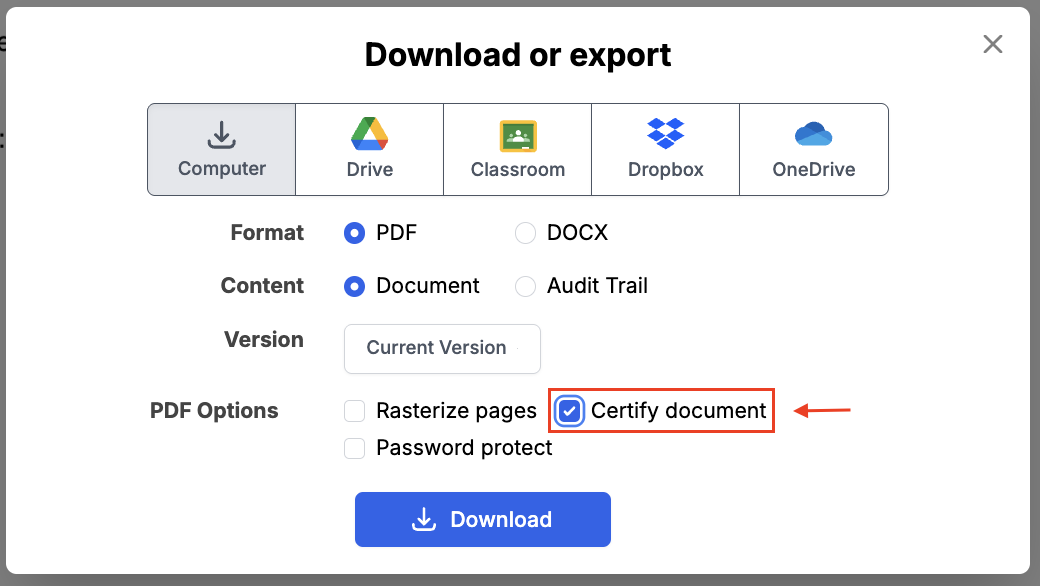
PDFs created from a DocHub Sign Request will be automatically digitally signed and certified. This includes all revisions of the document and the audit trail.
Why free eSignature tools may not be HIPAA compliant
Many healthcare practices use free tools to manage documents and collect signatures. While convenient, these solutions are often not designed for HIPAA compliance.
For example, standard PDF readers or computer preview applications usually lack the features needed for HIPAA-compliant workflows. These can include detailed audit trails to track document activity or stronger authentication methods to verify a signer’s identity.
Another key consideration is whether the vendor offers a Business Associate Agreement (BAA), which is required when a service provider handles protected health information (PHI). Many general-purpose tools aren’t meant for healthcare use and don’t provide this agreement.
Healthcare organizations that handle patient consent forms or other documents containing PHI must ensure their tools support the safeguards and agreements needed for HIPAA compliance.
How DocHub meets all 10 requirements
DocHub is designed to provide an audit-ready, HIPAA-compliant eSignature platform for healthcare providers. Our solution simplifies secure document management by integrating all the necessary security measures directly into your healthcare workflows.
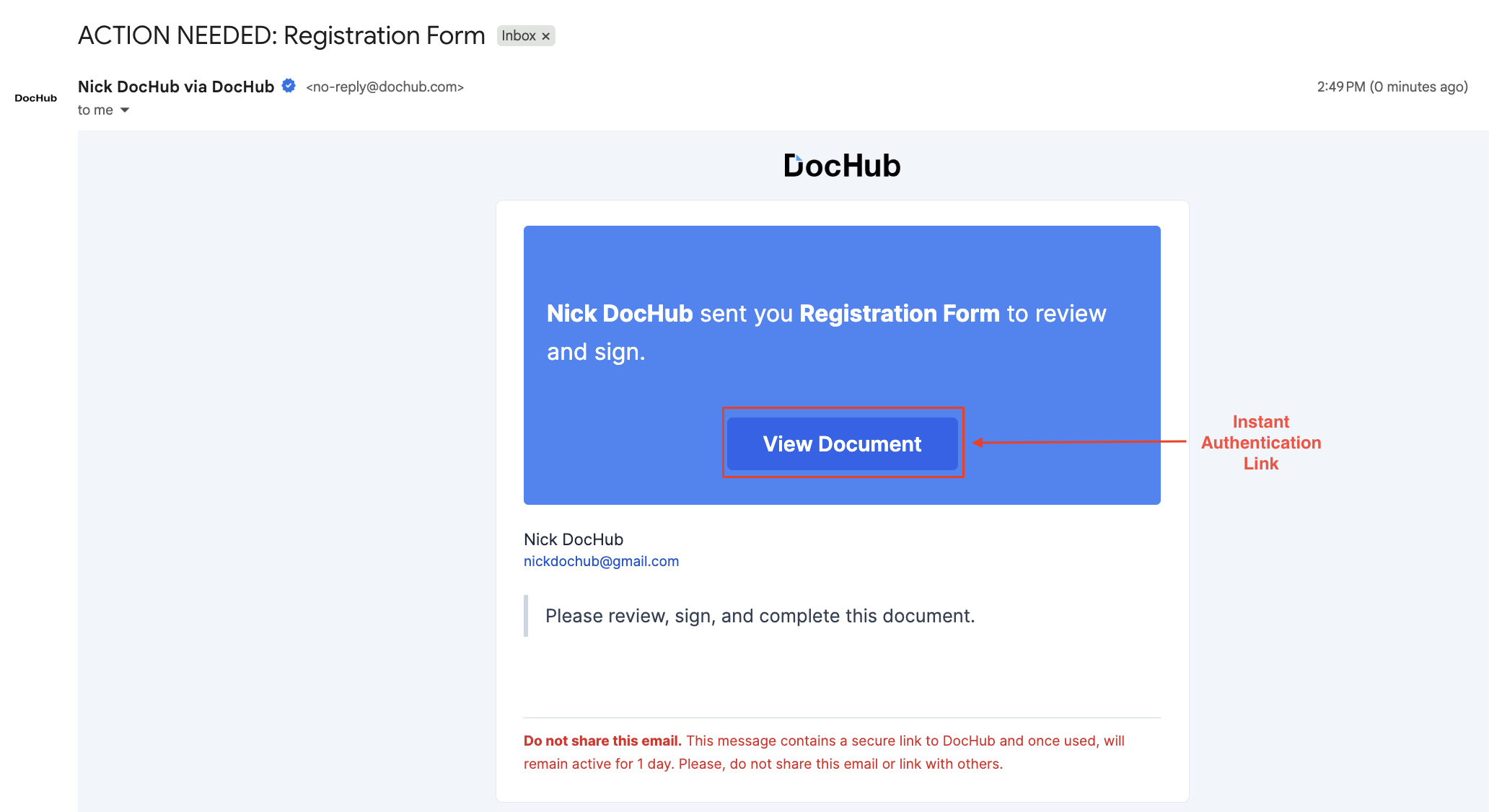
The Sign Requests feature is a perfect example. When you send a document for signature, the request is sent to the patient’s email, which serves as the first layer of user authentication. This process creates a clear record showing who was invited to sign and when they completed the action—proof that simply drawing a signature on an iPad cannot provide.
Upon completion, DocHub generates a detailed Certificate of Completion. This certificate is an essential part of the audit trail, capturing timestamps, IP addresses, and a full event history. This document, not just the signature image, is what protects your practice in a legal dispute.
Most importantly, DocHub offers a Business Associate Agreement for customers on our Site licence. Use this BAA Form to execute the DocHub Business Associate Agreement at legal.dochub.com/baa. Without a BAA, any other security features a vendor offers are irrelevant for HIPAA compliance.
Here’s a clear comparison of a standard solution versus a HIPAA-compliant eSignature from DocHub.
| HIPAA Security Feature | Generic eSignature Tools | DocHub HIPAA-Ready eSignature |
|---|---|---|
| Signer Authentication | Basic email verification or limited authentication options, depending on the provider | Multiple verification options, including email |
| Audit Trail for HIPAA Documentation | Basic document logs that vary by platform | Detailed, exportable audit trail capturing document activity and signer events |
| Encryption for Protected Health Information (PHI) | Encryption standards vary by vendor | AES-256 encryption |
| Document Integrity Protection | Tamper detection capabilities vary by tool | Digital signature certificate helps maintain document integrity |
| Legal Evidence & Signature Records | Signature evidence features vary by platform | Detailed signing records and verification data supporting legally defensible signatures |
| Access Controls for Sensitive Documents | Basic sharing permissions | Role-based permissions and controlled document access |
| Infrastructure & Data Center Security | Security certifications vary by vendor | Hosted in SOC 2 Type II–certified data centers |
| Business Associate Agreement (BAA) | Not always available from general-purpose tools | BAA available for DocHub Site license users |
| Data Export & Portability | Export options vary depending on the service | Documents and audit logs can be exported when needed |
While many eSignature tools support basic document signing, healthcare organizations should evaluate whether the platform provides the security controls, auditability, and agreements needed to support HIPAA-compliant workflows.
Watch our video guide to master the editor’s core features for professional PDF management.
Disclaimer: The information contained in this blog post is provided for general informational purposes only and does not constitute formal legal advice.
Final thoughts
When it comes to handling Protected Health Information, there’s no room for shortcuts. Using non-compliant eSignature tools can lead to severe penalties and damage your reputation. A HIPAA-compliant electronic signature is more than just a digital scribble; it’s a secure process that produces verifiable proof.
By choosing a solution that meets all 10 points on this checklist, you can confidently switch from paper to secure electronic workflows. A tool like DocHub provides the necessary security, audit trails, and a signed Business Associate Agreement, ensuring your practice stays compliant while improving efficiency.
Start streamlining your document workflows today with DocHub. Get started with DocHub now to experience secure, efficient, and compliant digital document management tailored for healthcare professionals.
Thank you!
Free HIPAA software vendor vetting questionnaire
Glossary
- Business Associate Agreement (BAA): A legally binding contract required by HIPAA between a healthcare provider (the covered entity) and a third-party vendor (the business associate). This agreement outlines how the vendor will safeguard protected health information (PHI) and restricts how they can use or disclose that data.
- Protected Health Information (PHI): Any health data created, received, stored, or transmitted by HIPAA-covered entities that can identify an individual. This includes medical records, patient consent forms, billing information, and test results. Electronic signature software must use advanced security measures to keep this data private.
- SOC 2 Type II: A comprehensive security framework and certification for cloud service providers. It verifies that a vendor has established and continuously follows strict information security policies to protect customer data against unauthorized access over an extended period.
FAQ
- Is a standard electronic signature automatically HIPAA compliant?
No. While a basic electronic signature may be legally binding, it doesn’t automatically meet HIPAA requirements. For a signature tool to be HIPAA compliant, it must have security measures like encryption, audit logs, identity verification, and access controls to protect patient data. - Do we need a Business Associate Agreement (BAA) to use document signing tools?
Yes. If you use a platform to sign, send, or store patient documents containing PHI, HIPAA considers that software vendor a Business Associate. DocHub offers a BAA for users on its Site license to help you maintain compliance. - What is a comprehensive audit trail, and why do I need one?
An audit trail is a secure, detailed log of every action taken on a document. It records exactly who opened the file, when they viewed it, the IP address they used, and when they applied their signature. This log provides the necessary legal proof that the signature is authentic and ensures you meet the HIPAA Security Rule guidelines for tracking system activity. - Can patients sign consent forms securely from their mobile phones?
Yes. You can send signature requests directly to a patient’s email or mobile device. A HIPAA-compliant eSignature platform requires the patient to verify their identity before they can view or sign the medical forms. This keeps patient information secure while making document creation and completion highly convenient. - Are eSignatures allowed for telehealth consent?
Electronic signatures can be used in many telehealth consent workflows, but HIPAA is not the only law to consider. Providers should determine whether the document contains PHI, apply appropriate HIPAA safeguards, and check applicable federal and state requirements governing the particular consent. State telehealth consent rules can vary. - Does signing a Notice of Privacy Practices mean the patient authorized disclosure of PHI?
No. HHS explains that signing an acknowledgment of receipt of a Notice of Privacy Practices does not mean the patient has agreed to special uses or disclosures of their medical information. HIPAA authorizations required for particular uses or disclosures are governed separately by 45 CFR §164.508.
- The 10-point HIPAA eSignature checklist
- How much can a HIPAA violation cost in 2026?
- HIPAA-compliant eSignatures for telehealth
- Real-world HIPAA eSignature use cases
- Digital signature vs. electronic signature for HIPAA
- Why free eSignature tools may not be HIPAA compliant
- How DocHub meets all 10 requirements
- Final thoughts
- Glossary
- FAQ