

When it comes to managing sensitive healthcare documents, choosing the right eSignature and editing software is critical. This comparison between DocHub and Docusign will help you determine which platform provides better features, security, and value for your practice.
- Both DocHub and Docusign are HIPAA-compliant and offer legally-binding eSignatures, but they target different healthcare needs.
- Docusign is an enterprise-grade platform best suited for large hospital systems with complex integrations and high-volume signing workflows.
- DocHub focuses on flexible document management — combining PDF editing, signing, and workflow tools in one interface.
- HIPAA compliance is easier to access with DocHub: its BAA is available upon the form request.
- DocHub allows in-platform PDF editing (add fields, redact PHI) without restarting the signing process, unlike Docusign’s rigid envelope workflow.
- Google Workspace integration is smoother with DocHub, letting teams open, edit, sign, and save documents directly in Google Drive.
Choosing the right electronic signature solution for a medical practice often feels like a mismatch between your actual needs and the software available. You face a classic dilemma: Do you need a massive, enterprise-grade contract platform, or a versatile document workspace that your front desk can actually use?
When comparing DocHub vs. Docusign, medical billers, office managers, and clinic owners often wonder if the market leader is worth the premium price. Docusign is highly recognized, but it can be overkill for a private clinic looking to manage documents efficiently.
This guide explores the key differences between these two platforms. We will examine how they handle HIPAA compliance, document editing, pricing, and workflow. By the end, you will know which platform offers the most cost-effective solution for your healthcare facility.
HIPAA compliance check: the must-have requirement
Healthcare providers cannot compromise on patient data security. Any software you use to manage documents containing Protected Health Information (PHI) must be HIPAA compliant. This means the vendor must sign a Business Associate Agreement (BAA) and maintain robust security measures.
Docusign provides industry-leading security and is fully HIPAA compliant. However, finding the exact Docusign HIPAA-compliant cost can be challenging. Often, the ability to request a BAA is gated behind specific enterprise pricing tiers. If you just need to sign documents securely, navigating these enterprise tiers can feel unnecessary.
DocHub takes a more transparent approach and makes its BAA accessible directly through the form request. Use this form to execute the DocHub Business Associate Agreement, and our team will contact you shortly.
Both platforms offer secure, legally-binding eSignatures that comply with the ESIGN Act. Under US law, a DocHub signature verifies the signer, remains under their sole control, and links to the signed document so any subsequent changes are immediately detected.
The verdict: Both are highly secure, but DocHub provides a much faster, more transparent path to HIPAA compliance for small to mid-sized practices.
Feature battle: signing vs. editing
The core function of any eSignature solution is to capture legally binding electronic signatures. Both tools perform this task reliably, but they approach document workflows very differently.
The Docusign limitation
Docusign is primarily designed for document signing workflows. Users upload PDF documents, assign signature fields, define signing order, and send documents to one or more recipients.
However, when a document needs to be changed after sending, the process can become more complex. For example, if a patient enters incorrect information on an intake form or a staff member notices a missing middle initial, the document often needs to be corrected outside the platform. In many cases, teams must void the envelope, update the original file, and resend it for signature.
For busy clinic staff managing multiple forms and patient records, these extra steps can interrupt collaboration and slow down administrative processes.
The DocHub advantage
DocHub takes a different approach by combining document editing and eSignature tools within the same platform.
Users can edit PDFs directly inside the application before sending them for signature. Depending on permissions, staff can modify fields, add text, highlight important sections, or redact sensitive PHI without leaving the workflow.
For example, if a patient submits an intake form with an error, office staff can quickly correct the document and continue the process without restarting the entire signature flow.
DocHub also allows teams to create reusable templates for commonly used forms. This makes it easier to prepare documents, complete forms, and collect signatures in just a few clicks.
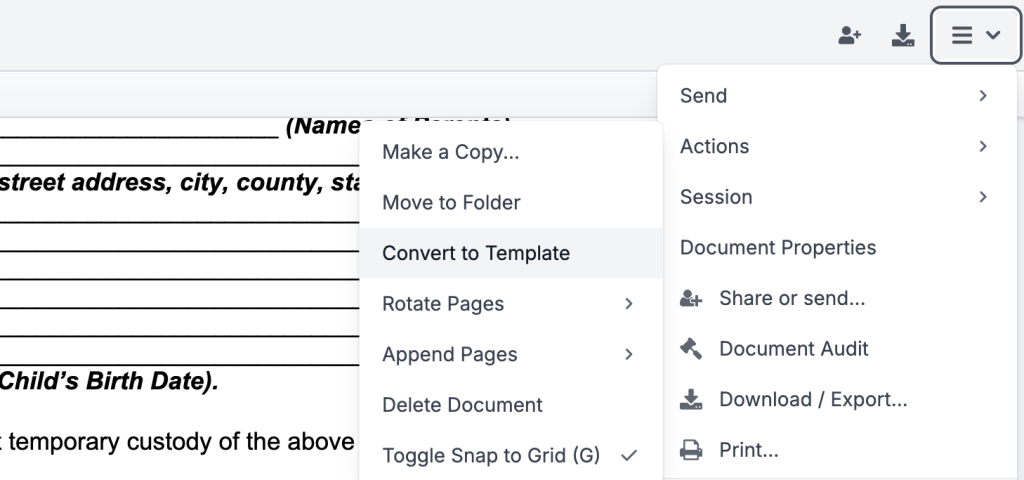
For healthcare providers and other document-heavy teams, having both editing and signing capabilities in a single interface can help simplify document management and reduce workflow interruptions.
Workflow and integration capabilities
Your clinic does not operate in a vacuum. Your electronic signatures need to integrate seamlessly with the tools your team already uses.
Google Workspace synergy
Many modern medical practices use Google Workspace to manage their operations. While both DocHub and Docusign offer basic integrations, the experiences are vastly different.
DocHub feels like a native extension of Google Drive and Google Docs. You can open existing documents directly from Drive, edit them, add custom branding, request a signature, and save the completed file back to Drive. This seamless integration means your staff spends less time downloading and uploading files, and more time focusing on patients.
Faxing support for healthcare workflows
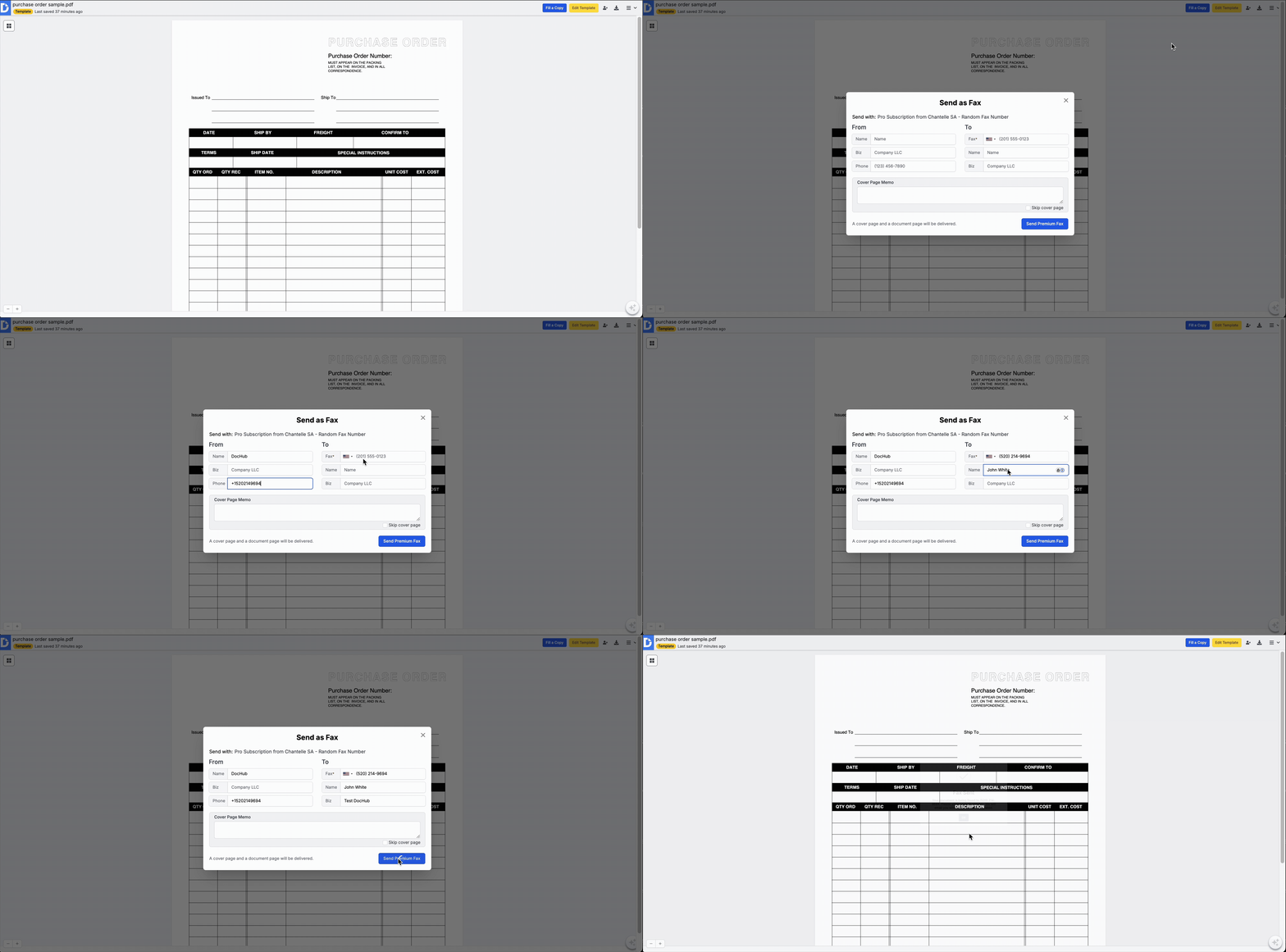
Despite the digital age, faxing remains a critical part of healthcare document workflows. Sending records to insurance companies, pharmacies, or other specialists often requires a fax. DocHub offers built-in faxing capabilities, allowing you to edit, sign, and fax a document from a single platform.
Collaboration and document workflows
DocHub also supports collaborative document management features such as:
- team collaboration within shared documents
- reusable templates for intake forms
- managing multiple signers
- detailed audit trail
- controlling signing order
Because the editor and signing tools exist within one interface, clinics can manage multiple documents simultaneously. This design enables users to handle intake forms, billing agreements, and insurance paperwork in the same workspace.
Price comparison: evaluating cost per user
Budget is a significant factor for any practice with 1 to 50 employees. When you compare the tools side-by-side, the cost differences become stark.
With Docusign, you pay a premium for brand recognition and advanced features like complex Salesforce or Oracle integrations. Many small clinics never use these enterprise tools. Furthermore, Docusign strictly limits how many envelopes you can send on its standard plans, forcing high-volume clinics to upgrade quickly.
DocHub stands out with its highly competitive pricing, offering the most affordable HIPAA-compliant eSignature solution without sacrificing functionality.
DocHub pricing tiers (2026):
- Free ($0/month): PDF editing (3 docs/month), eSignatures (5 signatures/month), with iOS and Android apps and limited AI Assistant access.
- Basic ($8–$11/user/month): Everything in Free, plus advanced editing tools, small team collaboration, fillable PDFs.
- Pro ($12–$16/user/month): Includes all Basic features, plus unlimited in-person signing, bulk sending, and document AI Assistant (extended access).
With DocHub, you pay for exactly what you need: document editing, seamless digital signing, and secure storage. You avoid the bloated enterprise pricing associated with traditional enterprise software.
User experience and onboarding
Software is only useful if your staff actually adopts it. The user interface plays a massive role in daily productivity.
Docusign users often face a learning curve when setting up complex envelopes and managing the document status dashboard. The platform is powerful, but that power brings complexity.
DocHub’s user interface is designed around a “what you see is what you get” philosophy. It is incredibly straightforward. Medical billers and front-desk staff can learn to prepare, send, and manage documents in minutes. The intuitive interface reduces onboarding time, ensuring that new hires can jump right into their document workflows without extensive training.
Disclaimer: The information contained in this blog post is provided for general informational purposes only and does not constitute formal legal advice.
Conclusion: When to choose DocHub vs. Docusign
When comparing DocHub and Docusign for a healthcare setting, the right choice depends entirely on your clinic’s specific needs and size.
Choose Docusign if: You operate a massive hospital network that requires complex API integrations with enterprise databases like Salesforce or Oracle. If your primary need is strictly capturing signatures at a massive, automated scale across thousands of active users, Docusign is a proven choice.
Choose DocHub if: You run a private medical practice, dental clinic, or specialized care facility. If your team needs to edit PDFs, correct patient intake forms on the fly, integrate deeply with Google Drive, and maintain HIPAA compliance without breaking the bank, DocHub is the go-to solution.
For small to mid-sized practices, DocHub provides the perfect balance of premium tools and a cost-effective solution. It transforms rigid signing processes into flexible, secure document management, ensuring your staff spends less time wrestling with software and more time delivering excellent care. Try DocHub today!
Thank you!
Free 2026 healthcare software comparison matrix
Glossary
- Business Associate Agreement (BAA): A legal contract required under HIPAA between a healthcare provider (Covered Entity) and a vendor (Business Associate) that will handle Protected Health Information (PHI). This agreement ensures the vendor will maintain the security and privacy of patient data according to HIPAA standards. For healthcare practices, having a BAA with a software provider like DocHub or Docusign is mandatory for compliance.
- ESIGN Act: The Electronic Signatures in Global and National Commerce Act is a U.S. federal law passed in 2000. It grants legal recognition to electronic signatures and records, making them as valid as their paper-and-ink counterparts. Both DocHub and Docusign comply with the ESIGN Act, ensuring the signatures they capture are legally binding.
- HIPAA (Health Insurance Portability and Accountability Act): A U.S. federal law that establishes national standards to protect sensitive patient health information (PHI) from being disclosed without the patient’s consent or knowledge. Any software used to store, process, or transmit PHI must be HIPAA compliant, which involves technical safeguards, security protocols, and the signing of a Business Associate Agreement (BAA).
- Protected Health Information (PHI): Any personally identifiable health information, such as names, birth dates, medical record numbers, diagnoses, or treatment information. This data is protected by HIPAA, and healthcare organizations must use secure, compliant tools for any documents containing PHI.
FAQ
1. Is DocHub cheaper than Docusign for a HIPAA-compliant plan?
Yes, DocHub is generally more affordable for healthcare practices needing HIPAA compliance. DocHub includes a Business Associate Agreement (BAA) with its straightforward Site licence. In contrast, Docusign often reserves HIPAA compliance for its more expensive, higher-tier, or enterprise plans, which can include features a small clinic may not need.
2. Can I edit a patient’s form after they sign it with DocHub?
No, once a document is finalized with legally-binding electronic signatures, the core content is locked to ensure its integrity and create a reliable audit trail. However, DocHub’s key advantage is its powerful document editing tools that allow your staff to correct typos or fill in missing information before the final signature is applied.
3. Do I need an enterprise plan for HIPAA compliance?
With DocHub, you do not. The DocHub Site licenses provide a BAA to help you meet HIPAA requirements. You can simply fill in the form to execute the DocHub Business Associate Agreement at legal.dochub.com/baa. Docusign typically requires you to contact sales or subscribe to an enterprise-level plan to get a BAA, which is often priced for larger organizations.
4. Which is easier for non-technical medical staff to use?
DocHub is widely regarded as having a more intuitive interface, making it easier for staff without technical expertise to learn and use quickly. Its design is similar to a standard PDF editor, allowing users to upload, edit, and send documents for signature with just a few clicks. Docusign can have a steeper learning curve due to its focus on complex “envelopes” and advanced workflow configurations.
5. What is the cheapest HIPAA eSignature software?
The cheapest HIPAA eSignature software typically starts at around $8–$15 per user per month, depending on the provider and included compliance features. Affordable options include tools like DocHub and SignNow which offer secure electronic signatures, encryption, and audit trails. When choosing a low-cost solution, healthcare organizations should also confirm the platform provides a Business Associate Agreement (BAA) and proper safeguards for protected health information (PHI). This ensures the software remains both budget-friendly and fully compliant with HIPAA requirements.