

To safely redact Protected Health Information (PHI), it’s crucial to use a dedicated redaction tool that permanently deletes the underlying data. Simply using a drawing tool to cover the information is not secure, as it only conceals it visually and does not remove the data itself.
DocHub’s secure workflows with Google Workspace integration let users:
- open files from Google Drive,
- edit, sign, and export them without leaving the cloud
- redact sensitive information
When you use DocHub, your files are protected with end-to-end encryption and stored securely in an encrypted format.
Disclaimer: The information contained in this blog post is provided for general informational purposes only and does not constitute formal legal advice.
Summary: what you need to know about the secure redaction
- Use a redaction tool, not a drawing or shape tool, when handling patient records.
- Redaction must remove underlying text and hidden information, not just place a black box over it.
- HIPAA de-identification often relies on the Safe Harbor method, which requires removing 18 categories of identifiers.
- DocHub supports secure document workflows, including redacting PDFs in Google Drive and exporting the cleaned version after editing.
Why is drawing a black box not a real PHI redaction?
On paper, a marker may block visible text. In a PDF document, a black rectangle often sits on top of the text as a separate layer, while the original data remains underneath in the document structure. That hidden text may still be copied, searched, extracted, or exposed through revision history, embedded metadata, or hidden layers if the file is shared carelessly.
That is why answering the question “How to redact PHI” is not the same as answering “How to hide text.” Proper redaction means the sensitive information is removed from the file itself so the redacted text cannot be recovered later. In healthcare organizations, that distinction matters because human error is one of the most common causes of data breaches.
A common redaction failure occurs when someone visually obscures sensitive information like patient names, social security numbers, or medical records before sending a file. This method is not secure, as the recipient can often highlight, copy, or use other tools to reveal the supposedly hidden text. This isn’t effective redaction—it’s a data breach waiting to happen.
Why do standard PDF editing tools fail at proper redaction?
Many basic editors are built for annotation, not sanitization. They are fine for comments or markups, but not for removing protected health information. If a user inserts a shape, adds whiteout, or overlays a filled rectangle, the original data may survive in the file. Learn how DocHub approaches editing and annotation from the feature page.
For more instructions on editing PDF files with DocHub, see our video guide:
Text embedded on a PDF page is not handled the same way as text in a word processor. That is exactly why the right tool matters. The platform separately documents whiteouts and redactions as editing actions and offers a dedicated Redact capability for PDF privacy workflows.
For HIPAA compliance, that distinction matters because the privacy rule focuses on protecting individually identifiable health information from impermissible use or disclosure. A covered entity or business associate cannot rely on visual masking alone where hidden layers, hidden text, or embedded metadata could still expose patient information. HHS guidance on de-identification also warns that actual knowledge and identification risk matter, not just appearance.
When do you need to redact PHI in a medical record?
You need to redact PHI whenever a medical record, patient records, or other health information must be shared, reviewed, or disclosed without exposing unnecessary identifying information.
Common use cases include:
- Sharing a medical record with insurers while minimizing unrelated sensitive data
- Producing patient records for litigation or discovery
- Preparing medical data for life sciences research, comparative effectiveness studies, or internal analytics
- Creating de-identified data for reporting, training, or policy assessment
- Sending records to outside reviewers, compliance teams, or authorized personnel who do not need full identifiers
In each case, the covered entity should limit disclosure and consider whether the file contains protected health information, personally identifiable information, or other sensitive content such as patient names, admission date, street address, phone numbers, social security numbers, medical record numbers, health plan beneficiary numbers, device identifiers, vehicle identifiers, biometric identifiers, or any other unique identifying number. HHS lists 18 identifier categories under the HIPAA Safe Harbor method. Safe Harbor also requires that the covered entity have no actual knowledge that the remaining data could still be used to re-identify a person.
What is the Safe Harbor method under HIPAA?
 Open
Open| Identifier category | Example in a medical record |
|---|---|
| Names | Patient names, spouse names, and physician names in narrative notes |
| Geographic data | Street address or geographic subdivisions smaller than a state |
| Dates | Birth date, admission date, discharge date |
| Contact details | Phone numbers, fax numbers, email addresses |
| Government and account numbers | Social security numbers, medical record numbers, health plan beneficiary numbers |
| Device and web data | Device identifiers, URLs, IP addresses |
| Other unique data | Biometric identifiers, comparable images, or any unique identifying number |
This is why redacting medical records is not just a matter of formatting. It is a structured privacy process tied to de-identification, data utility, and compliance risk.
How do you redact PHI securely in DocHub?
DocHub is a practical fit for this task because it combines cloud document editing with HIPAA compliance, secure handling, Google Drive workflows, and a dedicated redaction feature. Users can import, edit, sign, and export files directly through Google apps, and the documents are encrypted end-to-end.
Step 1: Upload the medical record securely
Open the medical record in DocHub by uploading it directly or using the Google Drive integration. This lowers friction and can reduce unnecessary file movement across desktops, email attachments, and local folders. DocHub supports opening files from Drive through its integration.
Step 2: Choose the Whiteout tool for redaction (not Draw)
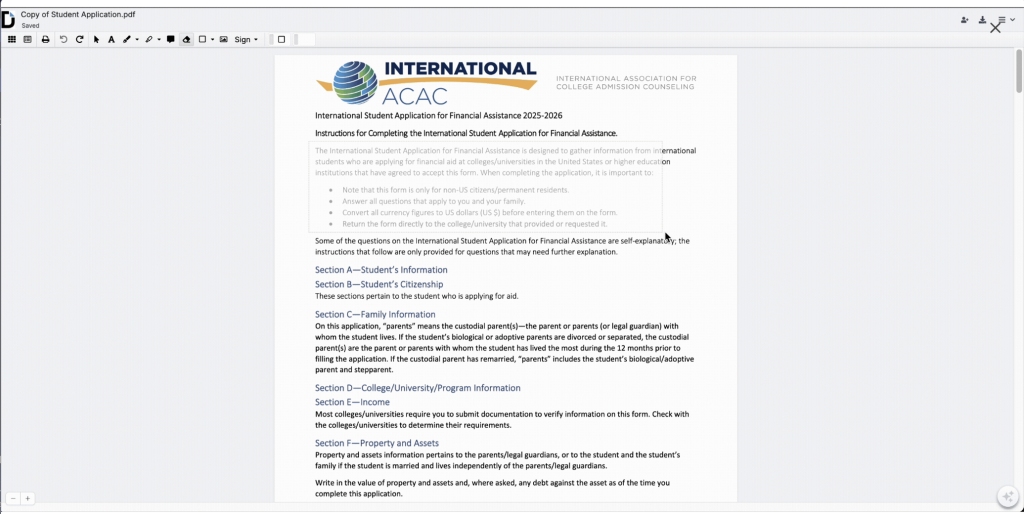
Open your document in the editor. In the toolbar, select Whiteout. Do not use a drawing, shape, or highlight tool for PHI redaction. This is the most important step in the whole workflow.
Step 3: Mark each identifier carefully
Highlight the exact text or area that contains protected health information. Review both structured fields and free text. Pay close attention to:
- Patient names
- Medical record numbers
- Social security numbers
- Phone numbers
- Admission date and discharge date
- Diagnoses or diagnosis codes when tied to identifying information
- Narrative notes that may contain hidden information or identifying information
Once redaction is applied, it cannot be undone, meaning the removed content is permanently deleted from the file. The Undo function won’t be applicable for this situation. It’s crucial for covered entities to review their selections carefully before redaction to avoid accidentally removing necessary information.
Step 4: Finalize and export the redacted version
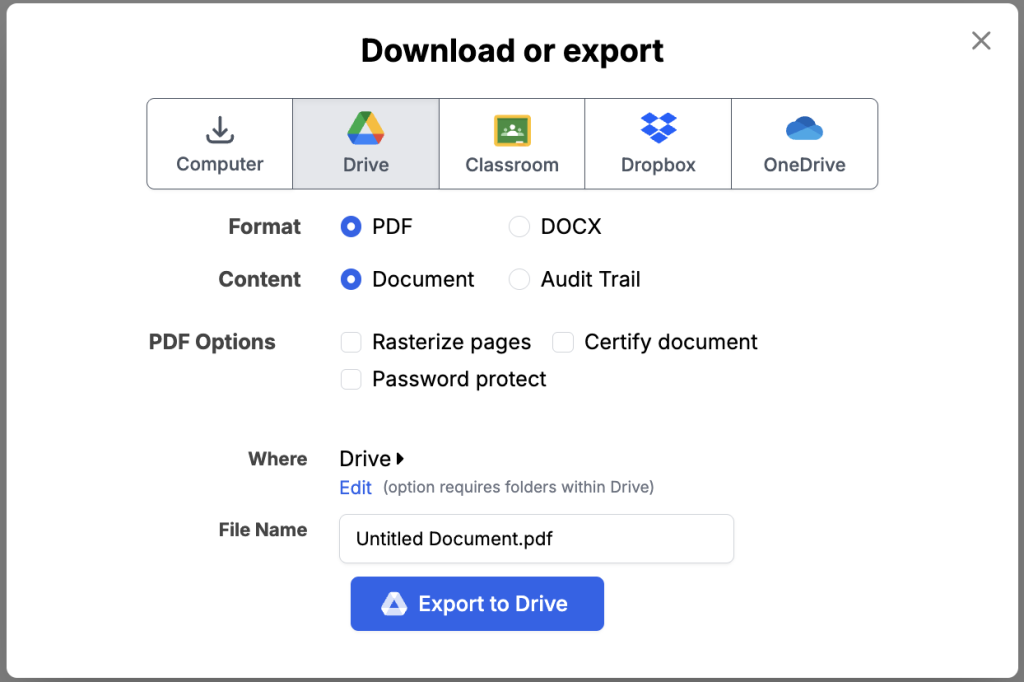
After reviewing the file, export the redacted version. DocHub supports downloading or exporting documents, as well as direct transfers to cloud storage services, including Google Drive. Learn more about DocHub’s potential as a cloud editor in our blog.
For practical compliance, share only the properly redacted version. Keep internal controls in place to restrict access to the original data, use role-based permissions where needed, and limit distribution to authorized personnel. DocHub also offers document security features, including encrypted storage, password protection, authentication options, and access controls, to support broader document governance.
For more detailed instructions and animated guides on applying redactions, check out our knowledge base article about document redaction.
What does a good PHI redaction workflow look like in practice?
Here is a simple use case.
A clinic receives a request for a patient’s medical record for an insurance review. The payer only needs documentation for one episode of care, not the full history. The clinic opens the file from Google Drive in DocHub and uses the Whiteout tool to remove any unrelated patient information. After checking the free-text notes for hidden identifiers, they export and share only the redacted version of the document.
That workflow supports data minimization, reduces human error, and helps the covered entity avoid exposing extra sensitive data. It also preserves data utility by sharing what is needed, while reducing privacy risks.
What alternatives do people try, and why are they weak?
When handling medical records, insufficient document protection can lead to severe consequences. While there are various redaction methods available, it’s important to compare them to understand their effectiveness.
- Marker and scanner
More secure than a fake digital black box, but slow, manual, low quality, and hard to audit at scale. - Generic document editors
Convenient, but risky for PHI redaction because hidden text, embedded metadata, hidden layers, and revision history may persist. - Manual copy and paste into a new file
Better than visual cover-ups in some cases, but still vulnerable to human error, formatting mistakes, and accidental retention of sensitive information. - Dedicated redaction tools
Best choice for proper redaction, as they are built to securely remove text from PDFs rather than simply obscure it.
DocHub’s redaction tool uses industry-standard methods to permanently remove sensitive information from your documents, making them safe for sharing with clients, colleagues, and other stakeholders.
How can teams reduce redaction mistakes?
Use a repeatable checklist to eliminate human error:
- Confirm the purpose of disclosure.
- Identify whether the recipient needs a full medical record or a limited data set.
- Review all pages, attachments, headers, footers, and notes.
- Remove all identifying information required under the privacy rule or your policy assessment.
- Save and share only the redacted version.
- Restrict access to the original data with access controls.
- Train staff on proper redaction and review common failure points.
For research and analytics, remember that de-identified data may still require thoughtful review. Expert Determination relies on scientific methods, including statistical methods, to mitigate identification risk while preserving data utility. Safe Harbor is rule-based, but both approaches exist to reduce privacy risks.
Final thoughts
When the question is how to redact PHI, the secure answer is simple: use a true redaction workflow, not a cosmetic edit. In healthcare environments, a single sloppy click can compromise patient confidentiality, trigger data breaches, and create avoidable HIPAA compliance issues.
DocHub gives teams a practical way to redact documents within an existing cloud workflow, especially for organizations using Google Drive. If your staff handles patient records, medical data, or any document with sensitive information, get started with DocHub to move them away from manual redaction and toward a dedicated redaction tool built for secure document handling.
Thank you!
Free 2026 HIPAA de-identification cheat sheet
Glossary
PHI redaction: The process of removing protected health information from documents so it cannot be recovered.
Protected health information: Individually identifiable health information held or transmitted by a covered entity or business associate.
Safe Harbor: A HIPAA de-identification method that requires removing 18 identifier categories and having no actual knowledge that the remaining data can identify a person.
Expert Determination: A de-identification approach that uses statistical or scientific methods to keep identification risk very small.
Redacted version: The shareable output after sensitive content has been removed.
Hidden layers: Underlying PDF elements that may preserve hidden text or sensitive content even when a visible box covers it.
FAQ
Is visual masking enough for HIPAA compliance?
No, that’s not true. If the hidden text or original data can still be recovered, copied, or exposed, the file is not properly redacted. Visual masking alone is not enough for HIPAA compliance.
How can I manage medical documents securely with DocHub?
To streamline your HIPAA compliance, apply for our essential security features and a Business Associate Agreement on our dedicated page. A DocHub representative will then contact you to help activate your Site license plan and enable HIPAA-compliant document workflows.
What PHI should I look for first?
Start with patient names, medical record numbers, social security numbers, phone numbers, dates, street address details, and any other unique identifying number.
Can I de-identify PHI without removing every data point?
Sometimes it is possible. HHS recognizes Expert Determination as an alternative to Safe Harbor, using scientific methods to reduce identification risk.
Why is a cloud workflow useful here?
A cloud workflow can reduce risky downloads and duplicate copies. DocHub’s Google Drive integration supports editing and exporting within a familiar document process.
- Summary: what you need to know about the secure redaction
- Why is drawing a black box not a real PHI redaction?
- Why do standard PDF editing tools fail at proper redaction?
- When do you need to redact PHI in a medical record?
- What is the Safe Harbor method under HIPAA?
- How do you redact PHI securely in DocHub?
- What does a good PHI redaction workflow look like in practice?
- What alternatives do people try, and why are they weak?
- How can teams reduce redaction mistakes?
- Final thoughts
- Glossary
- FAQ