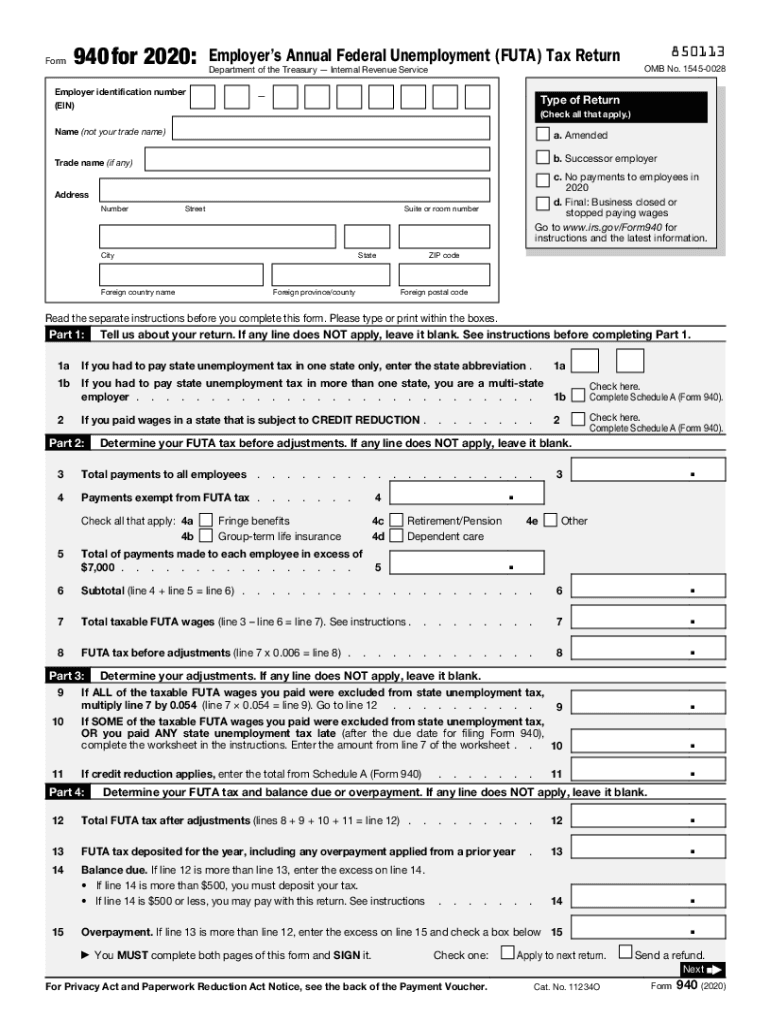







Definition and Purpose of Form 940
Form 940, officially known as the Employer's Annual Federal Unemployment (FUTA) Tax Return, is a document issued by the Internal Revenue Service (IRS) for employers to report their annual FUTA tax liabilities. This form is crucial as it helps the IRS track employer contributions towards the federal unemployment program, which provides temporary financial assistance to unemployed workers. The employers use this form to report and calculate unemployment taxes on wages up to a certain threshold paid to each employee.
Key Features of Form 940
- Tax Reporting: Employers report their total FUTA tax liability, including payments made to employees and any adjustments required.
- Payment Information: It includes sections for calculating what employers owe or overpaid.
- IRS Instructions: The form provides detailed guidance on filing, including addressing overpayments or outstanding balances.
How to Use Form 940
Completing Form 940 involves calculating your total FUTA tax liability for the year. Follow these steps:
- Collect Payroll Data: Gather all payroll data for the year, including total wages paid.
- Calculate Tax Liability: Use the form's instructions to calculate the tax due based on employee wages.
- Record Payments: Include any deposits made towards your FUTA tax throughout the year.
- Adjust for Credits: Apply any credits due from state unemployment taxes to reduce your federal tax liability.
- Finalize the Form: Ensure all calculations are correct and complete necessary fields before submitting.
Practical Examples
- A small business owner needs to file Form 940 to report $15,000 in wages paid to three employees. By calculating eligible credits, they determine the FUTA tax liability and submit payments accordingly.
- A corporation with 50 employees uses Form 940 to manage their annual tax payments while applying appropriate credits against state unemployment contributions.
Obtaining Form 940
Employers can access Form 940 in several ways to prepare for filing:
- Online Access: The IRS website offers a downloadable PDF version, which is easily accessible.
- Tax Preparation Software: Many software solutions, like TurboTax and QuickBooks, integrate Form 940 preparation.
- Physical Copies: Request a physical copy by calling the IRS or visiting a local IRS office.
Steps to Complete Form 940
The process of completing Form 940 is systematic and requires careful attention to detail:
- Gather Essential Documents: Collect payroll records and previous tax filings.
- Fill Out Employer Details: Enter your employer identification number (EIN) and other identifying information.
- Calculate Wages and Taxes: Report total wages subject to FUTA tax and compute the amount due.
- Include Adjustments: Make necessary amendments for any state unemployment tax offsets.
- Review and Submit: Double-check all entries, sign the form, and retain a copy for records.
Edge Cases and Nuances
- Businesses with seasonal workers might encounter unique scenarios requiring adjustments in reporting.
- Employers transitioning from digital to paper submissions must ensure compatibility with IRS requirements.
Why Form 940 Is Crucial
Form 940 serves multiple vital functions for employers and the federal unemployment system:
- Ensures Compliance: It is essential for maintaining compliance with federal tax laws.
- Facilitates Funding: Supports the federal unemployment insurance trust fund, aiding displaced workers.
- Credit Opportunities: Enables employers to claim credits against state unemployment contributions, potentially reducing their federal tax burden.
Who Typically Uses Form 940
Employers of all sizes ranging from small businesses to large corporations are required to file Form 940. However, certain entities such as nonprofits or government agencies may be exempt based on specific criteria.
IRS Guidelines for Form 940
The IRS provides specific guidelines that users must follow to correctly file Form 940:
- Filing Deadlines: Typically due by January 31st following the tax year being reported; late submissions incur penalties.
- Amendments: Procedure for amending previously filed returns if errors are discovered.
- Record Keeping: Employers are encouraged to retain records for at least four years for audit purposes.
Filing Deadlines and Important Dates
To avoid penalties, employers must adhere to key deadlines associated with Form 940:
- Annual Deadline: January 31st is the standard submission date.
- Quarterly Deposits: Employers exceeding certain thresholds may need to make quarterly deposits.
- Extensions: While not common for Form 940, extensions may be requested in specific situations through IRS channels.
Required Documents for Accurate Filing
Accurate filing of Form 940 necessitates specific documentation:
- Payroll Records: Detailed records of wages paid, including taxable and non-taxable amounts.
- State Unemployment Records: Relevant documentation to calculate allowable FUTA credits.
- Previous Year’s Returns: Reference for consistency in reporting and identifying discrepancies.
Documentation Tips
- Organize records chronologically to simplify data entry.
- Use digital record-keeping solutions to ensure accuracy and accessibility when filing.
Form Submission Methods: Online, Mail, In-Person
Employers have multiple options for submitting Form 940 to the IRS:
- Electronically: Through IRS-approved software, offering a quick and efficient method with confirmation of receipt.
- Mail: Physical submission to designated IRS addresses, based on business location.
- In-Person: Less common but possible by visiting a local IRS office, suitable for hands-on assistance.
Benefits of Digital Submission
- Immediate Confirmation: Ensures real-time acknowledgment from the IRS.
- Error Reduction: Electronic systems often include checks to catch common filing mistakes.
- Record Keeping: Digital submission provides a trail for future reference.
Penalties for Non-Compliance
Failing to file Form 940 accurately or on time can result in significant penalties:
- Late Filing Fees: Charges accumulate based on the amount unpaid and duration of delay.
- Interest on Unpaid Taxes: Compounded until full payment is received.
- Accuracy Penalties: Levied for intentional misrepresentation or fraudulent reporting.
Avoiding Penalties
- Timely Submission: Set reminders for essential deadlines and verify employer identification details.
- Regular Audits: Periodically review payroll and state contributions to ensure readiness for annual reporting.
- Professional Consultation: Engage tax professionals to navigate complex reporting scenarios and manage tax strategy effectively.
This comprehensive overview of Form 940 not only details its necessity and process but also aids employers in fulfilling their federal obligations with accuracy and confidence.