




01. Edit your 2014 schedule c form online
Type text, add images, blackout confidential details, add comments, highlights and more.

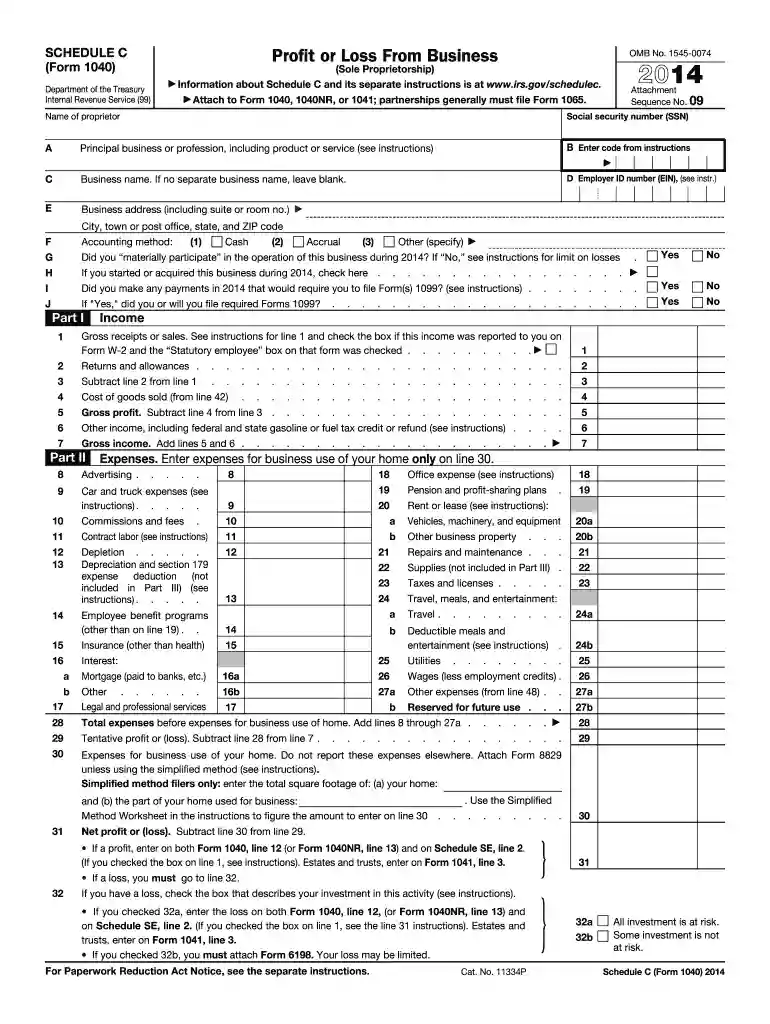
Type text, add images, blackout confidential details, add comments, highlights and more.

Draw your signature, type it, upload its image, or use your mobile device as a signature pad.

Send 2014 form 1040 schedule c via email, link, or fax. You can also download it, export it or print it out.
The Schedule C (Form 1040) for the year 2014 is a crucial document for sole proprietors and single-member LLCs operating in the United States. This form is used to report the income and expenses of a non-incorporated business, ultimately determining the profit or loss. It plays a significant role in calculating your taxable income and, consequently, the amount of tax owed to the IRS. By detailing categories such as income, expenses, and cost of goods sold, the form helps structure the financial aspects of your business operations over the fiscal year.
This form primarily targets individuals running businesses independently without corporate structures. For instance, freelancers, independent consultants, and small-scale retailers frequently utilize Schedule C to record their financial activities. The document ensures that proprietors account for both earnings and expenditures, facilitating accurate tax filings and compliance with IRS regulations.
Completing Schedule C requires careful attention to detail and a methodical approach. Here’s how to navigate the form effectively:
Gather Financial Information: Start by collecting all financial documents, including invoices, receipts, and bank statements. This documentation is essential for providing accurate figures for income and expenses.
Fill in Personal Information: The top section of the form requires basic details such as the proprietor's name, social security number, and business information.
Enter Income Details: Reflect gross receipts or sales in the income section. Make sure to account for returns and allowances to determine the net profit.
Record Business Expenses: This includes costs like advertising, legal fees, and supplies. Each expense type has designated lines to ensure clarity and proper categorization.
Calculate Cost of Goods Sold: If your business involves production or sales of physical goods, calculate this cost to determine gross income.
Complete Vehicle Expenses: If you use a vehicle for business, report relevant details and expenses incurred for its upkeep and operation.
Review and Submit: Double-check all entries to ensure accuracy and completeness before submission. Keep copies of all documentation for your records.
Understanding the terminology used in Schedule C can significantly impact your ability to fill out the form correctly:
These terms are crucial as they influence the reporting process and the final tax outcome.
The Schedule C 2014 form is composed of several distinct sections tailored to capture extensive details about your business activities:
Properly completing each of these sections ensures comprehensive documentation of your business financials.
Following IRS guidelines is essential for correctly filing Schedule C 2014. The IRS provides explicit instructions and definitions to help taxpayers discern what to include in each section. Adhering to these guidelines ensures compliance and reduces the risk of audits or the need for amendments. It is recommended to regularly consult the IRS website or a tax professional for updates on filing procedures and any changes in requirements.
For the 2014 tax year, the deadline for filing the Schedule C form was typically by April 15, 2015. Extensions may be available, allowing filers until October 15, 2015, but require a formal request through Form 4868. Missing these deadlines without an extension can result in penalties and interest charges on any tax owed. Therefore, timely submission is critical to avoid additional costs.
Failing to comply with the filing requirements for Schedule C can lead to several penalties:
Understanding these penalties emphasizes the importance of accurate and timely submissions.
Various business types leverage Schedule C for tax reporting. Here are some examples:
Illustrating different scenarios demonstrates Schedule C’s versatility across diverse business models.


We've got more versions of the 2014 schedule c form form. Select the right 2014 schedule c form version from the list and start editing it straight away!
| Versions | Form popularity | Fillable & printable |
|---|---|---|
| 2024 | 4.6 Satisfied (31 Votes) | |
| 2023 | 4.4 Satisfied (54 Votes) | |
| 2022 | 4.3 Satisfied (38 Votes) | |
| 2021 | 4.8 Satisfied (140 Votes) | |
| 2020 | 4.4 Satisfied (93 Votes) | |
| 2019 | 4.1 Satisfied (38 Votes) | |
| 2018 | 4.3 Satisfied (239 Votes) | |
| 2017 | 4.3 Satisfied (233 Votes) | |
| 2016 | 4.1 Satisfied (110 Votes) | |
| 2015 | 3.5 Satisfied (95 Votes) | |
| 2014 | 4.1 Satisfied (54 Votes) | |
| 2013 | 4 Satisfied (44 Votes) | |
| 2012 | 4 Satisfied (27 Votes) | |
| 2011 | 4.2 Satisfied (66 Votes) | |
| 2010 | 4 Satisfied (34 Votes) |
At DocHub, your data security is our priority. We follow HIPAA, SOC2, GDPR, and other standards, so you can work on your documents with confidence.


by RJ Kraus 2014 Cited by 1 The range of deductions on Schedule C, however, noticeably list expenses such as advertising, fees, contract labor, depletion, employee benefits, insurance,.Read more
If a profit, enter on both Form 1040, line 12 (or Form 1040NR, line 13) and on Schedule SE, line 2. (If you checked the box on line 1, see instructions).Read more
C (subject to credit reduction) on February 1. Because you paid wages in more than one state, you must complete Schedule A and file it with. Form 940. TheRead more


