




01. Edit your schedule c 2009 online
Type text, add images, blackout confidential details, add comments, highlights and more.

Type text, add images, blackout confidential details, add comments, highlights and more.

Draw your signature, type it, upload its image, or use your mobile device as a signature pad.

Send 2009 form schedule c via email, link, or fax. You can also download it, export it or print it out.
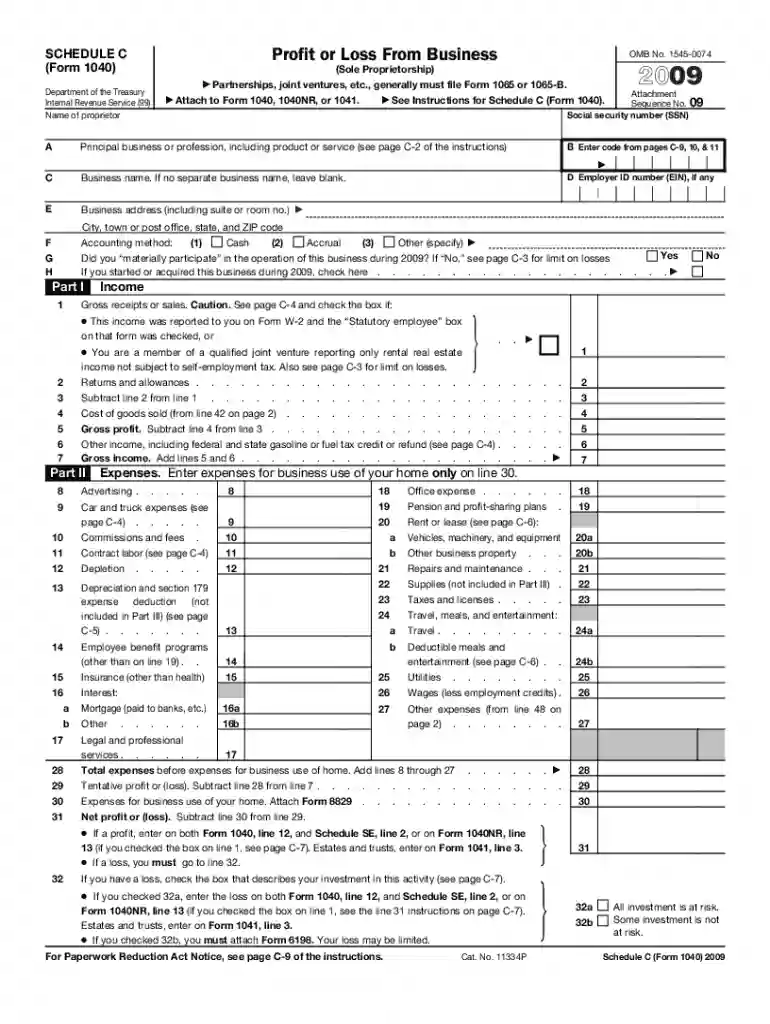
The 2009 Schedule C form, officially titled "Profit or Loss from Business (Sole Proprietorship)," is a critical tax document used by sole proprietors to report income and expenses related to their business. This form helps the Internal Revenue Service (IRS) assess the net profit or loss of a business which is then reported on the individual's personal tax return, Form 1040. The Schedule C is instrumental for self-employed individuals, freelancers, and independent contractors to detail their business earnings, eligible deductions, and overall financial performance.
Completing the Schedule C form requires careful attention to detail and an organized approach to capture all relevant information accurately. Here is a step-by-step guide:
Several crucial components are necessary for proper Schedule C completion. They include:
Key terminology can impact a taxpayer's understanding and filing of the Schedule C form:
The Schedule C form is specifically designed for sole proprietorships, which are businesses owned and operated by a single individual. This form is frequently utilized by:


The IRS provides comprehensive guidelines for completing the 2009 Schedule C form. Following these ensures accurate and compliant filing:
To accurately complete the Schedule C form, you need to compile several key documents:
Using a digital version of the 2009 Schedule C form can streamline tax filing through platforms such as TurboTax or QuickBooks, which offer software compatibility for easier data entry:
We've got more versions of the schedule c 2009 form. Select the right schedule c 2009 version from the list and start editing it straight away!
| Versions | Form popularity | Fillable & printable |
|---|---|---|
| 2024 | 4.6 Satisfied (31 Votes) | |
| 2023 | 4.4 Satisfied (54 Votes) | |
| 2022 | 4.3 Satisfied (38 Votes) | |
| 2021 | 4.8 Satisfied (140 Votes) | |
| 2020 | 4.4 Satisfied (93 Votes) | |
| 2019 | 4.1 Satisfied (38 Votes) | |
| 2018 | 4.3 Satisfied (239 Votes) | |
| 2017 | 4.3 Satisfied (233 Votes) | |
| 2016 | 4.1 Satisfied (110 Votes) | |
| 2015 | 3.5 Satisfied (95 Votes) | |
| 2014 | 4.1 Satisfied (54 Votes) | |
| 2013 | 4 Satisfied (44 Votes) | |
| 2012 | 4 Satisfied (27 Votes) | |
| 2011 | 4.2 Satisfied (66 Votes) | |
| 2010 | 4 Satisfied (34 Votes) |
At DocHub, your data security is our priority. We follow HIPAA, SOC2, GDPR, and other standards, so you can work on your documents with confidence.
If a profit, enter on both Form 1040, line 12, and Schedule SE, line 2, or on Form 1040NR, line. 13 (if you checked the box on line 1, see page C-7). EstatesRead more
by L Team 2009 The suggested citation for this document is as follows: ITRC (Interstate Technology Regulatory Council). 2009. Evaluating LNAPL Remedial. Technologies forRead more
Jan 26, 2009 2 years after the tax was paid. Schedule C (Form 1040), enter all your deductible qualified mortgage insurance premiums on line 10 of Form 8829.Read more


