
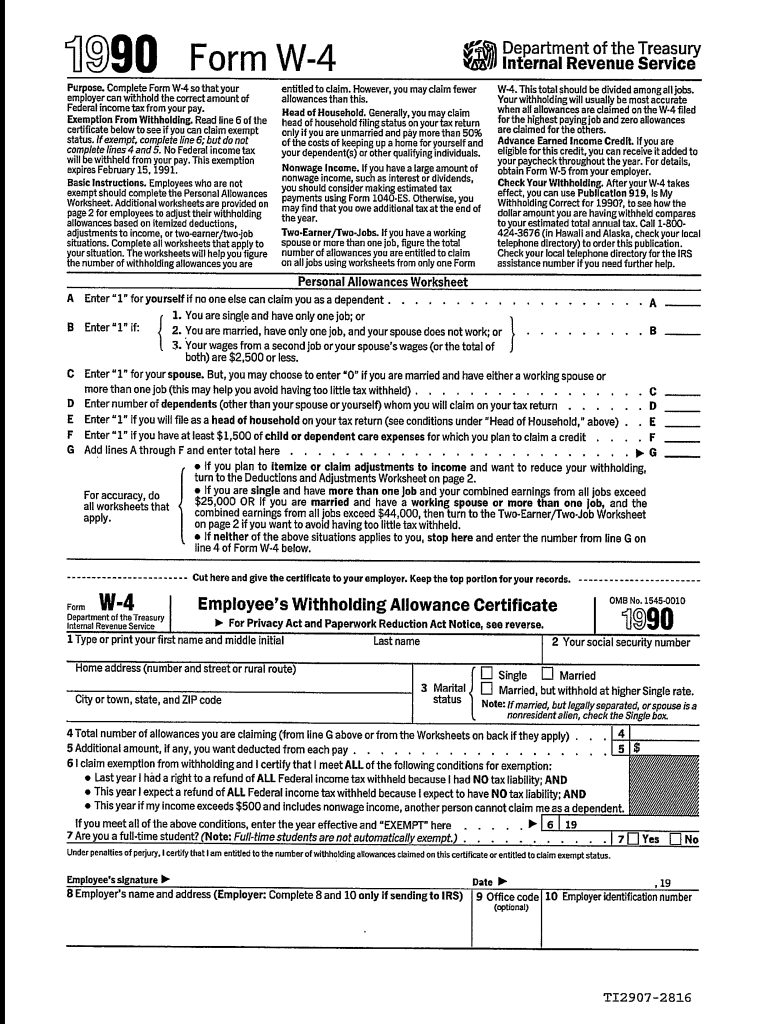







Definition & Meaning
The 1990 W-4 form, also known simply as Form W-4, is an essential document used by employees in the United States to inform their employers of the correct amount of federal income tax to withhold from their paychecks. This form directly impacts the calculation of an employee's withholding tax and is critical for ensuring that the tax withheld aligns with the individual's tax liability.
Key Purposes
- Allows employees to report their tax filing status.
- Helps in claiming exemptions and deductions, which affect the withholding amount.
- Provides a way for taxpayers to adjust withholding to prevent underpayment or overpayment of taxes.
Significance
Understanding and correctly filling out the Form W-4 can prevent large tax bills or insufficient withholding, thereby avoiding penalties or financial surprises.
Steps to Complete the 1990 W-4 Form
Filling out the Form W-4 correctly is vital for accurate tax withholding. Below are the steps to complete this form:
-
Personal Information: Start by entering your full name, Social Security number, address, and filing status.
-
Multiple Jobs or Spousal Work: Check this box if you have more than one job at a time, or if you're married filing jointly and both you and your spouse work.
-
Claim Dependents: Indicate if you have dependents, as this affects your withholding calculation.
-
Adjustments: For additional withholding, or if you have other income or deductions, use this section to indicate those adjustments.
-
Sign and Date: Validate your entries by signing and dating the form.
Common Mistakes
- Choosing the wrong filing status.
- Not updating the form for life changes, like marriage or a new job.
- Overlooking the multiple jobs worksheet when applicable.
Important Terms Related to 1990 W-4 Form
Understanding key terms related to the W-4 form is essential for accurate completion and compliance.
- Withholding Allowances: Reduces the amount of income subject to withholding tax.
- Exemptions: Prevents withholding of federal income tax from paychecks if circumstances justify it, like low income.
- Adjustments to Income: Modifications that reflect additional balances due or refund amounts.
Additional Considerations
- Tax Credits: Often included in withholding computations, potentially impacting the withheld amount.
- Filing Status: Determines how much tax is withheld.
Legal Use of the 1990 W-4 Form
The W-4 form is a legally binding document. Employees must provide truthful information as any misinformation can lead to penalties or legal consequences.
Compliance
- Employees must complete it accurately and update it when their personal or financial situation changes.
- Employers are required to use the information to determine withholding accurately based on IRS guidelines.
Limitation of Liability
Providing false information can incur penalties from the IRS.
IRS Guidelines
The Internal Revenue Service (IRS) provides detailed guidelines for both employees and employers concerning the W-4 form. These rules ensure taxable wages are appropriately withheld.
Main Provisions
- Employers must process updated W-4 forms promptly.
- Employees should review their W-4 annually, especially after significant life events.
Updates
IRS occasionally revises the form, so staying informed about changes is crucial for compliance.
Who Typically Uses the 1990 W-4 Form
Form W-4 is generally used by:
- All Employees: From new hires to those experiencing financial or familial changes that affect tax status.
- Self-Employed: Can use it to guide estimated tax payments.
- Part-Time or Seasonal Workers: Often adjust their withholding more frequently based on fluctuating income.


Unique Groups
- Newly married couples adjusting joint finances.
- Workers transitioning between multiple employers.
Software Compatibility (TurboTax, QuickBooks, etc.)
Modern tax software solutions, such as TurboTax and QuickBooks, support the integration of the W-4 form for streamlined tax filing processes.
Advantages
- Simplifies calculations for allowances and deductions.
- Guides individuals through form completion with step-by-step instructions.
- Helps avoid common errors by cross-verifying information against IRS rules.
Form Submission Methods (Online / Mail / In-Person)
Submission options for the Form W-4 vary to accommodate different preferences and accessibilities.
Methods
- Online: Many employers facilitate digital submission, improving speed and accuracy.
- Mail: Traditional but reliable for those without access to digital platforms.
- In-Person: Often used in small offices where direct HR support is available.
Benefits
Electronic submissions typically provide real-time feedback and quicker processing, reducing the risk of errors.




