



01. Edit your 2024 pit adj online
Type text, add images, blackout confidential details, add comments, highlights and more.

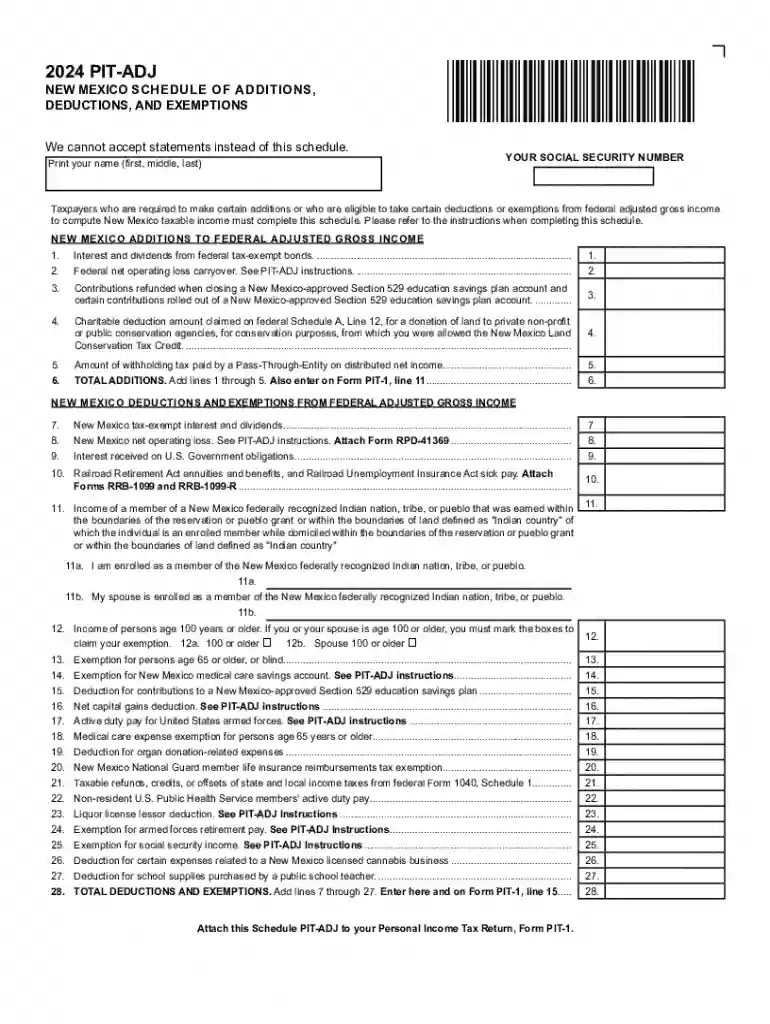
Type text, add images, blackout confidential details, add comments, highlights and more.

Draw your signature, type it, upload its image, or use your mobile device as a signature pad.

Send nm pit adj via email, link, or fax. You can also download it, export it or print it out.
Online forms are digital documents that allow users to input data directly via the internet. These forms are commonly used for a variety of applications, including data collection, registrations, applications, and surveys. Unlike traditional paper forms, online forms can be designed to include interactive elements, such as dropdown menus, checkboxes, and signature fields, which enhance user engagement and data validation. The aim is to streamline the process of gathering information by providing an easily accessible and user-friendly interface that can be accessed from any device with internet connectivity.
Access the Form: Begin by visiting the specific platform or website hosting the form. In this case, navigate to the DocHub platform.
Log In or Register: If required, log in with an existing account or register for a new one to gain access to the form.
Form Selection: Search and select the desired form from the available templates or start from scratch if custom fields are necessary.
Fill in the Required Information: Input data into the provided fields. Required fields will typically be marked to ensure all necessary data is captured.
Review and Edit: Before submission, review the entered information for accuracy. Make use of DocHub’s editing tools to rectify any errors.
Submit or Export: Once satisfied, submit the form or export it into the desired format, such as PDF, for sharing or storage.
Convenience: Online forms can be completed from any location, at any time, without the need for physical paperwork.
Efficiency: Automated data processing reduces the time required to organize and analyze information.
Environmentally Friendly: By eliminating paper, online forms contribute to reduced environmental impact.
Data Validation: Built-in validation functions minimize input errors, ensuring higher data quality.
Data Encryption: A method of securing information to prevent unauthorized access during transmission.
OAuth 2.0: An open standard for access delegation commonly used to grant websites or applications limited access to user data.
Legally Binding Signature: A signature that is recognized by law when collected through compliant electronic methods, as per the ESIGN Act.
In the United States, online forms are legally accepted for a wide array of purposes, including tax filings, applications, and contractual agreements. Platforms like DocHub ensure that electronic signatures are legally binding by adhering to the requirements of legislation such as the ESIGN Act. This enables both individuals and businesses to handle formal processes digitally with confidence that the integrity of their documents is maintained.
Tax Filings: Completing IRS forms online ensures timely submissions and instant validation of entered information.
Application Processes: Universities and job recruiters utilize online forms for candidate data collection, streamlining decision-making processes.
Feedback and Surveys: Businesses and researchers benefit from quick and wide-reaching data collection through online surveys.
Online forms created or edited on DocHub are compatible with various software platforms, including but not limited to Google Workspace. Users can import and export forms between DocHub and cloud services like Dropbox or Google Drive, facilitating collaboration and document management. Additionally, compatible with popular software like TurboTax and QuickBooks, online forms can be integrated into broader workflow systems for enhanced efficiency.
The transition from paper-based to digital forms affords significant benefits:
Accessibility: Digital forms can be easily accessed, filled out, and submitted using various devices.
Updates and Corrections: Changes to digital forms can be handled dynamically, ensuring all stakeholders have access to the most recent version.
Cost Savings: Reduced printing and mailing costs contribute to overall financial savings.
In summary, the use of online forms streamlines processes, enhances security, and provides a more sustainable approach to data collection and document management. Whether you're dealing with tax documents, legal agreements, or feedback surveys, online forms offer a versatile, efficient, and secure solution suitable for a wide range of applications.
We've got more versions of the 2024 pit adj form. Select the right 2024 pit adj version from the list and start editing it straight away!
| Versions | Form popularity | Fillable & printable |
|---|---|---|
| 2025 | 4.5 Satisfied (51 Votes) | |
| 2024 | 4.5 Satisfied (41 Votes) | |
| 2023 | 4.7 Satisfied (34 Votes) | |
| 2022 | 4.7 Satisfied (30 Votes) | |
| 2020 | 4.8 Satisfied (157 Votes) | |
| 2019 | 4.3 Satisfied (128 Votes) | |
| 2018 | 4.1 Satisfied (86 Votes) | |
| 2013 | 4.4 Satisfied (137 Votes) | |
| 2011 | 4.4 Satisfied (2841 Votes) |
At DocHub, your data security is our priority. We follow HIPAA, SOC2, GDPR, and other standards, so you can work on your documents with confidence.






New Mexico also offers deductions on the. PIT-ADJ schedule for tax-exempt interest and divi- dends, net operating losses, interest received on US governmentRead more
The maximum is $2,500 for each qualified exemption for income tax purposes. New Mexico Schedule of Additions, Deductions, and Exemptions to deduct any military


