




Here's how it works



How to use or fill out character analysis rubric with our platform

- Click ‘Get Form’ to open the character analysis rubric in the editor.
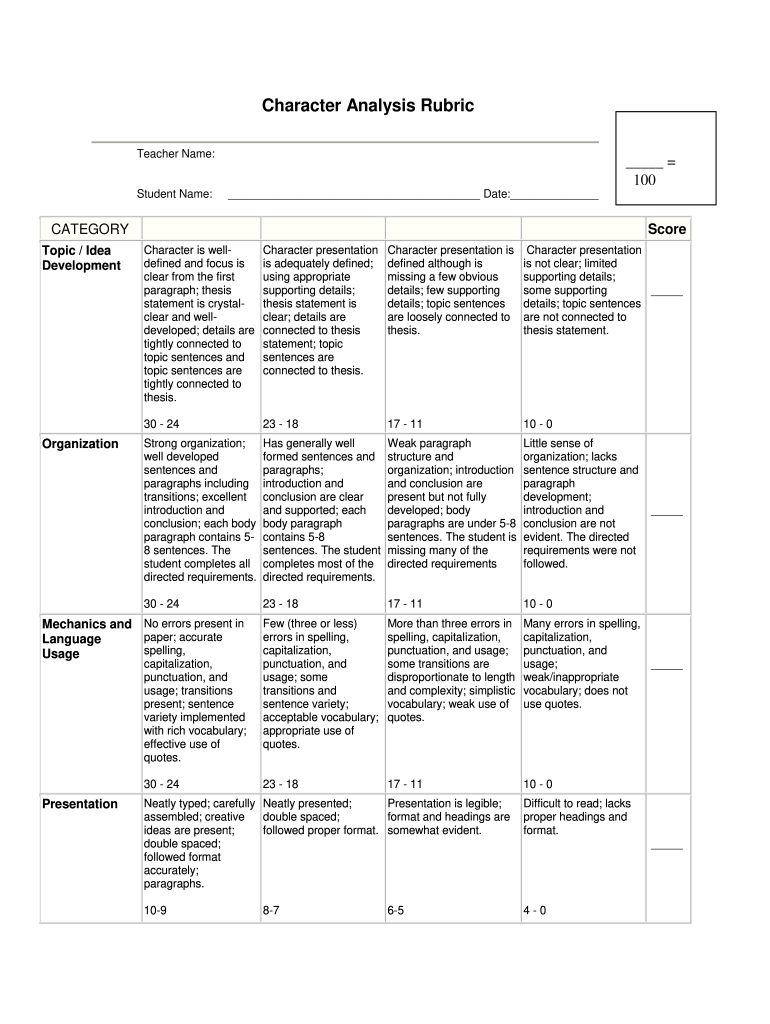
- Begin by entering the teacher's name and student’s name at the top of the form. This personalizes the rubric for easy reference.
- Fill in the date to document when the analysis is completed, ensuring accurate record-keeping.
- Evaluate each category: Topic/Idea Development, Organization, Mechanics and Language Usage, and Presentation. For each category, select a score based on the provided criteria.
- Provide detailed feedback in each section as needed. Use our platform’s commenting feature to add notes directly next to relevant sections for clarity.
- Once completed, review all entries for accuracy before saving or sharing your rubric with students or colleagues.
Start using our platform today to streamline your character analysis rubric process for free!
It's free
Got questions?
Can I type my electronic signature on my character head characterization rubric?
Sure, a typed name is recognized as a legitimate electronic signature when you create it on your paperwork utilizing a compliant solution like DocHub. Simply upload your character head characterization rubric to our editor, click Sign in the top tool pane → Create your signature → Type your name in the proper tab, and choose how it will appear on your document.
Do I need to set up software to edit my character analysis rubric high school?
If you edit your character analysis rubric high school with DocHub, you only need a stable internet connection and virtually any web browser installed on your device. No need to install any third-party software or study guides. Just open a tab with DocHub, drag and drop your file, and modify it immediately.
How do you start a character analysis?
What are the basic steps in writing a character analysis essay?
What are 5 methods of Analysing character?
Security and compliance
At DocHub, your data security is our priority. We follow HIPAA, SOC2, GDPR, and other standards, so you can work on your documents with confidence.
Learn more


