01. Edit your form online
Type text, add images, blackout confidential details, add comments, highlights and more.

Type text, add images, blackout confidential details, add comments, highlights and more.

Draw your signature, type it, upload its image, or use your mobile device as a signature pad.

Send it via email, link, or fax. You can also download it, export it or print it out.
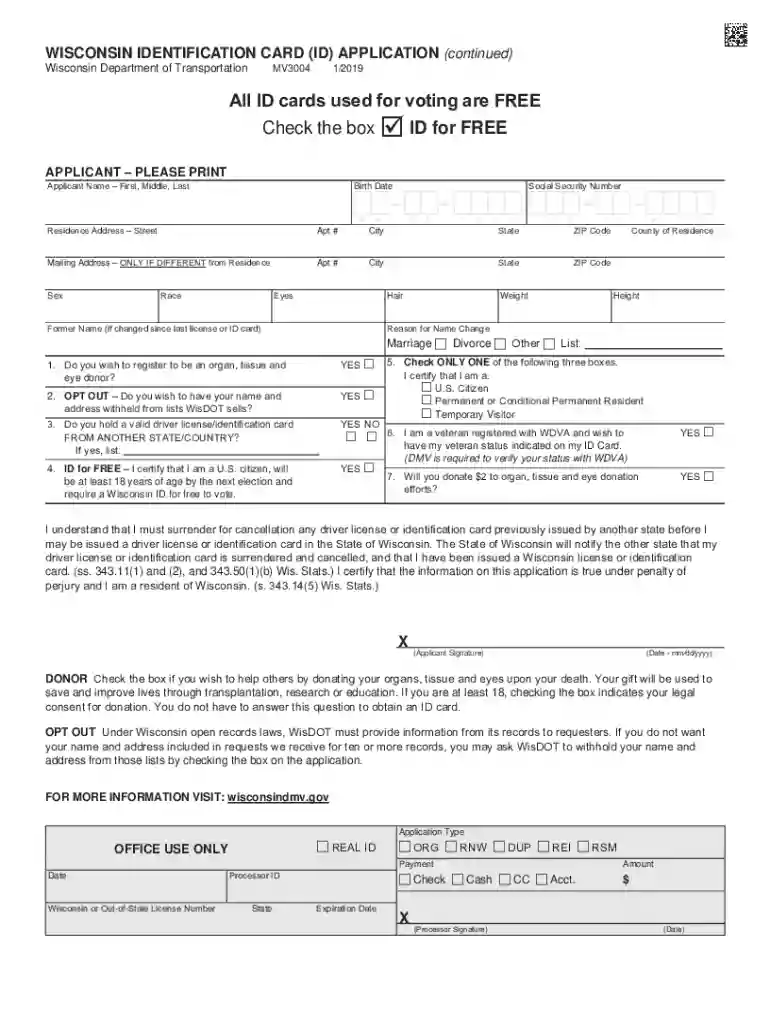
The "Apply for a New Wisconsin Identification CardDMV" is a crucial form offered by the Wisconsin Department of Transportation. This application, also known as form MV3004, serves individuals looking to obtain a state-issued identification card. The ID card is essential for those who do not possess a driver's license but still require official identification, whether for voting purposes, age verification, or other legal and personal needs. The card ensures that individuals have a recognized form of identity within the state, providing access to various services and rights.
To effectively use the "Apply for a New Wisconsin Identification CardDMV," applicants need to understand the layout and sections of the form. This form gathers pertinent information such as personal details, including name, address, date of birth, and Social Security number. It is advisable to fill out the form neatly and accurately, preferably in blue or black ink if submitting a paper version. Mistakes on the form can lead to delays in processing, so double-checking each section before submission is crucial.
The application form, MV3004, can be acquired through multiple channels. Applicants can visit any Wisconsin Department of Motor Vehicles (DMV) location to obtain a physical copy. Alternatively, those who prefer digital access can download the form from the official Wisconsin DMV website. Ensuring you have the most recent version of the form is essential, as outdated versions may not be accepted, leading to delayed processing or rejection of the application.
Gather Required Documents: Before beginning the application, make sure you have the necessary documents, such as proof of identity, Social Security number, and residency.
Fill Out Personal Information: Provide accurate personal information, including full name, date of birth, and contact details.
Social Security Information: Enter your Social Security number to verify your identity.
Proof of Identity and Residency: Attach copies of documents that prove your identity and residency status in Wisconsin. Accepted documents can include utility bills, lease agreements, or a valid passport.
Submit the Application: Once completed, submit the form to the Wisconsin DMV via mail or in person at a DMV location. Ensure all supporting documents are included to avoid any delays.
The "Apply for a New Wisconsin Identification CardDMV" form requires several documents to verify identity and residency. Applicants must present:
Failure to provide any of the above documentation can result in denial of the application.
Possessing a Wisconsin identification card offers various legal benefits. It is especially relevant for those who do not drive but require a recognized form of ID for activities such as voting, purchasing alcohol, or opening a bank account. The ID card is also crucial for accessing state services and facilities, ensuring legal representation of one's identity in any official capacity within Wisconsin.
To be eligible for a new Wisconsin identification card, applicants must meet several criteria:
Meeting these criteria is essential to ensure smooth processing and approval of the identification card application.


Applicants have the option to submit the "Apply for a New Wisconsin Identification CardDMV" form through:
Understanding these methods allows applicants to choose the one that best suits their circumstances, enabling an efficient application process.
We've got more versions of the Apply for a New Wisconsin Identification CardDMV form. Select the right Apply for a New Wisconsin Identification CardDMV version from the list and start editing it straight away!
At DocHub, your data security is our priority. We follow HIPAA, SOC2, GDPR, and other standards, so you can work on your documents with confidence.