Form premium remittance wsib 2026

Get Form
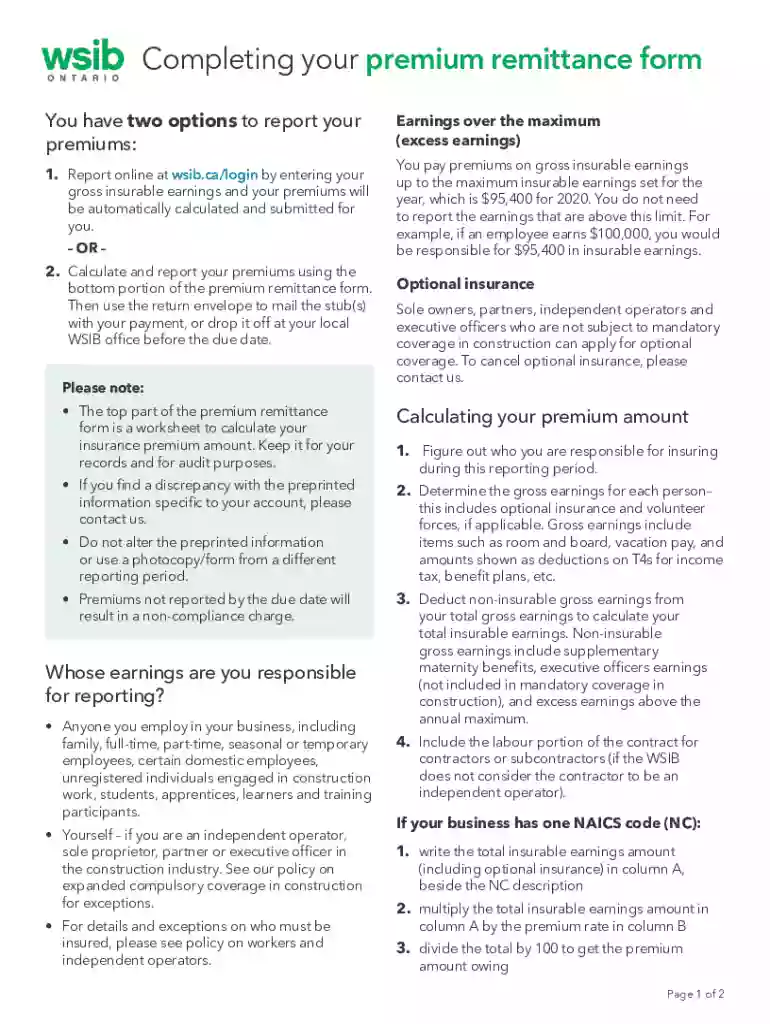
premium remittance Preview on Page 1

Here's how it works

01. Edit your premium remittance online
Type text, add images, blackout confidential details, add comments, highlights and more.

02. Sign it in a few clicks
Draw your signature, type it, upload its image, or use your mobile device as a signature pad.

03. Share your form with others
Send remittance wsib form via email, link, or fax. You can also download it, export it or print it out.

How to use or fill out form premium remittance wsib with DocHub

Form edit decoration
9.5
Ease of Setup
DocHub User Ratings on G2
9.0
Ease of Use
DocHub User Ratings on G2
  1. Click ‘Get Form’ to open the premium remittance form in our editor.
  2. Begin by reviewing the preprinted information at the top of the form. Ensure it reflects your account details accurately.
  3. Calculate your gross insurable earnings for each employee, including any applicable optional insurance. Deduct non-insurable earnings to find your total insurable earnings.
  4. If you have multiple NAICS codes, determine direct and common earnings. Follow the outlined steps to allocate common earnings appropriately across each code.
  5. Enter the calculated premium amounts in their respective columns on the form, ensuring accuracy before submission.
  6. Once completed, save your document and choose to either print it for mailing or submit it electronically if applicable.

Start using our platform today to streamline your premium remittance process for free!

See more form premium remittance wsib versions

We've got more versions of the form premium remittance wsib form. Select the right form premium remittance wsib version from the list and start editing it straight away!
Versions Form popularity Fillable & printable
2019 4.8 Satisfied (155 Votes)
2018 4.3 Satisfied (175 Votes)
2001 4.3 Satisfied (58 Votes)
be ready to get more

Complete this form in 5 minutes or less

Get form

Got questions?

We have answers to the most popular questions from our customers. If you can't find an answer to your question, please contact us.
Contact us
Your WSIB account will be active within three to five business days of registering for WSIB coverage. Once your registration is complete, well email you the details and send you a welcome package with your account information.
Remitted Premium means, for each Participating Agent, the earned title insurance premiums remitted to the Company or any Affiliate, as the case may be, by such Participating Agent.
Paper reconciliation return the original form in the envelope provided. dont return your working copy or any photocopies or faxes of the form keep them for audit purposes. return your completed form via mail to P.O. Box 4115, Station A, Toronto, ON M5W 2V3, so that we receive it no later than March 31.
Remittance refers to any kind of money transfer made from one person or organization to another. It can encompass various forms, such as electronic funds transfers, wire transfers, or even physical cash payments. In the context of business transactions, any payment of an invoice or a bill can be called a remittance.

Security and compliance

At DocHub, your data security is our priority. We follow HIPAA, SOC2, GDPR, and other standards, so you can work on your documents with confidence.

Learn more
ccpa2
pci-dss
gdpr-compliance
hipaa
soc-compliance