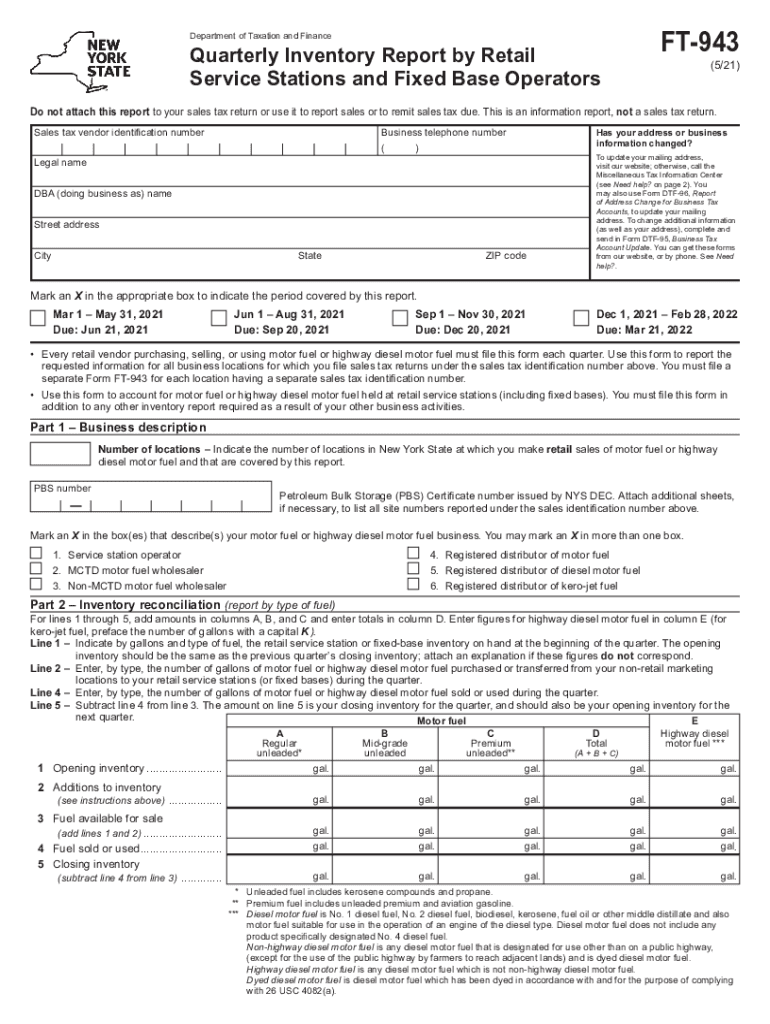
Form FT-943 Quarterly Inventory Report by Retail Service Stations and Fixed Base Operators Revised 5/21 2026

Get Form
ft 943 Preview on Page 1

Here's how it works

01. Edit your ft 943 online
Type text, add images, blackout confidential details, add comments, highlights and more.
02. Sign it in a few clicks
Draw your signature, type it, upload its image, or use your mobile device as a signature pad.
03. Share your form with others
Send it via email, link, or fax. You can also download it, export it or print it out.

How to use or fill out Form FT-943 Quarterly Inventory Report by Retail Service Stations and Fixed Base Operators Revised 5/21 with DocHub

Form edit decoration
9.5
Ease of Setup
DocHub User Ratings on G2
9.0
Ease of Use
DocHub User Ratings on G2
  1. Click ‘Get Form’ to open it in the editor.
  2. Begin by entering your sales tax vendor identification number, legal name, and business telephone number in the designated fields.
  3. Indicate if your address or business information has changed. If so, follow the instructions provided for updating your mailing address.
  4. Select the reporting period by marking an X in the appropriate box that corresponds to the quarter you are reporting.
  5. In Part 1, provide a description of your business, including the number of locations and your Petroleum Bulk Storage (PBS) Certificate number.
  6. For Part 2, report your inventory reconciliation by entering figures for opening inventory, additions to inventory, fuel sold or used, and closing inventory.
  7. Complete Part 3 by detailing motor fuel purchases from suppliers during the quarter. Ensure all columns are filled accurately.
  8. Finally, sign and date the form where indicated and ensure all required information is provided before submission.

Start using our platform today to fill out Form FT-943 easily and efficiently!

See more Form FT-943 Quarterly Inventory Report by Retail Service Stations and Fixed Base Operators Revised 5/21 versions

We've got more versions of the Form FT-943 Quarterly Inventory Report by Retail Service Stations and Fixed Base Operators Revised 5/21 form. Select the right Form FT-943 Quarterly Inventory Report by Retail Service Stations and Fixed Base Operators Revised 5/21 version from the list and start editing it straight away!
Versions Form popularity Fillable & printable
2023 4.7 Satisfied (37 Votes)
2022 4.9 Satisfied (45 Votes)
2021 4.9 Satisfied (30 Votes)
2020 4.3 Satisfied (70 Votes)
2019 4.3 Satisfied (62 Votes)
2018 4.4 Satisfied (219 Votes)
2016 4.4 Satisfied (52 Votes)
2015 4.4 Satisfied (404 Votes)
2015 4 Satisfied (54 Votes)
2014 4.2 Satisfied (66 Votes)
2013 4 Satisfied (27 Votes)
2011 4.1 Satisfied (75 Votes)
2002 4 Satisfied (21 Votes)
be ready to get more

Complete this form in 5 minutes or less

Get form

Got questions?

We have answers to the most popular questions from our customers. If you can't find an answer to your question, please contact us.
Contact us

Electronic document approval demands a software solution that works in compliance with data protection and eSignature laws. DocHub is a perfect tool for that, as it meets all the above mentioned requirements. Whatever method you prefer to sign your Form FT-943 Quarterly Inventory Report by Retail Service Stations and Fixed Base Operators Revised 5/21 in DocHub, your electronic signature will be legally binding and court-admissible.

With DocHub, there are several convenient methods to edit your Form FT-943 Quarterly Inventory Report by Retail Service Stations and Fixed Base Operators Revised 5/21 online. You can drag and drop the form and modify it directly at the DocHub site or use our browser extension to fill out your form immediately. Additionally, you can modify your PDF on your smartphone, as DocHub is compatible with all the available mobile platforms.

Security and compliance

At DocHub, your data security is our priority. We follow HIPAA, SOC2, GDPR, and other standards, so you can work on your documents with confidence.

Learn more
ccpa2
pci-dss
gdpr-compliance
hipaa
soc-compliance
be ready to get more

Complete this form in 5 minutes or less

Get form