
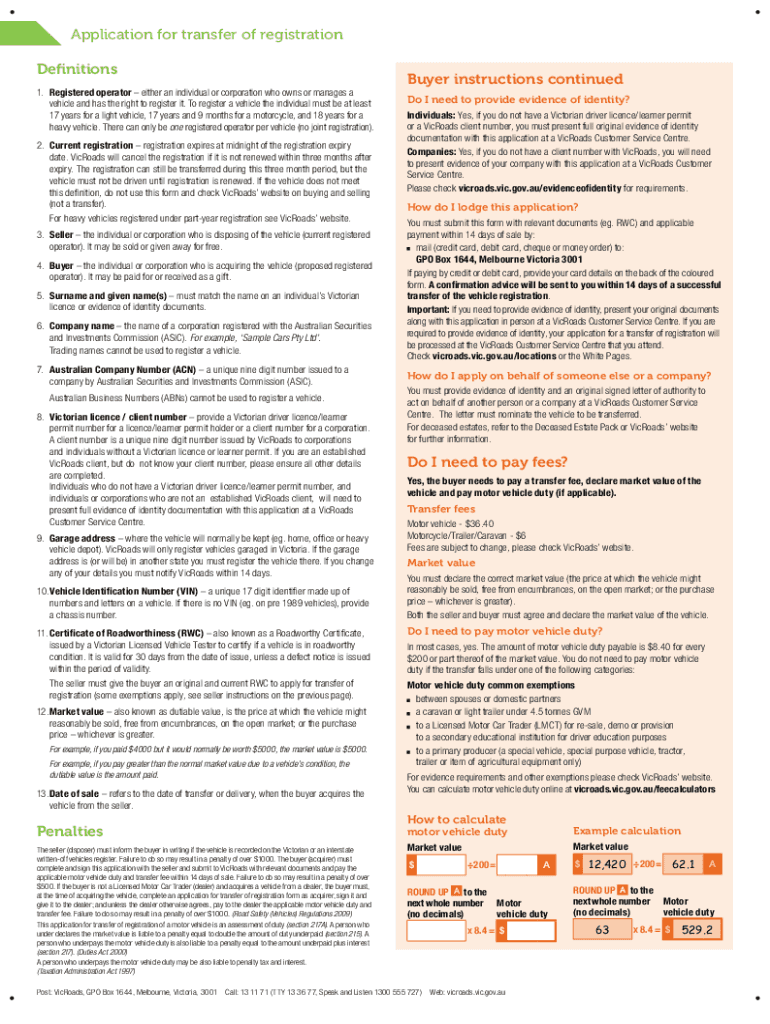




Here's how it works

01. Edit your vehicle transfer form online
Type text, add images, blackout confidential details, add comments, highlights and more.

02. Sign it in a few clicks
Draw your signature, type it, upload its image, or use your mobile device as a signature pad.

03. Share your form with others
Send vehicle transfer form vic via email, link, or fax. You can also download it, export it or print it out.
How to use or fill out vicroads transfer form with our platform

- Click ‘Get Form’ to open the vicroads transfer form in the editor.
- Begin by filling out the Seller details section. Include the surname, given name(s), and Victorian licence or client number. Ensure all information is accurate to avoid processing delays.
- Next, complete the Buyer details section with similar accuracy. This includes their surname, given name(s), and contact information.
- In the Vehicle details section, provide the registration number, VIN or chassis number, and confirm the vehicle's current registration status.
- Fill in the Transfer details section by agreeing on a market value for the vehicle and entering the date of sale.
- Both parties must sign the form to validate it. Make sure to attach any required documents like a Certificate of Roadworthiness if applicable.
- Finally, submit the completed form along with any necessary payments within 14 days of sale to VicRoads for processing.
Start using our platform today for free to streamline your vicroads transfer form process!
Fill out vicroads transfer form online
It's free
It's free
See more vicroads transfer form versions
We've got more versions of the vicroads transfer form form. Select the right vicroads transfer form version from the list and start editing it straight away!
Got questions?
We have answers to the most popular questions from our customers. If you can't find an answer to your question, please contact us.
Contact us
How to transfer vehicle ownership in Victoria?
Bring the following documents to a VicRoads Customer Service Centre: the completed vehicle transfer form. the roadworthy certificate, issued less than 30 days before the date of the sale (if required) evidence of identity. payment of motor vehicle duty and transfer fees (unless you have an exemption)
How do I transfer ownership of a car in Hawaii?
To transfer a car title in Hawaii, the seller signs and endorses the title, including the odometer reading, and gives it, the registration, and safety check to the buyer, who then takes these documents, plus an application form and ID, to their countys satellite city hall within 30 days to finalize the transfer, pay fees, and get new registration and plates, often requiring an appointment and potentially a notary depending on county specifics and title status. Sellers Responsibilities: Sign the Title: Sign and date the front of the Certificate of Title in the Assignment of Title section (Section A). Record Odometer: Provide the accurate odometer reading for vehicles from 2011 and newer. Lien Release (If Applicable): If a lienholder is listed, they must sign off in Section B or provide a lien satisfaction letter. Give Documents: Provide the buyer with the signed title, the current registration, and the current safety inspection certificate. Notify County: Complete and mail the Notice of Transfer form (usually at the top of the title) to the countys Motor Vehicle Licensing Office within 10 days. Buyers Responsibilities: Gather Documents: Collect the signed title, registration, safety certificate, and your ID. Complete Forms: Fill out the Application for Registration (Form CS-L(MVR)1 for Honolulu). Get DocHubd (If Needed): Some counties, like Honolulu, may require the title to be DocHubd or have specific rules if the seller isnt releasing interest. Visit Satellite City Hall: Go to your countys satellite city hall (e.g., for Oahu, visit honolulu.gov within 30 days. Pay Fees: Pay the transfer fee, registration renewal fees (if due), and any applicable taxes or surcharges. Key Things to Remember: Time Limit: Submit paperwork within 30 days to avoid late fees. County Specifics: Procedures and fees can vary slightly by county (Hawaii County, Maui, Honolulu). Appointments: Booking an appointment online for your satellite city hall is often recommended. AI can make mistakes, so double-check responsesVehicle Ownership Transfer | Department of Customer ServicesTo transfer the vehicle title and registration, new owner(s) must bring the following to a satellite city hall within 30 days of sCity and County of Honolulu (.gov)Ownership Transfer - Buyer | Maui County, HI - Official WebsiteThe new registered owner(s) must print and sign their name(s) on the appropriate lines on the reverse side of the Certificate of TMaui County (.gov)
How to fill form transfer of ownership?
To fill out a transfer of ownership (like for a vehicle title), the seller accurately completes their section on the title with their printed name (exactly as on the front), signature, odometer reading, sale date, and price; the buyer then fills in their info and signs, but its often best to do this at the DMV with guidance to avoid errors, paying taxes and fees to get the new title, ensuring all details match ID and insurance. This video provides a step-by-step guide on how to transfer a vehicle title: 53sNicks Car HistoryYouTube Aug 13, 2025Sellers Responsibilities Locate the Assignment of Title section: This is usually on the back of the title. Print your name: Exactly as it appears on the front of the title. Sign your name: Sign where indicated as the seller/owner. Enter Sale Details: Provide the sale price and the exact date of the sale. Record Odometer Reading: Enter the current mileage (or Exempt if applicable). Notarization (If Required): Some states (like Kentucky) require the seller to sign in front of a notary. You can watch this video for a demonstration of the title transfer process: 52sNicks Car HistoryYouTube Aug 5, 2025Buyers Responsibilities (Often Done at DMV) Complete Your Info: Fill in your printed name, address, signature, and date of purchase. Visit the DMV: Take the signed title, proof of insurance, ID, and payment for fees/taxes to your local DMV/BMV office. Pay Fees Taxes: Be prepared for title transfer fees, sales tax, and registration costs. Submit Receive: Submit paperwork and receive your new title and registration. This video explains the steps to take at the DMV to complete the title transfer: 59sCalifornia DMVYouTube May 23, 2024Key Tips Accuracy is Key: Mistakes can lead to delays or fees; fill out information carefully. Match Your ID: Ensure your printed name and address match your drivers license. Dont Leave Blanks: Never leave the buyers section blank to prevent abuse. Check State Rules: Requirements vary; visit your states DMV website for specific forms and procedures (e.g., Notice of Transfer). AI can make mistakes, so double-check responsesHow to Transfer a Georgia Vehicle TitleSep 10, 2024 and some general information at the very top you also shouldnt have to deal with this so the only section you really YouTube Nicks Car HistoryBuy, Sell, or Transfer Vehicle Ownership - NY DMVOverview. Two things are needed for most successful vehicle sales or transfers: proof of sale and proof of ownership. Proof of salNY DMV (.gov)
Where can I download a VicRoads transfer form?
Mail (including a completed Credit or debit card authorisation form if paying by credit or debit card. The form is available at vicroads.vic.gov.au/transfer-forms). If you are acting on behalf of the seller, buyer, or a company, you must provide your details on this form to transfer the registration.
What is the best way to transfer a car title to a family member?
The best way to transfer a car title to a family member involves the original owner signing the title (often as a gift), completing any necessary state forms (like a gift affidavit or bill of sale), and the recipient taking these documents, proof of insurance, ID, and fees to the local DMV to register it in their name, usually with sales tax exemptions available for family, but always check your states specific DMV rules first. Step-by-Step Transfer Process Check DMV Requirements First: Visit your states DMV website (or equivalent) to get exact forms and rules, as they vary by location. Clear Liens Get the Title: Ensure the car has no outstanding loans (liens) and you have the original title. Complete the Title: The current owner signs the title, indicating its a gift or sale (using gift or $0 for price to potentially avoid sales tax). Fill Out Gift/Affidavit Forms: Complete any required gift affidavits or bills of sale, which might need notarization, to claim tax exemptions. Recipient Gets Insurance: The new owner must get auto insurance for the vehicle. Go to the DMV: The recipient goes to the DMV with: Signed title gift/sale forms Proof of insurance Their valid ID/drivers license Funds for fees (registration, plates, potential taxes) Finalize: The DMV processes the paperwork, issues a new title in the recipients name, and provides registration/plates. Key Considerations Sales Tax: Many states exempt family transfers (spouses, parents, children, siblings) from sales tax, but you must use the correct forms. Notarization: Some states (like Texas) require notarization for gift affidavits, say Reddit users, so check locally. Location Matters: Rules for vehicle registration, insurance, and taxes are state-specific. AI can make mistakes, so double-check responsesHow to Transfer a Car Title to a Family Member - Mazda USA7. Complete the transfer at a DMV (or local equivalent) In most states, the giftee can finalize the vehicle transaction on their oMazda USAFrequently Asked Questions - Florida Department of Highway Safety and Motor VehiclesFlorida Highway Safety and Motor Vehicles (.gov)
Security and compliance
At DocHub, your data security is our priority. We follow HIPAA, SOC2, GDPR, and other standards, so you can work on your documents with confidence.
Learn more


Related forms
Chapter 3301-37 of the Administrative Code Preschool Program ...
The document is an Employee Medical Statement form from the Office of Early Learning and School Readiness, revised on Ju ...
Toastmasters form club
The document is an Addendum of Standard Club Options for a Toastmasters club, detailing the governance and operational c ...
Community college transcript lcc
The document is a Transcript Request Form from Lenoir Community College, allowing students to request their official or ...
Colonial life wellness claim
The document provides instructions for filing a health/wellness screening claim with Colonial Life, including options fo ...
Dcu application
The document outlines the application process for opening checking and savings accounts at Digital Federal Credit Union ...
Demonstration insurance blank
The document outlines the application process for Demonstration Jump Insurance, detailing terms, definitions, requiremen ...

Insurance documentation template
The document provides evidence of insurance for International Paper and its subsidiaries for the year 2020, detailing th ...


