




01. Edit your form online
Type text, add images, blackout confidential details, add comments, highlights and more.

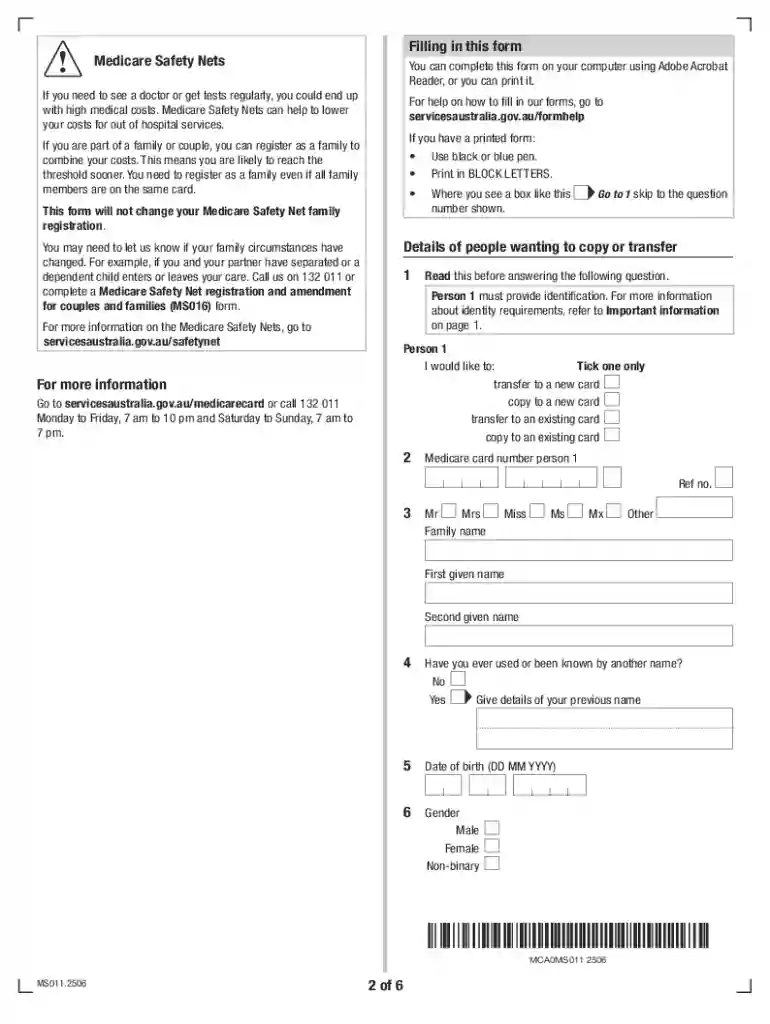
Type text, add images, blackout confidential details, add comments, highlights and more.

Draw your signature, type it, upload its image, or use your mobile device as a signature pad.

Send it via email, link, or fax. You can also download it, export it or print it out.
The "Application to Copy or Transfer from One Medicare Card to Another" (MS011) is designed for individuals who need to manage their Medicare card details by transferring or copying members between cards. This form is intended primarily for individuals aged 15 and older and involves specific processes for handling identification requirements and authorizations for minors under the age of 15. The MS011 provides a streamlined approach to ensure that members can accurately update their Medicare information to reflect changes in family composition or other relevant scenarios.
Collect Necessary Information: Gather personal details for each individual involved in the transfer or copy, including full names and Medicare numbers.
Understand Identification Requirements: Ensure all necessary identification documents are available, particularly for individuals aged 15 and older. For children under 15, the form requires specific authorizations from parents or guardians.
Fill Out Personal Details: Complete sections that require input of personal information and select whether you are copying or transferring individuals to the new card.
Review and Sign: Carefully check all entered details for accuracy. Sign the form where required, ensuring that all parties involved in the transfer or copy have signed appropriately.
Submit the Form: Follow instructions on submission, which may include mailing the completed form to a designated Medicare office or submitting it online if supported. Keep a copy of the form for your records.
Identification Proof: Government-issued identification for each individual needing a transfer on their Medicare card.
Authorization for Minors: Signed consent from parent or guardian for children under 15 involved in the application process.
Proof of Relationship: Documents proving the relationship when transferring dependents or other relatives, such as birth certificates or adoption papers if applicable.
Individuals can access the MS011 form through Medicare's official website, local Medicare offices, or designated healthcare providers. The form is available for both online completion and physical submission, offering flexibility based on user preference. Ensure you have the latest version to avoid any processing delays.
Using the MS011 form is essential for maintaining updated Medicare records, which is crucial for accessing healthcare services without interruptions. The form helps in accurately reflecting family and household changes, ensuring that Medicare coverage continues seamlessly across different members.
The MS011 form is predominantly used by families or individuals undergoing life changes, such as adding a new household member or addressing adjustments following a separation. It is also used by legal guardians managing Medicare coverage for minors or dependents.


Online Submission: Some Medicare services may offer an online portal for the electronic submission of forms for expedited processing.
Mail: Completed forms can also be mailed directly to the addresses specified by Medicare offices.
In-Person: Submission in person at a local Medicare office, if applicable, allows for direct assistance and verification.
Completing the MS011 correctly ensures compliance with Medicare's policies and regulations. Accuracy in submission aids in preventing any legal complications that may arise from misrepresenting member details or failing to update the card records in a timely manner.
Personal Identification Information: Essential details such as full names, Social Security numbers, and current Medicare numbers.
Detailed Account of Changes: Specific details regarding the nature of the transfer or copy, alongside reason codes if applicable.
Contact Details: Updated contact information for all parties involved to ensure easy communication in case further clarification is required by Medicare officials.
These comprehensive details are crucial for effectively using and submitting the MS011 form, ensuring that Medicare card changes are managed efficiently and accurately.
We've got more versions of the Application to copy or transfer from one Medicare card to another (MS011) form. Select the right Application to copy or transfer from one Medicare card to another (MS011) version from the list and start editing it straight away!
At DocHub, your data security is our priority. We follow HIPAA, SOC2, GDPR, and other standards, so you can work on your documents with confidence.

A resource for all researchers of aviation safety and security, the Aviation Safety and Security Archives. While most items can be copied, Please contact us
Log into (or create) your secure Medicare account to print or order an official copy of your Medicare card. You can also call 1-800-MEDICARE (1-800-633-4227)


