




Here's how it works



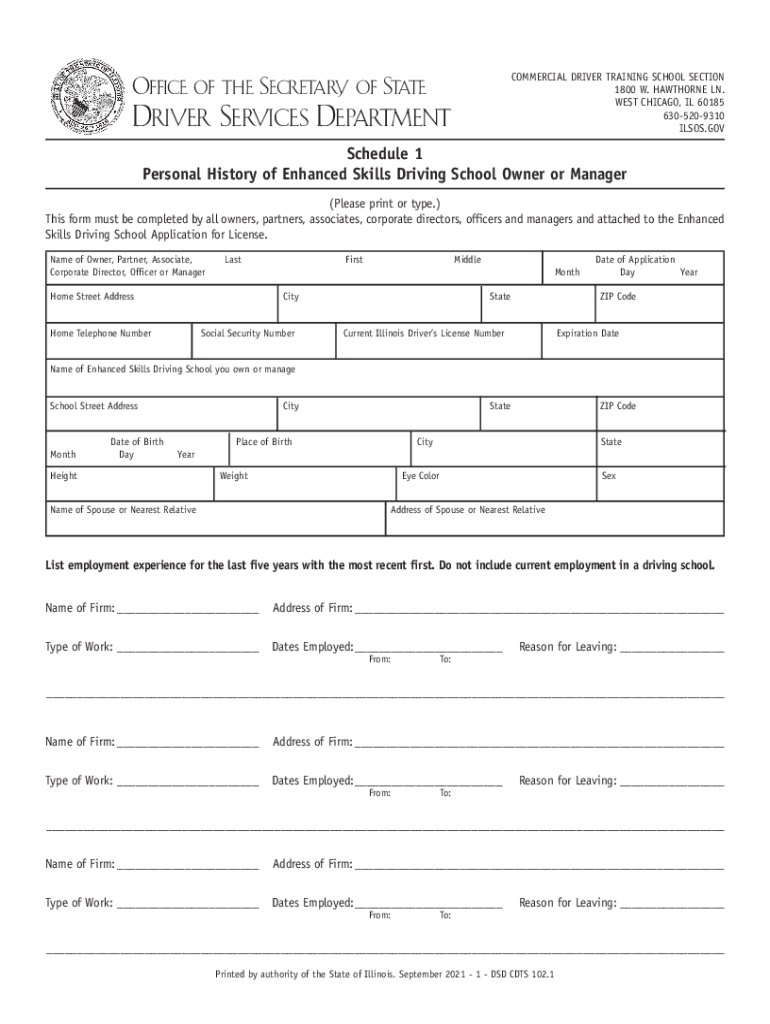
How to use or fill out Schedule 1 Personal History of Enhanced Skills Driving School Owner or Manager

- Click ‘Get Form’ to open it in the editor.
- Begin by entering your full name in the designated fields for Last, First, and Middle names.
- Fill in your home address, including street, city, state, and ZIP code. Ensure accuracy for correspondence.
- Provide your home telephone number and Social Security Number in the respective fields.
- Enter your current Illinois Driver’s License Number and its expiration date.
- Complete the section regarding your Enhanced Skills Driving School by providing its name and address.
- Input your date of birth, place of birth, height, weight, eye color, and sex as required.
- List employment experience for the last five years excluding current driving school employment. Fill out each firm’s name, address, type of work, dates employed, and reason for leaving.
- Answer all questions regarding past convictions truthfully. If any are answered 'Yes', provide explanations in the space provided.
- Finally, affirm that all information is true by signing at the bottom before submitting with your application.
Start using our platform today to complete your form easily and efficiently!
It's free
See more Schedule 1 Personal History of Enhanced Skills Driving School Owner or Manager versions
Got questions?
How do I sign my Schedule 1 Personal History of Enhanced Skills Driving School Owner or Manager without printing?
eSignatures are an excellent replacement for traditional signing, as they save time, effort, and costs people spend on printing, scanning, and paper delivery. You can electronically sign your Schedule 1 Personal History of Enhanced Skills Driving School Owner or Manager using a trustworthy and powerful online document processing tool like DocHub. It complies with major eSignature regulations (ESIGN and UETA), so all forms approved there are legally binding and have the same validity as manually signed ones.
How do you edit Schedule 1 Personal History of Enhanced Skills Driving School Owner or Manager in Chrome?
If you are using Chrome, there are two easy ways to modify your Schedule 1 Personal History of Enhanced Skills Driving School Owner or Manager online. First, go to the DocHub website, add your file, and modify it using our toolbar. You may also install our Chrome extension and modify any document by dragging and dropping it in your web browser tab.
Security and compliance
At DocHub, your data security is our priority. We follow HIPAA, SOC2, GDPR, and other standards, so you can work on your documents with confidence.
Learn more


