Dd2345 2026

Get Form
how to get a dd2345 Preview on Page 1

Here's how it works

01. Edit your how to get a dd2345 online
Type text, add images, blackout confidential details, add comments, highlights and more.
02. Sign it in a few clicks
Draw your signature, type it, upload its image, or use your mobile device as a signature pad.
03. Share your form with others
Send dd form 2345 via email, link, or fax. You can also download it, export it or print it out.

How to use or fill out dd2345 with our platform

Form edit decoration
9.5
Ease of Setup
DocHub User Ratings on G2
9.0
Ease of Use
DocHub User Ratings on G2
  1. Click ‘Get Form’ to open the dd2345 in the editor.
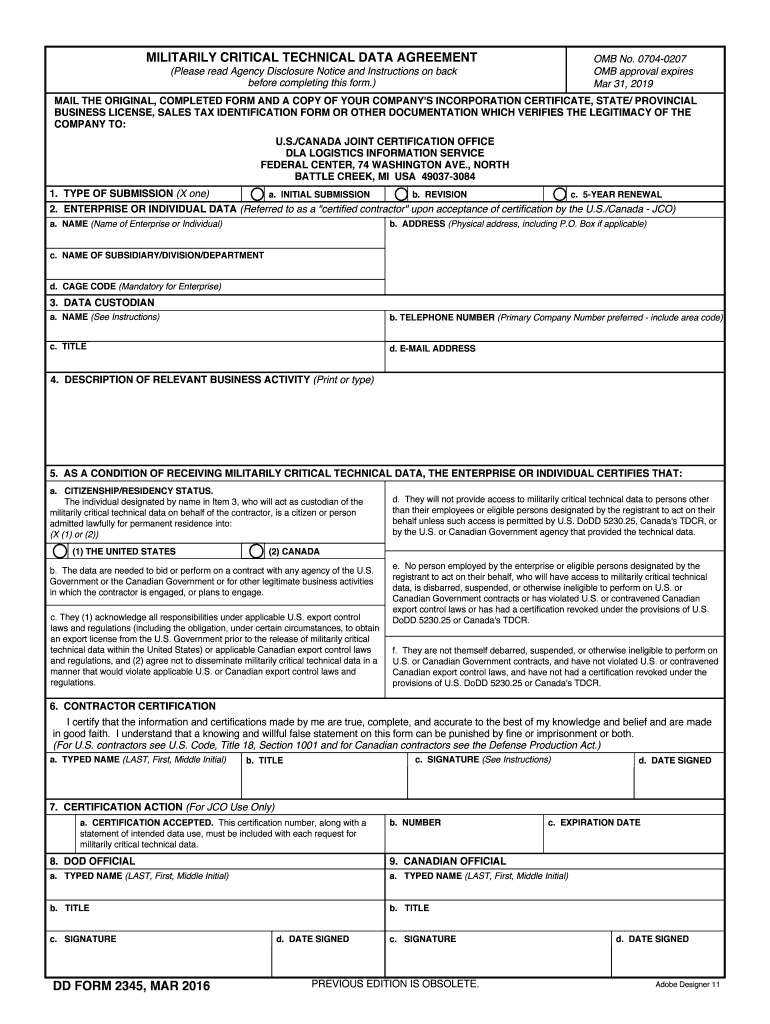
  2. In Section 1, select the type of submission by marking one box: Initial Submission, Revision, or 5-Year Renewal.
  3. Proceed to Section 2 and enter your enterprise or individual data. Fill in your name, address, subsidiary information, and CAGE code if applicable.
  4. In Section 3, provide the data custodian's details including their name, telephone number, title, and email address.
  5. Section 4 requires a description of your relevant business activity. Be specific about how it relates to militarily critical technical data.
  6. Complete Section 5 by certifying your citizenship/residency status and acknowledging responsibilities under export control laws.
  7. Finally, sign and date the form in Section 6. Ensure that all information is accurate before submitting.

Start using our platform today for free to streamline your dd2345 form completion!

See more dd2345 versions

We've got more versions of the dd2345 form. Select the right dd2345 version from the list and start editing it straight away!
Versions Form popularity Fillable & printable
2016 4.8 Satisfied (226 Votes)
2013 4.4 Satisfied (341 Votes)
2011 4.2 Satisfied (41 Votes)
2001 3.9 Satisfied (49 Votes)
be ready to get more

Complete this form in 5 minutes or less

Get form

Got questions?

We have answers to the most popular questions from our customers. If you can't find an answer to your question, please contact us.
Contact us
In order to obtain a DD Form 2345, an organization is required to have a cage code. An organization must register in the System for Award Management (SAM) in order to obtain a cage code. Lastly, in order to register in SAM, an organization will first need to receive a Dun and Bradstreet number (DUNS).
Blueprints, drawings, plans, instructions, computer software or documentation. Other technical information that can be used (or be adapted for use) to design, engineer, produce, manufacture, operate, repair, overhaul, or reproduce any military or space equipment or technology concerning such equipment.
Your business or entity must be either Canadian-owned or United States-owned. Your designated data custodian must be a Canadian or United States citizen. You must renew your DD 2345 every five years.
Recent experience indicates a range of several weeks and as long as 2-3 months if the form contains errors. To shorten the approval time, it is recommended that you email the form to JCP-Admin@dla.mil and email that address frequently for status.
The DD2345 is required for U.S. contractors or subcontractors who wish to obtain access to unclassified technical data disclosing militarily critical technology with military or space application that is under the control of, or in the possession of, the DOD.