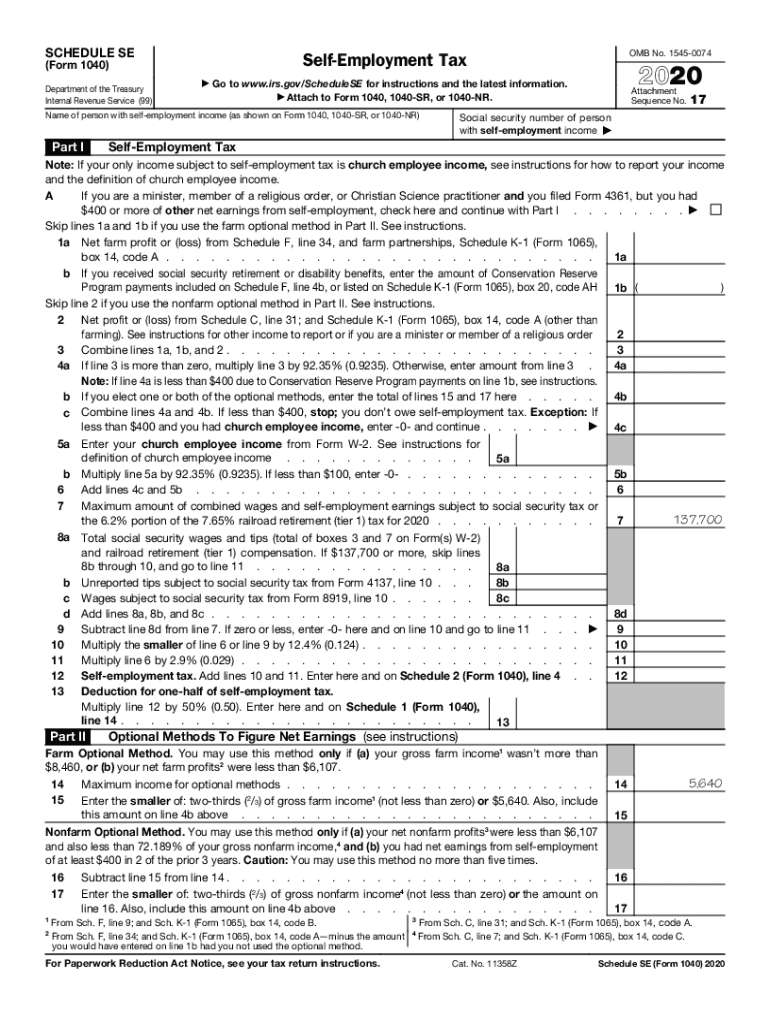







Definition and Meaning
The Schedule SE (Form 1040) is a tax form used in the United States to determine self-employment tax. Primarily, this form is essential for individuals who earn income through self-employment and need to report and calculate their net earnings to the Internal Revenue Service (IRS). The self-employment tax is meant to cover both Social Security and Medicare taxes and is similar to the taxes withheld from the paychecks of individuals employed by a company. Understanding the purpose and function of Schedule SE is crucial for ensuring compliance with tax regulations and avoiding potential penalties.
How to Use the Schedule SE
To use Schedule SE effectively, one must first determine if filing is necessary. Generally, individuals who have net earnings of $400 or more from self-employment must complete this form. The form includes instructions to help users calculate their net self-employment income along with any applicable tax. It typically involves a two-step process: calculating the net earnings from self-employment, and then applying the correct tax rate to those earnings. Accurate completion of Schedule SE ensures proper reporting of taxes owed, which can help avoid fines and penalties.
Steps to Complete the Schedule SE
-
Calculate Net Earnings: Begin by determining your net earnings from self-employment. This involves subtracting allowable business expenses that you have documented from your gross self-employment income.
-
Fill Appropriate Section: Depending on your total earnings, use either the short or long form within Schedule SE. Each section includes detailed instructions on how to compute various parts of the self-employment tax.
-
Apply Tax Rate: The next step is to apply the self-employment tax rate to the net earnings figure. The current rate is 15.3%, which consists of 12.4% for Social Security and 2.9% for Medicare.
-
Transfer Figures: Once calculated, transfer the total self-employment tax figure to Form 1040, ensuring correct reporting of taxes owed to the IRS.
-
Confirm and File: Double-check all figures and ensure that you have accurately completed the form before submitting it along with your overall tax return.
Important Terms Related to Schedule SE
-
Self-employment: This refers to the act of working for oneself as a freelancer or owner of a business rather than for an employer.
-
Net Earnings: The total income from self-employment after business expenses have been deducted is considered your net earnings.
-
Self-employment Tax: A tax consisting of Social Security and Medicare taxes primarily for individuals who work for themselves.
-
Gross Income: The total income from all sources before deductions such as expenses and taxes.
-
Allowable Expenses: Costs incurred during the operation of the business that can be deducted from gross income to reduce the taxable income.
IRS Guidelines
The IRS provides comprehensive guidelines for completing the Schedule SE. These guidelines include details on who must file, adjustments or exceptions that might apply, and the implications of filing incorrectly. The IRS mandates that if earnings from self-employment exceed $400, the Schedule SE must be submitted. Exceptions exist for some church employees and businesses operated by members of religious communities, who can opt out of Social Security and Medicare taxes through specific processes outlined by the IRS.
Taxpayer Scenarios
-
Freelancers and Independent Contractors: Individuals who earn through freelance work should complete the Schedule SE to report their self-employment income.
-
Small Business Owners: Owners who do not incorporate but retain all profits will need to file this form to calculate self-employment taxes.
-
Part-time Self-Employment: Even if self-employment is not the primary income source, any earnings over the $400 threshold require the completion of Schedule SE for accurate tax reporting.


Who Typically Uses the Schedule SE
Primarily, the Schedule SE is used by individuals who earn through self-employment activities. This includes freelancers, independent contractors, sole proprietors, and members of partnerships. Additionally, people involved in specialized roles, such as clergy members and certain agricultural workers, may be required to submit this form. Understanding who must complete the Schedule SE helps ensure compliance with tax laws and minimizes the risk of penalties for underreporting taxable income.

Eligibility Criteria
To be eligible to file Schedule SE, individuals must earn $400 or more from self-employment activities during the tax year. This includes income from providing services or selling products independently. There are some exemptions, such as individuals in certain religious sectors who have applied to be exempt from Social Security and Medicare taxes. Additionally, those whose income is below the threshold do not need to file this form, simplifying their tax return process significantly.