Hud 51000 2026

Get Form
hud 51000 Preview on Page 1

Here's how it works

01. Edit your hud 51000 online
Type text, add images, blackout confidential details, add comments, highlights and more.
02. Sign it in a few clicks
Draw your signature, type it, upload its image, or use your mobile device as a signature pad.
03. Share your form with others
Send it via email, link, or fax. You can also download it, export it or print it out.

How to use or fill out hud 51000 with our platform

Form edit decoration
9.5
Ease of Setup
DocHub User Ratings on G2
9.0
Ease of Use
DocHub User Ratings on G2
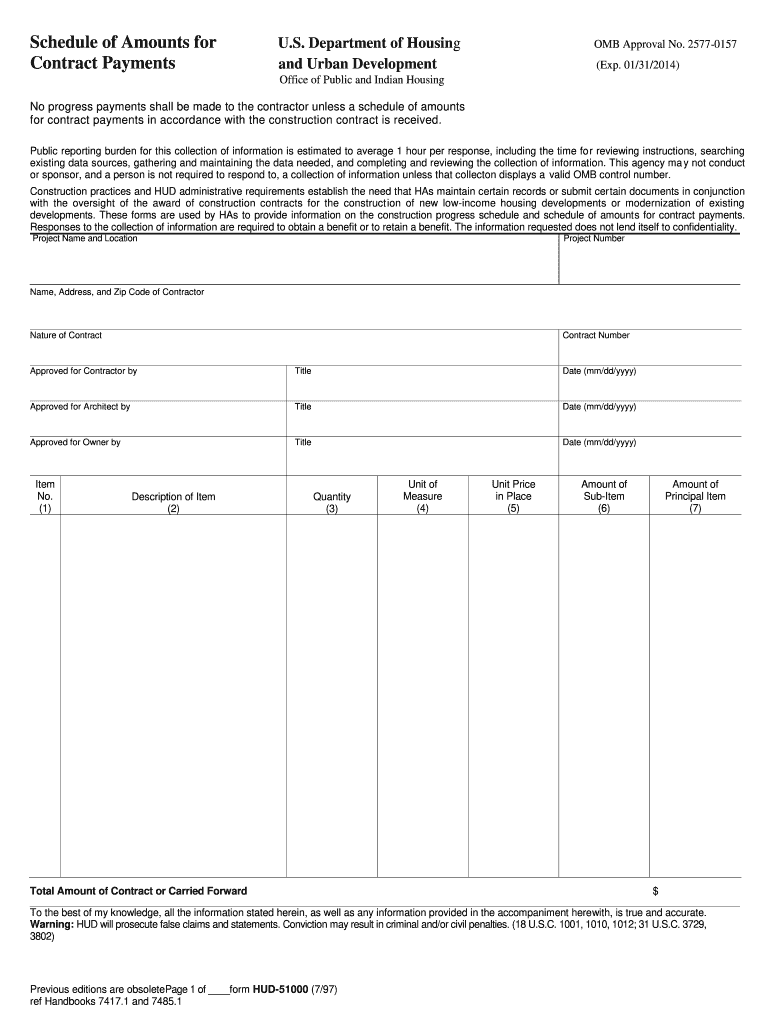
  1. Click ‘Get Form’ to open the HUD 51000 in the editor.
  2. Begin by entering the project name and location at the top of the form, along with the project number and contractor's details.
  3. In columns 1 and 2, list item numbers and corresponding descriptions of work. Ensure you follow the Master List for uniformity.
  4. Fill in column 3 with total quantities for each sub-item, followed by appropriate units of measure in column 4.
  5. Enter unit prices in column 5, then calculate amounts for each sub-item in column 6 by multiplying quantities by unit prices.
  6. Sum up amounts from column 6 to get totals for principal items in column 7.
  7. Finally, sign and date the form at the bottom to certify accuracy before submission.

Start using our platform today to streamline your HUD form completion process for free!

See more hud 51000 versions

We've got more versions of the hud 51000 form. Select the right hud 51000 version from the list and start editing it straight away!
Versions Form popularity Fillable & printable
2014 4.8 Satisfied (141 Votes)
1997 4.4 Satisfied (556 Votes)
be ready to get more

Complete this form in 5 minutes or less

Get form

Got questions?

We have answers to the most popular questions from our customers. If you can't find an answer to your question, please contact us.
Contact us

With DocHub, you can rapidly sign your hud 51000 or any other paperwork on iOS, even without installing additional applications. You can access your DocHub account from any web-connected browser and complete and sign your document in any way you like with just a couple of clicks.

If you edit your hud 51000 with DocHub, you simply will not need to look for other applications or services to eSign it. An electronic signature is part of DocHub’s comprehensive editing toolset, which allows you to apply changes in your form without switching between websites. Simply complete your form, double-check the correctness of your information and put your electronic signature at the end to make it submission-ready within a few minutes.

The listing price for a HUD home is typically lower than comparable properties in the area because the goal is to recover the losses from the foreclosure, rather than profit from a sale. This resale may provide a more accessible opportunity for first-time buyers, as well as middle- and lower-income homebuyers.
The Rate Reduction Incentive (RRI) is a financial incentive for Public Housing Authorities (PHAs) that pursue special and docHub efforts beyond what is required by statute and/or regulation to reduce their utility rate.
Yes. The homes that are on the market that are commonly called HUD homes can usually be purchased at a price that would be lower than other homes that are similar in age and features in the same area. These homes will usually not be interesting for people who are looking for move-in-ready homes.

Security and compliance

At DocHub, your data security is our priority. We follow HIPAA, SOC2, GDPR, and other standards, so you can work on your documents with confidence.

Learn more
ccpa2
pci-dss
gdpr-compliance
hipaa
soc-compliance
be ready to get more

Complete this form in 5 minutes or less

Get form

People also ask

Flexible Financing Options You can use various types of loans to buy a HUD home, including: FHA loans (with as little as 3.5% down)
Financing HUD Homes While HUD itself doesnt directly finance HUD homes, several government entities do. Some options are: VA loans with zero down. USDA rural development loans with zero down.
FHA might be just what you need. Your down payment can be as low as 3.5% of the purchase price. Available on 1-4 unit properties.

Related links