




Here's how it works

01. Edit your guardianship paperwork arizona online
Type text, add images, blackout confidential details, add comments, highlights and more.

02. Sign it in a few clicks
Draw your signature, type it, upload its image, or use your mobile device as a signature pad.

03. Share your form with others
Send guardianship arizona via email, link, or fax. You can also download it, export it or print it out.
How to use or fill out Arizona Annual Report Guardian with our platform

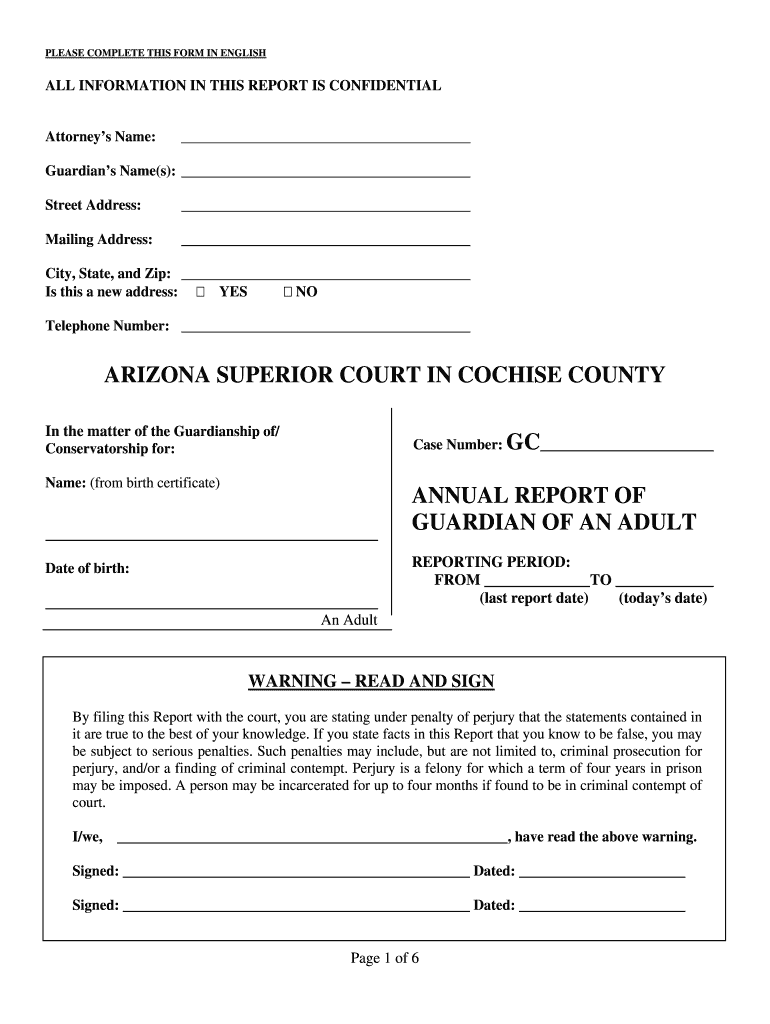
- Click ‘Get Form’ to open the Arizona Annual Report Guardian in the editor.
- Begin by entering the Attorney’s Name and Guardian’s Name(s) in the designated fields. Ensure all names are spelled correctly.
- Fill in the Street Address, Mailing Address, City, State, and Zip Code. Indicate if this is a new address by selecting 'YES' or 'NO'.
- Provide the Telephone Number and details regarding the case number and name of the ward as per their birth certificate.
- In the reporting period section, enter the dates for the last report and today’s date.
- Carefully read and sign the warning statement to confirm that all information is true to your knowledge.
- Proceed through each section detailing the ward's living situation, medical care, activities, and any changes in health over the past year.
- Complete sections regarding assets, county services received by the ward, and any additional comments or information not covered above.
- Finally, ensure you have included mailing information for all required parties before submitting your report.
Start using our platform today to easily complete your Arizona Annual Report Guardian for free!
Fill out arizona annual report guardian online
It's free
It's free
See more arizona annual report guardian versions
We've got more versions of the arizona annual report guardian form. Select the right arizona annual report guardian version from the list and start editing it straight away!
| Versions | Form popularity | Fillable & printable |
|---|---|---|
| 2025 | 4 Satisfied (34 Votes) | |
| 2025 | 4.8 Satisfied (31 Votes) | |
| 2025 | 4.3 Satisfied (34 Votes) | |
| 2025 | 4.2 Satisfied (34 Votes) | |
| 2025 | 4.6 Satisfied (55 Votes) | |
| 2025 | 4.5 Satisfied (44 Votes) | |
| 2025 | 4.2 Satisfied (37 Votes) | |
| 2025 | 4.7 Satisfied (34 Votes) | |
| 2025 | 4.5 Satisfied (26 Votes) | |
| 2025 | 4.5 Satisfied (36 Votes) | |
| 2025 | 4.5 Satisfied (40 Votes) | |
| 2024 | 4.3 Satisfied (21 Votes) | |
| 2024 | 4.6 Satisfied (51 Votes) | |
| 2024 | 4.5 Satisfied (23 Votes) | |
| 2024 | 4.8 Satisfied (29 Votes) |
Got questions?
We have answers to the most popular questions from our customers. If you can't find an answer to your question, please contact us.
Contact us
Do guardians get paid in Arizona?
Guardians in Arizona can be reimbursed for reasonable expenses incurred while caring for their ward, but they do not typically receive a salary unless specified by the court. The reimbursement covers necessary expenses such as food, clothing, medical care, and educational needs.
Is a guardian required to file an annual report?
If you have been appointed as a Guardian by the Court, you must file a Guardians Report every year unless or until the Guardianship is terminated.
Do you have to file an annual report in Arizona?
The state of Arizona requires all Arizona corporations, nonprofits, LLPs, and LLLPs to file an annual report each year. Arizona LLCs are not required to file an annual report. Check out the instructions below to file the Arizona Annual Report yourself or hire us to do it for you. Need to file in another state?
What is a title 14 guardian in Arizona?
Anyone concerned about a minors well-being can request the court to appoint a Title 14 guardian. A guardian can be appointed when someone other than the parent wants the court to grant them authority to take on parental responsibilities, including decisions about housing, medical care, and education.
Security and compliance
At DocHub, your data security is our priority. We follow HIPAA, SOC2, GDPR, and other standards, so you can work on your documents with confidence.
Learn more




