
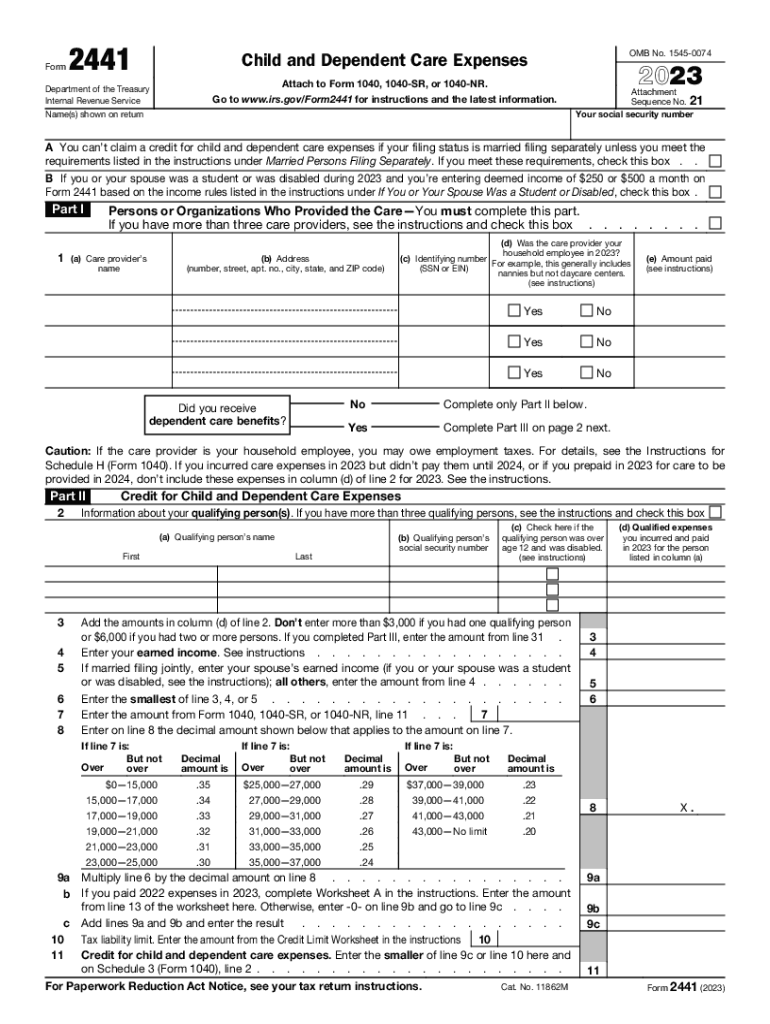







Definition & Purpose of Form 2441
Form 2441, also known as the Child and Dependent Care Expenses form, is primarily used by taxpayers in the United States to claim a tax credit for expenses incurred when paying for childcare or dependent care. This credit is designed to reduce the financial burden on individuals or couples who require care for dependents while they work or look for employment.
Key Features of Form 2441
- Allows taxpayers to claim care expenses for children under the age of 13 or dependents who are physically or mentally incapable of self-care.
- Used to calculate the available credit amount based on the taxpayer's total income and care expenses.
- Requires detailed information on care providers, including their name, address, and taxpayer identification number (TIN).
Steps to Complete the 2023 Form 2441
To accurately complete Form 2441, follow these steps:
- Identify Eligible Dependents: List all dependents who qualify for the credit. Include their names, social security numbers, and ages to ensure eligibility.
- Gather Provider Information: Collect and record the names, addresses, and taxpayer identification numbers of all care providers.
- Calculate Expenses: Total the amount paid for care during the tax year, keeping records of receipts and payment proofs.
- Compute the Credit: Use the form’s guidelines to calculate the available credit based on income levels and expenses.
Tips for Accurate Completion
- Ensure all information matches official documents like the provider’s TIN and dependent social security numbers.
- Double-check calculations to avoid errors which could lead to processing delays or denials.
Eligibility Criteria for Claiming the Credit
To be eligible to use Form 2441 and claim the credit, taxpayers must meet specific criteria:
- Work-Related Expenses: The care expenses must allow the taxpayer to work or look for work.
- Filing Status: Married individuals must file a joint return to qualify, with specific exceptions for individuals living apart.
- Earned Income: The claimed credit is contingent on having earned income during the year, although certain rules apply for married couples.


Special Considerations
- Full-time students and those unable to care for themselves may receive special consideration for the earned income requirement.
- The form includes instructions for cases involving more than one qualifying person, adjusting credits accordingly.
Important IRS Guidelines for Form 2441
Form 2441 adheres to specific IRS guidelines, which influence how taxpayers should prepare and submit it.
Key IRS Directives
- The expenses must be necessary for obtaining gainful employment.
- Only care services rendered within the United States are eligible for the credit.
- Taxpayers must maintain detailed records of all care-related expenses and provider information for auditing purposes.
Required Documentation for Form 2441
Filing Form 2441 requires various pieces of supporting documentation to substantiate claims:
- Proof of Expenses: Receipts, payment vouchers, and contracts for care services.
- Provider Details: Documentation of provider identification for all entities who received payment.
- Taxpayer Identification: Verification of social security numbers for all dependents.
Maintaining Comprehensive Records
- Taxpayers should keep all documentation for at least three years in case of IRS review or audit.
- Clear, organized records facilitate easier filing and substantiate claims competently.
Software Compatibility for Filing
Form 2441 can be completed using various taxation software programs, streamlining the filing process for ease and accuracy.
Compatible Software Examples
- TurboTax and H&R Block: These programs guide users through entering necessary data and calculating credits automatically.
- QuickBooks: Useful for individuals running small businesses who may have diverse care expense records to track.
Benefits of Using Software
- Automated accuracy checks reduce errors, ensuring compliance with IRS regulations.
- Provides additional support and guidance in understanding complex filing requirements.
Submission Methods for Form 2441
Taxpayers have multiple options for submitting Form 2441 to align with their preferences and logistical needs.
Available Submission Channels
- Electronic Filing: Through certified e-file providers or tax software, often resulting in quicker processing times.
- Paper Filing: Direct submission to the IRS by mail, requiring comprehensive form completion and enclosure of all required documentation.
Choosing the Best Method
- Electronic filing is recommended for efficiency and speed.
- For those without access to digital filing means, paper filing remains a viable alternative, though processing times may vary.
Penalties and Compliance for Form 2441
Failure to comply with Form 2441 requirements can lead to penalties.
Key Penalty Guidelines
- Inaccurate information or missing documentation could result in a denial of credit.
- Intentional misrepresentation may lead to additional IRS scrutiny or fines.
Ensuring Compliance
- Ensure all provided information is accurate and complete.
- Remain updated on tax law changes that might affect credits or requirements for Form 2441.




