Filling Out the FAFSA - IFAP - US Department of Education 2026

Get Form
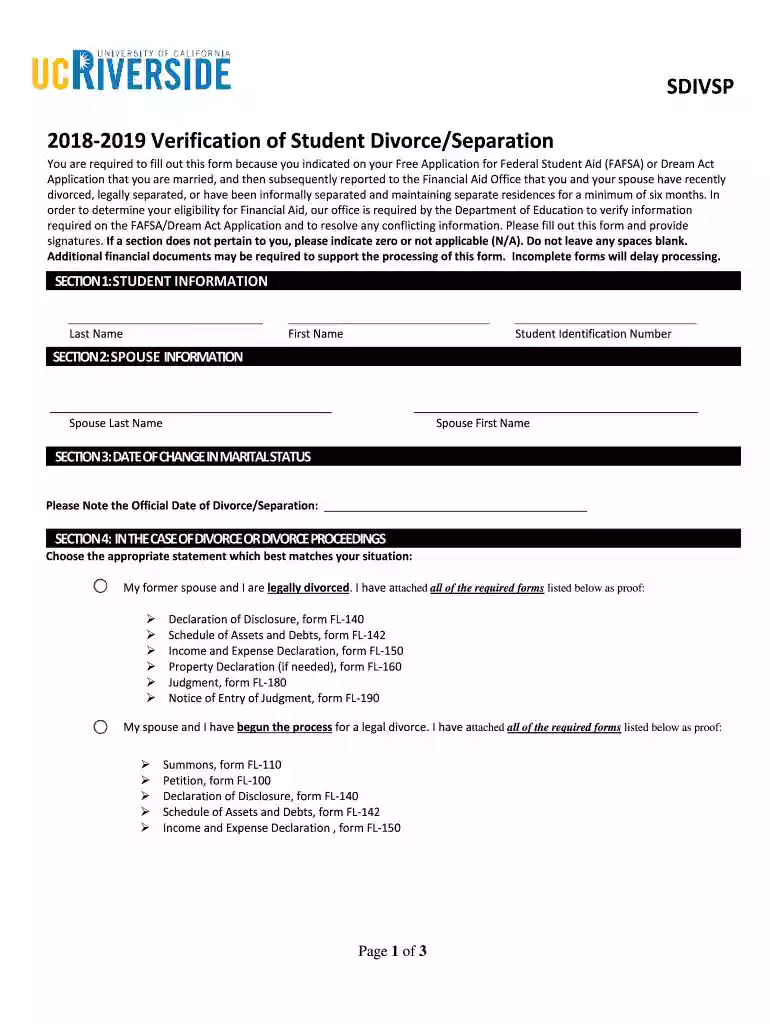
Filling Out the FAFSA - IFAP - US Department of Education Preview on Page 1

Here's how it works

01. Edit your form online
Type text, add images, blackout confidential details, add comments, highlights and more.

02. Sign it in a few clicks
Draw your signature, type it, upload its image, or use your mobile device as a signature pad.

03. Share your form with others
Send it via email, link, or fax. You can also download it, export it or print it out.

How to use or fill out Filling Out the FAFSA - IFAP - US Department of Education with DocHub

Form edit decoration
9.5
Ease of Setup
DocHub User Ratings on G2
9.0
Ease of Use
DocHub User Ratings on G2
  1. Click ‘Get Form’ to open it in the editor.
  2. Begin by filling out Section 1: Student Information. Enter your first name, last name, and student identification number accurately.
  3. Proceed to Section 2: Spouse Information. Provide your spouse's last and first names as required.
  4. In Section 3, indicate the official date of divorce or separation clearly.
  5. For Sections 4 and 5, select the statement that best describes your situation regarding divorce or separation and attach the necessary documentation as proof.
  6. Complete Section 6 by providing tax filing information if applicable. Ensure you attach the required tax documents.
  7. Finally, in Section 7, certify your information by signing and dating the form. Remember to scan and submit it in PDF format via email.

Start using our platform today to fill out your FAFSA form easily and for free!

See more Filling Out the FAFSA - IFAP - US Department of Education versions

We've got more versions of the Filling Out the FAFSA - IFAP - US Department of Education form. Select the right Filling Out the FAFSA - IFAP - US Department of Education version from the list and start editing it straight away!
Versions Form popularity Fillable & printable
2025 4 Satisfied (34 Votes)
2024 4.3 Satisfied (21 Votes)
2024 4.6 Satisfied (51 Votes)
2024 4.5 Satisfied (23 Votes)
2024 4.8 Satisfied (29 Votes)
2023 4.7 Satisfied (42 Votes)
2023 4.4 Satisfied (48 Votes)
2023 4 Satisfied (63 Votes)
2023 4.5 Satisfied (26 Votes)
2023 4.6 Satisfied (34 Votes)
2023 4.2 Satisfied (30 Votes)
2023 3.9 Satisfied (31 Votes)
2023 4.3 Satisfied (42 Votes)
2023 4.7 Satisfied (39 Votes)
2023 4.4 Satisfied (22 Votes)
be ready to get more

Complete this form in 5 minutes or less

Get form

Got questions?

We have answers to the most popular questions from our customers. If you can't find an answer to your question, please contact us.
Contact us
Some of the most common FAFSA errors are: Forgetting to sign and date: If youre filling out the paper FAFSA, be sure to sign it. Sending in a copy of your income tax returns: You do not need to include a copy of your tax returns with your FAFSA.
Do Not Report Your primary home: The FAFSA doesnt expect you to list the value of your primary home as an asset that can help pay for college. Your retirement savings: The FAFSA doesnt ask you to list the balance of 401(k)s, IRAs, Roth IRAs, pensions, annuities, or other retirement funds.
There is no income cut-off to qualify for federal student aid. Many factorssuch as the size of your family and your year in schoolare considered.
Basic Principles Reducing income during the base years. Reducing included assets. Increasing the number of family members enrolled in college and pursuing a degree or certificate at the same time.
Through Federal Student Aid (a performance-based organization), the U.S. Department of Education awards more than $120 billion a year in grants, work-study funds, and low-interest loans to approximately 13 million students.

Security and compliance

At DocHub, your data security is our priority. We follow HIPAA, SOC2, GDPR, and other standards, so you can work on your documents with confidence.

Learn more
ccpa2
pci-dss
gdpr-compliance
hipaa
soc-compliance
be ready to get more

Complete this form in 5 minutes or less

Get form

People also ask

8 Steps to Filling out the FAFSA 1Create an FSA ID Account. 2Start the FAFSA Form. 3Fill out the Student Demographics section. 4List the schools to which you want your FAFSA information sent. 5Answer the dependency status questions. 6Fill out the Parent Demographics section. 8Sign and submit your FAFSA form.

Related links