
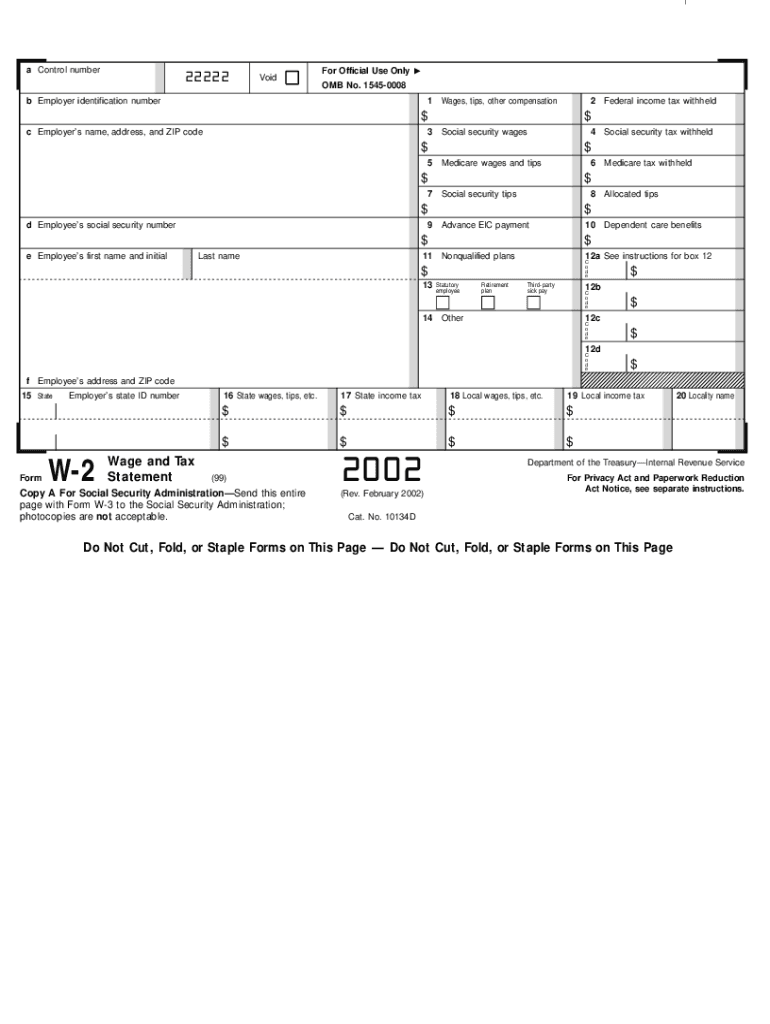







Definition and Meaning of the 2002 W-2 Form
The 2002 W-2 form, known as the Wage and Tax Statement, is an essential IRS document that employers must furnish each year to employees, detailing wages earned and taxes withheld. This form serves as an annual employment and earnings summary, critical for employees during tax season. It includes information on federal, state, and other applicable taxes withheld, such as Social Security and Medicare. The W-2 form helps both employees and the IRS track and reconcile annual earnings and tax obligations.
How to Use the 2002 W-2 Form
Employees use the 2002 W-2 form primarily when preparing their annual tax returns. The form provides necessary financial information to fill out IRS forms such as the 1040 or 1040A. Upon receipt, employees should review the form for accuracy, ensuring every detail matches their records, including wages, Social Security number, and tax withholdings. Accurate information is crucial to prevent discrepancies which could delay tax return processing or result in IRS inquiries.
How to Obtain the 2002 W-2 Form
Employers are required to send the 2002 W-2 form to employees by January 31 of the following year. This can often be delivered electronically via secure company portals or physically via mail. Employees who have not received their form by early February should contact their employer or HR department. In cases where former employers fail to provide the W-2, employees can contact the IRS directly, which can assist in obtaining the needed form.
Steps to Complete the 2002 W-2 Form
- Verify Personal Information: Confirm that the name, address, and Social Security number on the form are correct.
- Review Financial Details: Check the wages reported in Boxes 1 through 6, pertinent to federal, Social Security, and Medicare wages and taxes withholdings.
- Evaluate State Tax Information: Ensure state wages and taxes in Boxes 15 to 20 accurately align with pay stubs from the past year.
- Check Additional Details: If applicable, review additional income and deductions noted in Box 12, which may impact tax liability or entitlements to credits.
Common Errors to Look For
- Misreported wages or incorrect Social Security numbers
- Errors in state or local tax withholdings
- Misaligned employee address or employer details
Who Typically Uses the 2002 W-2 Form
The 2002 W-2 form is critical for most employees working within the United States who earn a minimum annual wage reported by their employer. This includes full-time, part-time, and seasonal employees. Freelancers and contractors, whose income is reported on Form 1099 instead of W-2, do not use this form unless they earn additional wages from employment beyond contracting services.


Specific Groups
- Full-time Employees: Use the form to report yearly earnings and withholdings.
- Part-time Workers: Essential for reporting part-time employment wages.
- Seasonal Employees: Employers must issue a W-2 form for temporary and seasonal staff.
Important Terms Related to the 2002 W-2 Form
Understanding key terminology associated with the W-2 form ensures clarity in its preparation and submission:
- Gross Wages (Box 1): Total annual earnings before deductions, such as retirement contributions or certain healthcare deductions.
- Federal Income Taxes Withheld (Box 2): The total amount of federal taxes deducted from an employee's wages throughout the year.
- Social Security Wage Base (Boxes 3 and 4): Reports gross wages subject to Social Security tax and the amount withheld.
Legal Use of the 2002 W-2 Form
The 2002 W-2 form must comply with IRS guidelines for legal validity. Employers are required by law to issue this form to each employee and report wages paid throughout the year. Employees rely on this document for filing accurate federal and state tax returns. Misuse or fraudulent alterations of the W-2 form can result in significant penalties, including fines and potential legal action by the IRS.
Filing Deadlines and Important Dates
Employees should receive the 2002 W-2 form from their employers by January 31 of the following year. This deadline ensures tax data is received well before the April 15 tax filing deadline, giving adequate time for document review and preparation of annual returns. Employers also must submit copies to the Social Security Administration by the same date. Failure to adhere to these deadlines can incur penalties for employers and complicate employees' tax filings.
Required Documents for Completing Tax Returns
Employees will need additional documents alongside the W-2 form to complete their tax returns:
- Previous year's tax return for reference
- Any Form 1099s, if applicable
- Records of deductible expenses (e.g., medical bills, mortgage interest statements)
- Information on other income sources such as dividends or stock sales
Software Compatibility and Digital Tools
Digital platforms such as TurboTax and QuickBooks streamline the tax filing process by integrating directly with W-2 information. Many employers offer digital W-2 forms that can be uploaded to tax software, aiding in more efficient calculation and error checking. This compatibility ensures easier data entry and helps maintain records in accordance with IRS standards.
Examples of Using the 2002 W-2 Form
Employees typically use the 2002 W-2 form when completing their annual tax filings, reconciling wages earned with taxes paid, and ensuring compliance with federal requirements. Individuals seeking to maximize tax returns often utilize the data for claiming tax credits such as the Earned Income Credit, provided they meet eligibility. Additionally, employers use the form as a historical record to verify details in employment-related legal or financial disputes.




