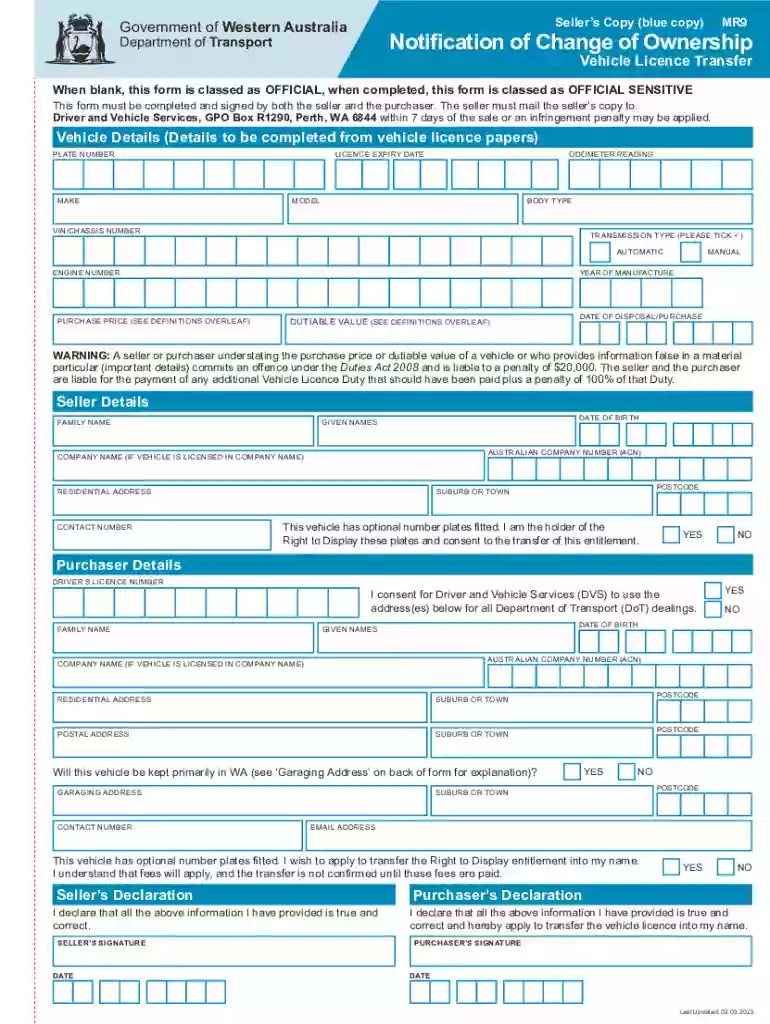
Vehicle Licence Transfer Form MR 9 2026

Get Form
mr9 form Preview on Page 1

Here's how it works

01. Edit your mr9 form online
Type text, add images, blackout confidential details, add comments, highlights and more.

02. Sign it in a few clicks
Draw your signature, type it, upload its image, or use your mobile device as a signature pad.

03. Share your form with others
Send form mr9 via email, link, or fax. You can also download it, export it or print it out.

How to use or fill out Vehicle Licence Transfer Form MR 9 with our platform

Form edit decoration
9.5
Ease of Setup
DocHub User Ratings on G2
9.0
Ease of Use
DocHub User Ratings on G2
  1. Click ‘Get Form’ to open the Vehicle Licence Transfer Form MR 9 in the editor.
  2. Begin by filling out the 'Vehicle Details' section. Enter the plate number, make, model, VIN/chassis number, and odometer reading as per your vehicle's licence papers.
  3. In the 'Transmission Type' field, select either 'Automatic' or 'Manual'. Provide the year of manufacture and engine number.
  4. Next, complete the 'Seller Details' section. Include your date of birth, given names, family name, residential address, and contact number.
  5. Proceed to fill in the 'Purchaser Details'. Ensure you provide their driver’s licence number, family name, given names, and residential address.
  6. Both seller and purchaser must sign and date the form at the designated areas to validate it before submission.

Start using our platform today for a seamless experience in completing your Vehicle Licence Transfer Form MR 9 online for free!

See more Vehicle Licence Transfer Form MR 9 versions

We've got more versions of the Vehicle Licence Transfer Form MR 9 form. Select the right Vehicle Licence Transfer Form MR 9 version from the list and start editing it straight away!
Versions Form popularity Fillable & printable
2023 4.5 Satisfied (29 Votes)
2023 4.3 Satisfied (21 Votes)
2021 4.9 Satisfied (25 Votes)
2020 4.3 Satisfied (250 Votes)
2019 4.4 Satisfied (45 Votes)
2019 4.4 Satisfied (143 Votes)
2014 4.4 Satisfied (552 Votes)
2012 4.3 Satisfied (146 Votes)
be ready to get more

Complete this form in 5 minutes or less

Get form

Got questions?

We have answers to the most popular questions from our customers. If you can't find an answer to your question, please contact us.
Contact us
You can check the rego of a vehicle in WA for free via the Department of Transport website. Make sure youve got the licence plate number handy and enter it into the search box to access the registration history.
What Documents Do You Need to Sell Your Car in WA? Notification of Change of Ownership - Vehicle Licence Transfer (MR9) form. Proof of Ownership. Proof of Identity. PPSR. Receipt of Sale.
Transfer of Ownership of Vehicle Application for change in ownership is required to be made in Form-29 and Form-30 along with a print of chassis number with pencil. For change of ownership through inheritance Form 31 and in case of change of ownership due to public auction, application in Form 32 should be made.
Follow the steps below to meet all the requirements, ensuring a smooth and stress-free sale. Step 1: Locate the vehicles title. Step 2: Complete a bill of sale. Step 3: Collect payment and sign over the title. Step 4: Remove your license plates. Step 5: Remove your personal items. Step 6: File a Report of Sale.
If you are unable to transfer your vehicle online, you can complete a Notification of Change of Ownership - Vehicle Licence Transfer (MR9) form.

Security and compliance

At DocHub, your data security is our priority. We follow HIPAA, SOC2, GDPR, and other standards, so you can work on your documents with confidence.

Learn more
ccpa2
pci-dss
gdpr-compliance
hipaa
soc-compliance

People also ask

Transfer vehicle ownership Buyers and sellers can either complete a form (PDF) or transfer the licence online. If filling in the form, take it to a Driver and Vehicle Services Centre or regional agent or post it to: Buyers will have to a pay a transfer fee and vehicle licence duty.

mr9 transfer form