Ngrid com payonline 2025

Get Form
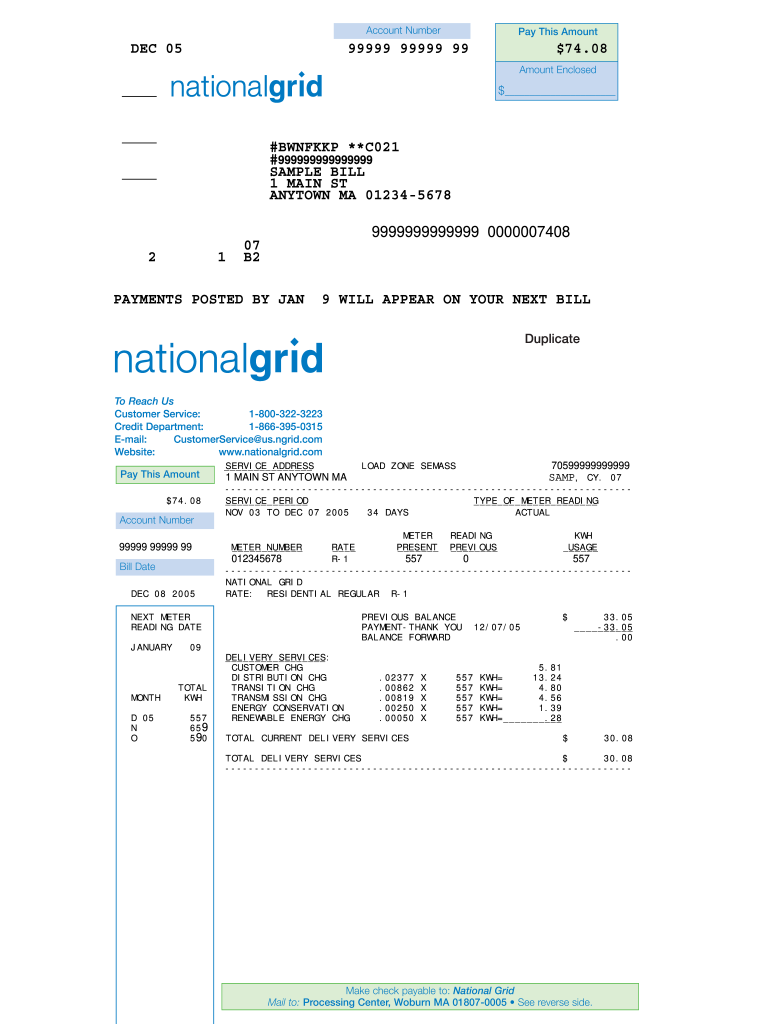
speedpay national grid Preview on Page 1

Here's how it works

01. Edit your speedpay national grid online
Type text, add images, blackout confidential details, add comments, highlights and more.
02. Sign it in a few clicks
Draw your signature, type it, upload its image, or use your mobile device as a signature pad.
03. Share your form with others
Send national grid speedpay via email, link, or fax. You can also download it, export it or print it out.

How to use or fill out ngrid com payonline with our platform

Form edit decoration
9.5
Ease of Setup
DocHub User Ratings on G2
9.0
Ease of Use
DocHub User Ratings on G2
  1. Click ‘Get Form’ to open the ngrid com payonline document in the editor.
  2. Locate the 'Account Number' field at the top of the form. Enter your unique account number as shown on your bill.
  3. In the 'Pay This Amount' section, input the total amount you wish to pay, which is $74.08 in this example.
  4. Fill in the 'Amount Enclosed' field if you are sending a check. Write the amount you are enclosing.
  5. Review any additional fields related to service address and meter readings, ensuring all information is accurate.
  6. Once completed, utilize our platform's features to save, sign, or send your filled form directly from your device.

Start using our platform today for free and streamline your payment process effortlessly!

be ready to get more

Complete this form in 5 minutes or less

Get form

Got questions?

We have answers to the most popular questions from our customers. If you can't find an answer to your question, please contact us.
Contact us
First, enroll for services with your bank online. This will allow you to access your checking account through your banks website. Then sign up for the bill payment service and add all of the accounts you plan to use the service for.
Paying my energy bill by direct debit Direct debit is a popular choice for managing energy bills. Its a hassle-free method that automates payments from your bank account, ensuring you never miss a due date. You can opt for monthly or quarterly payments, depending on what works best for you.
National Grid supports doxo, an online service and mobile app that allows you to view and pay bills from one centralized place.
If your bank or credit union offers bill pay, log in to your online account and navigate to the Bill Pay tab. If youre using a third-party service, the process for setting up payments will be similar. Youll need to enter each payees name and information.
To make a one-time payment, simply log in to your National Grid account, navigate to the billing section, and select your preferred payment method. For added convenience, National Grid offers an automated payment option, allowing you to set up recurring payments.

People also ask

Payments generally take 24 hours to post. There is a small grace period after the bill is due, so no late fees should be accrued.
Pay Bill Online Our new mobile app makes it easy to manage your energy account on the go. You can now schedule a payment from our app using your checking or savings account. Pay your bill with a credit/debit card through Speedpay. Fees apply, starting at $1.85 for residential customers and $5.95 for business customers.

national grid ri login