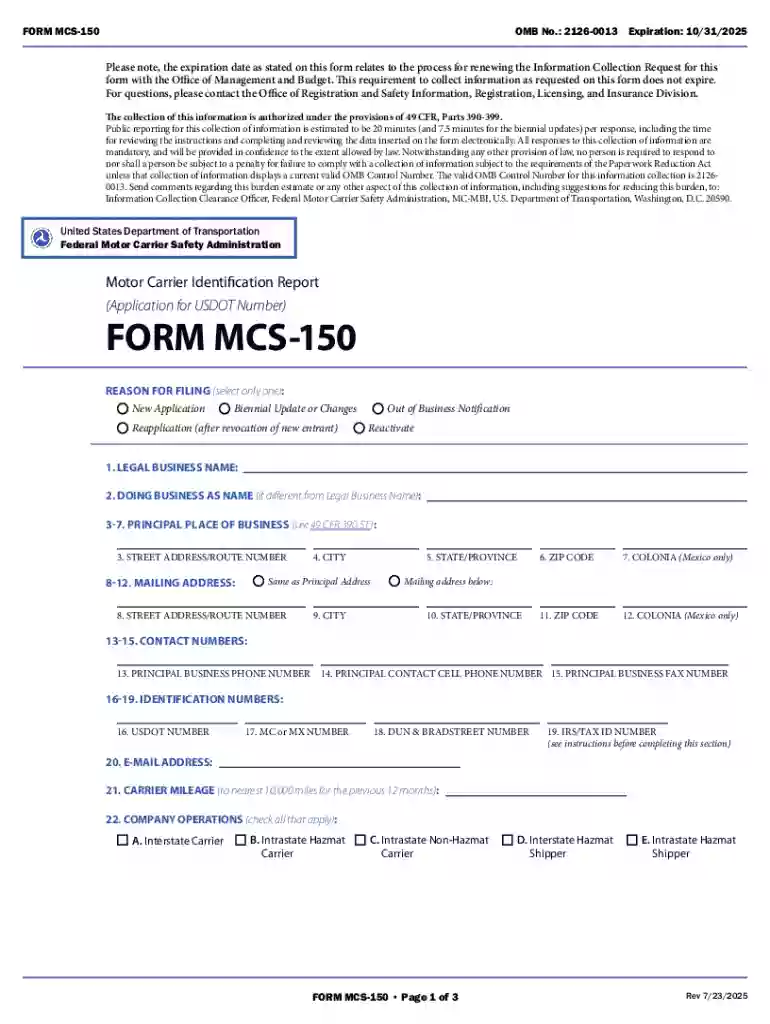
Motor Carrier Identification Report (MCS-150 Form) Preview on Page 1

Motor Carrier Identification Report (MCS-150 Form) 2026

Here's how it works

  • 01. Edit your form online

    Type text, add images, blackout confidential details, add comments, highlights and more.

  • 02. Sign it in a few clicks

    Draw your signature, type it, upload its image, or use your mobile device as a signature pad.

  • 03. Share your form with others

    Send it via email, link, or fax. You can also download it, export it or print it out.

Definition and Meaning of Form Online

The term "form online" refers to electronic templates or documents available on the internet that individuals or businesses can fill out digitally. These forms are designed to be completed and submitted through online platforms, streamlining processes that traditionally required paper-based submissions. They cover a wide range of purposes, including applications, registrations, and compliance reports.

In practice, online forms are an essential tool in modern business operations and personal administration. They allow users to input data directly into designated fields, often featuring interactive elements such as drop-down menus, checkboxes, and text areas to facilitate the collection of structured information. This digital approach reduces the need for manual handling and speeds up processing times.

How to Use the Form Online

Using an online form typically involves a few straightforward steps. First, access the form through an appropriate platform such as DocHub, which supports various document types. Begin by opening the form in the editor, where you can make necessary changes or add information.

Step-by-Step Instructions:

  1. Access the Platform: Log into the platform where the form is hosted, such as a government website or a private provider like DocHub.
  2. Locate the Form: Use the platform's search function or navigation menu to find the form you need.
  3. Fill Out the Form: Enter data into the required fields, checking for mandatory fields that must be completed before submission.
  4. Review and Edit: Double-check your entries for accuracy and completeness.
  5. Submit: Follow the submission instructions, which could involve clicking a 'Submit' button or sending the completed form to a specified email address.

Steps to Complete the Form Online

Completing an online form can vary based on its complexity and purpose. However, the following approach ensures a streamlined process:

  1. Preparation: Before you begin, gather all necessary information and documents you'll need. This might include identification numbers, addresses, or supplementary documentation.
  2. Field Understanding: Familiarize yourself with each section of the form. Understanding the purpose of each field ensures accurate completion.
  3. Mandatory Fields: Identify and complete mandatory fields. These are often marked with an asterisk (*) and must be filled out to proceed.
  4. Attachments: If the form requires supporting documents, ensure these are digital and ready to upload.
  5. Final Review: Go through the form once more to confirm all information is accurate.
  6. Save and Export: Some platforms allow you to save your progress and export a copy for your records.

Why Should You Form Online

Opting for online forms over traditional methods presents numerous advantages:

  • Convenience: Forms can be completed and submitted from any location with internet access, removing the need for physical delivery.
  • Time Efficiency: Digital submissions are often processed faster than paper-based alternatives, reducing waiting periods for feedback or confirmation.
  • Cost Reduction: The need for printing, postage, and storage is eliminated, lowering operational costs.
  • Environmentally Friendly: Digital forms reduce paper usage, contributing to environmental sustainability.

Legal Use of the Form Online

Online forms must comply with legal standards to ensure their validity and enforceability:

  • Data Protection: Forms should comply with data protection laws, such as the General Data Protection Regulation (GDPR) in Europe or federal and state data regulations in the U.S., to protect users' privacy.
  • Electronic Signatures: Many online forms require electronic signatures, which, under the ESIGN Act, hold the same legal weight as handwritten signatures in the U.S.
  • Audit Trails: Platforms like DocHub provide a detailed audit trail for each form, documenting who accessed, edited, and signed the form, thus safeguarding the integrity of the document.

Who Typically Uses the Form Online

Online forms are utilized by a diverse range of users across various industries:

  • Individuals: For applications such as job submissions or government services.
  • Businesses: To streamline internal processes like employee onboarding or client intake.
  • Educational Institutions: Facilitating student registrations and admissions.
  • Government Agencies: Enabling public access to necessary resources and documentation.
decoration imageratings of Dochub

Key Elements of the Form Online

Upon engaging with a form online, users can expect to encounter several key elements:

  • Interactive Fields: Areas designated for user inputs, such as text fields, checkboxes, and dropdown menus.
  • Instructions: Clear guidelines are often provided to assist users in properly completing the form.
  • Submission Options: Users may choose to submit the form directly online or download it for offline use or printing.

Examples of Using the Form Online

Here are a few scenarios showcasing the versatility of online forms:

  • Tax Returns: Platforms like TurboTax enable users to file taxes online by filling out required information directly on digital forms.
  • Event Registrations: Event organizers leverage online forms for attendees to sign up efficiently.
  • Medical History Forms: Healthcare providers use online forms to gather patient history prior to appointments, speeding up administrative processes.

These applications illustrate the adaptability and efficiency of utilizing forms online in various contexts.

See more Motor Carrier Identification Report (MCS-150 Form) versions

We've got more versions of the Motor Carrier Identification Report (MCS-150 Form) form. Select the right Motor Carrier Identification Report (MCS-150 Form) version from the list and start editing it straight away!

VersionsForm popularityFillable & printable
20264.7 Satisfied (25 Votes)
20254.2 Satisfied (58 Votes)
20244.6 Satisfied (35 Votes)
20244.8 Satisfied (53 Votes)
20234.7 Satisfied (30 Votes)
20224.8 Satisfied (63 Votes)
20184.7 Satisfied (62 Votes)
20164.3 Satisfied (282 Votes)
20074.4 Satisfied (561 Votes)
20054 Satisfied (32 Votes)
20044.2 Satisfied (68 Votes)
20034.6 Satisfied (31 Votes)
20004.3 Satisfied (61 Votes)

be ready to get more

Complete this form in 5 minutes or less

Security and compliance

At DocHub, your data security is our priority. We follow HIPAA, SOC2, GDPR, and other standards, so you can work on your documents with confidence.

be ready to get more

Complete this form in 5 minutes or less

Related links

49 CFR 390.19T - Motor carrier, hazardous material safety

Each motor carrier and intermodal equipment provider must file Form MCS-150, by calling 1-800-832-5660.

Learn more
Operators/Dev Notes

This page records developer notes. MCS Short Barrel: Unlock. Please specify engine version when reporting bugs. Operative and 150 on Legend Firing. Report

Learn more
If you believe that this page should be taken down, please follow our DMCA take down process here